
Problem with NVIDIA GeForce GT740M on laptop.
c0okie_o_chocolat
Posted messages
3
Status
Member
-
marcmarais Posted messages 24260 Status Moderator -
marcmarais Posted messages 24260 Status Moderator -
Hello,
I'm coming to this forum because I need help with my graphics card (NVIDIA GeForce GT740M). It's worth noting that I'm on a laptop. I recently had the infamous Code 43, which I managed to resolve (by trying to update the drivers from the NVIDIA site, from the manufacturer, a good ten times), but now I have a new problem: it's my base graphics card (Intel(R) HD Graphics 4600) that is active instead of my NVIDIA graphics card.
- I can't access my NVIDIA control panel, (I recently had an error message saying: "You are not currently using a display connected to an NVIDIA graphics processor", but it hasn't appeared again for some reason that is completely obscure to me.
- When I start NVIDIA GeForce, I have a recurring update that comes back every time I shut down/restart my PC (365.10).
-->>>> I no longer had code 43, I could see my graphics card "working properly", and now, surprise, I go back to the device manager and I find this:
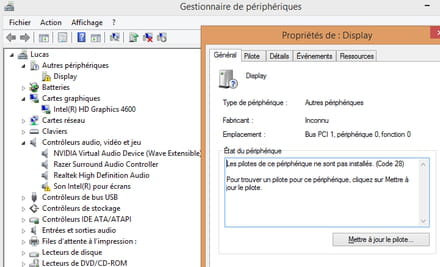
Thank you in advance for your help, best regards.
Configuration: Windows 8.1 / Asus X750JB (notebooks) | Intel® Core™ i7-4700HQ ;
NVIDIA GeForce GT740M 2GB graphics card
--> https://www.asus.com/fr/Laptops/x750jb/
DxDiag :
------------------
System Information
------------------
Time of this report: 5/7/2016, 13:05:02
Machine name: NAME
Operating System: Windows 8.1 64-bit (6.3, Build 9600) (9600.winblue_ltsb.160310-0600)
Language: French (Regional Setting: French)
System Manufacturer: ASUSTeK COMPUTER INC.
System Model: X750JB
BIOS: X750JB.208
Processor: Intel(R) Core(TM) i7-4700HQ CPU @ 2.40GHz (8 CPUs), ~2.4GHz
Memory: 6144MB RAM
Available OS Memory: 6030MB RAM
Page File: 4248MB used, 2740MB available
Windows Dir: C:\WINDOWS
DirectX Version: DirectX 11
DX Setup Parameters: Not found
User DPI Setting: Using System DPI
System DPI Setting: 96 DPI (100 percent)
DWM DPI Scaling: Disabled
DxDiag Version: 6.03.9600.17415 64bit Unicode
------------
DxDiag Notes
------------
Display Tab 1: No problems found.
Sound Tab 1: The file RzSurroundVAD.sys is not digitally signed, which means that it has not been tested by Microsoft's Windows Hardware Quality Labs (WHQL). You may be able to get a WHQL logo'd driver from the hardware manufacturer.
Sound Tab 2: No problems found.
Input Tab: No problems found.
--------------------
DirectX Debug Levels
--------------------
Direct3D: 0/4 (retail)
DirectDraw: 0/4 (retail)
DirectInput: 0/5 (retail)
DirectMusic: 0/5 (retail)
DirectPlay: 0/9 (retail)
DirectSound: 0/5 (retail)
DirectShow: 0/6 (retail)
---------------
Display Devices
---------------
Card name: Intel(R) HD Graphics 4600
Manufacturer: Intel Corporation
Chip type: Intel(R) HD Graphics Family
DAC type: Internal
Device Type: Full Device
Device Key: Enum\PCI\VEN_8086&DEV_0416&SUBSYS_122D1043&REV_06
Display Memory: 1792 MB
Dedicated Memory: 32 MB
Shared Memory: 1760 MB
Current Mode: 1600 x 900 (32 bit) (60Hz)
Monitor Name: Generic PnP Monitor
Monitor Model: unknown
Monitor Id: LGD0390
Native Mode: 1600 x 900(p) (60.083Hz)
Output Type: Internal
Driver Name: igdumdim64.dll,igd10iumd64.dll,igd10iumd64.dll,igdumdim32,igd10iumd32,igd10iumd32
Driver File Version: 10.18.0010.3308 (English)
Driver Version: 10.18.10.3308
DDI Version: 11.1
Feature Levels: 11.1,11.0,10.1,10.0,9.3,9.2,9.1
Driver Model: WDDM 1.3
Graphics Preemption: DMA
Compute Preemption: Thread
Miracast: Not Supported by WiFi driver
Hybrid Graphics GPU: Integrated
Power P-states: Not Supported
Driver Attributes: Final Retail
Driver Date/Size: 10/1/2013 14:02:32, 12100096 bytes
WHQL Logo'd: Yes
WHQL Date Stamp:
Device Identifier: {D7B78E66-4756-11CF-1F7F-2732BBC2C735}
Vendor ID: 0x8086
Device ID: 0x0416
SubSys ID: 0x122D1043
Revision ID: 0x0006
[...]
D3D9 Overlay: Supported
DXVA-HD: Supported
DDraw Status: Enabled
D3D Status: Enabled
AGP Status: Enabled
I'm coming to this forum because I need help with my graphics card (NVIDIA GeForce GT740M). It's worth noting that I'm on a laptop. I recently had the infamous Code 43, which I managed to resolve (by trying to update the drivers from the NVIDIA site, from the manufacturer, a good ten times), but now I have a new problem: it's my base graphics card (Intel(R) HD Graphics 4600) that is active instead of my NVIDIA graphics card.
- I can't access my NVIDIA control panel, (I recently had an error message saying: "You are not currently using a display connected to an NVIDIA graphics processor", but it hasn't appeared again for some reason that is completely obscure to me.
- When I start NVIDIA GeForce, I have a recurring update that comes back every time I shut down/restart my PC (365.10).
-->>>> I no longer had code 43, I could see my graphics card "working properly", and now, surprise, I go back to the device manager and I find this:

Thank you in advance for your help, best regards.
Configuration: Windows 8.1 / Asus X750JB (notebooks) | Intel® Core™ i7-4700HQ ;
NVIDIA GeForce GT740M 2GB graphics card
--> https://www.asus.com/fr/Laptops/x750jb/
DxDiag :
------------------
System Information
------------------
Time of this report: 5/7/2016, 13:05:02
Machine name: NAME
Operating System: Windows 8.1 64-bit (6.3, Build 9600) (9600.winblue_ltsb.160310-0600)
Language: French (Regional Setting: French)
System Manufacturer: ASUSTeK COMPUTER INC.
System Model: X750JB
BIOS: X750JB.208
Processor: Intel(R) Core(TM) i7-4700HQ CPU @ 2.40GHz (8 CPUs), ~2.4GHz
Memory: 6144MB RAM
Available OS Memory: 6030MB RAM
Page File: 4248MB used, 2740MB available
Windows Dir: C:\WINDOWS
DirectX Version: DirectX 11
DX Setup Parameters: Not found
User DPI Setting: Using System DPI
System DPI Setting: 96 DPI (100 percent)
DWM DPI Scaling: Disabled
DxDiag Version: 6.03.9600.17415 64bit Unicode
------------
DxDiag Notes
------------
Display Tab 1: No problems found.
Sound Tab 1: The file RzSurroundVAD.sys is not digitally signed, which means that it has not been tested by Microsoft's Windows Hardware Quality Labs (WHQL). You may be able to get a WHQL logo'd driver from the hardware manufacturer.
Sound Tab 2: No problems found.
Input Tab: No problems found.
--------------------
DirectX Debug Levels
--------------------
Direct3D: 0/4 (retail)
DirectDraw: 0/4 (retail)
DirectInput: 0/5 (retail)
DirectMusic: 0/5 (retail)
DirectPlay: 0/9 (retail)
DirectSound: 0/5 (retail)
DirectShow: 0/6 (retail)
---------------
Display Devices
---------------
Card name: Intel(R) HD Graphics 4600
Manufacturer: Intel Corporation
Chip type: Intel(R) HD Graphics Family
DAC type: Internal
Device Type: Full Device
Device Key: Enum\PCI\VEN_8086&DEV_0416&SUBSYS_122D1043&REV_06
Display Memory: 1792 MB
Dedicated Memory: 32 MB
Shared Memory: 1760 MB
Current Mode: 1600 x 900 (32 bit) (60Hz)
Monitor Name: Generic PnP Monitor
Monitor Model: unknown
Monitor Id: LGD0390
Native Mode: 1600 x 900(p) (60.083Hz)
Output Type: Internal
Driver Name: igdumdim64.dll,igd10iumd64.dll,igd10iumd64.dll,igdumdim32,igd10iumd32,igd10iumd32
Driver File Version: 10.18.0010.3308 (English)
Driver Version: 10.18.10.3308
DDI Version: 11.1
Feature Levels: 11.1,11.0,10.1,10.0,9.3,9.2,9.1
Driver Model: WDDM 1.3
Graphics Preemption: DMA
Compute Preemption: Thread
Miracast: Not Supported by WiFi driver
Hybrid Graphics GPU: Integrated
Power P-states: Not Supported
Driver Attributes: Final Retail
Driver Date/Size: 10/1/2013 14:02:32, 12100096 bytes
WHQL Logo'd: Yes
WHQL Date Stamp:
Device Identifier: {D7B78E66-4756-11CF-1F7F-2732BBC2C735}
Vendor ID: 0x8086
Device ID: 0x0416
SubSys ID: 0x122D1043
Revision ID: 0x0006
[...]
D3D9 Overlay: Supported
DXVA-HD: Supported
DDraw Status: Enabled
D3D Status: Enabled
AGP Status: Enabled
3 answers
-
Hello,
do you have an Asus X750JB laptop?
I need the full reference, like X750JB-TY029H
here it is on the manufacturer's website:
https://www.asus.com/fr/Laptops/x750jb/
What were you doing just before you got this code 43?
Have you tried downloading the graphics driver from the laptop manufacturer's website?
You should not get the graphics drivers from the Nvidia or AMD website:
myth: the graphics driver for my laptop is on AMD/Nvidia
if you do this, the switching between the two graphics chips may not work properly.-
Thank you for responding,
Do you have an Asus X750JB laptop?
I was told it was an Asus X750JB, but when checking (by looking at the label under my laptop) I found R751JB-TY017H.
--> https://www.asus.com/fr/Laptops/R751JB/
(I imagine I will try to install the drivers available here: (https://dlcdnwebsites.asus.com/maintain/web/500.html
(But now I'm not sure if my computer is an X750HB or an R751JB...
)
What did you do right before getting this code 43?
I saw this code 43 when I wanted to activate my NVIDIA graphics card (I realized it wasn't working properly and wasn't activated when I played)
Have you tried downloading the graphics driver from the laptop manufacturer's website?
Yes, but on this model https://www.asus.com/fr/Laptops/x750jb/
For the graphics drivers, I had already been told about it, and after following other posts from other forums that suggested trying, I tried..
-
-
I tried to update the drivers from "Display", and bam, the return of code 43 :(
-
I would like to understand a little more about the use of your laptop ...
Since when do you have it?
Did it work well at first, just after your purchase?
I saw this code 43 when I tried to activate my NVIDIA graphics card (I realized it wasn't working properly and that it wasn't activated when I was playing)
If your laptop has never worked properly, you should have returned it to the seller within 15 days of your purchase; it is covered by the warranty, and often they offer you an exchange
If it worked well at first, you must have done something that it didn't like (installing a driver, software,...)
