
Unable to create a system image
Solved
Hello everyone,
I'm creating this topic because I couldn't find an answer anywhere else!
Since I got my PC, I've been regularly backing up Windows (including a system image) on a 1 TB external hard drive.
Today, I wanted to update everything by making a new backup, the last one dating back to August (yeah, I know, it's not smart not to have done it for so long!) but it’s impossible. Apparently, due to insufficient space. However, my internal hard drive only has 530 GB of data out of 1 TB, and the backup is scheduled on my 1 TB external hard drive.
So there should definitely be enough space, right?
Even after completely formatting the said external hard drive, I still get the same message: "the backup could not be completed due to a lack of space." It’s quite frustrating...
I'm coming to you to see if you have a solution, because I'm out of ideas and it's really bothering me not being able to perform my backup, given that you're never safe from a failure.
If I'm not precise or clear enough, please let me know, I really want to resolve this issue...
Thank you in advance for your responses!
See you soon!
Configuration: Windows 7 / Chrome 48.0.2564.109
I'm creating this topic because I couldn't find an answer anywhere else!
Since I got my PC, I've been regularly backing up Windows (including a system image) on a 1 TB external hard drive.
Today, I wanted to update everything by making a new backup, the last one dating back to August (yeah, I know, it's not smart not to have done it for so long!) but it’s impossible. Apparently, due to insufficient space. However, my internal hard drive only has 530 GB of data out of 1 TB, and the backup is scheduled on my 1 TB external hard drive.
So there should definitely be enough space, right?
Even after completely formatting the said external hard drive, I still get the same message: "the backup could not be completed due to a lack of space." It’s quite frustrating...
I'm coming to you to see if you have a solution, because I'm out of ideas and it's really bothering me not being able to perform my backup, given that you're never safe from a failure.
If I'm not precise or clear enough, please let me know, I really want to resolve this issue...
Thank you in advance for your responses!
See you soon!
Configuration: Windows 7 / Chrome 48.0.2564.109
25 answers
-
Hello,
Check your hard drive for any corrupted sectors.
Another thing, you don't need to perform a complete backup of Windows regularly. Doing it once is quite sufficient; you just need to regularly back up your new data (photos/images/documents).
--
The optimist said: this glass is half full. The pessimist replied: I would rather say it is half empty. The engineer then said: but no, this glass is simply twice too big. -
Hi kyon0043, thanks for your quick reply!
How can I do that? (yes, I'm a bit of a tech novice)
Oh, thanks for the tip! So, I just need to manually back up important documents and not use the Windows backup?
On the other hand, is it the same for the system image? Just once and that's it? Because I regularly install new software (Steam games for example, or others), and that gets backed up by the system image, right?
Thanks in advance! -
ContributorHello.
Since I got my PC, I regularly perform Windows backups (including a system image) on a 1TB external hard drive.
Is it automatic or manual?
Your message about lack of space makes me think that when you set up your backup in Windows, you designated a specific space that has to be reached today.
You need to set it up with more space.
As for the system image, my practice is as follows.
When Windows is installed or reinstalled and configured and updated, that's when I make a system image.
It therefore contains brand new system files.
I keep it safely stored.
And then from time to time, with updates and new software installations, I create another image that I renew.
So that makes two system images.
After two or three years of use, I go back to the first image which has brand new system files again, which avoids having to reinstall.
For personal data, I use SynBackFree which is very practical. -
Hi cado21! Thanks for your response!
I perform the backup manually. It is indeed schedulable, but since this external hard drive is only used for that, it is not always plugged in. So I plug it in, perform the backup, and then put it away.
I don't understand what you mean? The only settings I can adjust are:
- the backup destination
- let Windows choose the files to back up (i.e., files in libraries + system image), or decide for myself
- the scheduling date
- choose whether Windows should keep multiple system images occupying a maximum of 30% of disk space, or only keep the latest one (which means replacing it each time to only keep the most recent one).
What troubles me is that even after completely formatting the external hard drive (I now have 1 TB free to back up the 530 GB of my internal hard drive), it tells me that there isn't enough space to perform the snapshot (which is the system image?). So this is highly detrimental if I can't at least make one, especially in case of a failure, and it's really strange that it says there's no space!
EDIT: I just performed a test backup without the system image. And it worked this time, but now I don't have a system image, even though this backup takes up 338 GB of the 1 TB on the external hard drive. So there’s likely a problem somewhere, because I don't know much about it, but I don't think a system image would take more than 600 GB. -
ContributorHello.
Didn't you keep a system image?
That's really too bad because it seems like you could have used it right now.
Have you read my previous post?
How many partitions do you have?
Is your system on the same partition as your data?
Try to create a system image on your own to see if it works.
Control Panel, Backup and Restore, Create a system image. -
Hi! Sorry for the late reply, I was quite busy all weekend.
No, I made the mistake of not keeping a system image when I formatted my external hard drive to see what was going on. When I say I'm clueless about computers x)
Yes, I read your previous post, why? I even think I replied to you ;)
I have only one partition, C:, since I've never needed to create others. And everything is on it.
Yes, I had tried before but every time, I get the same low disk space message:
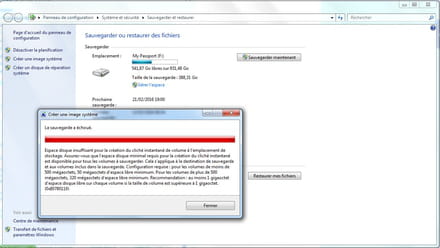
Yet, as we can see above, there are 541 GB free (the rest is taken up by the backup mentioned in my previous post) on my external hard drive and only 493 GB are filled on my internal hard drive, most of which is filled with personal data, so I don't think it has much to do with it, even if I don't know much.
I admit I don't really know what to do here... Maybe just try a system image on the external hard drive alone? But it would be weird if it worked, since there aren't any space issues there... -
ContributorHello Envalion.
We can try a system restore to a previous point:
Type restore in the search bar
Create a restore point
System restore
Next
Show more restore points
Choose a point before the problem occurred,
Next
Finish
About 10 minutes later the PC will restart. -
Indeed, we can give that a try! Do you think this could resolve the issue in what way? Wouldn't it be more related to the DDE since it seems to be running out of space? (I'm just asking but it might not be relevant)
What will it allow? To restore Windows as it was on that date? Should I back up sensitive data beforehand because does it erase them or not at all?
My last system image was from August, so do I need to find one from that date?
In any case, thanks for taking all this time to try to solve my problem! -
ContributorYou need to see how far back you can go with the restore points.
It will erase the new things that have been added to your computer since the date you choose.
You can try this first:
Type services.msc in the search box above the Windows button.
Look for the Volume Shadow Copy service.
Make sure the service is set to Automatic.
Similarly:
Right-click on Computer,
Manage
Disk Management
Can you take a screenshot of this page opened wide and post it?
The Snipping Tool is located in: All Programs, Accessories. -
Ah indeed, Snapshot of volumes was in manual. I switched it to automatic and retested, but it didn't change anything... I believed it for a while though.
As for the restore points, I can go back to July 2015, and it's actually a system image restore point. Should I use that?
So only the Windows files are affected (and installed software like games for example but well, that's less serious), I don't need to back up my data first?

-
ContributorAs long as you mix data and system on the same partition, it's better to back up the data; however, the system image restore point won't work because you deleted that image.
So there is January 14 to try.
Can you take a screenshot of the disk management page, please? I need to see all the partitions. -
Ah great, so it was really a big mess... Yay...
So, should I still try the restoration? It might not be very useful for a month ago, right? If not, what other possible solutions are there?
Yes, of course! Here it is:
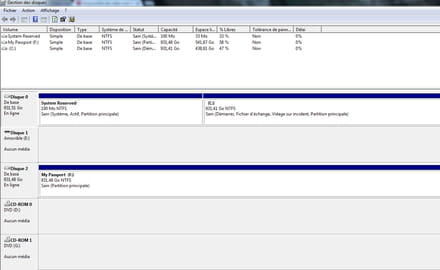
-
ContributorYou can try, you never know, your data is backed up, right?
For the other solutions, I will look for them.
It's a PC that you built, I don't see a recovery partition?
Do you have the installation DVD? -
Yes, that's true! And you’re right, it’s worth a try! Are the software data also backed up with the Windows backup (for example, game saves, etc.), or do I need to back them up separately to avoid losing everything that happened after January 14th?
Thank you so much for taking the time to help me!
Yes, it's a PC that I built with a friend. And it has never had any problems since it was built, back in October 2014.
Whoa, things are getting complicated: no, I don't have an installation DVD because I had a laptop that died before. So, I extracted the Windows key from the laptop to activate the Windows on the desktop PC. I don't know if that's a good idea, but it has always worked fine since then. -
ContributorHello.
The easiest way for you is to use third-party software,
like EaseUS Todo Backup Free, which is simple and more reliable than Windows' system backup.
You can create a bootable disk to use when Windows won't start.
And you can even do everything from this disk if you don't want to keep the software on your PC.
Otherwise, you can reinstall Windows from an ISO downloaded from the internet.
https://quick-tutoriel.com/sauvegarder-votre-ordinateur-avec-easeus-todo-backup/ -
Hi!
I tried the recovery point, it didn't change anything...
So if I understand correctly, you are advising me to use synbackfree for data backup and easeUS todo backup free for the system image? Or does the second one do everything?
I can also try installing W10, right? If it's a problem coming from Windows, it could maybe solve it?
Thanks for the advice anyway! -
ContributorGood evening.
I haven't told you about Synback Free even though I use it and find it useful.
EaseUs Todo Backup does both, but I only use it for the system.
You can try Windows 10, but first back up the system with EaseUs Todo Backup because if you run into issues with Windows 10, you can go back to Windows 7, because sometimes the downgrade tool to Windows 7 doesn't work or doesn’t work without problems.-
ContributorIf you are migrating to W10, don't forget to note down your W7 license key if you've lost it.
There's Speccy for that:
https://www.commentcamarche.net/telecharger/utilitaires/20825-speccy/
-
-
Hello!
It seems to me that you mentioned synbackfree in one of your earlier responses, that's why I'm bringing it up. So can I combine the two? Synback free for backup and easeUS todo backup for the system. Thank you!
I’ll give it a try and keep you posted in the evening! -
Hi! Sorry for the late reply but I really haven't had the time to deal with it until now!
So I made a backup of the important data with Synbackfree, which is indeed very handy.
Then I did a system backup with EaseUS Todo Backup Free on my external hard drive and it seems to have worked! Even though it took 5 hours haha!
So I think the initial problem is resolved!
Thank you very much for all your efforts to help me find a solution! -
ContributorHello.
Could you please tell me the size of the system backup
made with EaseUS Todo Backup Free (right-click on the file, properties)?


- 1
- 2
Next