External DVD Drive Issue
cabou27
Posted messages
7
Status
Member
-
djfopdj -
djfopdj -
Hello everyone, I have an Asus laptop running Windows 10. I bought an external disk drive which is recognized by my computer (I can see the audio/video files on the DVD but I can't play it). The first time I inserted a DVD, it directed me to the Windows Store and, as advised elsewhere on this forum, I downloaded the VLC app. Since then, when I insert the DVD, it automatically opens the Windows Store but I still don't know how to play my DVD...
I feel like this is a bit of a silly problem, so thank you in advance for your suggestions!
I feel like this is a bit of a silly problem, so thank you in advance for your suggestions!
8 answers
-
pistouri Posted messages 19008 Registration date Status Contributor Last intervention Ambassadeur 8 723
right-click on the start button
control panel
copy and paste or type: autoplay
in the search box at the top right
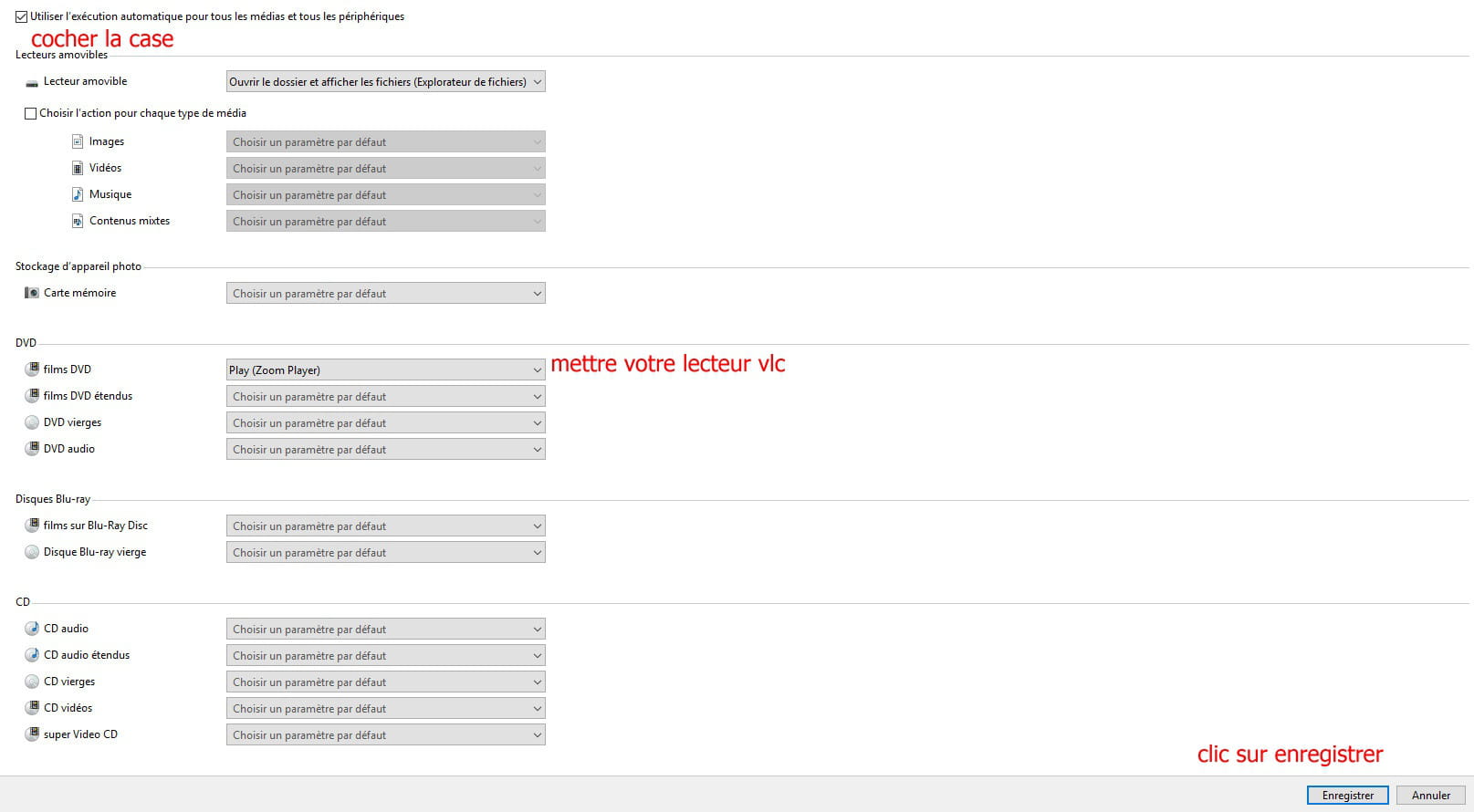
check the box use autoplay for all media and devices.
then dvd section
dvd movies and on the same line you drop down the little arrow and select vlc
to finish click on save at the bottom of the window.
--
scalpel