
How to remove Office 15 Click-to-Run Extensibility Component
Don Diego de la Vega
-
lolo -
lolo -
Hello,
I am currently facing a problem when trying to uninstall/reinstall Office 2013 on Windows 10 64-bit version.
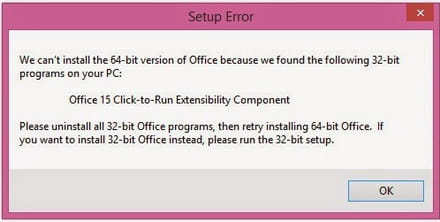
After uninstalling Office using the Windows assist, I tried to launch the Office setup to reinstall it, but I get the error message:
However, I cannot remove that pesky Office 15 Click-to-Run Extensibility Component! I have looked at http://support.microsoft.com/kb/2739501/fr but I obviously haven't succeeded. How can I ensure that I correctly delete the registry keys? Do I need to right-click/delete?
Thank you in advance for your help!
Configuration: Windows / Chrome 46.0.2490.86
I am currently facing a problem when trying to uninstall/reinstall Office 2013 on Windows 10 64-bit version.
After uninstalling Office using the Windows assist, I tried to launch the Office setup to reinstall it, but I get the error message:
We can't install the 64-bit version of Office because we found the following 32-bit programs on your PC: Office 15 Click-to-Run Extensibility Component. Please uninstall all 32-bit Office programs, then retry installing 64-bit Office.
However, I cannot remove that pesky Office 15 Click-to-Run Extensibility Component! I have looked at http://support.microsoft.com/kb/2739501/fr but I obviously haven't succeeded. How can I ensure that I correctly delete the registry keys? Do I need to right-click/delete?
Thank you in advance for your help!
Configuration: Windows / Chrome 46.0.2490.86
2 answers
-
1. Open the registry
For Windows 8.1 or higher: Click Start -> Type "regedit" and hit enter.
For Windows 7 or Vista: Click Start -> In the search box, type "regedit" and hit enter.
For Windows XP: Click Start -> Click Run -> In the Run window, type "regedit" and hit enter.
2. In the registry open: Computer\HKEY_CLASSES_ROOT\Installer\Products
3. In the Products folder, you will find many folders. The folders we need start with this name: 00005 (see image below).
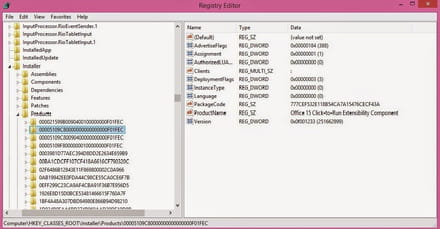
4. Find and delete all folders that contain components "Office 15 Click-to-Run Extensibility Component" under "ProductName".
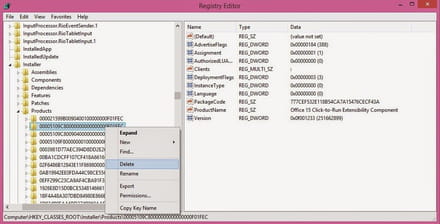
5. After deleting all necessary folders, restart the Office installation and everything will go smoothly.


