Googleadservices.com
Solved
loicf
-
loicf -
loicf -
Hello everyone.
It's in the title... I'm looking to get rid of it, all the classic "cleaners" are ineffective, I've also read a lot of things and nonsense,
Thank you for kindly enlightening me and suggesting a solution.
In the browser, it also appears: everesttech? Is it related?
I'm using Free and Vista
Thank you

It's in the title... I'm looking to get rid of it, all the classic "cleaners" are ineffective, I've also read a lot of things and nonsense,
Thank you for kindly enlightening me and suggesting a solution.
In the browser, it also appears: everesttech? Is it related?
I'm using Free and Vista
Thank you
11 réponses
Hello,
I will help you remove these unwanted items.
Your PC is infected with adware, here are the steps to follow:
Then:
Once your computer has restarted, relaunch Malwarebytes Anti-Malware and this time go to the "History" tab,
then "Application Logs".
Select the most recent report, open it and click at the bottom on Copy to clipboard.
All you have to do is paste the report in your next message.
And finally:
I will help you remove these unwanted items.
Your PC is infected with adware, here are the steps to follow:
- Download AdwCleaner by Xplode to your Desktop
- Run AdwCleaner
- Click on "Scan"
- Once the analysis is complete, click on "Clean".
- Wait for the cleaning process to finish.
- Once the cleaning is done, you may be prompted to restart.
- Upon restarting your PC, a report will open.
- Go to pjjoint click on "Browse", select the report
- Click on Send file. Wait while the file is being sent, then copy/paste the provided link in your next response on the forum.
Then:
- Download Malwarebytes Anti-Malware
- Uncheck "Enable Malwarebytes Anti-Malware Premium trial"
- Run MalwareBytes
- In the Dashboard tab, click on Update
- Then click on the "Scan" tab
- Check "Threat Scan"
- Click on "Scan Now"
- Wait for the analysis to finish
- Once the analysis is complete, click on "Quarantine All"
- Accept the restart of the PC if prompted
Once your computer has restarted, relaunch Malwarebytes Anti-Malware and this time go to the "History" tab,
then "Application Logs".
Select the most recent report, open it and click at the bottom on Copy to clipboard.
All you have to do is paste the report in your next message.
- Go to pjjoint to host the report.
- Post the link you will be given
And finally:
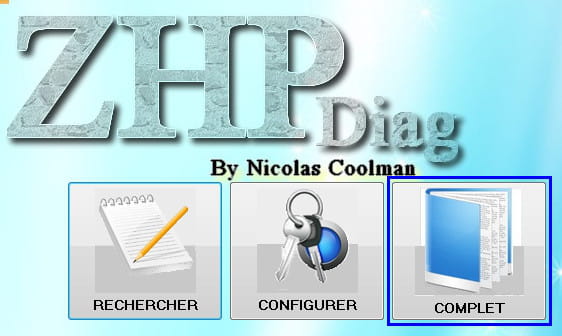
- Download ZHPDiag
- On the ZHPDiag download page, click the blue button "Nicolas Coolman - Download".
- Run it (if you are on Windows Vista, 7, or 8, do it by right-clicking -> Run as administrator
- Follow the installation instructions, then click on "Finish" at the end.
- Two shortcuts will be created on the Desktop (ZHPDiag and ZHPFix):
- launch ZHPDiag (if you are on Windows Vista, 7, or 8, do it by right-clicking -> Run as administrator
- Click on the "Complete" icon to perform a full scan and wait, it may take a few minutes.
- At the end of the scan, a report will open, save it on your Desktop (File -> Save As).
- Go to pjjoint click on "Browse", select the ZHPDiag report and click on Send file. Wait while the file is being sent, then copy/paste the provided link in your next response on the forum.
/!\ This script is exclusively reserved for the current user of the subject. You must not use it on another PC by your own initiative, at the risk of damaging the system /!\
This script will target certain elements to delete:
(if not, paste them (right-click > paste or ctrl V)
NB (W8): In some cases, the script pastes automatically in the script area and does not require clicking the "IMPORT" button.
on pjjoint
Note: The report can also be found under C:\ZHP\ZHPFix[RX].txt
Then:
Then restart your PC and tell how it goes.
++
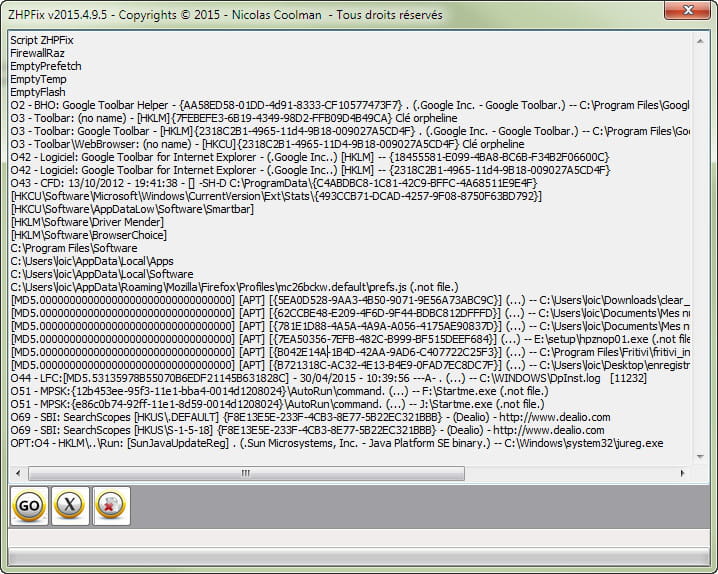
This script will target certain elements to delete:
- Close all your running applications.
- Select the lines below by clicking on "select content", then right-click on the highlighted area and choose "copy"
Script ZHPFix
FirewallRaz
EmptyPrefetch
EmptyTemp
EmptyFlash
O2 - BHO: Google Toolbar Helper - {AA58ED58-01DD-4d91-8333-CF10577473F7} . (.Google Inc. - Google Toolbar.) -- C:\Program Files\Google\Google Toolbar\GoogleToolbar_32.dll
O3 - Toolbar: (no name) - [HKLM]{7FEBEFE3-6B19-4349-98D2-FFB09D4B49CA} Orphaned key
O3 - Toolbar: Google Toolbar - [HKLM]{2318C2B1-4965-11d4-9B18-009027A5CD4F} . (.Google Inc. - Google Toolbar.) -- C:\Program Files\Google\Google Toolbar\GoogleToolbar_32.dll
O3 - Toolbar\WebBrowser: (no name) - [HKCU]{2318C2B1-4965-11D4-9B18-009027A5CD4F} Orphaned key
O42 - Software: Google Toolbar for Internet Explorer - (.Google Inc..) [HKLM] -- {18455581-E099-4BA8-BC6B-F34B2F06600C}
O42 - Software: Google Toolbar for Internet Explorer - (.Google Inc..) [HKLM] -- {2318C2B1-4965-11d4-9B18-009027A5CD4F}
O43 - CFD: 13/10/2012 - 19:41:38 - [] -SH-D C:\ProgramData\{C4ABDBC8-1C81-42C9-BFFC-4A68511E9E4F}
[HKCU\Software\Microsoft\Windows\CurrentVersion\Ext\Stats\{493CCB71-DCAD-4257-9F08-8750F63BD792}]
[HKCU\Software\AppDataLow\Software\Smartbar]
[HKLM\Software\Driver Mender]
[HKLM\Software\BrowserChoice]
C:\Program Files\Software
C:\Users\loic\AppData\Local\Apps
C:\Users\loic\AppData\Local\Software
C:\Users\loic\AppData\Roaming\Mozilla\Firefox\Profiles\mc26bckw.default\prefs.js (.not file.)
[MD5.00000000000000000000000000000000] [APT] [{5EA0D528-9AA3-4B50-9071-9E56A73ABC9C}] (...) -- C:\Users\loic\Downloads\clear_flash.exe (.not file.) [0]
[MD5.00000000000000000000000000000000] [APT] [{62CCBE48-E209-4F6D-9F44-BDBC812DFFFD}] (...) -- C:\Users\loic\Documents\My scans\wmp11-windowsxp-x86-FR-FR.exe (.not file.) [0]
[MD5.00000000000000000000000000000000] [APT] [{781E1D88-4A5A-4A9A-A056-4175AE90837D}] (...) -- C:\Users\loic\Documents\My scans\CubicExplorer_0.90_final_Setup.exe (.not file.) [0]
[MD5.00000000000000000000000000000000] [APT] [{7EA50356-7EFB-482C-B999-BF515DEEF684}] (...) -- E:\setup\hpznop01.exe (.not file.) [0]
[MD5.00000000000000000000000000000000] [APT] [{B042E14A-1B4D-42AA-9AD6-C407722C25F3}] (...) -- C:\Program Files\Fritivi\fritivi_install.exe (.not file.) [0]
[MD5.00000000000000000000000000000000] [APT] [{B721318C-AC32-4E13-B4E9-0FAD7EC8DC7F}] (...) -- C:\Users\loic\Desktop\TV recording\fritivi_install.exe (.not file.) [0]
O44 - LFC:[MD5.53135978B55070B6EDF21145B631828C] - 30/04/2015 - 10:39:56 ---A- . (...) -- C:\WINDOWS\DpInst.log [11232]
O51 - MPSK:{12b453ee-95f3-11e1-bba4-0014d1208024}\AutoRun\command. (...) -- F:\Startme.exe (.not file.)
O51 - MPSK:{e86c0b74-92ff-11e1-8d59-0014d1208024}\AutoRun\command. (...) -- J:\Startme.exe (.not file.)
O69 - SBI: SearchScopes [HKUS\.DEFAULT] {F8E13E5E-233F-4CB3-8E77-5B22EC321BBB} - (Dealio) - http://www.dealio.com
O69 - SBI: SearchScopes [HKUS\S-1-5-18] {F8E13E5E-233F-4CB3-8E77-5B22EC321BBB} - (Dealio) - http://www.dealio.com
OPT:O4 - HKLM\..\Run: [SunJavaUpdateReg] . (.Sun Microsystems, Inc. - Java Platform SE binary.) -- C:\Windows\system32\jureg.exe
- For XP, double-click on the shortcut located on your Desktop.
- For Vista, Windows or Windows 8, right-click and select "Run as administrator"
- In the window that opens, click on [IMPORT]
- A window will appear where the previously copied lines should automatically appear
(if not, paste them (right-click > paste or ctrl V)
NB (W8): In some cases, the script pastes automatically in the script area and does not require clicking the "IMPORT" button.
- Click on [Go] at the bottom left to start the cleaning
- Confirm the cleaning request by clicking [yes]
- A message will ask you to empty your recycle bin, choose your option: click yes or no. If yes, the cleaning time will be longer or shorter.
- Be patient during the cleaning procedure.
- Upload the report ZHPFix[RX].txt
on pjjoint
Note: The report can also be found under C:\ZHP\ZHPFix[RX].txt
- Then provide the link in the forum.
- Close ZHPFix
Then:
- Download and save Zhpcleaner on your Desktop.
- Launch its execution by right-clicking then "Run as administrator"
- You must accept the terms of use,
- Click on the [Clean] button
- Accept all proposed repairs
- A report will be created on the Desktop (ZHPCleaner.txt)
- Upload this report on cjoint
- Copy/Paste the generated link in your response.
Then restart your PC and tell how it goes.
++
The ZHPFix script did not work.
Take the script HERE
Then make sure that the lines are properly stacked one below the other.
Line 1
Line 2
Line 3
Etc...
You need to run the script, and I will give you the final procedure that will also clean up the tools and reports used.
Take the script HERE
Then make sure that the lines are properly stacked one below the other.
Line 1
Line 2
Line 3
Etc...
You need to run the script, and I will give you the final procedure that will also clean up the tools and reports used.
Hello
sorry for the wait but I was waiting for a confirmation.
Try with the script like this
sorry for the wait but I was waiting for a confirmation.
Try with the script like this
Script ZHPFix
FirewallRaz
EmptyPrefetch
EmptyTemp
EmptyFlash
O2 - BHO: Google Toolbar Helper - {AA58ED58-01DD-4d91-8333-CF10577473F7} . (.Google Inc. - Google Toolbar.) -- C:\Program Files\Google\Google Toolbar\GoogleToolbar_32.dll
O3 - Toolbar: (no name) - [HKLM]{7FEBEFE3-6B19-4349-98D2-FFB09D4B49CA} Orphaned key
O3 - Toolbar: Google Toolbar - [HKLM]{2318C2B1-4965-11d4-9B18-009027A5CD4F} . (.Google Inc. - Google Toolbar.) -- C:\Program Files\Google\Google Toolbar\GoogleToolbar_32.dll
O3 - Toolbar\WebBrowser: (no name) - [HKCU]{2318C2B1-4965-11d4-9B18-009027A5CD4F} Orphaned key
O42 - Software: Google Toolbar for Internet Explorer - (.Google Inc..) [HKLM] -- {18455581-E099-4BA8-BC6B-F34B2F06600C}
O42 - Software: Google Toolbar for Internet Explorer - (.Google Inc..) [HKLM] -- {2318C2B1-4965-11d4-9B18-009027A5CD4F}
O43 - CFD: 13/10/2012 - 19:41:38 - [] -SH-D C:\ProgramData\{C4ABDBC8-1C81-42C9-BFFC-4A68511E9E4F}
[HKCU\Software\Microsoft\Windows\CurrentVersion\Ext\Stats\{493CCB71-DCAD-4257-9F08-8750F63BD792}]
[HKCU\Software\AppDataLow\Software\Smartbar]
[HKLM\Software\Driver Mender]
[HKLM\Software\BrowserChoice]
C:\Program Files\Software
C:\Users\loic\AppData\Local\Apps
C:\Users\loic\AppData\Local\Software
C:\Users\loic\AppData\Roaming\Mozilla\Firefox\Profiles\mc26bckw.default\prefs.js (.not file.)
[MD5.00000000000000000000000000000000] [APT] [{5EA0D528-9AA3-4B50-9071-9E56A73ABC9C}] (...) -- C:\Users\loic\Downloads\clear_flash.exe (.not file.) [0]
[MD5.00000000000000000000000000000000] [APT] [{62CCBE48-E209-4F6D-9F44-BDBC812DFFFD}] (...) -- C:\Users\loic\Documents\My scans\wmp11-windowsxp-x86-FR-FR.exe (.not file.) [0]
[MD5.00000000000000000000000000000000] [APT] [{781E1D88-4A5A-4A9A-A056-4175AE90837D}] (...) -- C:\Users\loic\Documents\My scans\CubicExplorer_0.90_final_Setup.exe (.not file.) [0]
[MD5.00000000000000000000000000000000] [APT] [{7EA50356-7EFB-482C-B999-BF515DEEF684}] (...) -- E:\setup\hpznop01.exe (.not file.) [0]
[MD5.00000000000000000000000000000000] [APT] [{B042E14A-1B4D-42AA-9AD6-C407722C25F3}] (...) -- C:\Program Files\Fritivi\fritivi_install.exe (.not file.) [0]
[MD5.00000000000000000000000000000000] [APT] [{B721318C-AC32-4E13-B4E9-0FAD7EC8DC7F}] (...) -- C:\Users\loic\Desktop\TV recording\fritivi_install.exe (.not file.) [0]
O44 - LFC:[MD5.53135978B55070B6EDF21145B631828C] - 30/04/2015 - 10:39:56 ---A- . (...) -- C:\WINDOWS\DpInst.log [11232]
O51 - MPSK:{12b453ee-95f3-11e1-bba4-0014d1208024}\AutoRun\command. (...) -- F:\Startme.exe (.not file.)
O51 - MPSK:{e86c0b74-92ff-11e1-8d59-0014d1208024}\AutoRun\command. (...) -- J:\Startme.exe (.not file.)
O69 - SBI: SearchScopes [HKUS\.DEFAULT] {F8E13E5E-233F-4CB3-8E77-5B22EC321BBB} - (Dealio) - http://www.dealio.com
O69 - SBI: SearchScopes [HKUS\S-1-5-18] {F8E13E5E-233F-4CB3-8E77-5B22EC321BBB} - (Dealio) - http://www.dealio.com
OPT:O4 - HKLM\..\Run: [SunJavaUpdateReg] . (.Sun Microsystems, Inc. - Java Platform SE binary.) -- C:\Windows\system32\jureg.exe
Hello
I'm really sorry for the wait!
Try this:
If it doesn't work, we'll test with another tool.
You need to download the script zhpfix to the Desktop.
Open the script and right-click in the file and "select all"
new right-click and "copy"
Launch zhpfix and click on import, then go.
I'm really sorry for the wait!
Try this:
If it doesn't work, we'll test with another tool.
You need to download the script zhpfix to the Desktop.
Open the script and right-click in the file and "select all"
new right-click and "copy"
Launch zhpfix and click on import, then go.
Hello @mesam,
I was absent for a while, and I admit I've lost track of the process.
I have other issues: bugs and "crash dumps" with this computer (which is a bit old).
I will do a proper formatting and we'll see after that.
But I sincerely thank you for your unwavering assistance.
Best regards
Loïc.
I was absent for a while, and I admit I've lost track of the process.
I have other issues: bugs and "crash dumps" with this computer (which is a bit old).
I will do a proper formatting and we'll see after that.
But I sincerely thank you for your unwavering assistance.
Best regards
Loïc.


Here is the latest report.