"Advanced control" always grayed out
lopdilou
Posted messages
24
Status
Member
-
lopdilou -
lopdilou -
Hello,
My question is in the title. I'm taking English classes and I would like to record my voice to put it on my MP3.
If you could give me an answer for VLC or suggest any other software with which I could record myself, that would be great.
I have downloaded the latest version of VLC, and I've done the same with Java.
I've disabled Avast and Malware, but it still doesn't work.
Thank you in advance
Have a nice afternoon
Configuration: Windows / Firefox 37.0
My question is in the title. I'm taking English classes and I would like to record my voice to put it on my MP3.
If you could give me an answer for VLC or suggest any other software with which I could record myself, that would be great.
I have downloaded the latest version of VLC, and I've done the same with Java.
I've disabled Avast and Malware, but it still doesn't work.
Thank you in advance
Have a nice afternoon
Configuration: Windows / Firefox 37.0
8 answers
-
Hello, I think this software will help you, click on the link to install it.
https://www.commentcamarche.net/telecharger/audio-musique/3893-audacity/
--
Thank you in advance for keeping me informed after my intervention. Give us time to find the problem.
Don't forget to click on "Resolved" once the issue is fixed.-
Thank you for your quick response..
I just installed Audacy and a window opens telling me this:
"Error while opening sound device. Please check the recording device setting and the project sample rate."
I'm lost....
However, I also checked if I had sound by watching a video on VLC.
I have perfect sound and the red button is on.
-
-
Have you connected a microphone?
--
Thank you in advance for keeping me updated after my intervention. Give us time to look for the problem.
Don't forget to click on "Resolved" once the issue is fixed. -
Yes, I connected a microphone but I can't hear any sound.
However, it is properly plugged in, I went to the recording devices and a green signal tells me that it's connected and the green levels are active too. I think it’s neither VLC nor Audacy but my PC, but I don’t know anything about that. -
go to https://www.driverscloud.com/fr install the agent then run an automatic detection and check if you need any updates for your sound card driver.
--
Thank you in advance for keeping me updated after my intervention. Give us time to look for the problem.
Don't forget to click on "Resolved" once the issue is fixed. -
The sound card was installed shortly.
Could you please tell me where the recorded items are located?
On another note, in Ma-config, I did a search and I was told there are several drivers to install. There were 5 stars next to it with 3 solid orange stars and two empty. What does that mean? Should I install these drivers anyway?
Have a nice Sunday,
There is nothing urgent.
Thank you for taking the time to reply to me, -
For the drivers, you need to check the legend.
Most recent: a green circle
Identical: a yellow circle
Older: a red circle
If you have a green circle, it means that the site has a more recent driver than the one you have. (the circle with an "i" inside right next to the stars)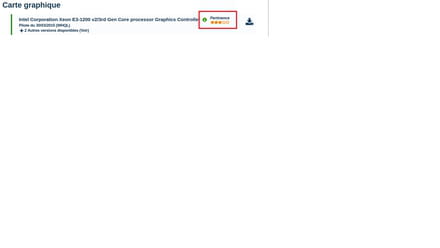
Before installing your drivers, I strongly recommend creating a system restore point just in case.
--
Thank you in advance for keeping me updated after my intervention. Give us time to find the problem.
Don't forget to click "Resolved" once the problem is fixed. -
For saving your sound, once the recording is finished, click on "File" and select "Export Audio" then save your sound in MP3 format
--
Thank you in advance for keeping me informed after my intervention. Give us time to look for the problem.
Don't forget to click on "Resolved" once the problem is fixed. -