How to uninstall greenshot
Solved
mariedesblogs
Posted messages
20
Status
Member
-
Fish66 Posted messages 18337 Status Security Contributor -
Fish66 Posted messages 18337 Status Security Contributor -
Hello
please can someone tell me how to uninstall Greenshot
it has an uninstaller but when I use it, it invariably responds that it is open in another program, I know it's not because I close everything before an uninstallation.
thank you for any help, happy Easter,
best regards, Marie
please can someone tell me how to uninstall Greenshot
it has an uninstaller but when I use it, it invariably responds that it is open in another program, I know it's not because I close everything before an uninstallation.
thank you for any help, happy Easter,
best regards, Marie
4 answers
-
Hello fish66
I’m getting back to the topic of how to remove Greenshoot
I just spent the night on it but can’t seem to find a solution,
I’m trying to follow your advice but I must really be hopeless
first of all, I can’t find start/run, and then I don’t know what non-essential processes are, I’m pushing my luck a bit but could you please advise me again? Thank you,,, Marie -
Hello,
1/
You can disable the automatic launch of this software using MsConfig:
Click on Start/run, then type Msconfig, click on the startup tab and finally uncheck the non-essential processes (especially the one for greenshot if present).
(Do not touch your antivirus and firewall ones)
Help: how to disable the execution of certain programs at startup
2/ Next
Uninstall greenshot using:
===> revo-uninstaller
Have a nice day
--
¤¤¤ The best cure for all problems is patience.... ¤¤¤ -
Hello,
[*] Download: Farbar Recovery Scan Tool (FRST) from
this link: https://www.bleepingcomputer.com/download/farbar-recovery-scan-tool/
[*] Save it to your desktop (You need to run the version compatible with your 32-bit or 64-bit system)
==> How to know which 32-bit or 64-bit version is running on my system?
[*] Run FRST, execute as administrator on Windows: 7/8 and Vista
[*] In the main menu, ensure that the box "Addition.txt" is checked then click on "Scan" and wait for the analysis to complete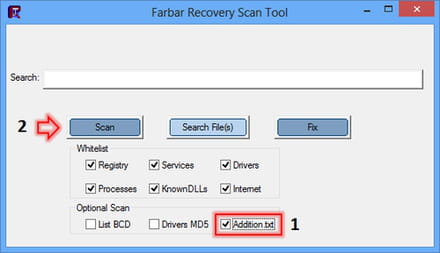
[*] Once the scan is finished go to your desktop, two reports FRST.txt and Addition.txt have been created.
[*] Upload the FRST.txt and Addition.txt reports located on your desktop to: malekal.com
[*] Copy/paste the provided links in your next reply.
==> Help: <<<HERE>>>
@+
--
¤¤¤ The best remedy for all problems is patience.... ¤¤¤ -
Hello Fish66
Sorry for the late reply, I was hospitalized
Thank you for your help, I didn't have to use it because my son completely formatted my PC, so my problem is solved, but I really appreciate all the help I find on this great site, I've already called on your help and always positive, so thank you very much, best wishes, Marie.