
#VALUE! in OpenOffice Calc
Solved
ptrv97
Posted messages
4
Registration date
Status
Member
Last intervention
-
ptrv97 Posted messages 4 Registration date Status Member Last intervention -
ptrv97 Posted messages 4 Registration date Status Member Last intervention -
Hello everyone!
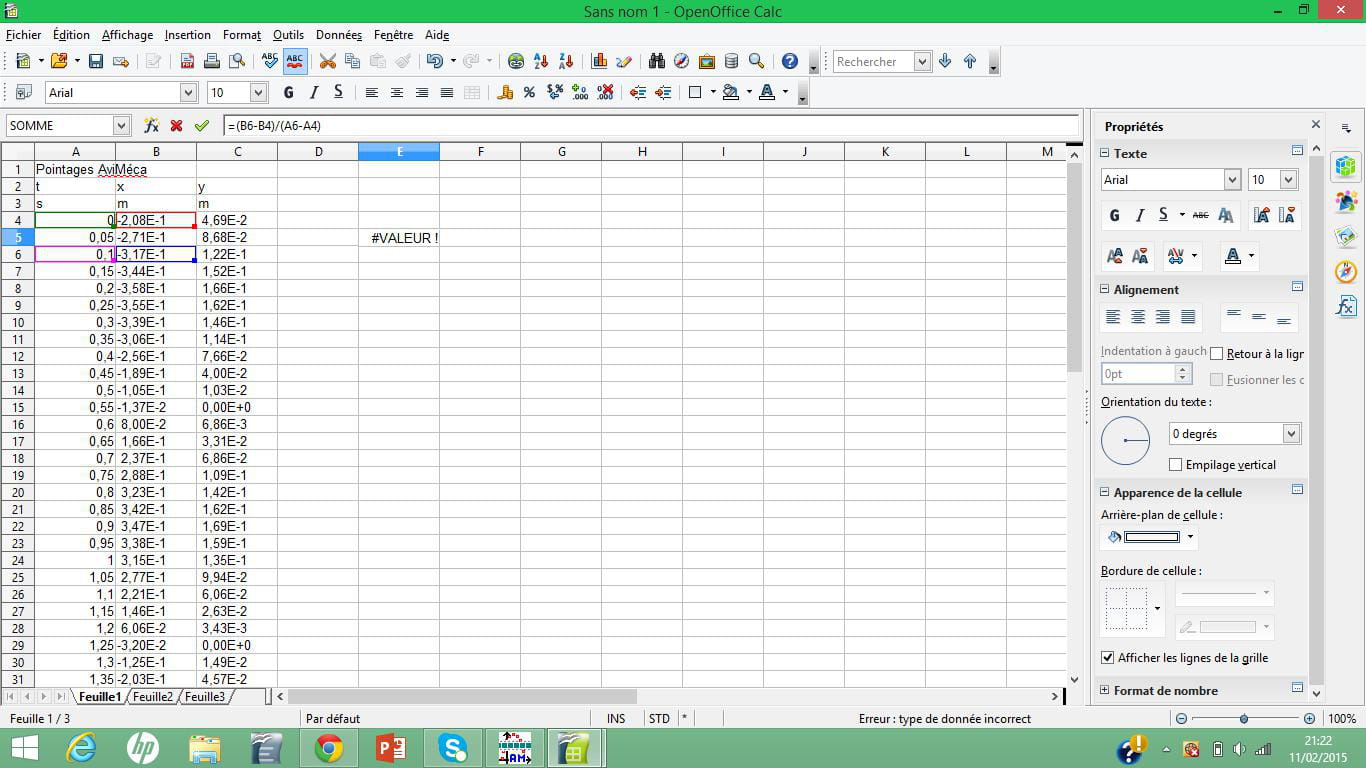
For the new school year, I have a physics assignment to submit, which requires good spreadsheet skills. However, as you can see, I'm starting off poorly since I can't solve a problem that prevents me from starting this darn activity... It turns out that when I try to enter the distance over time ratio, well, the result is hard to come by... "#VALUE!" is what I'm being told! I've made countless attempts, to no avail. Anyway, if a kind soul understands what's wrong, I would be grateful, because I won't hide it from you, this situation is driving me crazy!
Here are some pictures:


Thank you in advance!
For the new school year, I have a physics assignment to submit, which requires good spreadsheet skills. However, as you can see, I'm starting off poorly since I can't solve a problem that prevents me from starting this darn activity... It turns out that when I try to enter the distance over time ratio, well, the result is hard to come by... "#VALUE!" is what I'm being told! I've made countless attempts, to no avail. Anyway, if a kind soul understands what's wrong, I would be grateful, because I won't hide it from you, this situation is driving me crazy!
Here are some pictures:

Thank you in advance!
2 answers
-
Hello,
With a right-click "Open link in a new tab," the images become readable.
However, a file sent using Cjoint.com would be very useful.
The values are aligned to the left in column B; we can therefore assume that these are text values and not numbers.
To check, enter the formula =ISNUMBER(B4) in D4.
