
Graphic problem Empire Earth 1 Windows 8.1
Plumerey
Posted messages
12
Status
Member
-
evilsun Posted messages 1 Status Member -
evilsun Posted messages 1 Status Member -
Hello,
Some time ago, I wanted to try Empire Earth 1 again on my laptop running Windows 8.1
I want to specify that it's the original CD from a few years ago.
I launch the installation in Windows XP Service Pack 2 compatibility mode (I've also tried in normal mode and it does the same thing). Everything goes well. I start the game, I can go into play, play solo, load the map and everything but I never see the map or my capitol, it gets stuck on loading completed.
I tried running it as an administrator and all compatibility modes but nothing works.
I looked online and saw that I needed to make these modifications in the registry:
Navigate to "HKEY_CURRENT_USER\Software\SSSI\Empire Earth\Wait for VSync" and change it to "0" (do this by double-clicking the entry).
Then navigate to "HKEY_CURRENT_USER\Software\SSSI\Empire Earth\Rasterizer Name" and change it to "Direct3D Hardware TnL" (similar to how you did with VSync).
There, I can launch the game, I see my map and everything but I have these kinds of moving rectangles. (see my screenshots).

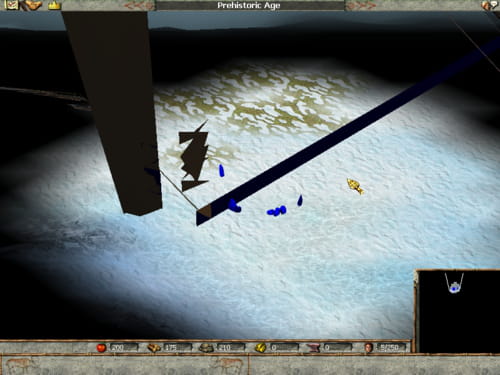
I tried installing the update patches, I couldn't for the first one because there is a problem with the file language.dll, I can for the second one but afterward the game doesn't work at all, I get an error message. (on this site: http://www.sierrahelp.com/Patches-Updates/Patches-Updates-Games/EmpireEarthUpdates.html
Thank you in advance for your help,
Have a good day
Some time ago, I wanted to try Empire Earth 1 again on my laptop running Windows 8.1
I want to specify that it's the original CD from a few years ago.
I launch the installation in Windows XP Service Pack 2 compatibility mode (I've also tried in normal mode and it does the same thing). Everything goes well. I start the game, I can go into play, play solo, load the map and everything but I never see the map or my capitol, it gets stuck on loading completed.
I tried running it as an administrator and all compatibility modes but nothing works.
I looked online and saw that I needed to make these modifications in the registry:
Navigate to "HKEY_CURRENT_USER\Software\SSSI\Empire Earth\Wait for VSync" and change it to "0" (do this by double-clicking the entry).
Then navigate to "HKEY_CURRENT_USER\Software\SSSI\Empire Earth\Rasterizer Name" and change it to "Direct3D Hardware TnL" (similar to how you did with VSync).
There, I can launch the game, I see my map and everything but I have these kinds of moving rectangles. (see my screenshots).
I tried installing the update patches, I couldn't for the first one because there is a problem with the file language.dll, I can for the second one but afterward the game doesn't work at all, I get an error message. (on this site: http://www.sierrahelp.com/Patches-Updates/Patches-Updates-Games/EmpireEarthUpdates.html
Thank you in advance for your help,
Have a good day
14 answers
-
I found the problem... You just need to change the driver for your graphics card (basically reset your graphics card to factory settings, and not the update w8.1..
- Go to File Explorer (formerly This PC)
- Right-click on "This PC" then go to Manage
- Device Manager
- Graphics card (click on the small arrow) this will display your graphics card..
- Right-click then update driver
- "Search for driver on my computer"
- "Choose from a list of drivers.....etc...."
- And finally select the original driver, check the date to know which one to choose, it will be the oldest date...
it will restart automatically (if not, restart)
and just play..-
Hi stark_eric, I did the manipulation you described and it worked wonderfully. I was playing, then I closed the game, and when I relaunched it to continue, it was bugged again. So I was going to redo your manipulation, but when I tried to select the oldest date, no dates were displayed anymore; only my graphics card is shown...
It's frustrating to have been able to play but now not be able to. Do you have a solution for the different dates to return to the list so that I can select the oldest one? Thanks in advance, and I'm really sorry for the multiple mistakes x)
-
-
I specify that the performance of my computer far exceeds the requirements for the game.
-
When I do this, the game freezes at loading complete.
I can hear the background music.
I kept the changes I made at the beginning, could that be the problem? -
I manage to launch it, but when I press play, the loading gets stuck on "loading complete."
I have 3 of them, but one does not seem to correspond to my graphics card number. -
Hi, I have the same problem. My friend has the same issue. In the game options, some settings aren't even displayed because of these graphics bugs. :(
I've tried a lot of manipulations (compatibility, etc.) and nothing works. If you find an old PC, keep it to play EE1. Sniff.. -
Same situation, I even wanted to play Sim City 4, it's the same problem...
From what I understand, the graphics card is too powerful...
By trying Sim City again, reducing the graphics to the lowest settings, there were fewer problems...
Of course, I'm still looking for Empire Earth... -
Yes, it doesn't work better on Empire Earth
Any other ideas? -
Are you having trouble launching the game at all? Or are you still getting to the Empire Earth menu? … How many updates do you have for your graphics card drivers?
-
Is your old problem solved? Does the menu display correctly before playing? ... Yes, but the drivers you see displayed are all compatible with your system, so don't worry about that.
If the old problem is solved and it cuts off when you want to play, go to
- Game options
- Then video
- Click on the graphics card, you will see your graphics card and "main display driver", try both.
- Also check the resolution, set your correct resolution to 32 bit. -
I'm sorry I forgot to respond as I had a problem while doing this manipulation.
Actually, my computer crashed and I had to do a system recovery...
So I would like to know if this manipulation works for other users or if it's just my computer acting up. -
-
-
A friend who hasn't changed their settings tried to install the original graphics card driver and the problem is still the same, there's still this texture issue.
-
In my opinion, it’s your game settings that caused you to get blocked, since I believe you must have tried any configuration. So try resetting your game settings to factory defaults and redo the operation by changing the graphics driver.