How to move data labels at once
Solved
mbus
-
Warala Posted messages 1 Status Member -
Warala Posted messages 1 Status Member -
Hello,
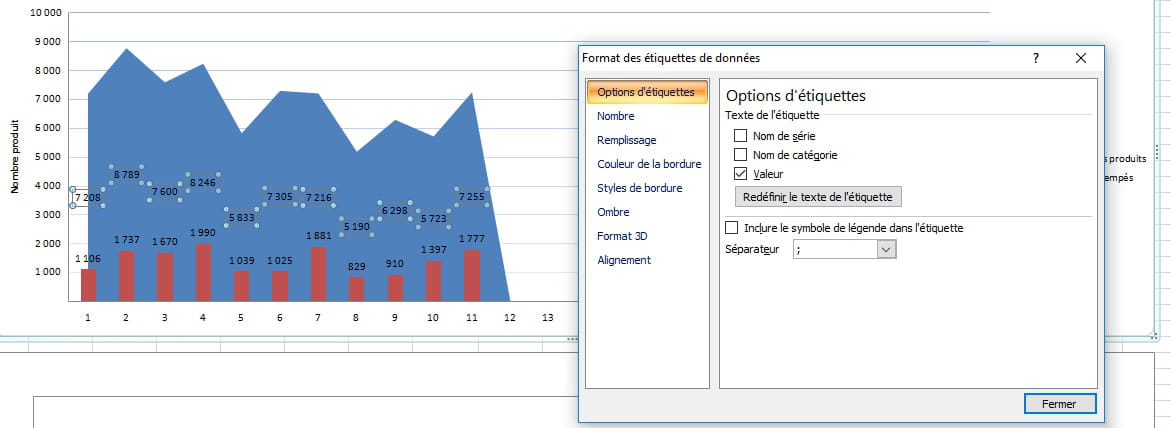
I am new to this forum, and I am trying to move data labels in Excel 2007 for a histogram. I can only do it one by one, which is really not practical. I went to layout and data labels, but I only have two options: either None or Show, whereas I had already seen that they could be placed either on the outer or inner edge. Could someone help me? Thank you in advance.
Best regards
Mbus
Configuration: Windows Vista / Chrome 21.0.1180.89
I am new to this forum, and I am trying to move data labels in Excel 2007 for a histogram. I can only do it one by one, which is really not practical. I went to layout and data labels, but I only have two options: either None or Show, whereas I had already seen that they could be placed either on the outer or inner edge. Could someone help me? Thank you in advance.
Best regards
Mbus
Configuration: Windows Vista / Chrome 21.0.1180.89
5 answers
-
Thank you all for your response. In the end, I managed on my own. I noticed that depending on the histograms, some could be modified and others could not. Therefore, I changed the shape.
Thanks again to everyone.
Mbus -

Hello,
In this chart, I am unable to correct the position of the labels on the blue graph, even though I have requested to reformat the labels. Even in the "Alignment" tab, I cannot manage to move the values up. Am I therefore forced to move them up manually?
Thank you in advance! -
Hello
Right-click on a tag
Format
and you have the choices you wanted
Best regards -
Thank you for your response, but when I right-click on a label, it does not allow me to move them all at once to center them in the bars of the histogram. I have to do it one by one and it is really tedious; there must surely be a trick.
Best regards
mbus -
Hello
If the macros don't bother you, we can adapt this example (Excel 2003)
https://www.cjoint.com/?3BxvtuqYgjG
Have a good continuation