
Laptop battery problem
Hello, I changed the battery of my Dell laptop about 3 months ago, a new battery. At least once a day the issue of the battery running out despite being on AC power causes it to shut down abruptly. I unplug the cable, remove the USB mouse, also remove the battery and press the power button for 30 seconds. I reinstall the battery and reconnect it and it starts again. But what is the reason, since the battery is new, whereas the PC itself isn’t new!
Thank you for your interest
Nelly
3 answers
-
Hello,
3 possible causes:
1 - Faulty charger or not recognized (this is quite common with Dell)
2 - The battery itself. Generic batteries are cheaper but some may not be well tolerated by the charging circuits of older PCs.
3 - BIOS or battery driver not up to date.
What to do?
- Check in the BIOS if the charger is recognized. You should see AC Adapter and on the opposite side if you see the word unknown or none instead of the Power (in Watts), the charger is the culprit.
- Reinstall the battery driver in Windows by going to Device Manager. Look under Batteries. Right-click on Microsoft ACPI-Compliant Battery and choose Uninstall. Restart the PC and Windows will automatically reinstall the driver.
- Update the BIOS, I believe there is an utility for this preinstalled on Dell PCs. Otherwise you can download it from Dell's site.
Don’t forget that some batteries bought online at unbeatable prices are often of very poor quality or even dangerous for some. It’s not rare for them to fail shortly after purchase.
-
Moderator
Hello,
For my part, I would lean more towards a temperature issue.
The laptop is old and if it has never been cleaned, chances are that dust is obstructing, more or less, the ventilation system and leads to, over time, overheating. Heat leads to protection mode and therefore a abrupt shutdown.
Firstly, a blow with a can of dry air aimed at the ventilation vents should be beneficial. Then, probably, consider a more thorough internal cleaning, which implies disassembly.
Very difficult to catch a black cat in a dark room.
Especially when it isn’t there... -
Contributor
Hello
A battery loses about 20% of its capacity in 1 year.
To check the battery status, via an elevated command prompt (Administrator):
type the command: powercfg /batteryreport
a report will be created, open it.Alternatively, a small utility in English (Hwmonitor)
the download is at the bottom of the page.
run " Hwmonitor "
at the very bottom of Hwmonitor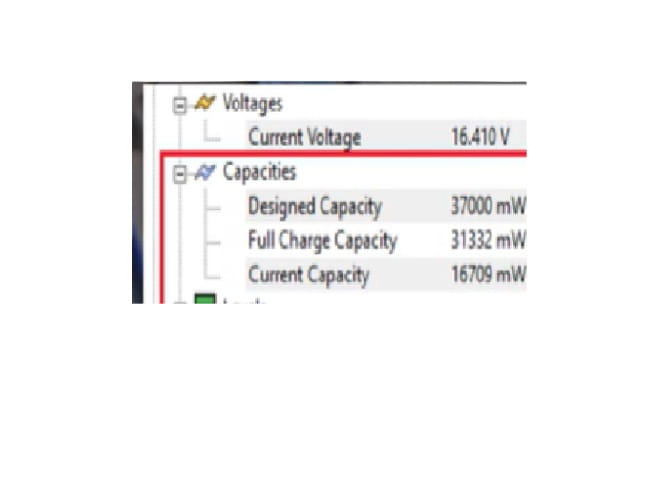
Designed Capacity = nominal capacity
Full Charge Capacity = capacity at full charge
Current Capacity = current capacity
Wear Level = battery wear
Charge Level = Charge Level
If my answer helped you, click the Thank you button.
Mark as resolved if your issue is fixed.

