
Permanent security alert!
Solved
Hello, for a few days now I’ve been receiving a security alert telling me to analyze my PC’s system, then to buy an antivirus! I know it isn’t a virus but despite the advice I’ve found on the web, I can’t get rid of it.
What should I do? Thanks for helping me out.
5 answers
-
Moderator
Hello .
I was on vacation and since you sent the reports with a 5-day delay I had already left.
Normally the reset of Chrome and Edge that I indicated in my first message should have been enough, unless you did not do it, so:
Procedure to follow in the order indicated:
FIRST:
Remove the SearchShield extension in Edge .
Remove the WASM TTS Engine extension in Google Chrome, .
SECOND:
1- Open FRST as administrator; to do this, right-click FRST and choose run as administrator
2 - Copy the entire script in the box below:Start:: CreateRestorePoint: CloseProcesses: CustomCLSID: HKU\S-1-5-21-4018870028-1931207711-3785038618-1001_Classes\CLSID\{1AC77AE9-9EC6-405A-9F9B-C06AB3C10B71}\InprocServer32 -> C:\Program Files\Microsoft Research\Image Composite Editor\ShellExtension.dll -> Pas de fichier CustomCLSID: HKU\S-1-5-21-4018870028-1931207711-3785038618-1001_Classes\CLSID\{FFA5B06E-20BB-4E7E-A0AC-6982ED6A6041}\localserver32 -> C:\Program Files (x86)\CyberLink\Shared files\CLToast.exe -> Pas de fichier ContextMenuHandlers5: [igfxcui] -> {3AB1675A-CCFF-11D2-8B20-00A0C93CB1F4} -> -> Pas de fichier SearchScopes: HKU\S-1-5-21-4018870028-1931207711-3785038618-1001 -> DefaultScope {6A1806CD-94D4-4689 URL = SearchScopes: HKU\S-1-5-21-4018870028-1931207711-3785038618-1001 -> {0633EE93-D776-472f-A0FF-E1416B8B2E3A} URL = FirewallRules: [{09680A80-61B2-4EFC-B503-5BD2EEB88D86}] -> (Allow) C:\Users\marie\AppData\Roaming\Zoom\bin\airhost.exe -> Pas de fichier FirewallRules: [{9EF033FD-D288-4C65-BF50-AFBD04FB061F}] -> (Allow) C:\Users\marie\AppData\Roaming\Zoom\bin\airhost.exe -> Pas de fichier FirewallRules: [{7DF20BB5-E7F1-4CD7-AC28-DBC42B219087}] -> (Allow) C:\Program Files\ON1\ON1 Photo RAW 2024\ON1 Photo RAW 2024.exe -> Pas de fichier FirewallRules: [{EEE0F80C-99C2-4BF7-8E3D-5A3273C6A08C}] -> (Allow) C:\Program Files\ON1\ON1 Photo RAW 2024\ON1 Photo RAW 2024.exe -> Pas de fichier FirewallRules: [{6DEBD1A7-F90B-445C-9CDF-55FD5C66C4F3}] -> (Allow) C:\Program Files\ON1\ON1 Photo RAW 2024\on1capture.exe -> Pas de fichier FirewallRules: [{B1B4B560-76CA-4A88-9992-1296DF452D4D}] -> (Allow) C:\Program Files\ON1\ON1 Photo RAW 2024\on1capture.exe -> Pas de fichier FirewallRules: [{19C77F32-C6C7-4658-95E6-E6677C5B334A}] -> (Allow) C:\Program Files\ON1\ON1 Photo RAW 2024\on1sandbox.exe -> Pas de fichier FirewallRules: [{C6008CB1-E1F6-493E-88E0-75D1D9CF8C4A}] -> (Allow) C:\Program Files\ON1\ON1 Photo RAW 2024\on1sandbox.exe -> Pas de fichier FirewallRules: [{E9B7CAE1-E6DA-4E04-AECB-52E9CDE24CCF}] -> (Allow) C:\Program Files\ON1\ON1 Photo RAW 2024\ON1 Photoshop Emulator.exe -> Pas de fichier FirewallRules: [{D8A076DC-EB2F-4205-A6C5-64A0E411A2B0}] -> (Allow) C:\Program Files\ON1\ON1 Photo RAW 2024\ON1 Photoshop Emulator.exe -> Pas de fichier FirewallRules: [{B24611EE-8E1E-4BF1-851E-C59836B46241}] -> (Allow) C:\Users\marie\AppData\Local\Temp\7zS3C3F\HP.EasyStart.exe -> Pas de fichier HKLM\SOFTWARE\Policies\Microsoft\Windows\WindowsUpdate: Restriction HKLM\SOFTWARE\Policies\Mozilla\Firefox: Restriction Task: {A8D07A15-B911-4DF9-8110-040DCB7502CE} - System32\Tasks\Avast Software\Overseer -> C:\Program Files\Common Files\Avast Software\Overseer\overseer.exe /from_scheduler:1 (Pas de fichier) Task: {231E3003-5504-4D77-9AD5-330C0FF95E6C} - System32\Tasks\OneDrive Startup Task-S-1-5-21-4018870028-1931207711-3785038618-1004 -> C:\Program Files\Microsoft OneDrive\25.070.0413.0001\OneDriveLauncher.exe /startInstances (Pas de fichier) S2 WirelessBackupService; C:\Program Files (x86)\Wondershare\drfone\Addins\Recovery\WirelessBackupService.exe (Pas de fichier) U3 aspnet_state; pas de ImagePath S3 WinRing0_1_2_0; \??\C:\Users\marie\AppData\Local\Temp\tmpD01D.tmp (Pas de fichier) Edge NewTab: Default -> Active:"chrome-extension://cajkghbacphcjgemgmmachjcgamkcacd/newtab.html" Edge DefaultSearchURL: Default -> hxxps://searchraptor.com/search?q={searchTerms} CHR StartupUrls: Default -> "hxxp://search.babylon.com/home?affID=18173&tt=3512_3","hxxp://www.google.com" CHR DefaultSearchURL: Default -> hxxps://search-launch.com/?subid=qi5FkFiCHqCF1ekiqFrPC1V9bqbCr9rN5Vb9PqqP&browser=chrome&keyword={searchTerms} CHR DefaultSearchKeyword: Default -> searchpro CHR DefaultNewTabURL: Default -> hxxps://new-tab-url.com/?subid=qi5FkFiCHqCF1ekiqFrPC1V9bqbCr9rN5Vb9PqqP&browser=chrome End::3- Once you have copied the script, click Fix, FRST will automatically take the script from the clipboard.
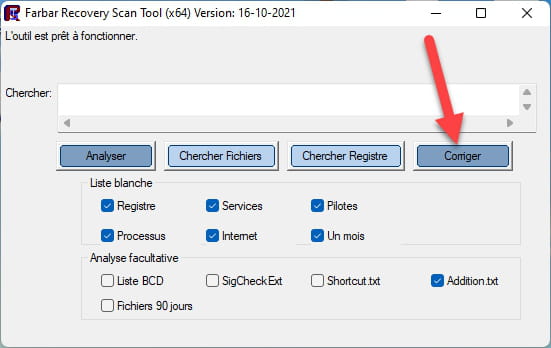

Let the correction finish; once it is done you will be asked to restart your PC, do it as soon as it asks you to, see below.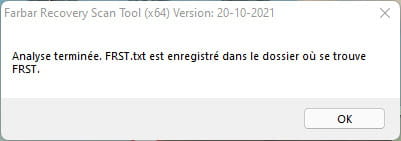
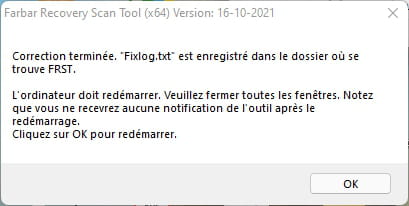

Then once your computer has restarted:
4- You will have a Fixlog file on your desktop; then send this report fixlog to .Then provide the link generated by in your reply.
5- CHECK AND TELL ME IF YOUR PROBLEM IS STILL PRESENT.
bazfile
Moderator/Security Contributor.
a hello, a reply, a thank you always please.-
Hello Bazfile,
Thank you for dedicating so much time to help me. I hope you had a good vacation. I apologize for not replying right away. I'm having a bit of trouble with computers ...
I've done all the steps you indicated. I couldn't find WASM TTS Engine in Google Chrome.
Regarding the Fixlog folder, I'm having trouble copying it into my reply. I managed to post the link below. I hope you can make use of it. Thank you.
https://pjjoint.malekal.com/files.php?read=20260819_2e162cc07537287f -
Moderator
-
@bazfile
Good evening,
The problem seems to be finally resolved!
Many thanks again to you and to Fabul.
Marie
-
Moderator
-
Moderator@mistero39
You're welcome, if you have any questions don't hesitate.
Have a good evening.
See you later.
-
-
ModeratorHello .
These are nuisance notifications that you've recorded in your web browser.
Two solutions.
- Either delete the nuisance notifications yourself, for that read and also .
- Or reset the affected browser manually or reset it with Reset Browser.
bazfile
Moderator/Security Contributor.
A hello, a reply, a thank you always pleases. -
Hello,
Thank you for your help, albeit a bit late! Here are the items following the FRST analysis.
Have a good day.
-
Hello,
I realize that in my last message the two links I pasted were not taken into account... I’m retrying the operation in the hope that it will work this time.
Thank you in advance.
https://pjjoint.malekal.com/files.php?read=20260812_c27a97ad3fefe114
https://pjjoint.malekal.com/files.php?read=FRST_20260812_d11acd60eca37da2-
-
-
Moderator@mistero39
In Chrome I only see Facebook notifications:
CHR Notifications: Default -> hxxps://www.facebook.comIn Firefox I see:
FF Notifications: Mozilla\Firefox\Profiles\hkqg5yfw.default-release -> hxxps://particuliers.engie.fr; hxxps://www.copinesdevoyage.com; hxxps://www.flypgs.com; hxxps://www.franc-tireur.fr; hxxps://web.whatsapp.com; hxxps://www.commentcamarche.net -
Moderator@fabul
Hello again,
You can remove this extension in Edge
(SearchShield) - C:\Users\marie\AppData\Local\Microsoft\Edge\User Data\Default\Extensions\cajkghbacphcjgemgmmachjcgamkcacd [2026-08-02] [UpdateUrl:0]
-
This extension in Chrome
(WASM TTS Engine) - C:\Users\marie\AppData\Local\Google\Chrome\User Data\WasmTtsEngine\20260806.1 [2026-08-07] [UpdateUrl:0]-
Then in Windows with Autoruns64.exe run as Administrator
In the Logon tab of Autoruns, right-click > Delete
Startup: C:\ProgramData\Microsoft\Windows\Start Menu\Programs\Startup\errorlog.txt
Then in the Drivers tab of Autoruns, again right-click > Delete for this:
WinRing0_1_2_0; \??\C:\Users\marie\AppData\Local\Temp\tmpD01D.tmp (No file)
So 4 things to delete, at a glance. -
@fabulHello Fabul,
Thank you for your help.
I did the 4 interventions you advised. It seems to be a bit better overall, i.e., I have fewer of these alerts now. However, this morning I still had the one attached below. Is there anything else to remove? Thanks in advance.
-
-
Thank you. I spoke too soon!! I just got a full page that forces me to restart the PC!
I will do what you tell me and I will send you the report.
-
-
@fabul
Hello, I hope you will receive the link after the RegRun Reanimator analysis. I’m having trouble copying it and sending it! Thank you
-
Moderator@mistero39Hello,
I don’t have access to a file; Uploadnow.io asks me to sign in and I see 0 files (No files).
Normally doing a Chrome ResetBrowser would have fixed all the problems with Chrome, I don’t know what happened.
Try Malwarebytes, you can disable real-time protection (15-day trial) but manual scanning is still free.
https://help.malwarebytes.com/hc/en-us/articles/31589235673883-Install-Malwarebytes-for-Windows
There is a chance it will fix the issue; if it fails, we’ll look for another method or another hosting site.
Have a good day.
@+
-


