
Potential threat warning screen appearance
Chante73 Posted messages 21 Registration date Status Member Last intervention -
Hello.
Hello.
I have Avast antivirus and I uninstalled McAfee antivirus which was useless to me. But since the uninstallation, a screen appears with the message "Potential Threat Warning". I can't close this screen, so I shut down my computer and when I restarted it I ran Avast which found nothing. Unfortunately, the potential threat screen appears regularly. How can I get rid of it?
Thank you for your help and simple explanations because I don't understand much about computers.
chante73
4 answers
-
Hello,
See what results you get:
https://forums.commentcamarche.net/forum/affich-38206831-alors-vous-voulez-supprimer-les-virus-vous-meme-comment
Read under the PS for a more in-depth analysis, it doesn’t remove anything without your request.
One checkbox must be ticked and click the Red button to delete.
If it’s about Browser Notifications Parasites, it’s in tab #5 (Search Settings) -
Hello Chante73
If you are on Windows 10 or 11, remove Avast and Microsoft Defender will take its place.
-
Hello @Chante73 StatusMember.
Download FRST.
Once downloaded save FRST to the desktop then right-click FRST and choose Run as administrator which gives this:
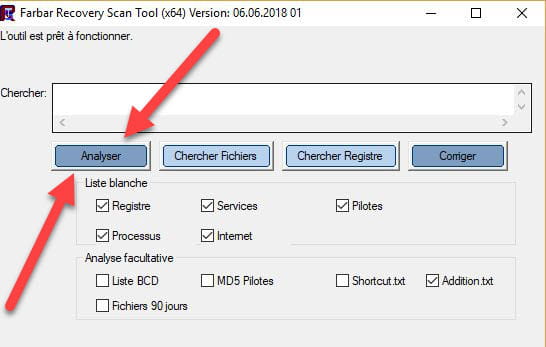

 Wait for the message the tool is ready to run to appear then click Analyze.
Attention, wait for the messages saying the analysis is finished to appear.
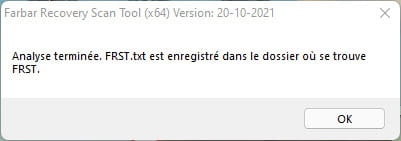
 At the end of the analysis the two reports FRST and ADDITION will be on the desktop.

 Upload the FRST and ADDITION reports tohttps://pjjoint.malekal.com/ .
Then attach the two links generated by https://pjjoint.malekal.com/ in your reply.
For information:
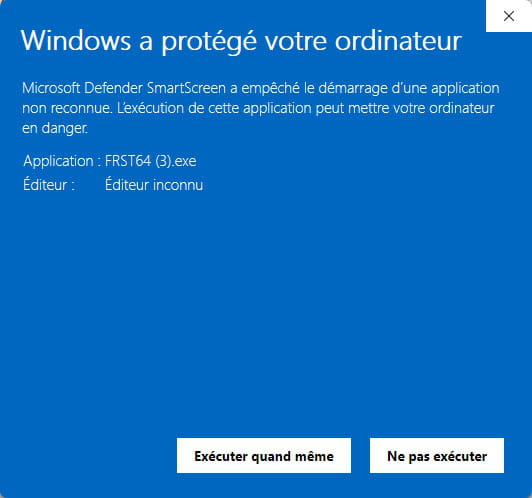
 If opening FRST triggers a Microsoft Defender alert, do not worry; click on More information then Run anyway, see below.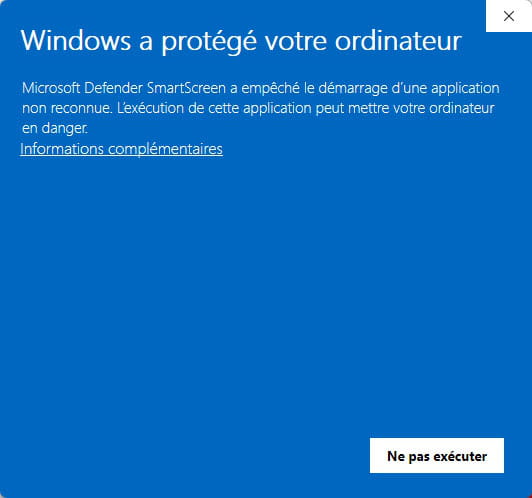


bazfile
Moderator/Security Contributor.
a hello, a reply, a thanks always welcome. -
Hello and a big thank you for your explanations, which I will put into practice in just a few days, but I will warn you to share the result.
Thank you to you,
Chante 73


