
Google problem redirects me to Yahoo
bazfile Posted messages 58507 Registration date Status Moderator Last intervention -
Hello,
when I’m on Google Chrome and request a site, I land on the Yahoo search engine, and I have an address that appears: joblkedrumscoomq.com, and Avast alerts me about a phishing URL? even though I run a virus scan with Avast and it says everything is normal. I think it’s a scam, how can I return to the Google search engine?
- I'm receiving text messages that are not intended for me.
- remove yahoo that keeps coming back
- Google Chrome closing by itself
- Porn sites appearing in Google search results when I type my name
- A strange program in my processes that is taking up performance
- Remove persistent Yahoo Search engine from Chrome
2 answers
-
jeannets Posted messages 28404 Registration date Status Contributor Last intervention Ambassadeur 6 604
hello,
from the text of the question, one can assume that the search engine was changed in the web browser... ⇒ therefore Yahoo instead of Google.
There must be a setting in the web browser where you can place the search engine of your choice (Google is a search engine) Chrome is Google's browser...
So you should go to Chrome's settings and restore the correct search engine options and remove this "joblkedrumscoomq" to replace it with "Le Figaro" or another more well-known and less spyware...
There you go, that's the idea.
-
Hello.
Reset Google Chrome manually or reset it with ResetBrowser.
OR
Download FRST .
Once downloaded save FRST to the desktop then right-click FRST and choose Run as administrator which yields this:
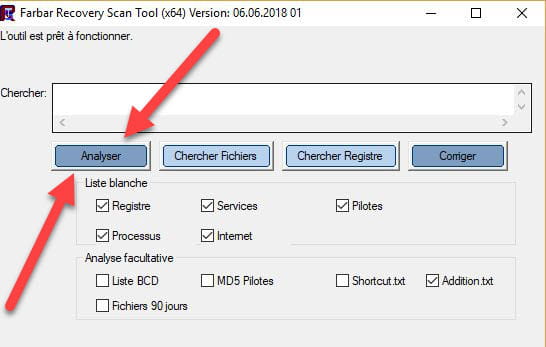

 Attendre que le message l'outil est prêt à fonctionner s'affiche puis cliquer sur Analyser.
Pour information :
 If opening FRST triggers a Microsoft Defender alert, ignore it and click on More information then Run anyway, see below.




Attention, wait for the messages saying that the scan is finished to appear.
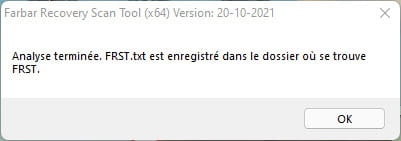


At the end of the analysis both FRST reports and ADDITION will be on the desktop.




Send the FRST and ADDITION reports tohttps://pjjoint.malekal.com/ .
Then attach the two links generated by https://pjjoint.malekal.com/ in your reply.
bazfile
Moderator/Security Contributor.
a hello, a reply, a thanks always is appreciated.

