
One drive microsoft
SolvedIceKT -
Hello,
I did a transfer from PC to PC and I'm finding myself with quite a few problems.
For example, I no longer have my documents, everything has gone to OneDrive and they're pestering me to increase the storage by paying, of course.
Except that on my plain Windows 11, which I had on my old PC, clearly different from this Windows 11 Pro, I had access to my documents for which I could open a new folder whenever I wanted and move it as I pleased.
So, first of all, I would like to know if we can uninstall OneDrive.
And possibly, if I can (that is, if I'm capable of it) migrate to Linux.
Thank you for your advice.
Sincerely,
Nobeline
7 answers
-
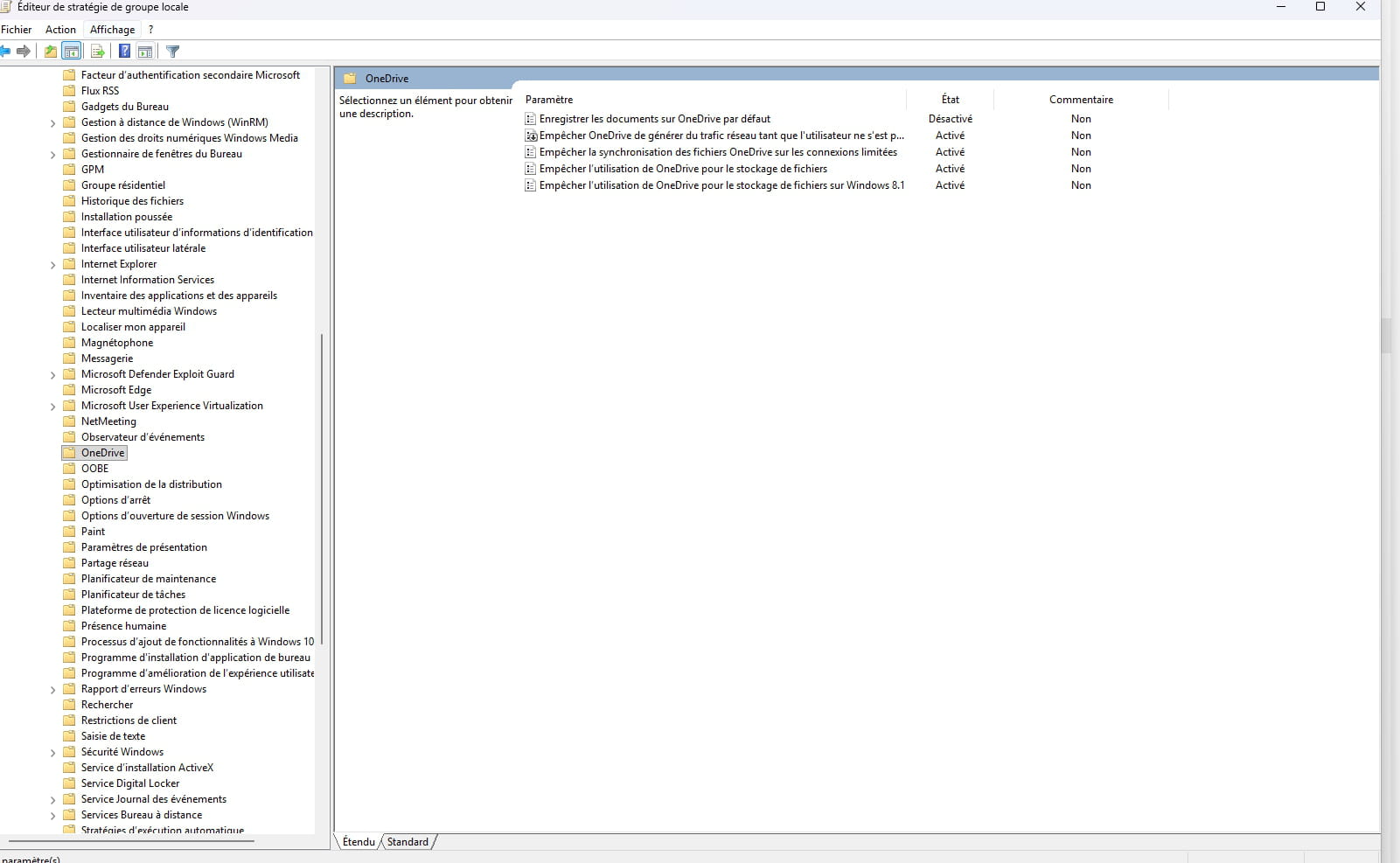
Hello, if you have reset Windows 11 to its original state. However, if you are using Windows 11 Pro, you need to go to the command line and type gpedit.msc (Group Policy) as an administrator. It is then in this menu that you can block OneDrive by clicking on: Computer Configuration, Administrative Templates; Windows Components; OneDrive; as shown in the image; you select the options as shown in the image then restart the computer and OneDrive will be blocked and jackpot it should work; for me it has always worked because I do not use OneDrive. No worries about this operation;
-
Hello,
For OneDrive, see here.
Disable or uninstall OneDrive - Microsoft Support
As for Linux, there are a multitude of tutorials available online; just search using your search engine.
In your search engine.
How to install Linux?
And also, how to install Linux in dual-boot?
One can never be too careful...
Dual-boot allows you to have Linux and Windows in turn, knowing that for Linux, it's another world, and in the event that you find yourself struggling with Linux, you will always have the option not to have to reinstall Windows.
After some time, you'll be able to remove either Linux or Windows, or the other way around.
Or also keep both operating systems in dual-boot.
-
thank you immensely for your advice. I will get started right away.
best regards
nobeline
-
Hello,
Before disabling OneDrive, copy (copy/paste and not cut/paste) all the documents stored remotely to retrieve them on your PC.
In principle, you should be able to find them by reactivating OneDrive (if necessary) but "better safe than sorry".
Incidentally, Windows 10 and Windows 11 have the same interface, but the latest updates have made it evolve.
-
YES, the interface is really different.
When installing Windows on my previous computers (there were many), I was never asked to specify which type of azerty keyboard I was using and it was impossible to "skip" that box. The result is disappointing.
Thank you for your response.
Best regards,
Nobeline
-
Hello,
If I'm not mistaken, Brussels and Paris share the same time zone, and geographic location alone isn't enough to distinguish them.
Therefore, it’s not unreasonable to ask if I want to use a French or Belgian AZERTY keyboard, not to mention I may have good reasons to use a Belgian keyboard in Paris or a French one in Brussels.
On the interface, I am reactionary, and I use Open Shell, which shows one that is more reminiscent of Windows 7 than Windows 10.
With each Windows update, we can't escape the installation of questionable applications, some of which can be disabled (like AI), but which in this case do not change the interface at all, including the new start menu or other widgets. -
Hello,
There’s probably a misunderstanding regarding the term "interface," which for me refers to the appearance of the desktop, the taskbar, the Windows window, or the file manager, whereas you imply the setup during installation, which involves configuring several functions, which may be slightly different for the pro version.
In any case, everything is modular, and as Brucine said, we can always opt for different ergonomics, provided that they are operational for the latest versions of the system.
As for the keyboard, if you are using an external keyboard, it may be a driver issue, and I suggest you try borrowing one.
Moreover, although using a Linux distribution, even simultaneously (dual boot or virtualization), is often presented as a panacea, it is not a one-button solution and requires the same level of familiarization and learning as any computing environment.
Regarding the transfer, there is no information in your messages about the method used, particularly concerning the reinstalled software, without which some files will not open.
Regardless of this, to open a new folder, you can either right-click on the desktop (and choose "new/folder" from the sub-menus) or do it within the software you are using (save as/new folder).
I strongly encourage you to let us know the steps you have completed (method of copying your files from the old to the new PC, keyboard test, reinstallation of software and opening an associated file, recovery of files under OneDrive).
Note: The PC, Windows, or Microsoft do not decide on automatic copying to OneDrive; only the user has control by installing and activating the synchronization of certain files, knowing that this should not be the main backup, which should remain on the computer.It would also be useful to provide the exact reference of the PC.
-
-
Thank you Georges,
I was so upset that I completely reset the new Geekom A9 MAX PC.
It is now blank. And I have asked their support about the keyboard.
I am obviously awaiting their response to continue the installation.
I will take a USB stick to transfer from my old PC and proceed with care. I had used EaseUS Todo but... the result was not satisfactory, hence my earlier question about OneDrive.
Thank you again for your explanations, being fully aware that you are an expert, which I am not at all -;).
Sincerely
Nobeline
-
I hope you didn't take my intervention as that of someone trying to show off.
Furthermore, I have no merit other than sharing my knowledge, and having over 40 years of practice, I consider myself just a seasoned amateur, knowing that specialists are part of the CCM members, from whom I learn every day. They will certainly step in helpfully if needed.
I insisted on my "checkpoints" because problem-solving (especially in IT) can only be conceived if we proceed step by step and especially if we reflect on the actions taken and the results obtained.This implies responses to the questions asked, without which the participants cannot know from a distance where you stand.
In fact, I had to go through your history to find the reference of the PC mentioned in your previous response.
There is no reason for the installation to hang up on a simple keyboard problem, unless it is broken or requires a special driver (backlit keyboards, for example).
Without trying to resolve everything at once, perhaps you would want to provide the steps followed gradually, to which I add a request for the type of keyboard used.
Additionally, you can check that access to the desktop, Wi-Fi, internet, and the file manager to browse your folders are functioning before moving on to installing software and retrieving remote files (OneDrive) and/or via USB stick.
I look forward to hearing from you regarding:
- method of transferring your files from the old to the new PC
- testing the new keyboard
- reinstalling a software and opening an associated file, retrieving files under OneDrive
"Slow and steady wins the race."
