
XP Drivers, impossible is not French?
brucine Posted messages 25277 Registration date Status Member Last intervention -
Hello,
I need a PC running XP, ideally a small format Dell to replace an Optiplex SFF 760.
I found one and ordered it from a website, everything available right now has been reinstalled with Ubuntu but it doesn't matter, we'll format and reinstall.
The lady called me back the next day, we no longer have it in stock, I suggest "upgrading" to a mini-tower.
I replied it doesn't matter as long as it's XP compatible and has a network port, a few days later I received a mini-tower, not an Optiplex 360 but an Optiplex 7020.
I powered it on to check that it boots properly under Ubuntu, then I installed XP (Pro SP3), the machine starts up fine and works basically but shows 7 devices with issues, either I return it or we try to find the drivers. Upon checking, it's only meant for Windows 7 and up.
I found the first ones, an 802.11 driver that seems to be lost somewhere but I can do nothing about it (it has to be ethernet), SM Bus controller, USB Bus controller.
I could not care less that we can't find the video controller (the default mode is enough for me), the video controller, the serial port, but I absolutely need the ethernet network.
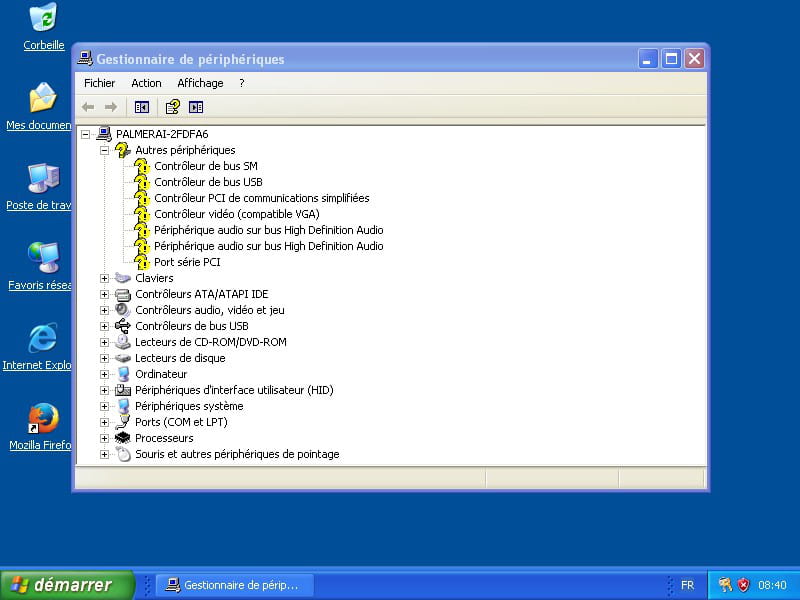
SM Bus Controller PCI\VEN_8086&DEV_8C22&SUBSYS_05A51028&REV_04\3&11583659&0&FB USB Bus Controller PCI\VEN_8086&DEV_8C31&SUBSYS_05A51028&REV_04\3&11583659&0&A0 PCI Simple Communications Controller PCI\VEN_8086&DEV_8C3A&SUBSYS_05A51028&REV_04\3&11583659&0&B0 VGA Compatible Video Controller PCI\VEN_8086&DEV_0412&SUBSYS_05A51028&REV_06\3&11583659&0&10 High Definition Audio Bus Audio Device HDAUDIO\FUNC_01&VEN_10EC&DEV_0280&SUBSYS_102805A5&REV_1000\4&18C787B9&0&0001 High Definition Audio Bus Audio Device HDAUDIO\FUNC_01&VEN_8086&DEV_2807&SUBSYS_80860101&REV_1000\4&14B47729&0&0001 PCI Serial Port PCI\VEN_8086&DEV_8C3D&SUBSYS_05A51028&REV_04\3&11583659&0&B3 I searched everywhere, I can't find anything, thanks to anyone who might have inspiration.
The backup plans, I haven't tried yet, would be to attempt the Windows 7 drivers or to install Windows 7 and run an XP virtual machine (not easy, I would need to find and buy additional RAM, 4 GB by default, and it should accept reading a USB stick from the host).
Thank you.
7 answers
-
Hello,
Download and install --> 7Zip 32 bit
Download this driver --> Dell Driver Package
Right-click on the driver --> 7020-win7-A08-M8FMR.CAB
Select --> 7Zip
Choose --> extract to "7020-win7-A08-M8FMR\"Go to Device Manager.
Right-click on a device
Update driver
No, not this time, next
Install from a list or specified location, next
Include this location in the search
Browse
Select the extracted driver folder --> 7020-win7-A08-M8FMR
Next, etc…
Do the same with all other devices-
Hello,
I had already set aside, these are Windows 7 drivers, and as mentioned, not tested yet.
Testing done, none work, even those that don't interest me, maybe the video ones where outside the driver files there are different Intel Graphics executables, I didn't go further.
What's strange is that I don't see any unknown driver that could concern the network card, yet there is one in the model specifications and an RJ45 port on the tower unless it was a telephone port, but then it would be RJ11 and the cable wouldn't fit?
On another site, there are executables, but they are only 64-bit and also Windows 7, of course, there's no way to run them in 32-bit; it would require reinstalling 64-bit XP for testing but I believe it's only SP2, not sure if the software I want to use would agree.
Anyway, for now still at a standstill.
-
-
Hello
And while we're at it, what is the exact ID of the PC?
It does seem to be from after the XP era... what we need are the drivers for the motherboard since everything is apparently implemented on it. Alternatively, we could install a basic LAN card that is compatible with XP and has an old driver, then it would work.
What’s strange is that I don’t see any unknown driver that could be related to the network card,
It's probably the SM bus controller that includes the network. And with a Dell, you also have to check the BIOS, they sometimes have options to enable or disable the network chip, and the USB as well, by the way.
-
Go to the device manager.
Right-click on the --> SM Bus Controller
Update driver
Install from a list or a specific location
Don't search
Provided disk
Browse
Go to the folder of the unzipped driver --> 7020-win7-A08-M8FMR
Folder --> 7020
Folder --> win7
Folder --> x86
Folder --> Chipset
Folder --> TH57N_A00-00
Folder --> production
Select the file --> Chipset_SMBus.inf
Restart.-
Hello to both of you,
Sorry, I'm late to the party; the sick PC (which is no longer sick since I cleaned it up with Autoruns, but I'll wait and see) is in the basement with the screen and everything, and my desk is cluttered.
I've connected both PCs to my screen that has a switch, and to switch from one to the other, I also move a USB hub for the keyboard and mouse, nothing but joy.
Flo88 is partly right, I'm as dumb as a brick, the LAN wasn't enabled in the BIOS; I now have the available identifier and fumbled around until I found one that it said was incompatible with the installation but works when forced.
Otherwise, indeed, I could have changed the card, I just didn't think of it.
Regarding the rest, the problem is even more complicated because there are no Dell drivers that only start from Windows 7.
The SMB bus controller had nothing to do with it, it was identified correctly at first, but I did as my screenshot says.
Updated screenshot, especially on the aesthetic side if you have time to waste, it still lacks PCI (there isn’t and there won’t be a serial card), audio (silence suits me just fine), video (even in degraded mode it should work), and PCI communications whose purpose I don't know, I don't know if it's only related to the serial card or also to the audio and video chipsets.
Go to Device Manager.
Right-click on the --> PCI Simplified Communications Controller
Update Driver
Install from a list or specified location
Do not search
Provided disk
Browse
Go to the unzipped driver folder --> 7020-win7-A08-M8FMR
Folder --> 7020
Folder --> win7
Folder --> x86
Folder --> Chipset
Folder --> X37VM_A00-00
Folder --> Win7x86
Folder --> heci.inf
Select the file --> heci.inf
-------------------------------------------------------------------------------------------------------------Go to Device Manager.
Right-click on the --> Video Controller
Update Driver
Install from a list or specified location
Do not search
Provided disk
Browse
Go to the unzipped driver folder --> 7020-win7-A08-M8FMR
Folder --> 7020
Folder --> win7
Folder --> x86
Folder --> video
Folder --> N6P66_A00-00
Folder --> Win7x86
Folder --> Kt116266.inf
Folder --> 10.18.14.4432
Select the file --> Kt116266.inf-------------------------------------------------------------------------------------------------------
Go to Device Manager.
Right-click on the --> High Definition Audio Bus Audio Device (HDAUDIO\FUNC_01&VEN_10EC&DEV_0280&SUBSYS_102805A5)
Update Driver
Install from a list or specified location
Do not search
Provided disk
Browse
Go to the unzipped driver folder --> 7020-win7-A08-M8FMR
Folder --> 7020
Folder --> win7
Folder --> x86
Folder --> audio
Folder --> 4GGVY_A10-00
Folder --> Win7x86
Folder --> HDAudio
Select the file --> HDAADCMA.inf-------------------------------------------------------------------------------------------------------
Go to Device Manager.
Right-click on the --> High Definition Audio Bus Audio Device HDAUDIO\FUNC_01&VEN_8086&DEV_2807&SUBSYS_80860101
Update Driver
Install from a list or specified location
Do not search
Provided disk
Browse
Go to the unzipped driver folder --> 7020-win7-A08-M8FMR
Folder --> 7020
Folder --> win7
Folder --> x86
Folder --> video
Folder --> N6P66_A00-00
Folder --> Win7x86
Folder --> IntcDAud.inf
Folder --> 6.16.00.3174
Select the file --> IntcDAud.inf----------------------------------------------------------------------------------------------------
Go to Device Manager.
Right-click on the --> PCI Serial Port
Update Driver
Install from a list or specified location
Do not search
Provided disk
Browse
Go to the unzipped driver folder --> 7020-win7-A08-M8FMR
Folder --> 7020
Folder --> win7
Folder --> x86
Folder --> Chipset
Folder --> X37VM_A00-00
Folder --> Win7x86
Folder --> mesrl.inf
Select the file --> mesrl.inf-
Thank you for the two PCI drivers; I had searched for them in the relevant folders without success.
As mentioned, I found the video controller through another download by clicking on the Intel setup. I had some doubts, so I uninstalled the software and tried again from your folder, thinking it might interfere with the audio drivers.
Nothing, in any case, the video controller and audio drivers don't work, whereas without going through the setup, the inf file from "my" folder, which is just video, works.
The next step is to clone the disk of the presumed faulty PC, so it boots from the new one (the XP version I installed on the new machine is the Dell OEM CD from the old one). If that's the case, we now have most of the essential drivers, and if the software it serves doesn't have an activation based on MAC data, then I'm in trouble, except perhaps this time by using a virtual XP machine in Windows 7, which might also allow us to customize and virtualize certain hardware features.
Try these 2 drivers:
--> Intel video
--> Realtek audioFor HDMI audio, have you tried the procedure below?
Normally it should work:
Go to Device Manager.
Right-click on --> High Definition Audio Device HDAUDIO\FUNC_01&VEN_8086&DEV_2807&SUBSYS_80860101
Update driver
Install from a list or specific location
Don't search
Provided disk
Browse
Go to the unzip folder of the driver --> 7020-win7-A08-M8FMR
Folder --> 7020
Folder --> win7
Folder --> x86
Folder --> video
Folder --> N6P66_A00-00
Folder --> Win7x86
Folder --> IntcDAud.inf
Folder --> 6.16.00.3174
Select the file --> IntcDAud.inf-
The first one, I already had; it's the one that helped me install the video controller as mentioned earlier.
The second one does indeed install one of the two audio controllers but not the other, which still allows the sounds to work normally to the point that I turned off the speakers; I am a fan of the world of silence.
In which case, now we have most of the drivers and the software it serves does not have an activation based on the MAC data, in which case I’m in trouble.
If I remember correctly, XP mainly blocks based on the network card, so the motherboard is primarily responsible for the activation.
However, if I understood correctly, you want to clone the XP disk from PC A to PC B, and then XP does not like that at all; expect a blue screen with no solution.
-
Yes, I know.
Activating XP is not a problem; anyway, even with several legitimate licenses, which is my case, we have to cheat because the Microsoft server no longer exists.
The crux of the problem is the activation of the Daikin software, even though I also have the installer and the license; it goes through a Daikin server, the existence of which we are not sure about, and which is only accessible by a Daikin password that they refuse to discuss. Their only suggestion is to change not only the computer but also the software and the entire computer system.
I see various "solutions" to the problem here and there; I have only skimmed through those that simply involve using cloning software; there are plenty of them, but they seem insufficient.Some, to avoid doing it on an already open system, go through a Live USB, often Linux, and/or the cloning software hosted there (with the target disk connected via a USB to IDE adapter) with a number of modifications to the target or source computer; I can only afford the latter if I'm sure they won't crash it, which is the risk of direct cloning because, by definition, the Windows hardware identifiers should be common and Windows is bound to crash two active disks at the same time presenting the same identifiers.
Hello Brucine,
This XP PC is for the building's boiler; the old one really let you down, didn't it?
-
Hello,
It shuts down several times a day without being able to identify the responsible phenomenon, but by incrementing the consumption that occurred during the blackout, that's the main thing.
The issue hasn't occurred again for now after a bit of tinkering (disconnection of the USB alert software of the uninterruptible power supply that requires an Internet connection, which there isn't, and disabling a number of services) but we won't lose anything by waiting; the machine is 16 years old.
-


