
I can no longer log into my Facebook account
Didi64_549 Posted messages 2906 Registration date Status Member Last intervention -
I'm unable to log into my Facebook account because the approval has not been received.
I can no longer access my Facebook account and I'm not receiving the notifications sent by Facebook to approve this login. (PC-W10)
However, I am still logged in on another PC (PC-W11) on Facebook without any problems. But I'm not logging out to avoid having the same issue.
After checking, all my data is correct.
What should I do.
Can someone help me, thanks!
- I can no longer see photos on FACEBOOK.
- Why can't I comment on Facebook anymore?
- I can't log into my Facebook account anymore, what should I do?
- I can no longer see their Facebook profile!
- My Facebook account has been disabled and I can't unlink it from my Instagram.
- Why can't I log in to Facebook anymore?
7 answers
-
Good evening,
It's always better with a little hello!
Recurring question here on CCM, you need to check that with the help available on Facebook support.
If Facebook is not sending you the codes in question, in this context, no one here will be able to help you, unfortunately.
SMS codes can sometimes take a while to arrive. Check your phone again in a moment.Recover an account | Facebook Help Pages
Resolve login issues with two-factor authentication on Facebook | Facebook Help Pages
Troubleshoot login issues to Facebook with a phone number | Facebook Help Pages
What can I do if I no longer have access to my account? | Meta Business Help Pages
-
Hello again,
I still have this message:
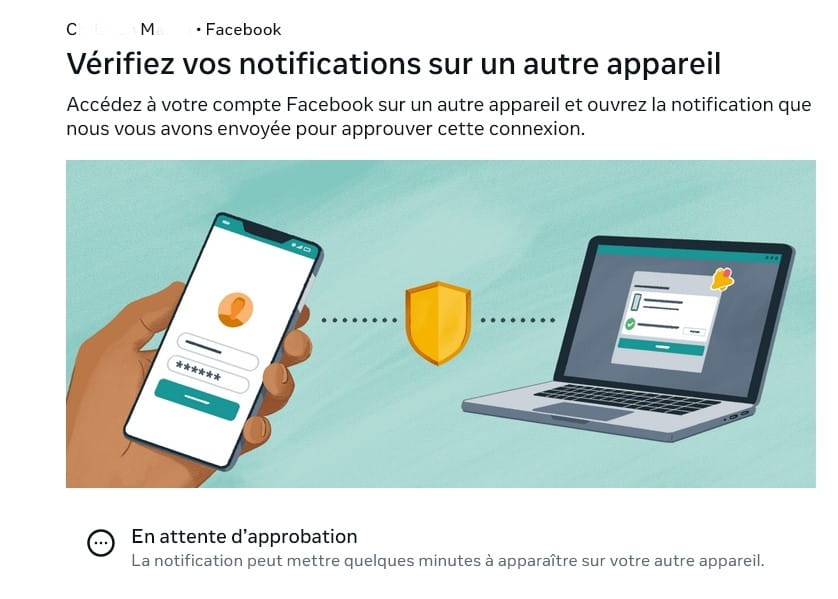
C.... M.... • Facebook
Check your notifications on another device
Access your Facebook account on another device and open the notification we sent you to approve this login.
I’m receiving neither SMS nor email
I keep getting stuck on this message every time I try to log in.
-
I received an email with a code to change my password and then when I enter the code sent, I always get this message:
Pending approval
The notification may take a few minutes to appear on your other device.
I have a Facebook connected on my other computer (W11), I am not logging out because I have access to it, but I can't change anything regarding my account, I can't add another email address because it tells me that I cannot do it at the moment because this is not my usual device. (And for good reason, I am migrating from W10 to W11 on this other PC). I also checked my phone, which is correct).
There you go! Thank you if you can help me! I have been trying to solve my problem for 2 days! I saw that Facebook had incidents for the past 2 days, I don't know if everything is fixed and if I fall into the concerned cases?
-
It is:
Resolving connection issues with two-factor authentication on Facebook
Which seems to be not working!
Hi again,
Patience remains the key advantage because if Facebook is under maintenance, it lasts for a while.
Moreover, you are migrating to 11, so at some point, you will need to connect on your other device that will be W11.
Be patient and let it be.
Come back if everything gets back to normal or the opposite as well.
Have a nice day.
Yes, but until two days ago I was connecting without any issues on both the W10 and W11 computers, at least for the past month.
These are issues with Orange (which I wasn't aware of) that made me unable to connect to the internet, so I cleaned up my browsing history, meaning I cleared the caches....
As usual, we have to log in to all the sites, it worked for everything, Google, YouTube..... but not for Facebook.
That's the beginning of the story.
Thank you for your attention and your responses.
I will of course report back on the progress of the issue.
-
-
-
Good evening,
So I remain without Facebook and unable to do anything!
What kind of world are we living in!
I'm 77 years old, for me the future is behind me, but what about my children and grandchildren?
So I'm at a dead end; only Facebook could do something, but it can't, it doesn't have the means or the will!
Great!
Thank you anyway to those of you who are trying to help me...
-
So far, it worked on both PCs!
I've been stuck here for more than a week.
I did indeed post my issue on their help site, but it's clearly stated that this is assistance for them in resolving incidents, specifying that no individual response will be given.
What's curious in this story is that if I request a reset of my master password, I do receive an email with a code from them.
Then I'm asked to approve my login on another device.
But I don't receive a notification to approve this login.
This applies whether it's on my phone (which indicates that a message has been sent by email to my PC at my address).
I'm stuck on this issue!
-
-
Hello,
I indeed posted my issue on their help site, but it is clearly stated that this is assistance for them in resolving incidents, specifying that no individual response will be provided.This is what I've been trying to explain to you from the beginning!
I'm re-sending it below!
You need to check this with the help available on Facebook's support.Good evening, Facebook does not provide assistance by phone or email; there is only the help available on their support in this area. -
-
Hi,
I believe that MPMP10 is right about the lack of assistance, except that they send you notifications, but on which device?
Moreover, since the hacks, Facebook frequently updates its site.
What brand is the phone?
Why don’t you communicate with the WhatsApp app via video call to see and talk to your little ones as you say?
-
My problem is not the discussion with my grandchildren, as I have WhatsApp and other means, nor even my own Facebook, but it's a group about the history of a small village in Brittany that I manage, with almost 600 subscribers, and I definitely wouldn't want to lose it along with all the posts and my subscribers from that group.
I don't know if it's possible to link a group to another account!
-
-
Hello,
I didn't do anything, and it's working again!
But now it's Microsoft that isn't functioning properly, blank screen!
Then hit return and it works! I read that somewhere recently!
Thanks anyway to those who tried to help me.
Best regards.
CM

