
Livebox WPS button
Hello,
While reading an article about WiFi risks, I read that it's a MUST to disable WPS, which I used to do before using a Box.
With my Livebox, when I just tried to disable WPS, I immediately got a message saying that the UHD WiFi decoder would stop functioning and that other devices would also have problems.
Orange reacts "fiercely" when you want to tinker with WPS.
Is this a specific problem with Orange, or are all Boxes like this = Are these routers "special"?
I've never had issues on that side, and it's not going to keep me up at night. I had noticed this a long time ago, but this time I'm asking the question since I just reread a network security article stating that WPS MUST be disabled.
There's a conflict in the use of Box routers somewhere.
Have a good weekend.
7 answers
-
Hello,
normally WPS is disabled, it’s the temporary activation (for a few minutes) that can be activated, you should explain more clearly what you mean.
WPS is only used for the first connection, once it’s done it’s no longer necessary.
If you could provide the exact message from Orange instead of your translation of it ...
a screenshot would be better.
And there you go, there you have it ....
But goodness, those line spaces are so annoying!! -
Hello,
Some devices have the possibility of connecting via a WPA code which solves the problem, but it seems to me that the different models of Livebox require WPS for the decoder.
So there is no option other than a direct Ethernet connection if the decoder is close enough, or through a wall RJ45 network, or indirectly via powerline adapters, not great in the latter case but sufficient for television.
That said, if WPS is not desirable, the risk remains theoretical; there must be a wrongdoer nearby, for example, in a neighboring apartment. -
Good evening
Still in good shape, I see
Just a question like that: My LiveBox 6 won't let me disable its WPS. Really.
Take care.
-
I am responding to your request.
If I disable WPS, it's no longer possible to connect to WiFi with the decoder... I have to run a cable.
Completely impossible for me.
And for my 16 WiFi devices, no more pairing possible.
So without WPS, no more WiFi at all since the LB 6.
I have been using WPS for 12 years and everything is fine. But since it is recommended to disable it, that's where my curiosity comes from.
Looking forward to it.
-
-
Indeed, this message from the box is wrong regarding the decoder: if it is already connected to Wi-Fi, turning off WPS will not disconnect it, or Orange is messing things up.
There is no reason for WPS to be permanently activated; it is actually a huge security flaw because when it is active, anyone can connect to the Wi-Fi network without knowing the WPA key, that's exactly what it is for.
-
-
Moderator
Hello everyone,
This doesn't explain the reason for the decoder loss, but it is a well-known problem
https://www.monpetitforfait.com/comparateur-box-internet/erreurs/orange/wifi-07-0020
Very difficult to catch a black cat in a dark room.
Especially when it's not there...-
-
Moderator@kaumune
Although this is only my assumption.
One must not confuse the action on the WPS button, which allows for transmitting the Wi-Fi security key code, and the WPS function, which, in my opinion, analyzes whether a Wi-Fi device has the security key and then authorizes the connection of that device to the box.
The action on the button is obviously time-limited, while the functionality must be permanent to ensure connections.
-
@baladur13
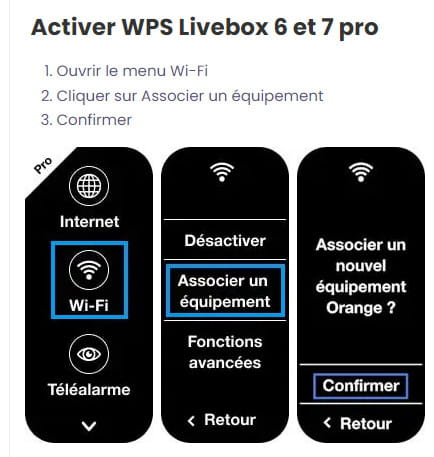
The WPS function (there is no button on the Livebox 6) only exchanges the security key between the box and the requester instead of requiring manual input.
It will not constantly check, during a connection, the validity of the key.
In any case, whether activated or not, it does not interfere with already established connections.
Now, it wouldn't be surprising if there's a bug in the Wi-Fi connection between the Livebox and the Orange decoder.
It would also be interesting to know, precisely, how the requester "deactivates" the WPS function of a Livebox 6.
When looking at the interface, one can indeed imagine confusion between disabling Wi-Fi and WPS.
The Wi-Fi icon is directly above the WPS one.
-
Moderator@kaumune
OK
In fact, I think bigbernie simply tried to carry out the deactivation procedure and received the message linked to message #4
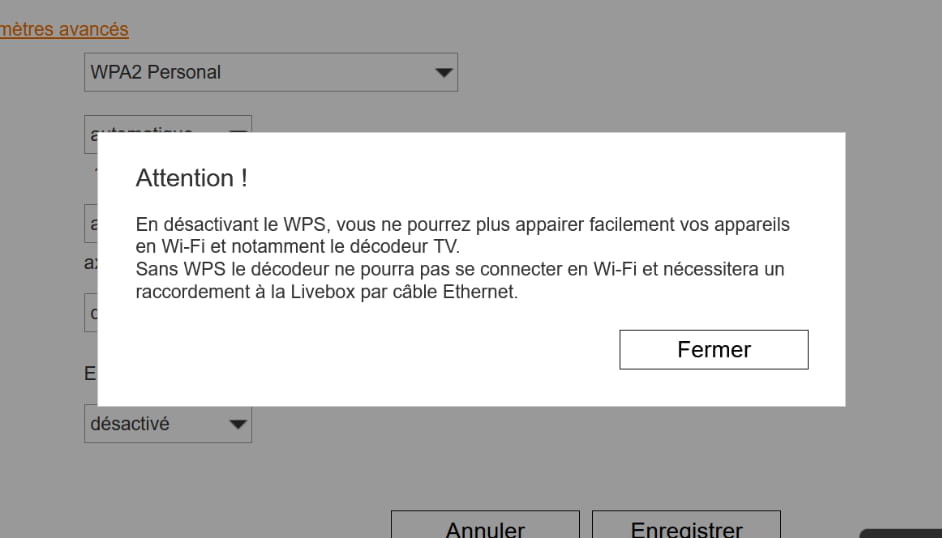
The message saying: "Without WPS, the decoder will not be able to connect via Wi-Fi, and a connection to the Livebox via Ethernet cable will be necessary." scared him.
This message can be confusing; not being able to connect does not mean it will disconnect.
-
@baladur13
Hi,
I have never heard of the function you're talking about, Edouard.
Some Wi-Fi access points/routers/modems have a button to activate WPS for a few minutes, in others it's a Wi-Fi configuration setting, so just a virtual button, that's all.
-
-
Thank you
I had never had this code because for 12 years I've had LiveBoxes with a TV decoder and I had never turned off WPS because of the message from Orange when I do.
In terms of security, I have nothing to fear. But it's because of my local environment.
I have 50 cm thick stone walls. When I tested the range of my WiFi by walking around the house with a tablet, it doesn't pass through the walls. Still WiFi 5 because none of my devices, including my repeater, are compatible. WiFi 6 is not activated.
Except for smartphones, but not for the UHD decoder, Alexa, live TV on the Box, automower, smart radiators, WiFi repeater.
Then my 2 neighbors and friends are 50 m away. And all around it's filled with... cows. (They're not mine).
No worries.
Now I understand the usefulness of WPS with Orange.
Thank you for enlightening me
Have a good week.
-
Hello
The WPS is enabled by default. Obviously, otherwise as stated in the Orange message, if we want to disable it in the box management, the decoder will no longer work.
True or false, I haven't checked since I've been operating this way for 12 years. WPS poses zero risk. Cows don't attempt to hack WiFi.
Thanks to everyone.


