
Cumulative Update for Windows 11, version 25H2
SolvedFred17400 -
Hello, I have an error message regarding the installation of the Windows 11 25h2 update Error - 0x800f0983
While I installed Windows 11 on an incompatible PC using Rufus, and I had no issues with updates and installations
Thank you for letting me know the procedure or procedures to resolve this issue
Thanks
2 answers
-
pistouri Posted messages 19010 Registration date Status Contributor Last intervention Ambassador 8 732
Hello,
It would be nice to know which update is not installing, namely the KB number in your next message.
The last 2 cumulative updates with version 25h2 from October 2025:
==► KB5066835 (14/10/2025)
==► KB5070773 (21/10/2025)
Without complicated Microsoft procedures, 2 tools are available to address the updates (tested on 2 PCs 25h2) when cumulative updates were failing with an error code.
CASE N°1
The second to last update is installed, but not the last one offered.
This won't work if it's the last update, so proceed to case N°2
Solution:
Settings --► System --► Recovery
Click on “Troubleshoot problems with Windows Update” then on “Reinstall now”
Click OK to confirm.
Windows Update will now open and automatically begin to download and install the repair version of Windows.
Once the Windows update is complete, click Restart now to perform the repair installation.
Once the Windows 11 repair installation is complete, log in to Windows 11.
Check Windows update.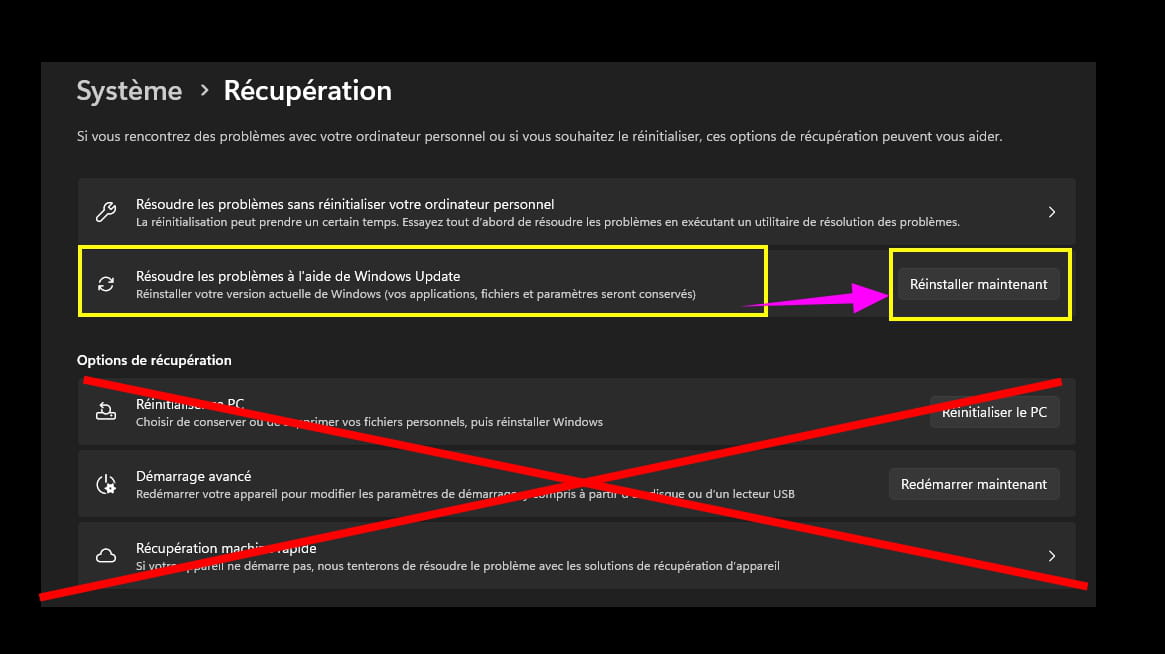
CASE N°2
The last cumulative update from Windows Update is not installing.
Solution:
Disk cleanup (tested on a PC 25h2)
Type disk cleanup in the search box on the taskbar.
Check the boxes if present:
- Windows update cleanup
- Previous Windows installation
- Delivery optimization files
- Upgrade log files of Wind (optional)
- Windows old (if present)Then click on Delete files.
Duration 30 to 45 minutes.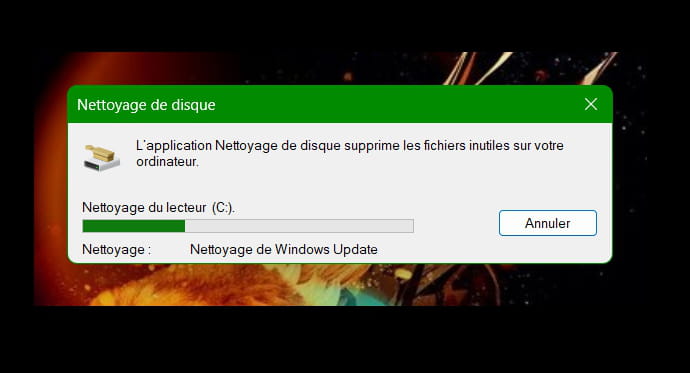
Restart Windows Update --► Check for updates
Sometimes the last update will be right in front of you, and click on install or this last one may have started its download which will be the first step (% displayed) then move to the installation which will be the second step (% displayed), you will just need to click on Restart which will show up in Windows Update, also in the form of 2 blue circular arrows next to the time.
A CCM publication explains the procedure for W10 and is valid for W11.
==► Delete Windows Update update files
-
Hello,
Create a text file called text.txt and paste the bold text below:Windows Registry Editor Version 5.00
[HKEY_LOCAL_MACHINE\SYSTEM\Setup\MoSetup]
"AllowUpgradesWithUnsupportedTPMOrCPU"=dword:00000001
Then go to File > Save As
In the Type field, select All Files (*.*)
Then, in the File Name field, replace .txt with .reg
Once saved, double-click the resulting .reg file and accept the modification.
There may be a chance it helps, even though personally I haven't tested this on a PC that is not compatible with Windows 11.-
-
Oh, I misunderstood, well it will be more certain then.
Right-click on the Start button, use this command with Windows PowerShell (Admin) (Admin Terminal)
CHKDSK /F C:
Respond with Y for Yes to then restart Windows.
Next
Dism /Online /Cleanup-Image /RestoreHealth
Then
sfc /scannow
Restart Windows
Afterwards you can delete everything in the folder
C:\Windows\SoftwareDistribution\Download
And retry Windows Update
If it still doesn't work:
Download a Windows 11 ISO file
https://www.microsoft.com/fr-fr/software-download/windows11
When you have the ISO file, right-click > Open with > Windows Explorer
Then click on the setup.exe file
Follow the instructions to "install" without deleting everything, make sure the green checkmarks indicating that you are keeping everything are all okay. -
Well, I did the first manipulation, it didn't work, so I downloaded the ISO file as you told me, and it says that this device is already running the latest version of Windows 11, while the update has failed.
I'll leave it like that; we'll see how it goes with the update in November.
Thank you for your help.
-
-
-

