
Mac locked, damaged disk
SolvedAliboron Martin Posted messages 3662 Registration date Status Contributor Last intervention -
Hello everyone,
I downloaded an app and since then I can't use my Mac :(
The loading wheel keeps spinning and safe mode doesn't help. I can't reinstall the OS: when it asks which disk to boot from, nothing shows up.
Disk SOS tells me that the hard drive is damaged. Let's just say that my Mac is filled with important files (and I don't use Time Machine).
I'm desperate, so if anyone has a solution.
Thank you very much.
14 answers
-
With a saturated startup disk, it is perfectly logical that operations are very disturbed and slowed down; no need for a virus or other malware for that. Hard drives that age and eventually give up (for example, after an intensive sequence of downloads) do exist. Not making backups is a dangerous sport!
I think the best you can do is to try to back up what you can on an external disk (your Documents folder as a priority) before starting with a clean installation and formatting the disk (hoping that it doesn’t simply need to be replaced).
Alternative (complementary): install macOS on an external disk to more easily recover precious data. See this page for details.
It might be helpful to provide some details about the exact model of the Mac, the version of macOS being used, the type of startup disk (SSD, hard drive)...
Hello at your place!
Bernard-
Hello Aliboron
Why did you switch this discussion back? If I understood correctly, following the download of some dubious software, his disk has been filled with several hundreds of GB.... This is usually a sign of an actual infection, especially when the PC is used in zombie mode, and it affects all platforms. That's why I moved it to the security section of the forum; for me, that makes more sense.
By convention, when a contributor switches a discussion, we don't revert it afterwards, otherwise it quickly becomes chaotic; only the moderators should intervene.
Sorry. Before considering a virus's activity on a Mac, one must first establish that there is indeed one (which is quite rare). A 2017 iMac with a "Fusion Drive" is much more likely to have a failing hard drive, particularly after an intense session of download attempts (see the various messages from chamoismignon).
-
-
Hello Aliboron Martin,
when creating an external hard drive with the OS, I was asked if I wanted to recover everything. I recovered everything :D
I reformatted my internal HDD and here I am with a "new" iMac.
I have the day left to reinstall everything, which is not a problem :D
Thank you for your assistance and patience, you were great ;)
Have a great end of the weekend :)
-
Just so you know, the hard drive is full (even though I had over 2TB left).
-
Further information:
The OS update is not effective, Malwarebytes quickly gets stuck after a few items are scanned. I cannot access the disk utility because the spinning wheel appears on Finder :(
Thank you.
-
Hello Aliboron Martin,
The Mac is a 27" iMac from 2017.
The OS is Ventura 13.7.6.
The installation (update) is not completing (it reaches the end of the progress bar and then nothing :(. )
I have 609.098 Go left on a 3TB startup disk (even though it is almost empty).
This happened after a sad download last night.
I connected an external hard drive to recover my files. Is that possible?
Thank you so much.
(I am currently on another Mac but it's very, very old)
-
Yes, the priority is to recover the files from an external drive. Then, it will be necessary to test the functionality of the "Fusion Drive". It's a combination of a (small) SSD with a hard drive. It's not uncommon for all of this to become chaotic. After backing up useful data, one must consider checking the functionality, possibly redoing the "Fusion Drive" setup after formatting, or even replacing the hard drive with an SSD and abandoning the "Fusion Drive" setup (which would then have no value, only disadvantages).
Advantage of the iMac model: it is possible on these machines to replace the hard drive when necessary (see the tutorial on this page).
-
-
Hello Didi64,
Sorry, I hadn't seen your responses earlier. The updates are impossible to make and the problem persists in safe mode :/
The app was for downloading VK videos.
CleanMyMac detects nothing :(
-
chamoismignon :
The problem is that I no longer have access to Finder. Is there any way to copy the files to my external hard drive anyway?
It's not going to be simple, indeed. You would need to install a system on your external drive (preferably an SSD with a fast USB 3.2 connection) as mentioned this morning (message at 10:04) and hope that the internal drive is in good enough condition to allow this recovery.
Note: You need to boot from the recovery partition for these procedures, so hold down the power button long enough for that option to be presented.
chamoismignon :
Diskwarrior (which I finally managed to open) refuses to "rebuild" my hard drive because it is using a non-supported version of APFS.
Normal. I think you should stop manipulating your machine. It could "wear out" the drive even more or further increase system instability.
Hello at your place!
Bernard -
Thank you very much Aliboron,
I will give this a try and keep you posted.
Have a great day ;)
-
Sorry, I'll update you when there's news, which is the case.
I managed to open and save my In Design files through Creative Cloud, without going through the Finder.
The images can also be retrieved, but there is no batch processing (there are hundreds of photos).
The files are therefore not dead :)
However, is there a way to open the MP4 without going through the Finder?
Thanks again to you ;)
-
I do an "open" on Photoshop and InDesign, without double-clicking on the icon and therefore without Finder. Then I save the documents to an external hard drive ;)
That's not possible with Quicktime :/
Thanks a lot for following this topic :)
Have a great weekend.
-
??? Why is it "not possible with QuickTime"? We still have the usual commands (open, save, duplicate, rename,...) :
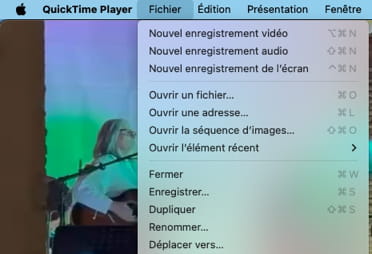
What happens when you try to do it?
I'm doing this online with Creative Cloud :)
Sorry for this late reply, I was busy "moving to" the Quicktime files. Thanks for your help... I'm losing my bearings a bit since last night. Is there a risk of loss when "moving to"? You're AWESOME, thanks Aliboron :)
PS: I'm still surprised that I was able to open Quicktime via the dock.
Hello,
I bought a bootable USB drive (Ventura) and I reinstalled the OS.
No change.
It is impossible to install the system on an external hard drive (the progress bar stops at "1 minute remaining").
When starting with Disk Utility (Disk First Aid), everything is OK :(
Thank you for your help.
That is reassuring :)
However, after trying to install Ventura on this external hard drive, it seems that I have lost all the files that were inside (despite 500GB being used (??)).
Am I cursed?
I'm joking, but I'm cracking up :/
Thanks again, Aliboron.
-


