Unable to load a driver
Solvedkaneagle Posted messages 86302 Registration date Status Moderator Last intervention -
Hello,
I am contacting you because I have a problem
that has been occurring for a few days.
An alert message appears when I turn on my PC, indicating that it is impossible to load a driver on this device (screen attached)
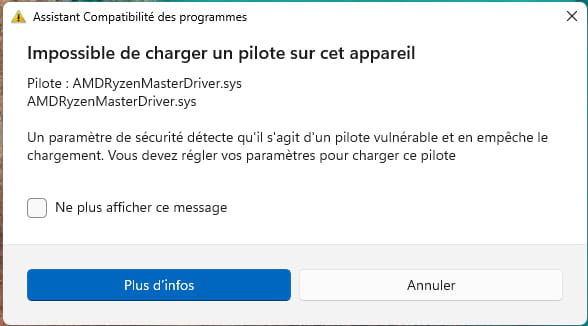
And a few days after the appearance of this message, I am experiencing "severe slowdowns" that make it impossible to use the PC and necessitate a restart.
These problems are recurring
Here is the configuration of the PC
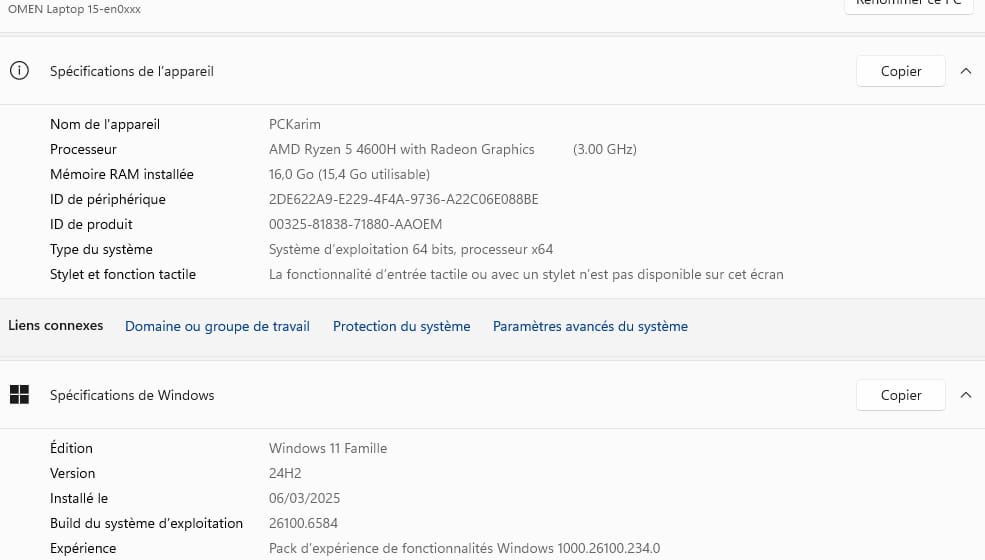
With an NVIDIA GeForce GTX 1660 Ti graphics card
Thank you in advance for the help you could provide me
14 answers
-
Hello,
It’s a driver that I suppose is linked to the processor or to software that configures it and that is not Microsoft certified.
If there is no update available that is certified, there isn’t really much other solution than to disable it if it’s optional software or in the security center to disable the options that oppose it (in app control and device security). -
Hello,
Uninstall RysenMaster and reinstall it --> RysenMaster
-
Hello,
Thank you, but when trying to reinstall series 3000 to 8000 like mine, it seems that it doesn’t work; the system refuses.
-
Do you really need this software?
Are you the one who installed this software before the problem appeared?
-
Which Ryzen Master software? I don't particularly need it, but that doesn't solve my driver problem.
-
Try a system restore and choose a date prior to the issue.
Windows + R
Type --> rstrui.exe and OK.
---------------------------------------------------------------------------------------------------------If the problem persists:
Proceed with an sfc:
Windows key + X
Select --> Terminal (administrator)
Type --> sfc /scannow and enter
A system file check will be performed.-----------------------------------------------------------------------------------------------------------
If nothing works:
Perform a Windows repair.
See this --> Repair Windows 11 without data lossIf the repair did not yield results, perform a clean reinstall of Windows 11
--> How to install Windows 11
-
Thank you for the solution, unfortunately, I am not offered a backup date prior to the problem, I waited too long.
I am considering resetting the PC, I don't know if it's a good solution, what do you think?
-
Have you tried the second suggestion which is an sfc (System File Checker)?
-
-
Hello,
I just tried the first repair method SFC and DISM and it doesn't solve my problem.
I also reset my PC and the problem persists. The error message still appears.
Thank you anyway for the solutions you proposed.
I don't know, the integrity of the memory relies on a list that Microsoft may have updated or at least on the reading of this parameter or its absence in the driver, which changes nothing about the solution: if there is no newer Microsoft-certified driver, one can only disable the integrity function or the driver itself or through the software that installs it.
-
-
It works, thank you for the effort to help me anyway ^^
Have a nice day
-
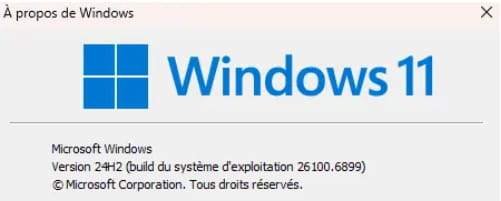
I have also reset my PCIs Windows up to date?
Press Windows + R
Type --> winver and hit OK
What version is it?
Example image: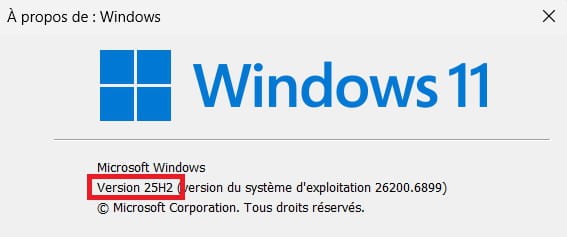
-
-
This problem was not present beforeLatest suggestion:
Do a clean installation of Windows 11
Check out this tutorial --> How to install Windows 11N.B. Make sure to select the latest version --> Windows 11 25H2
-
Hello Kaneagle,
I just reinstalled Windows and the problem has been resolved.
After updating, everything seems to be working correctly.
Thank you for all the help and time you spent.
Best wishes and thanks again!
-
You're welcome.
Have a nice evening.