
Upgrade from Windows 10 to Windows 11
Solvedbrucine Posted messages 25285 Registration date Status Member Last intervention -
Hello,
I'm about to migrate to Windows 11. My PC seems to be all good, fully compatible.
I have a few questions I need answers to. If everything goes well, will I automatically retrieve my bookmarks on Firefox? Do I need to back them up (export - import)?
How can I get rid of the Microsoft account to stay on a local account, please? I found a detailed article, but many tips have been updated because they're "obsolete".
Some sites mention that I need to free up space on the PC before starting the installation: is it mandatory? For my PC, I have plenty of space on my D drive and quite a bit of space on the hard drive as well; for the second PC, it seems more complicated regarding the hard drive.
Should I do the optional updates? For my PC, there are two that I've never performed because they weren't mandatory, and they didn't interfere with the PC's use (apparently a printer driver and one for the PC).
In any case, the printer has always worked well with Win10. That said, I have little hope once the migration is done since I understand that Win11 quickly considers any older hardware... it's a Canon over 10 years old, and apparently, Canon no longer provides updates for the model I have.
I wouldn't want to cause more harm than good by checking these optional updates.
Besides, the PC is up to date on everything.
Thank you in advance.
3 answers
-
Hello
"If everything goes well, will I automatically retrieve my bookmarks on Firefox? Should I back them up (export-import)?"
If it's just a migration, you should keep them. Making a backup is always a good idea, so go ahead and do it ;-)
"How can I bypass the Microsoft account to stay with a local account, please?"
The last installation I did was with nano11 (link), it requires a minimum of computer knowledge that you seem to have. The script allows for automating the creation of a local account. Be careful, I haven't done the migration yet, but it's worth a look. In any case, you'll see quickly if it doesn't offer migration; you're in control, just like any Windows install, before wiping everything.
"Some sites mention clearing space on the PC before starting the installation: is it mandatory? For my PC, I have plenty of space on my D drive and also quite a bit on the hard drive; for the second PC, it seems more complicated regarding the hard drive."
Count on a solid 40GB free on C: to be safe, yes. Generally speaking, an HDD should be a maximum of 80% full, and an SSD a maximum of 60% full for dynamic sector reallocation.
"Should I do the optional updates?"
Not at all. They were optional with 10, they will be irrelevant with 11.
"That said, I have little hope once the migration is done"
No reason for that, drivers from 10 work very well on 11!
Keep me updated, especially if you try the migration with nano11; I would be very interested in your feedback.
The MAMAA may not have oil, but they have data!
Do you feel my Big Data?
Sacrifice some freedoms for more security, and you'll lose them ALL.
ALL YOUR DATABASE ARE BELONG TO US-
Hello,
If the update is not actually a clean installation, it’s... an update: the local account will remain local and even if it wasn’t, that’s a secondary issue, it’s easy to fix.
We can have surprises with old hardware/software that works under Windows 10 but not under Windows 11, I've encountered this with the scanning software of an old Epson, it could also be the printer itself.
-
-
Thank you for the information.
I have some basic knowledge in theory, but nothing more than that, and as soon as it comes to practice, I feel a bit unsure. I won't be diving into using this nano11, thanks anyway :)I made some necessary backups thanks to the external SSD, we'll see how it goes. However, I haven't tried to create a system image (or disk?) or a recovery drive for the time being.
Regarding the space on the disk, I have more than enough, no worries. It's only on the second PC that it shows less than 55 GB free and therefore just over 60 GB used.
With my PC, I'm used to doing a disk cleanup (old restore point) in case of issues, and I'll try to do the same on this second PC to free up a bit of space. -
Hello,
Windows 11 installed perfectly fine on my PC. The printer is recognized and works, fortunately. However, I can't find how to scan a document... I've never installed the software in the past, is that why?
I went to Scanner Settings. Do I need to click on the scanner application or something like that? If someone knows, of course.
As for the Camera, should I leave it in Enabled mode for "camera access"? If I disable everything, will I still be able to use it for video calls on Firefox? (webcam that I plug - unplug)
Thank you in advance.
-
Hello,
On the second point, if the camera is activated, only the browser and the relevant applications have access to it. We can adjust the permissions of the former for the desired websites or for all, and for the latter to whatever we want.
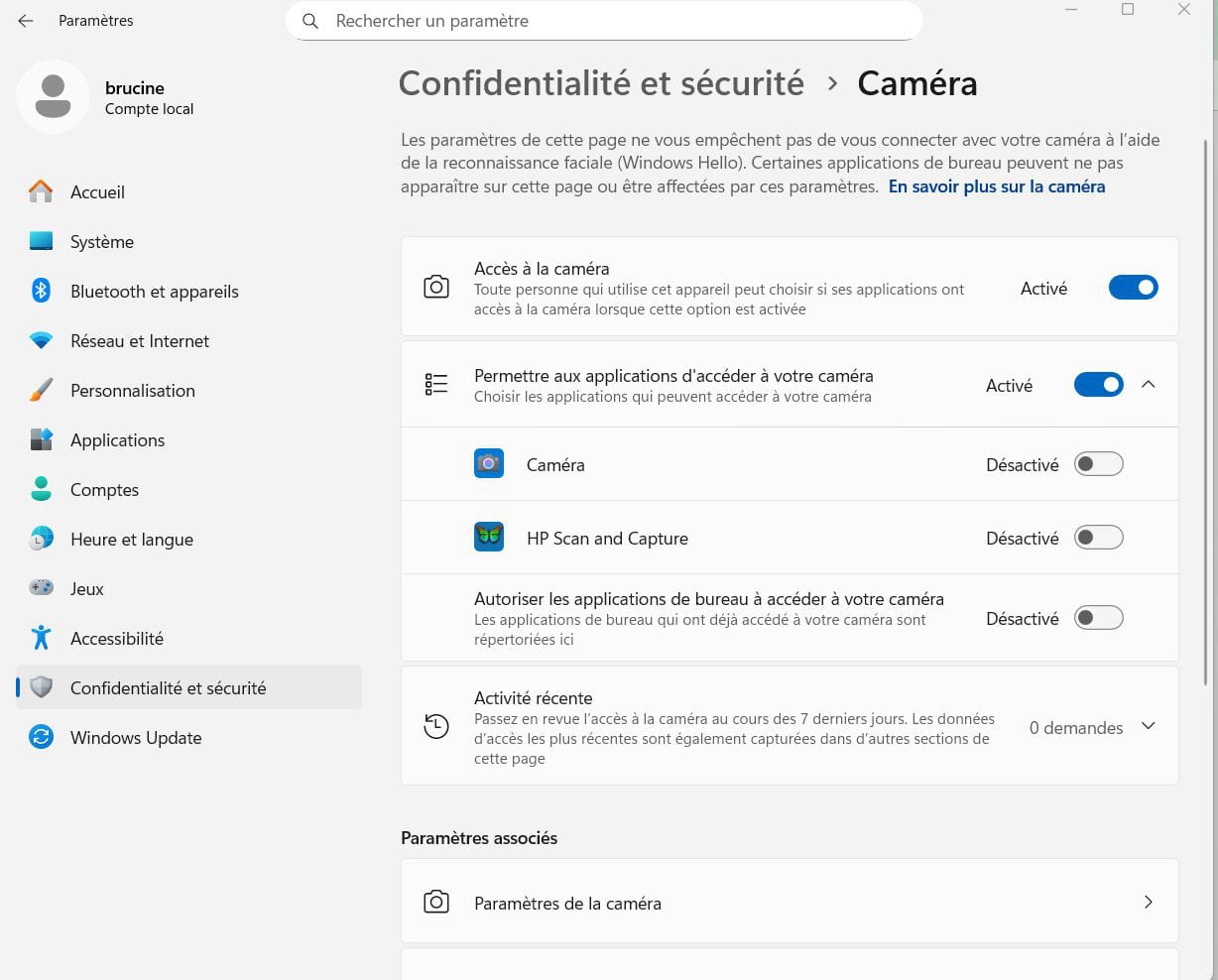
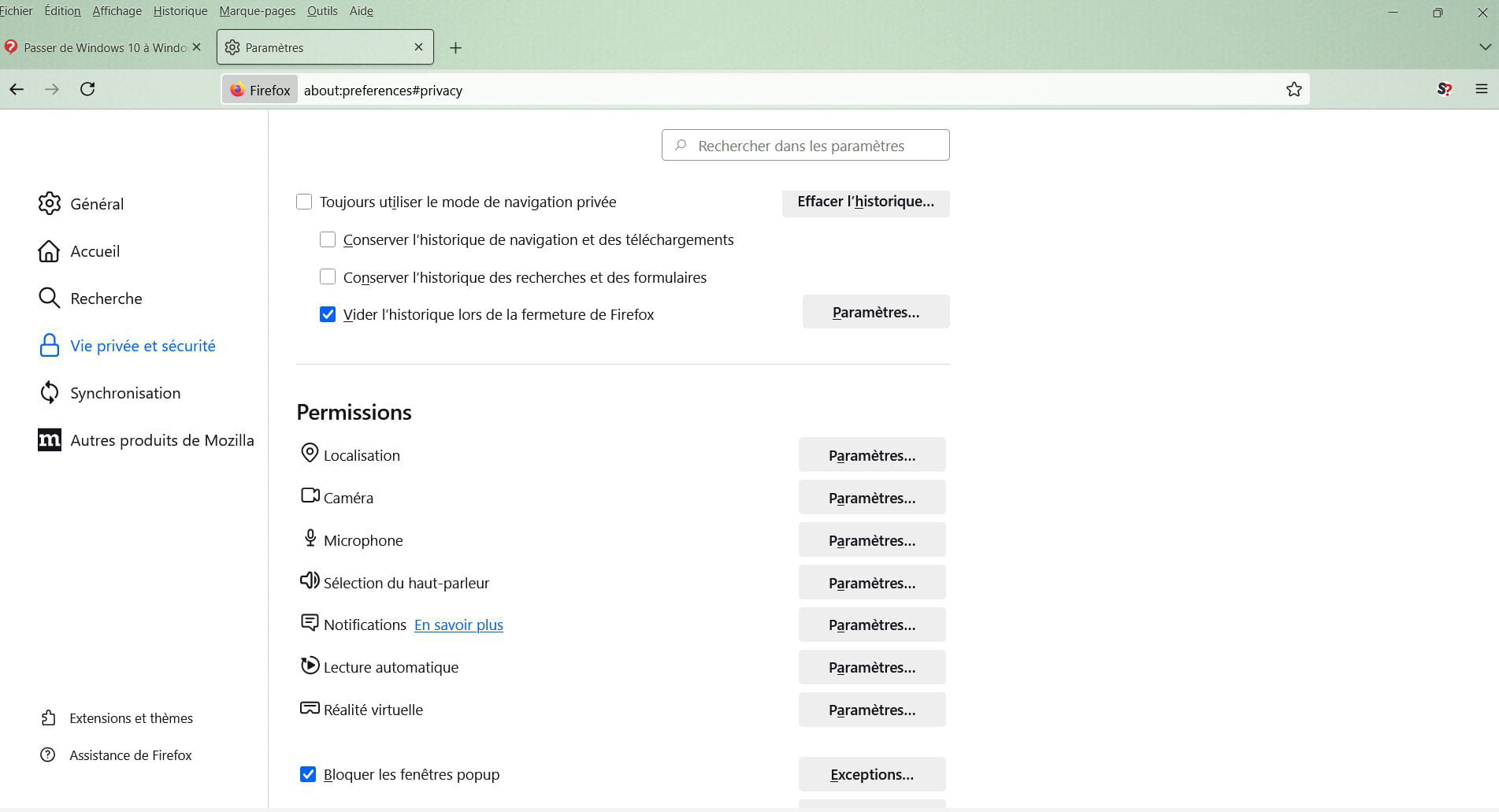
As for the first point, the scanner driver is most often tied to the scanner software itself that needs to be installed (from the manufacturer's site). After that, one can choose between this, which is more elaborate, or the one incorporated into Windows, which is more basic.
There are cases (it was my case with an old multifunction device) where the scanner software worked under Windows 10 but not under Windows 11. If that's the case, it will be time to suggest a workaround.Yes, that's what I did for the Camera and on Firefox, everything has been set for a while. It should work. Thanks.
For the printer, when I had Win10, I might not have been doing the simplest thing :) I would connect and turn on the printer, or often the other way around, then I would go to Settings, then Devices, and click on the Canon printer.
Then I would right-click on it and choose something like Print Options to be able to scan.
That's why I'm thinking, with Win11 maybe there are similar steps to take on the Scanner side by clicking a thousand times to make it work. I've searched a bit but not much. Apart from scanning to a USB stick if that works and then putting it back on the PC, I don't really see how else to do it... Unless the Windows Scan application is actually useful.
Did your printer also only work halfway like mine?Is it possible to uninstall the widgets safely? I feel like they take up space (via Task Manager). I've already removed them from the taskbar anyway.
In the Apps, are there any that I can uninstall without risk? (like News, Weather, Spotify...).Thanks, have a good evening.
You can remove the Widgets without any problem; I use Open Shell which displays an interface in the style of Windows 7, so without Widgets.
You can try to remove unwanted applications from the Start menu or Settings-App-Installed Apps.
For those that are stubborn, use the WinGet command after listing the applications to find the exact names.
https://www.it-connect.fr/powershell-comment-gerer-les-applications-sur-windows-avec-winget/
A number of utilities allow you to get rid of a larger amount of Windows junk more broadly.
The simplest in graphical mode is Winaero Tweaker, and there are others (Dism++, etc.).
On my printer, I don't use it (I have another one), but it works fine; it was the scanning software that was causing issues.
You can normally find Windows Fax and Scan in the Start menu and test it; but as mentioned, the best and most complete way is to go to the Canon website and download the scanning software corresponding to Windows 11 if it exists (sometimes the one for Windows 10 works).
It then launches with a shortcut like any other program, where you can optionally choose the output options (jpg or pdf and other settings).Hello. Sorry for the late reply! Thanks, I'll bookmark the link to check it out when I get a chance :) We'll see if it's not too complicated.
There are no more updates for the Canon I have, I had already looked and found nothing. I doubt that something equivalent for another printer would work, better to avoid guessing and the main thing is that it works for printing :) that's what I was mostly worried about.
Have a great rest of the day.
Hello,
If the printer is working and the scanning software is not, try this, you never know (HP Scan and Capture) which resurrected scanning for me in a similar situation with an old Epson.
It's no longer available either at HP or on the Microsoft Store, but archived on a Korean site:
http://sh-oa.co.kr/bbs/board.php?bo_table=05&wr_id=3&device=pc
Have a good evening as well.
-
