
Battery indicator on Samsung Galaxy
SolvedPierr10 Posted messages 13864 Registration date Status Moderator Last intervention -
Hello,
I would like to know if it's possible to increase the size of the numbers for the battery charge percentage indicator on a Samsung A16.
Thank you in advance.
Guilhot
2 answers
-
Hello,
The battery indicator is located in the area of the screen called the status bar.
It is not possible to change the size of this bar.
To assist you, use the zoom function. It is found in
Settings > Accessibility > Vision enhancements > Zoom
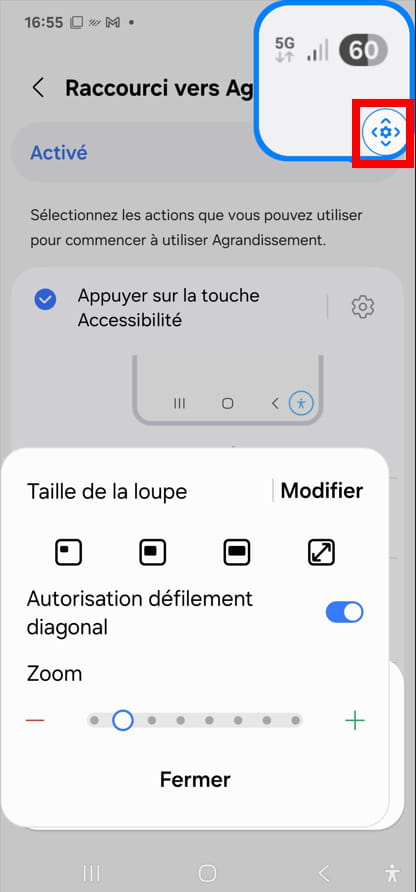
To change the settings, click on the icon that I have highlighted in red.
What is well conceived is clearly expressed,
And the words to say it come easily.
(Boileau) -
Thank you, I tried but it's not very nice, I thought that for young people of my advanced age, it was considered that lowercase numbers might be difficult to read.
Too bad, when my battery is dead, I won't be able to use my Galaxy and I will put it on charge.
In any case, thank you for responding.
Best regards
Guilhot
-
Advice: You can charge the battery regularly, for example every night.
Limit the charge to 85 or 90%. Charging stops when the limit is reached, and it is not at risk of suffering.
The charging limit can be managed in Settings > Battery > Battery Protection.
Therefore, if you use the smartphone normally, you are unlikely to run out of battery.
-
