
Private browsing and "regular" browsing
SolvedGuilhot Posted messages 202 Registration date Status Member Last intervention -
Hello,
who can answer:
Why can I watch CanalPlus videos in private browsing while the video doesn't work when I use Firefox, even though it works with Opera?
I've been trying for several days to ask the question to Mozilla, but I can't find any link to contact them except "support" where I go around in circles.
Thank you in advance to whoever will reply to me.
Guilhot
9 answers
-
Hello,
Some installed extensions may interfere with viewing, but they are not used and not taken into account in Private Browsing.
-
Good evening, I continue to search by specifying that the video, the match or the movie starts well but stops after half a second. What could be blocking the continuation?
Thank you
Guilhot
-
Do you have no security extension, ad blocker, or script blocker?
-
Good evening Fabul and thank you for this response
I have an ad blocker but I tried disabling it and it doesn't change anything; a script blocker??? What is this strange beast, how do you recognize it?
Best regards
Guilhot
-
NoScript, for example, is a script blocker, and therefore also blocks ads.
It blocks web scripts.
Maybe by uninstalling the ad blocker completely? -
I'm going to check with Canal to see if they have any ideas because, after all, the video starts normally and stops after half a second.
If they have no ideas, I will uninstall Firefox and reinstall it, but I will have to update everything in the shortcuts and settings...meh.
Thanks anyway and good night
Guilhot
-
Hello
Yes, it’s the site that blocks if it doesn’t do what it wants in the browser.
Other browsers are mostly managed by Windows, but Firefox has its own independent "engine".
Firefox is fully customizable, which can help reproduce what works on another browser with fewer settings.
Indeed, private browsing no longer takes into account certain cookies set by some sites.
But we will reduce other types of protections present in Firefox; some sites require permissions in different ways, for example "automatically allowing Google functions in Windows without any intermediate choices"; but in Firefox, you sometimes have to grant permission from the browser, especially for certain functions, we have that choice.
From the simplest to the most complex, everything can be found on this site for Firefox, even specialized contacts since they are the ones who do it:
https://support.mozilla.org/fr/products/firefox?as=u&utm_source=inproduct
Indeed, if you don’t want to think about the strange beasts of the internet, it’s easier to use private browsing or Opera.
-
Hi
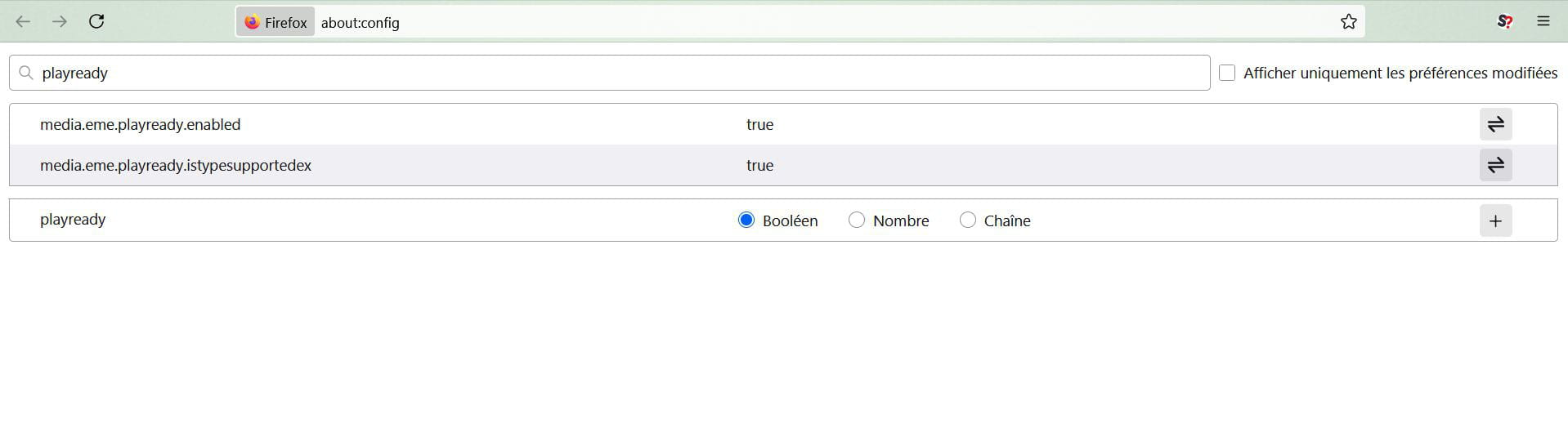
Playready is not yet implemented on Canal+, which recommends disabling it in Firefox and also in Chrome, as of 6 days ago. It is for accessing documents in 1080 definition but not all are available; however, this is an example where they responded because the black screen is clearly visible. As I have already said, Google has been able to implement features in Windows through its browsers Chrome, Opera, and Edge, as it coded for them and did what it wanted.
It's becoming a mess, I suppose Eric wanted to reply to me, I'm the one who mentioned Playready (and I don't know if the trick works).
It's documented in the first link in <8>, in about:config search for playready and set it to False.
Hello,
According to Mozilla, the only effect of private browsing is that it does not save history and cookies upon exit.
In that case, it doesn't make much sense because setting Firefox to do this outside of private browsing leads to the same result.
Perhaps apart from a VPN that would be used in one configuration and not the other, normally there is no effect on extensions (for instance, regarding me, NoScript remains enabled).
Hardware acceleration, DRM, a PlayReady setting that I didn't even know existed, have been called into question, but the problem should then exist in both configurations except perhaps concerning not extensions but plugins (see the second link, and even there they seem to remain, notably DRM, activated in private browsing).
https://canal-assistance.canalplus.com/fr/conversations/application-canal-pcmac/pas-dimage-de-canal-plus-via-firefox/689aea5f7eb71f34fd1f59b3
On the other hand, Canal+ support tells us that the history retention and tracking protection settings are contrary to this, but the latter point does not seem coherent (set to strict on my end, it is also carried over to private browsing), and the link explicitly refers to problems in private browsing.
The crux of the matter would then not lie with the user but with the Canal+ site, a function like the Referer could detect that history is not being retained.
It is easy to test in normal Firefox configuration.
In Settings, Privacy and History, clear at least the first 3 items on close (don't panic, they will be restored on next login) or even the Cookies and site data paragraph even if it is then redundant and check if you can connect.-
Aside from the history and cookies, Firefox's private browsing would disable certain APIs; the target site detects the absence of these APIs and censors.
There would be a workaround in the Firefox configuration, but its result is at least to diminish the private nature of browsing.
https://www.reddit.com/r/firefox/comments/pzlxzf/firefox_allowing_websites_to_see_if_user_is_on_a/
Thanks to Eric and Brucine
After quite a bit of reading through the links you gave me, I was able to go into about:config (without space) and set playready to false..... miracle, Canal+ is back on my computer.
I will declare the issue resolved.
Thanks again and long live this forum
Very best regards
Guilhot
-

