
Windows 11 new bitmap image
brucine Posted messages 25171 Registration date Status Member Last intervention -
Hello,
It's not really stopping the Earth from turning, but I can't find a way to remove the new bitmap image from the right-click context menu - New.
The situation is also related to the new Text Document (which I keep) as Paint and Notepad are now applications (of course, for what it's worth, you can still delete the former, but hey....).
The documented trick here, where you delete the value of the key or the whole thing, doesn't work for me.
Thank you.
3 answers
-
Hello,
To lighten this New menu, I have been using this little program for a long time: https://www.nirsoft.net/utils/shell_menu_new.html
-
Hello,
I'm using Winaero Tweaker and in the same section as what you suggested and that I just tried ShellNewHandler: no better, the relevant entries are not there either.The one I'm referring to is ShellMenuNew (from 2013), on W10.
It allows me to disable, in W10, the superfluous entries in the New menu, leaving only 3: new folder, shortcut, text file:
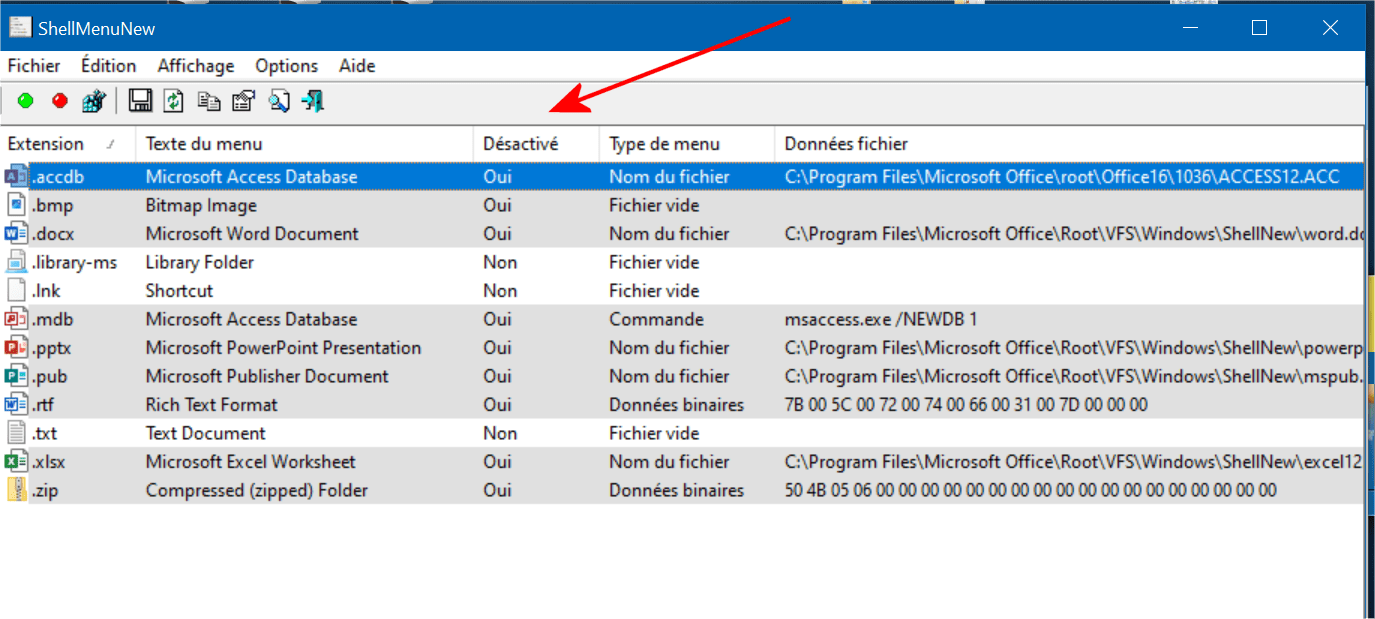
Yes, we are indeed talking about the same thing; with the one you mentioned and with ShellNewHandler, I tested both and the result is the same.
The entries appear correctly on Windows 10 but not on Windows 11 because Notepad and Paint are no longer software but applications, and there are no more ShellNew entries.
I should try to experiment, it should be possible, to get rid of these two applications, which by the way each become bloated with unnecessary features, and replace them with the old executables.
For example, from there, I will test tomorrow.
https://win7games.com/#gamesHello
Well, if it's just about deleting words in a key: has it been done or not? But someone has found a second key???:
"Yes, I got it... You were right
I searched again in the registry "CellNewDisplayName-Bmp"
I found another key and then I deleted the date value... as you described earlier."
Hello,
I learned to live with it over time, otherwise I saw it seems that it was necessary to remove one of the apps from the Microsoft Store, I can't remember if it's Paint.
Edit: The method doesn't work for me either, the request on the Microsoft site
Edit 2: By uninstalling Paint, it works, and the answer on the Microsoft site was a good lead.
Look for ShellNewDisplayName_Bmp
I deleted things from:Windows Registry Editor Version 5.00
[HKEY_CLASSES_ROOT\Local Settings\MrtCache\C:%5CProgram Files%5CWindowsApps%5CMicrosoft.Paint_11.2507.371.0_x64__8wekyb3d8bbwe%5Cmicrosoft.system.package.metadata%5CS-1-5-21-1873204142-3532024279-121606442-1001-MergedResources-21.pri]
[HKEY_CLASSES_ROOT\Local Settings\MrtCache\C:%5CProgram Files%5CWindowsApps%5CMicrosoft.Paint_11.2507.371.0_x64__8wekyb3d8bbwe%5Cmicrosoft.system.package.metadata%5CS-1-5-21-1873204142-3532024279-121606442-1001-MergedResources-21.pri\1dc1df3129a5f44]
[HKEY_CLASSES_ROOT\Local Settings\MrtCache\C:%5CProgram Files%5CWindowsApps%5CMicrosoft.Paint_11.2507.371.0_x64__8wekyb3d8bbwe%5Cmicrosoft.system.package.metadata%5CS-1-5-21-1873204142-3532024279-121606442-1001-MergedResources-21.pri\1dc1df3129a5f44\5764bc37]
"@{Microsoft.Paint_11.2507.371.0_x64__8wekyb3d8bbwe?ms-resource://Microsoft.Paint/Resources/AppDisplayName}"="Paint"
"@{Microsoft.Paint_11.2507.371.0_x64__8wekyb3d8bbwe? ms-resource://Microsoft.Paint/Resources/ShellNewDisplayName_Bmp}"="Image bitmap"
"@{Microsoft.Paint_11.2507.371.0_x64__8wekyb3d8bbwe?ms-resource://Microsoft.Paint/Resources/AppDescription}"="Paint allows you to create and edit drawings using various shapes and colors, and different brushes."[HKEY_CLASSES_ROOT\Local Settings\MrtCache\C:%5CProgram Files%5CWindowsApps%5CMicrosoft.Paint_11.2507.371.0_x64__8wekyb3d8bbwe%5Cmicrosoft.system.package.metadata%5CS-1-5-21-1873204142-3532024279-121606442-1001-MergedResources-21.pri\1dc1df3129a5f44\59185949]
"@{Microsoft.Paint_11.2507.371.0_x64__8wekyb3d8bbwe?ms-resource://Microsoft.Paint/Resources/AppDisplayName}"="Paint"[HKEY_CLASSES_ROOT\Local Settings\MrtCache\C:%5CProgram Files%5CWindowsApps%5CMicrosoft.Paint_11.2507.371.0_x64__8wekyb3d8bbwe%5Cmicrosoft.system.package.metadata%5CS-1-5-21-1873204142-3532024279-121606442-1001-MergedResources-21.pri\1dc1df3129a5f44\c31c595]
"@{microsoft.paint_11.2507.371.0_x64__8wekyb3d8bbwe?ms-resource://microsoft.paint/files/assets/paintapplist.png}"="C:\\Program Files\\WindowsApps\\Microsoft.Paint_11.2507.371.0_x64__8wekyb3d8bbwe\\Assets\\PaintAppList.targetsize-32.png"
And I ended up with:Windows Registry Editor Version 5.00
[HKEY_CLASSES_ROOT\Local Settings\MrtCache\C:%5CProgram Files%5CWindowsApps%5CMicrosoft.Paint_11.2507.371.0_x64__8wekyb3d8bbwe%5Cmicrosoft.system.package.metadata%5CS-1-5-21-1873204142-3532024279-121606442-1001-MergedResources-21.pri]
[HKEY_CLASSES_ROOT\Local Settings\MrtCache\C:%5CProgram Files%5CWindowsApps%5CMicrosoft.Paint_11.2507.371.0_x64__8wekyb3d8bbwe%5Cmicrosoft.system.package.metadata%5CS-1-5-21-1873204142-3532024279-121606442-1001-MergedResources-21.pri\1dc1df3129a5f44]
[HKEY_CLASSES_ROOT\Local Settings\MrtCache\C:%5CProgram Files%5CWindowsApps%5CMicrosoft.Paint_11.2507.371.0_x64__8wekyb3d8bbwe%5Cmicrosoft.system.package.metadata%5CS-1-5-21-1873204142-3532024279-121606442-1001-MergedResources-21.pri\1dc1df3129a5f44\5764bc37]
"@{Microsoft.Paint_11.2507.371.0_x64__8wekyb3d8bbwe?ms-resource://Microsoft.Paint/Resources/AppDisplayName}"=""
"@{Microsoft.Paint_11.2507.371.0_x64__8wekyb3d8bbwe? ms-resource://Microsoft.Paint/Resources/ShellNewDisplayName_Bmp}"=""
"@{Microsoft.Paint_11.2507.371.0_x64__8wekyb3d8bbwe?ms-resource://Microsoft.Paint/Resources/AppDescription}"="Paint allows you to create and edit drawings using various shapes and colors, and different brushes."[HKEY_CLASSES_ROOT\Local Settings\MrtCache\C:%5CProgram Files%5CWindowsApps%5CMicrosoft.Paint_11.2507.371.0_x64__8wekyb3d8bbwe%5Cmicrosoft.system.package.metadata%5CS-1-5-21-1873204142-3532024279-121606442-1001-MergedResources-21.pri\1dc1df3129a5f44\59185949]
"@{Microsoft.Paint_11.2507.371.0_x64__8wekyb3d8bbwe?ms-resource://Microsoft.Paint/Resources/AppDisplayName}"=""[HKEY_CLASSES_ROOT\Local Settings\MrtCache\C:%5CProgram Files%5CWindowsApps%5CMicrosoft.Paint_11.2507.371.0_x64__8wekyb3d8bbwe%5Cmicrosoft.system.package.metadata%5CS-1-5-21-1873204142-3532024279-121606442-1001-MergedResources-21.pri\1dc1df3129a5f44\c31c595]
"@{microsoft.paint_11.2507.371.0_x64__8wekyb3d8bbwe?ms-resource://microsoft.paint/files/assets/paintapplist.png}"="C:\\Program Files\\WindowsApps\\Microsoft.Paint_11.2507.371.0_x64__8wekyb3d8bbwe\\Assets\\PaintAppList.targetsize-32.png"
No More > Image Bitmap
So basically, I modified that, (The - at the end or I deleted)
But the paths can vary from user to user.Windows Registry Editor Version 5.00
[HKEY_CLASSES_ROOT\Local Settings\MrtCache\C:%5CProgram Files%5CWindowsApps%5CMicrosoft.Paint_11.2507.371.0_x64__8wekyb3d8bbwe%5Cmicrosoft.system.package.metadata%5CS-1-5-21-1873204142-3532024279-121606442-1001-MergedResources-21.pri\1dc1df3129a5f44\5764bc37]
"@{Microsoft.Paint_11.2507.371.0_x64__8wekyb3d8bbwe?ms-resource://Microsoft.Paint/Resources/AppDisplayName}"=-
"@{Microsoft.Paint_11.2507.371.0_x64__8wekyb3d8bbwe? ms-resource://Microsoft.Paint/Resources/ShellNewDisplayName_Bmp}"=-
[HKEY_CLASSES_ROOT\Local Settings\MrtCache\C:%5CProgram Files%5CWindowsApps%5CMicrosoft.Paint_11.2507.371.0_x64__8wekyb3d8bbwe%5Cmicrosoft.system.package.metadata%5CS-1-5-21-1873204142-3532024279-121606442-1001-MergedResources-21.pri\1dc1df3129a5f44\59185949]
"@{Microsoft.Paint_11.2507.371.0_x64__8wekyb3d8bbwe?ms-resource://Microsoft.Paint/Resources/AppDisplayName}"=--
Hello,
Yes, absolutely, we should probably start by uninstalling Paint as an application.
Regarding your registry issue, I'll take a look at that tomorrow, but the "-" seems to basically mean deleting those keys as suggested in the link, except that I may have forgotten one (the last block?)Hello everyone,
On the registry, the S-1-... keys indeed depend on each PC where they are set up according to the user.
The 2 alphanumeric folders below as well, otherwise I don't know what they correspond to.
For some obscure reason, I only have the first one, but anyway I struck out trying to delete one or all keys, whether manually or with a REG file and the minus sign.
I was successful as linked in <7> by uninstalling the Paint application, removing those infamous registry keys, and installing the old software linked: I would need to force the context menu for new bmp image, which obviously I did not do.
The moral of the story is that the old Paint version doesn't have the same frills (but you'll find that in a multitude of third-party image managers if needed) and that I'm probably losing nothing by waiting for the next Windows update.
I wanted to apply the same trick to Notepad, if only to get rid of the Bing search that gives me hives, but this leads to a complicated setup to reconfigure the context menus and open with, and anyway does not kill the enemy: abandonment.
-


