
ALCATEL FIXE 530 LOCKED KEYBOARD
baladur13 Posted messages 47355 Registration date Status Moderator Last intervention -
Hello, I can't unlock the keyboard on my phone. When I press the "star" key, it says "keyboard locked," press "hash," but nothing responds. And it's precisely the "hash" key that I need. Thank you for your help. Best regards.
11 answers
-
Hello,
Unless I'm mistaken, a long press on the * (star) key locks or unlocks the keyboard.
It's very difficult to catch a black cat in a dark room.
Especially when it's not there... -
Hello Baladur13n, thank you for replying but unfortunately it’s not working.
When I press the "star" key it tells me "keyboard locked," press "hash," and by pressing "hash" I get crossed-out zeros. So I'm stuck...
-
Re
For the batteries, nothing
press and hold for 2 minutes, nothing
model F530
on the screen to the right, I have a key which certainly means locked
-
In this notice, https://manuall.fr/alcatel-f530-voice-duo-telephone-sans-fil/#downloadModal
It clearly states that the star key allows for locking/unlocking by long press.
However, on newer models (with call blocking)
https://www.alcatel-home.com/wp-content/uploads/2023/10/Alcatel-F530-Voice-EU-FR.NL_Rev4_11May-1.pdfnothing is specified, no more labeling (key) on the buttons. No description regarding the locking/unlocking of the keyboard.
As a result, I invite you to contact Alcatel:
0820.820.217*
*The cost of the call is 15 Euro cents per minute, in addition to the call rate
From Monday to Saturday
08:00 to 19:00serviceconso@alcatel-business.com
It's very difficult to catch a black cat in a dark room.
Especially when it isn't there...-
Hello Edouard,
why is it marked as resolved?
Is it still the problem of responding to notification emails?
I don't think it should be resolved.
Especially if we can get an unspecified response in the documentation.
-
Hello baladur15
No, my problem is not resolved, unfortunately.
My phone is old; I've had it for 8 years, and it's not a smartphone.
I couldn't find my model on the Alcatel website.
This morning, I called the store where I bought it, and "they don't know"...
I'm going to call Alcatel....
Have a nice day, and thank you for taking the time to respond to me.Best regards
You must be able to tell us which model you have.
In the image below:
- on the left, the old model (with a key screen print on the star key).
- on the right, the new model with call blocking (keys M1 - blocking - M2) above keys 1, 2, 3
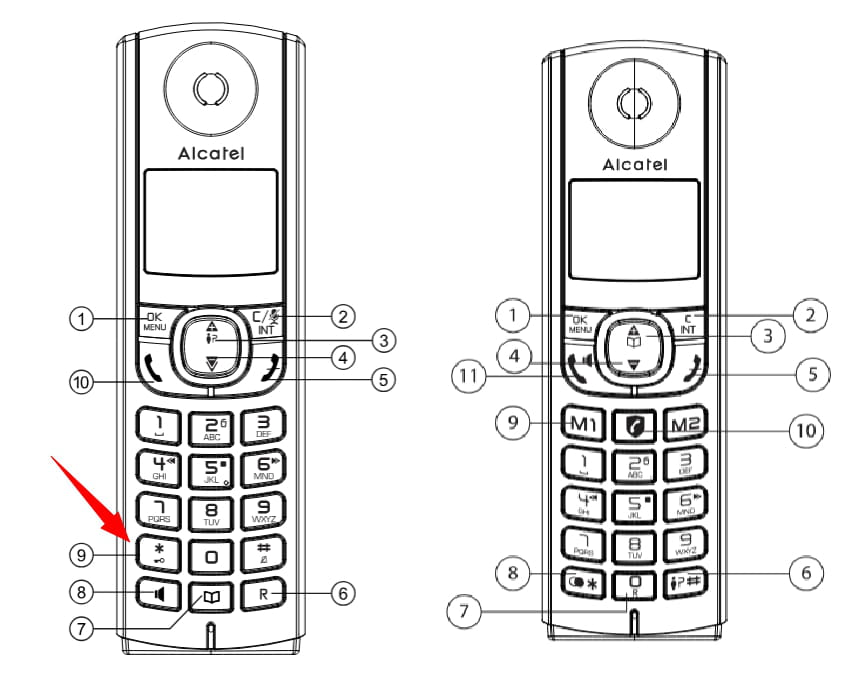
Before we deal with the # key, let's go step by step.
When you press and hold the star key, does the key-shaped icon displayed on the screen (your message #4) disappear or not?
Another question: What does the battery status icon look like on the screen (in the top right)?
Completely black inside or not?
Very difficult to catch a black cat in a dark room.
Especially when it's not there...By chasing two hares at once, you are sure to get lost along the way.
Continue your search, I'm giving up.
Very difficult to catch a black cat in a dark room.
Especially when it's not there...-
Hello, I would appreciate your help because my keyboard does not lock/unlock (f685 new model with locking). The asterisk key only serves to type stars ^^
Hello,
On this phone, there is no key-shaped printing on the * (star) or # keys.
Nothing in the manual about locking the keypad except for the possible presence of a key displayed on the screen in case of locking [page1 (4 of the pdf)] ???
However, you could try pressing and holding the C/int key. If that doesn't work, I recommend contacting Alcatel (see message #5).
Hello,
Despite the keyboard being locked, is the next button on the handset functional? I assume it is not (do you have access to the menu through it...)?

If it is functional, try resetting your Alcatel.
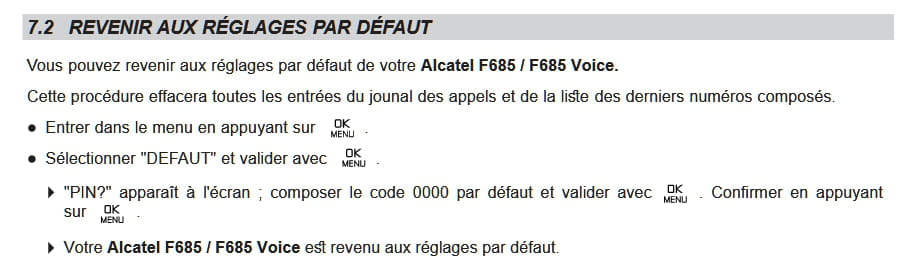
Hello MPMP10, thank you for responding.
I can access the menu, default, ok, it's asking me for my PIN code? But when I try to enter 4/0, the hash sign appears, and I can't proceed any further, so I can't reset it. This phone is really messed up.
Re for the plug, I have already tried..... and for the 2nd solution: I think I agree. I will ask for a new one from Santa Claus... hee hee hee. Thank you for wanting to help me. Have a good day. Best regards
Have you tried long pressing the C/int key (message#24)
The appearance of # when entering the PIN code can be normal, in order to hide the entered code from the view of a third party.
It's very difficult to catch a black cat in a dark room.
Especially when it's not there...
-


