An INetCache folder appears...
SolvedTech_Passion -
Hello,
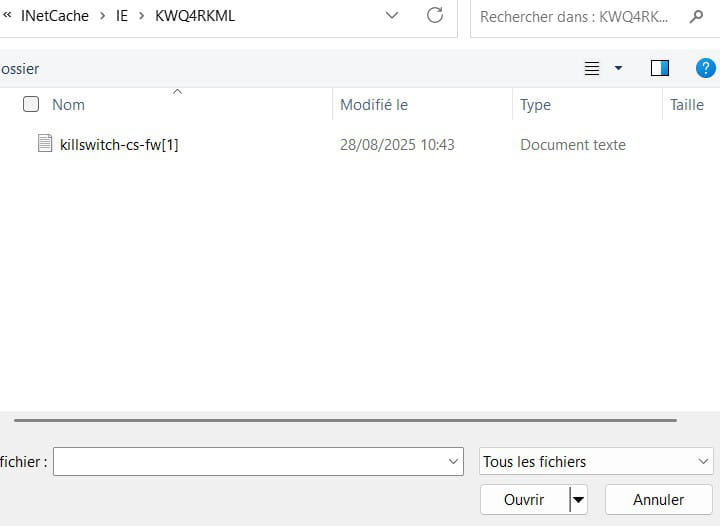
I was in the process of writing an email and when I tried to attach a file, the "INetCache" folder appeared (see screenshot). I've never seen that before and I have a feeling it's malware.
I don't know much about it, but any help would be appreciated.
Thanks and talk to you soon
Cécile
7 answers
-
It's a Microsoft file
-
Hello,
This is the internet cache folder, usually related to IE (though it no longer exists in recent Windows versions except in compatibility mode), possibly Edge by extension, while other browsers have their own cache folders.
If we don't like the content (and for my part even if the opposite is true), we can configure the browser to clear it upon closing, but its existence is normal.
-
-
Hello @ceciel2307 StatusMember.
INetCache/IE is not malware; IE stands for Internet Explorer. It's the cache of Internet Explorer, nothing suspicious, your attachment is simply stored in the Internet Explorer cache.
bazfile
Moderator/Security Contributor.
A hello, a response, a thank you are always appreciated. -
Re hello,
It's because the name INetCache made me think of a folder specifically from Microsoft, the new folder created after an update, the folder c:\inetpub
You might simply use the command prompt, or PowerShell (Admin) Terminal (Admin) to hide the folder c:\inetpub which didn't exist before in Windows 11, now appears, and is important to keep, even if it is empty you shouldn't delete this system folder that doesn't have the attributes System and Hidden (Hidden)
attrib +s +h c:\inetpub
The attrib command basically explained to hide/show folders/files:
attrib = Attributes
+ To Add an attribute to a folder or file it's + (What we want)
- To Remove an attribute from a folder or file it's -
s = System Attributes
h = Hidden (Hidden)
https://learn.microsoft.com/fr-fr/windows-server/administration/windows-commands/attrib
Have a good afternoon. -
Hello,
I confirm what has been said above. Just for your information, this often happens after certain major Windows updates (Windows Update has the annoying habit of sometimes resetting folder display preferences).
So no worries, it’s a "classic" behavior of the OS, nothing malicious.
Have a good day!
-
with the attachment it's better
-
Hello,
I don't know about INetCache, but C:\inetpub is from Microsoft, and it should not be deleted.
Rather hide it with a .bat file that contains
attrib +s +h c:\inetpub -
Thank you, I don't quite understand your response "Rather hide it with a .bat file that contains - attrib +s +h c:\inetpub"