
Hard drive on SFR box
brucine Posted messages 25218 Registration date Status Member Last intervention -
Hello,
Being "a bit" annoyed that I couldn't install Windows 11 due to my non-compatible i5 processor on my Dell, I'm turning to LINUX MINT.
My first impressions are very good (version 22.1 Cinnamon).
However, I'm unable to access my hard drive connected to my SFR box. It's very frustrating, as I use it to synchronize my backup.
Does anyone have any ideas? In Nemo 6.4.5, I don't see anything under the network.
Thanks
Stéphane
9 answers
-
Hello,
Do a search for "linux mint access hard drive connected to sfr box".
It's relatively technical, involving mounting Samba shares.
Some sources say that it's not possible on external drives connected to the SFR Box, which would then be read-only, but why not connect this drive to one of the network PCs (which, of course, will always need to stay on)? -
Yes, why not, I have a PC that is permanently connected, although it is running Windows 10.
-
I don't have a direct answer because I'm using Linux Mint in a virtual machine.
I access it wherever I want on the network through a short but somewhat complex process involving creating the share and mounting it, which I'm willing to share with you but won’t be relevant in your case.
One thing is certain, you need to install the Samba package if you haven't already.
A solution is proposed here for a USB drive connected to a router, which doesn’t change the situation except for the destination IP.
https://forums.linuxmint.com/viewtopic.php?t=190916#p988634
-
-
I just created a shared folder on this Windows PC and a shared folder on my Linux PC.
On the Windows PC, I can see the shared folder, but not on the Linux PC.
I suppose there's a step to take, but being a beginner, it's a bit complicated for me.
-
It's good, I just managed to access the directory present on the Windows PC.
You need to declare the username and password, and you can access it using SMB:\\192.168.x.xx from the Linux PC.
I think it should also be possible on the SFR box because I was doing it without any problem with Win10 for read/write, so there's no blocking on the box side.
Thank you Brucine
Have a good day
-
Hello,
What era is this SFR box from?
It is quite possible that it only works with SMB 1.0 and under Linux, which hasn't been supported for a long time. There are settings to work around it, but I tried and it didn't work, so I gave up. Anyway, the hard drive is a USB drive, right? You should be able to connect it directly to your Linux PC.
What worries me is that you can't even see the box and its Windows shares, so it's not a SMB version problem; that doesn't come into play before the login request.
With Mint, I don't know why, but SMB network discovery doesn't work; you have to connect to a server and specify the machine's address, either the IP address or the name.
So that's the address of your box; then, if there is a user account, you'll need to specify it and normally leave the default workgroup (WORKGROUP).
And there you go ....
But goodness, how annoying the line spacing is!!-
Hello,
In any case, both my physical machine and my Windows virtual machines can see each other and the Box, but from and to my Linux Mint virtual machine, nothing.
There's nothing in Network, the "Shared Folders" in VMWare that points to the Windows 11 desktop is inoperative unlike those of the other machines; I can only access it by the workaround of having added its mount in mnt/hgfs to my favorites.
I'm not very skilled in Linux; I suppose I would need to do the same to mount the other network shares, but I don't know what the situation is with the Box itself and what might be connected to it.
-
-
Small tip, to see the file sharing from my hard drive connected to my SFR box under Windows, I had to enable samba 1.0 on the computers by following this link:
https://la-communaute.sfr.fr/t5/installation-et-param%C3%A9trage/partage-de-fichiers-acc%C3%A8s-impossible-depuis-windows-10-une/m-p/2041502#M63854
-
Brupala tells us that SMB1 is no longer implemented in Mint.
Some contributions mention a workaround to reactivate it.
https://forums.linuxmint.com/viewtopic.php?t=380044
See also, for example, here:
https://forum-francophone-linuxmint.fr/viewtopic.php?t=17465 -
-
-
Brucine,
You say ":
"Why not, try on the Box itself, the logic doesn’t change,
SMB:\\IP\Network-name, what I read is that it remains impossible to access under these conditions because the Box would prevent doing anything other than reading it."I'm fine with that, but what IP address should be used? Probably not the user interface IP 192.168.1.1
In this box, we enable document sharing in a sub-menu they call "application"
-
Yes, but the test done at my place (NB6) has no way to access it, we should be able to do it via the IP followed by the device name.
Another way described here to access a USB disk connected to Windows from Linux this time, but I believe you've already done it.
https://forums.linuxmint.com/viewtopic.php?t=403727
My second link and its sub-links in <10> regarding the disk on the Box, I haven't gone further, doesn't lead to anything?
After that, to read a USB drive directly on Windows, it needs to be formatted in a format compatible with Windows, and there are fewer options than under Linux. If it was formatted by the box, there's a good chance it's in ext4.
Two years ago, I had an SFR fiber box 7, and I don't remember having issues with network sharing, but I'm not sure I tested it with Linux Mint.
Initially, before doing it from Linux, I tested with a data backup disk usually connected to a Windows PC by connecting it to the NB6, with no result.
There are conflicting reports, sometimes stating that only FAT32 disks can be read (I haven't tested, I also have one connected to my TNT recorder) or that the content would only be accessible through a media server.
-
-
Indeed, when I access it with an Android phone, I can clearly see the address:
Local network >192.168.1.1>BACKUPS
But I can't get there under Linux...
-
I did the test on Windows.
Since I'm not clever, I forgot to share the files in the Box administration, and there, it's the Box that's not clever; we can't share the entire disk but only a specific folder.
Anyway, correction made and verification of SMB1 activation done, I should be able to access it via \Box\archive.
Nothing, at best it opens the Box administration page and asks for the credentials, as soon as I provide them, the result is Unknown page.
I don't know how it is for you, but before checking for any access on Linux, we probably need to test it on Windows first.
-
-
Hello,
The IP address of your SFR Box is usually:
192.168.1.1 or 192.168.8.1
you can confirm by typing in the terminal:
(ip route | grep default
the address after default via is that of the Box).
Try this as well by opening the File Manager (Nemo in Cinnamon) to access the hard drive via the SMB protocol (Windows sharing) then in the address bar, type:
smb://192.168.1.1 or 192.168.8.1
where you replace it with the actual IP address of your Box
Your login credentials since some Boxes require a username/password, and try this:
Username: admin
Password: admin or leave it blank.
If not, check in the web interface of your SFR Box (through the browser for example) if a password is set for file sharing.
You need to install the necessary packages, but if nothing shows up, install the SMB tools:
sudo apt install cifs-utils g
Restart your PC after installation.
Also, for manual mounting which is just an option, you can mount the hard drive in your system:
sudo mount -t cifs //192.168.1.1/nom_du_partage /mint/sfr -o username=admin,password=admin,iocharset=utf8
this replaces: nom_du_partage with the name of the drive or shared folder.
If nothing works, make sure your hard drive is recognized by the Box by also trying from another device running: Windows, Smartphone to see if it is accessible and also check that file sharing is enabled in the settings of your Box.
Have a nice day.
-
Hello,
All of this is nice and fine but it doesn't work, at least not for me.
Once the target disk is shared in the NB6 Box and shared in Windows overall, provided that the samba packages are installed in Mint (but it should be by default), what works for me is simply to enable SMB1 in smb.conf edited from the command line (sudo nano) as specified in the second link in <10>, otherwise I can access all the Windows shares I want using smb://brucine11/h but none on the Box smb://Box/archive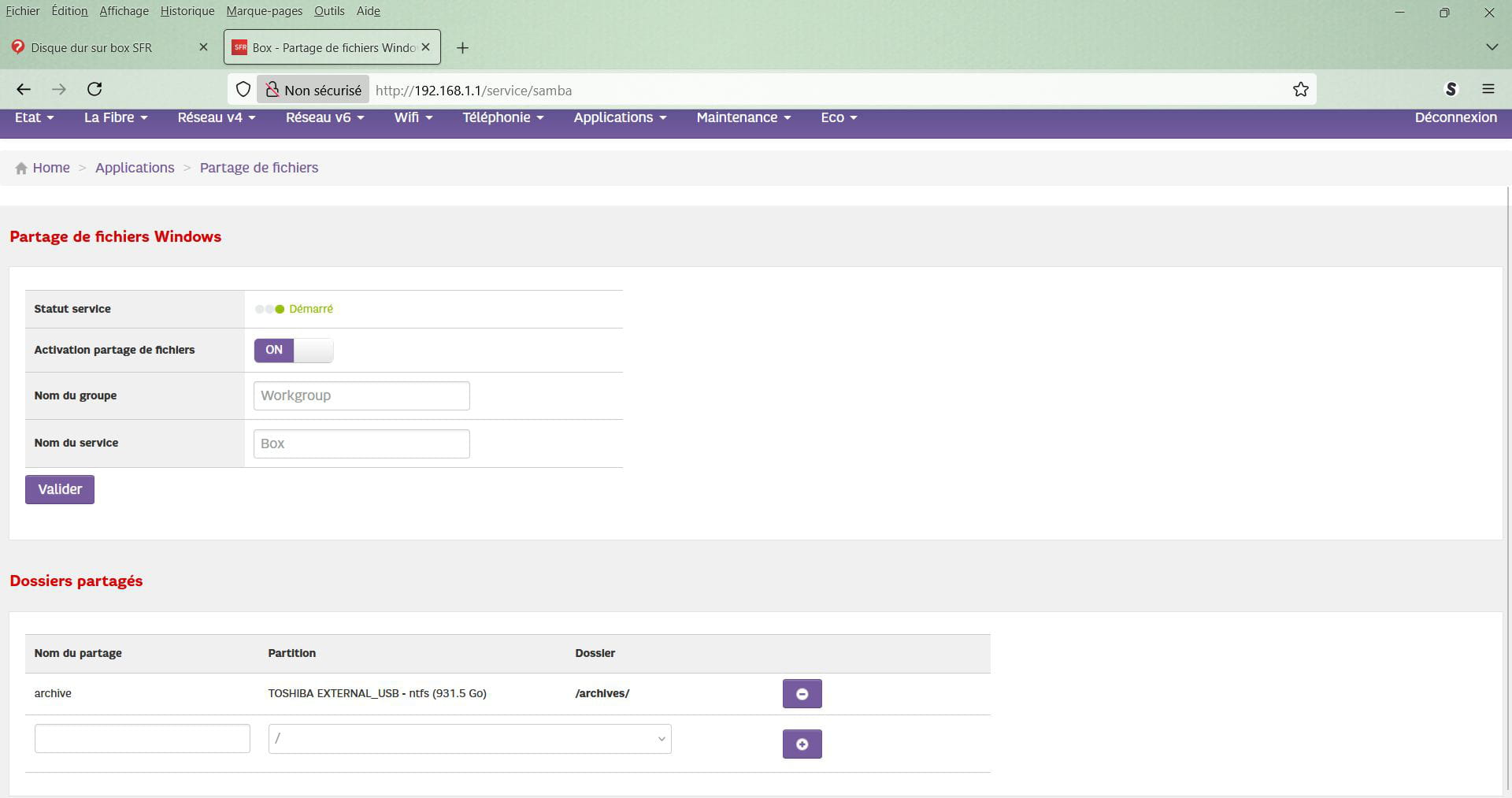

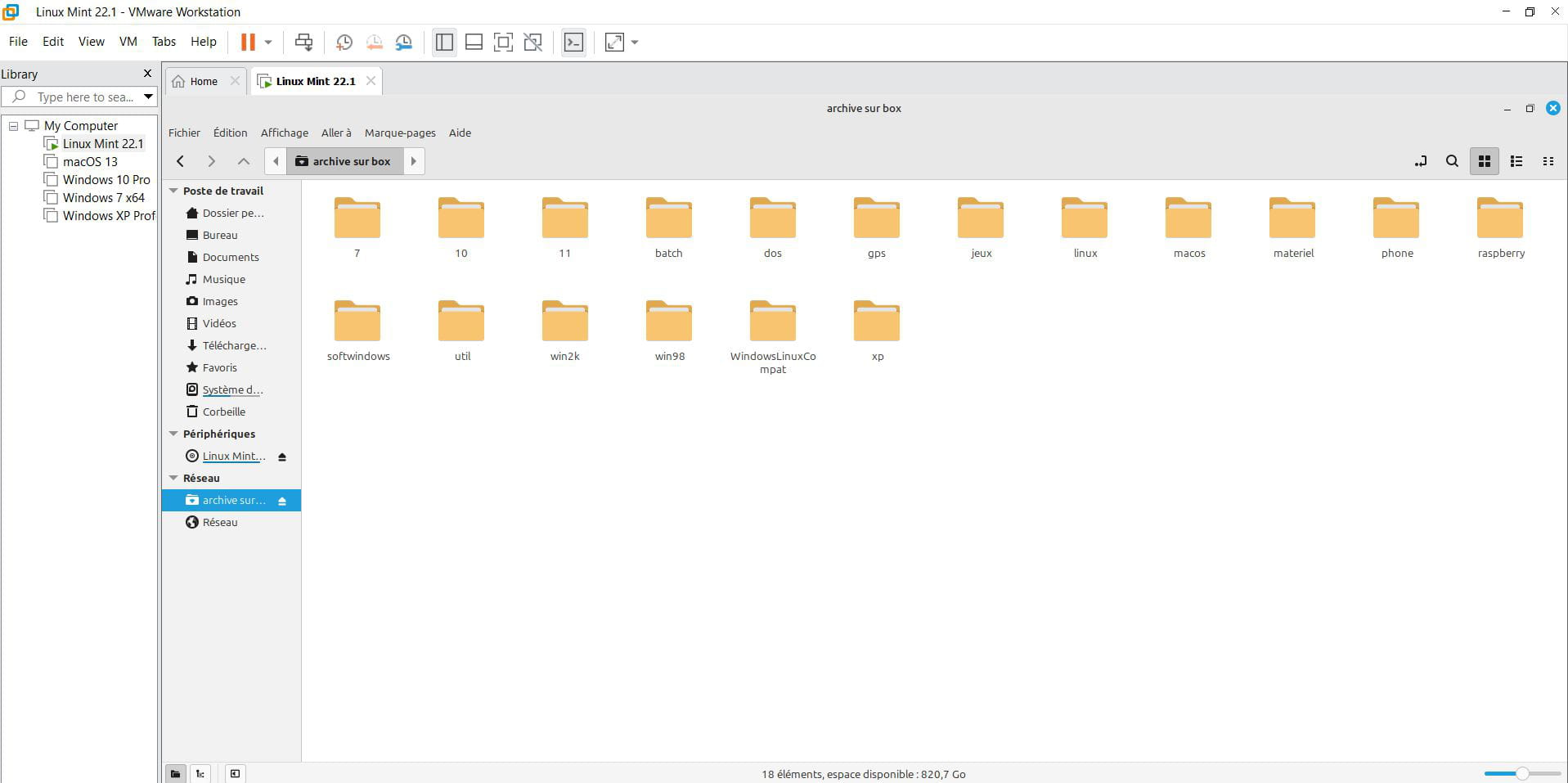
In doubt, I went overboard; the entire external drive was already shared under Windows, and I added another layer by selectively sharing the target folder archives using advanced sharing.
The consequence is that, unless I’m mistaken, the NB6 will not want to share the drive at the root level, so we need to place the files we want to access in a folder and/or, if necessary, share several folders in the Box.Second attempt made, the Box successfully accepts sharing the entire disk by naming the share as I wish and selecting only / from the dropdown list, then I will access the entire disk via smb://Box/
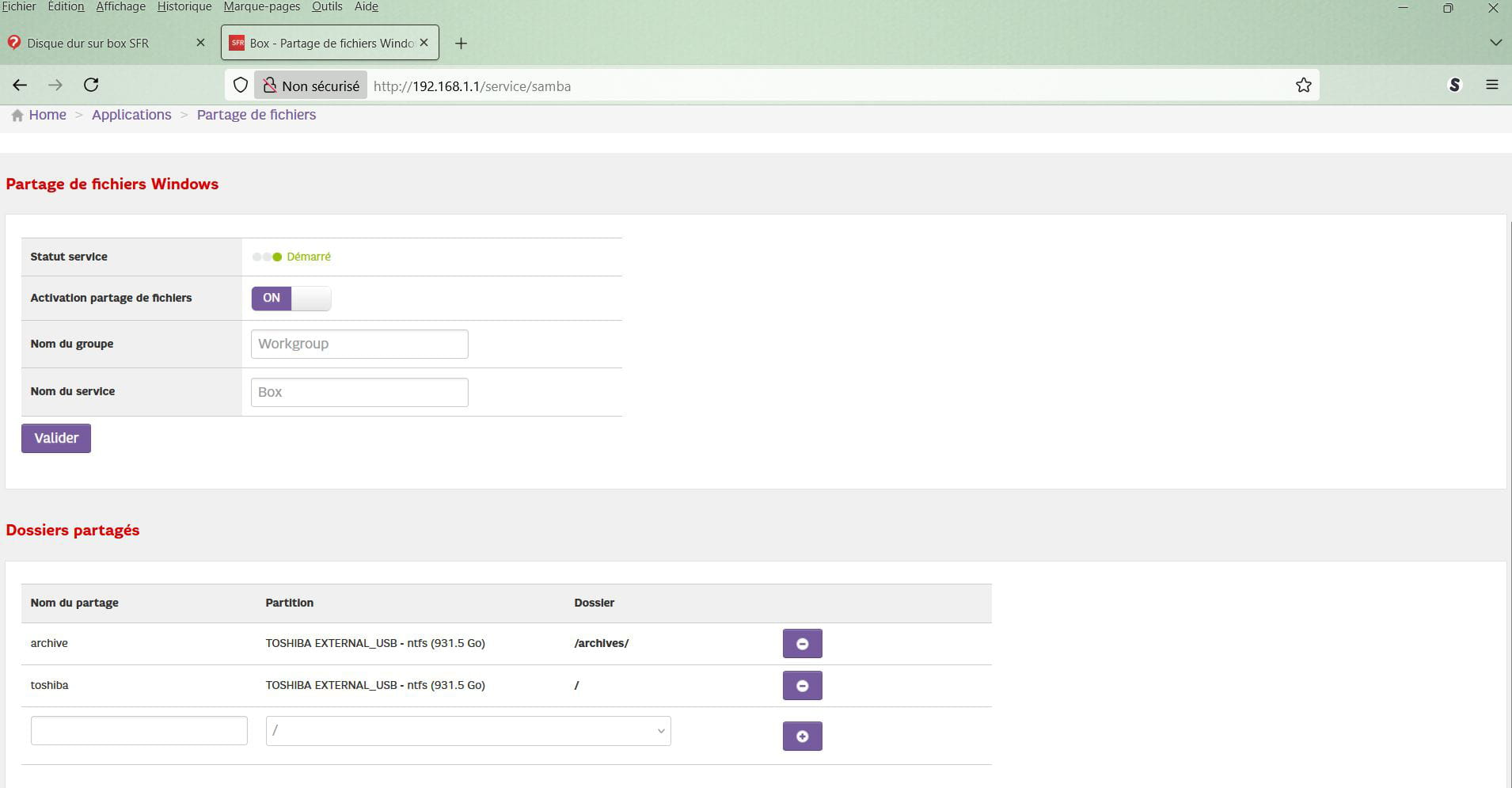
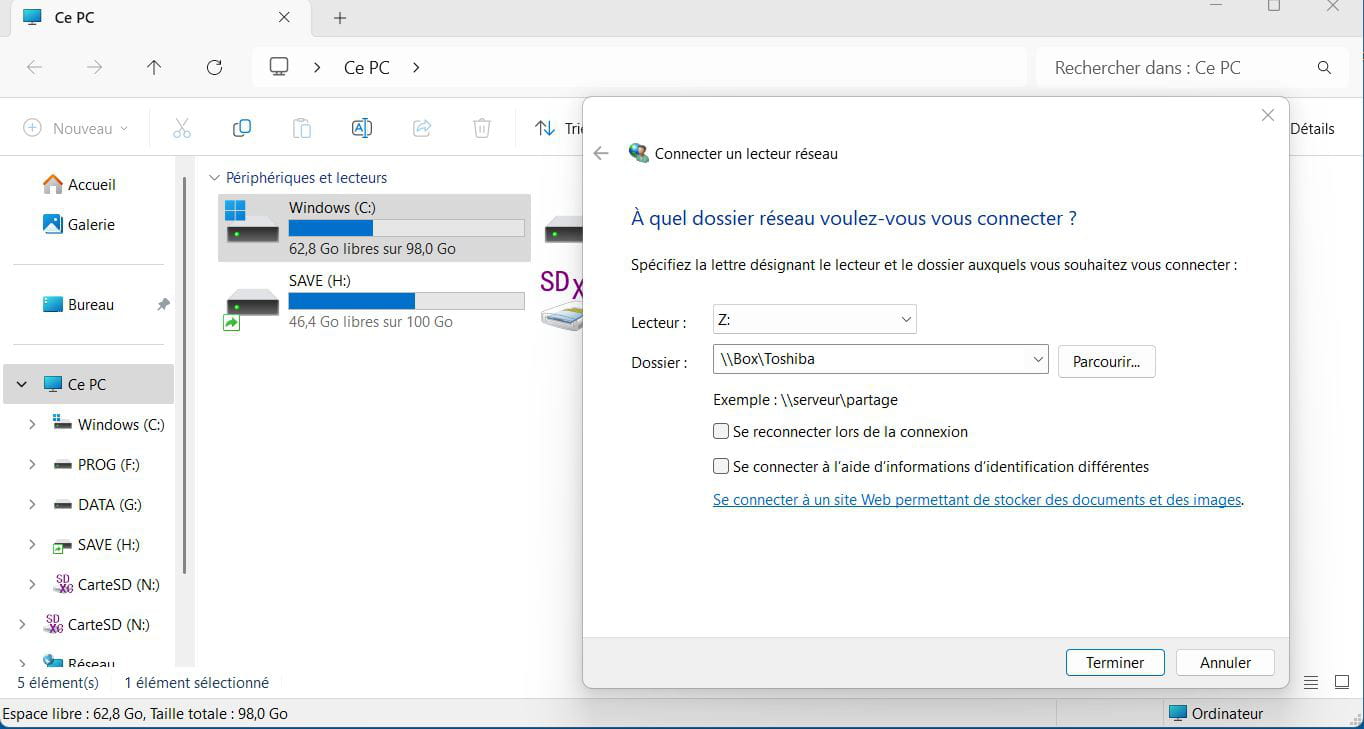
On the other hand, when starting from Windows, I have to specify the share name as entered in the Box, here Toshiba for the entire disk.
Latest Discussions -
How to eject a hard drive without the eject tab
at 16:20 -
Dell pc slow at startup
at 16:14 -
Retrieve my address book ***@***
at 16:44 -
Excel dropdown list formula
at 16:01 -
Program that opens and then closes
at 15:34 -
Retrieve puk code
at 15:10 -
Asus computer blocked since covid
at 14:31 -
How to increase the taskbar size
at 14:08 -
During software load, it is noted twice .exe
at 13:34 -
Uninstall new tab
at 13:17
Other languages
-

