
Integration of emoji in Excel sheet tab
Nain_Porte_Quoi Posted messages 173 Registration date Status Member Last intervention -
Hello, I want to insert an emoji (not from Windows, I specify) into the name of an Excel sheet (open or closed padlock). I’ve gone through the tutorials but haven’t found anything that allows for this insertion. I specify; no problem inserting an emoji that is in Windows! but I can't manage with another one.
11 answers
-
Hello,
An emoji is a Unicode character, so you need to find its number, and Excel outside of 365 will only display it in black and white anyway.
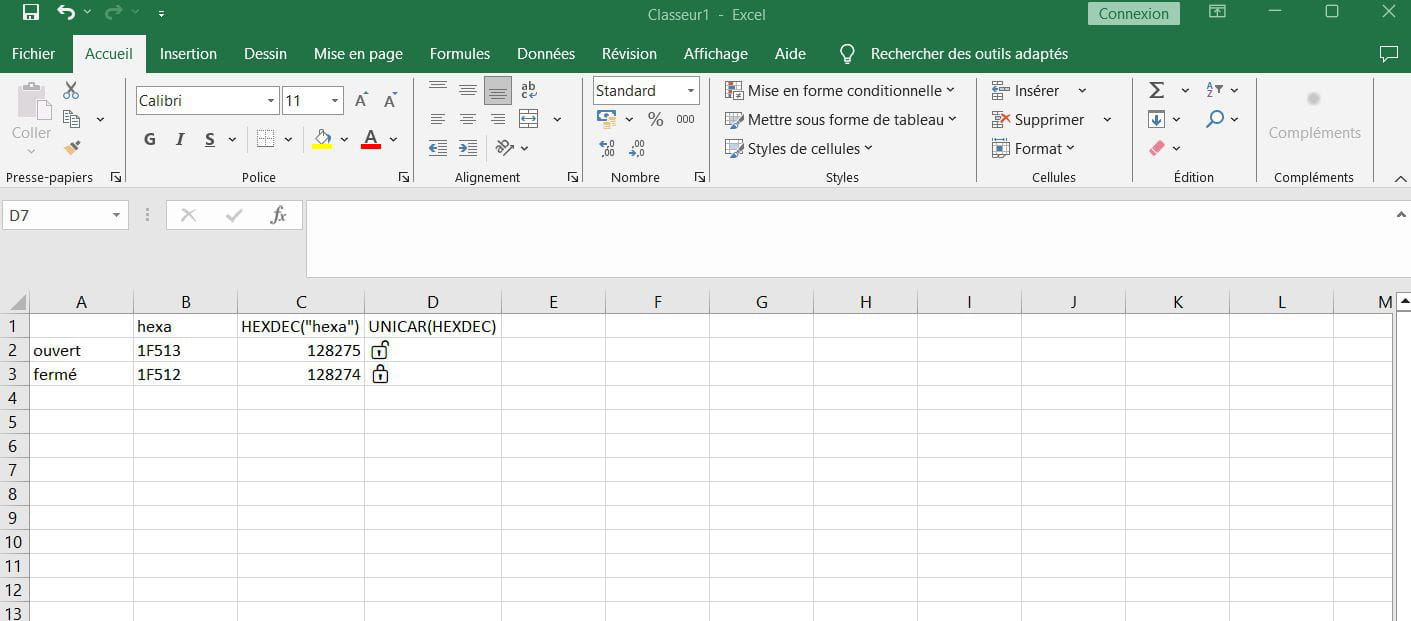
The hexadecimal values for the open and closed padlock are U+1F513 and U+1F512 respectively, and can be found by searching "Unicode padlock".
The emoji is then rendered by =UNICAR(HEXDEC("1F513"))
-
A big thank you to you; BRUCINE!!!
But my problem, as explained in my question, is not to make an emoticon appear in a cell; but to manage to place it in the tab of a sheet?????
There are many tutorials where the demonstrator performs this action, but unfortunately, since this action is not the current topic, there are no explanations.
I have asked several people but unfortunately no answers so far!
So, the meaning of my question is indeed to find a way to place an emoticon in the tab (the name of the sheet for me) or to enhance the Windows panel since inserting from the Windows panel is fine.
-
It indeed does not work in sheet names where you cannot write any formula or copy anything (otherwise the solution would be simple, in Word since Excel does not want to hear about it 1F513ALT+C and copy-paste).
There seems to be no other solution than through a VBA macro by searching for the character using Chr or ChrW in the mode:
Worksheets(1).Name = Chr(50)
The catch, because there has to be one, is that the syntax does not allow certain characters.
You then have to, I quote, copy the desired character into any Excel cell and then read its value in VBA and concatenate the values:
https://www.reddit.com/r/excel/comments/6pq1r1/vba_how_can_i_write_emojis_using_chrw/
But regarding the precise procedure, it exceeds my very limited capabilities in VBA.
-
-
Hello,
Following Brucine's idea, I wrote in a cell :
="aaa"&CHAR(HEXDEC("1F513"))&"bbb"
I got in the cell :
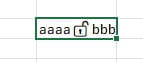
I made a copy / special paste of the cell onto itself and I pasted the result in the tab :
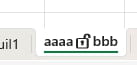
Thanks to Brucine.
Daniel
-
Hello,
You can achieve the same result without the emoji being entered into any cell by positioning it in the target (here D4), using VBA:
Range("D4").Value = ChrW(&HD83D) & ChrW(&HDD12)
The ChrW decomposition is due to the fact that the sought Unicode is higher than the 16-bit limit.
The ChrW values are obtained in VBA by reading the number of characters in the string representing the Unicode (here 2) and then applying AscW to each of those characters, don’t ask me how, but you who are knowledgeable...
In any case, the same syntax does not work for ActiveSheet.Name, which does not directly solve the problem.
-
-
Hello,
based on danielc0's idea and the initial request, I think the goal would be to display this padlock as closed or open depending on the state of the protection of the sheet/workbook/other? All in VBA certainly.
-
A big thank you to everyone!
I'm just going to hide the sheets; after I've locked them.
I think that's the simplest solution; because VBA and I are two things that are incompatible.
Thanks again to you all.
-
Thank you all very much!!
-
Hello everyone,
As far as I know, VBA cannot detect the transition from protected to unprotected state or vice versa. So that's not an option.
Daniel
-
So for everyone, just a little reminder! My original request was how to place a closed padlock (????) in an Excel sheet tab.
Just to inform the spreadsheet user that they should not intervene on this sheet, after watching numerous tutorials there are indeed people who manage to place an emoji in the tab of an Excel sheet ?????????????????.
That is what I wanted to accomplish simply; but following all the information received from you, I decided to lock and hide all the cells in the concerned sheets and then I hid the said sheets; so if the sheets are not visible, errors are impossible, and attempts to make changes are also removed!
(in principle??)
That's all I was looking to do! But well, my solution may not be so bad, since the sheets are not visible!!
No????
Thanks again to all of you!
GILLES
-
-
Hello,
It's not easy, but thank you for your response with your solution; you are helping a lot of people on the forum who are in the same situation as you.
You are a super star.
Best regards.
Hello,
To continue fighting for not much, the illustrated kitchen in <13> results from VBA's inability to read a character of more than 16 bits.
The trick is then to determine the length of the string (2 or more), determine the value of each part, and reassemble.
In the example we are interested in (locked padlock) I simply copied these values (-10179 and -8942) servilely, but assuming we want to apply the procedure to another Unicode of more than 16 bits, we need to redo the calculation.
We find different techniques, some convoluted, the simplest here respectively in 10 and 3.
https://stackoverflow.com/questions/55418398/how-do-i-remove-emojis-from-an-excel-sheet-using-vba/55418901#55418901https://stackoverflow.com/questions/73853790/how-to-check-the-value-of-%CE%A3-character-in-an-excel-cell-vba
The problem is that I am really bad at VBA, I can't find where and how to write these codes for them to work (and which can possibly in at least one of the cases be applied not to ActiveCell but to the cell containing the Unicode, for example D4).
Thank you.
-
-
Hello Brucine,
I don’t understand much about unicode and even less about how you arrive at a negative decimal value from a hex value...
Moreover, according to some tests and research I've done, I found that negative values can be replaced by positive values and yield the same results (I don’t get it)
Example
ChrW(-10179) can be replaced by ChrW(55357)
It’s true that we’re fighting over "not much", but it’s still interesting to understand
-
Hello,
55357 is the difference between 65536 (16-bit limit) and 10179, which explains why your daughter is mute.
ChrW (actually AscW for the intended purpose) would yield a negative value (which is the same) when the source integer is unsigned.
https://www.vbforums.com/showthread.php?797751-RESOLVED-AscW-returns-negative-value
But what I still don't understand, regardless of whether the value is positive or negative since it will lead to the same result, is how to obtain the relevant values by splitting a Unicode that is greater than the 16-bit limit and therefore contains at least two strings on which to perform these calculations.
-
-
Re Brucine,
thank you for the explanation of the difference between positive and negative although the sentence "explaining why your daughter is mute" seems strange to me.
If I understood your "misunderstanding" correctly, this simplified little code should clarify things for you
Option Explicit Sub test() Dim Car_Debut As String Dim Car_Fin As String Dim Val_Debut As Integer Dim Val_Fin As Integer Const Cell_Source As String = "D4" Car_Debut = Left(Range(Cell_Source), 1) Car_Fin = Right(Range(Cell_Source), 1) Val_Debut = AscW(Car_Debut) Val_Fin = AscW(Car_Fin) ActiveSheet.Name = ChrW(Val_Debut) & ChrW(Val_Fin) End Sub
You put your unicode character in cell D4 (you can change that in the code) and run the "test" procedure
-
I meant to say that regardless of the artifact that leads to negative values, if they exist, it is likely that AscW performs the operation alone by subtracting from 65536.
Since D4 is occupied by one of the locks, I placed a rose (1F339, why not) in D6, and your script does indeed lead to the desired result without decomposing 1F339.
I assume (again, I don't understand anything) that your Option Explicit syntax allowed the macro to execute where others I've tried with the same effect did not work.
I also assume, I haven't tried to display them, that Car_Debut and Car_Fin perform that famous decomposition?
-
-
Option Explicit is an instruction that requires variables to be declared, nothing more.
https://learn.microsoft.com/en-us/office/vba/language/reference/user-interface-help/option-explicit-statement
Unicode is actually made up of 2 characters, Car_Debut the first and Car_Fin the second, then I retrieve the value of each character to reassemble it and put it in the sheet name.
This is still quite twisted since the sheet name now consists of 2 characters.
