
Unwanted notifications on FIREFOX
SolvedHello,
Unwanted/annoying pop-ups are appearing on my screen, especially when I open certain tabs (I haven't identified which ones precisely) on Firefox. From my research online, I understand that using FRST would fix the problem, provided I have the help of an experienced third party. Can someone help me?
Thank you in advance. Xavier
10 answers
-
Hello,
A number of sites throw notifications and popups, others have scripts calling third-party content.
Before blaming a virus, check in Firefox's Privacy settings if there are any allowed notifications and if popups themselves are allowed.
Install the NoScript extension and reconnect to the same sites to see if the behavior persists. -
Hello,
See here:
https://forums.commentcamarche.net/forum/affich-38063320-a-lire-avant-toute-demande-de-desinfection
You can try this first as well.
Precaution: Backup Firefox and Chrome Bookmarks
Although bookmarks are kept, it's always safer to have a copy.
https://www.commentcamarche.net/telecharger/utilitaires/19335-resetbrowser/
https://support.mozilla.org/fr/kb/diagnostiquer-resoudre-problemes-firefox#w_5-reinitialiser-firefox
https://support.mozilla.org/fr/kb/diagnostiquer-resoudre-problemes-firefox
-
Hello Brucine.
Indeed, I have just blocked certain permissions in the FIREFOX settings. I'm waiting to see if the notifications (targeted towards antivirus types like AVAST, MACAFEE, ... + towards ADBLOCKER + towards BRAINBERRIES & ZEST RADAR sites) keep appearing. I'll keep you updated. Thank you in advance for your help!
-
Moderator
Hello @GingkoX.
These are nuisance notifications.
There are two solutions available to you.
- Either delete the nuisance notifications yourself, for this read this page and also this page.
- Or download FRST.
Once downloaded, save FRST to the desktop then right-click on FRST and choose Run as administrator, which looks like this:

 Wait for the message the tool is ready to operate to appear and then click on Analyze.
For your information:
 If you have an alert from Microsoft Defender, ignore it, click on More information then on Run anyway, see below.

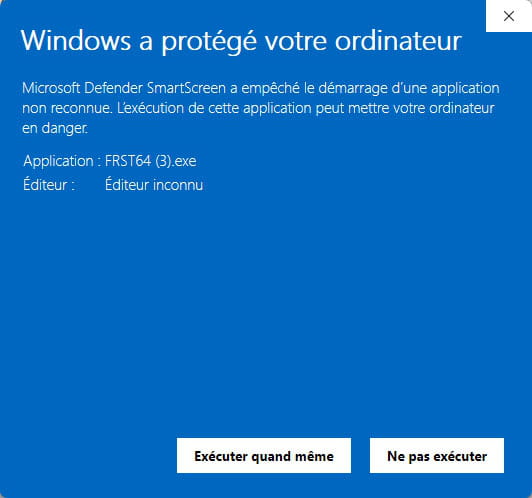
Warning, wait for the messages saying that the scan is complete to appear.


At the end of the scan, both reports FRST and Addition will be on the desktop.


Send the FRST and ADDITION reports to https://pjjoint.malekal.com/ or https://www.catupload.com/.
Then attach the two links generated by https://pjjoint.malekal.com/ or https://www.catupload.com/ in your response.
bazfile
Moderator/Security Contributor.
a hello, a response, a thank you are always appreciated. -
Thank you .
For now, on @Brucine's invitation, I have blocked notifications from certain sites on FIREFOX and my notifications no longer appear. Otherwise, I will go for the FRST tool according to your instructions.
Thank you in advance.
GingkoX
-
Hello again @BAZFILE;
Here are the 2 links obtained based on your instructions, with my thanks for your help:
https://pjjoint.malekal.com/files.php?id=FRST_20250707_d10w14q6q10q13
https://pjjoint.malekal.com/files.php?id=20250707_y11r7w15h1011
If I understood correctly, I'm waiting for feedback with new instructions to complete the process, right?
-
Moderator
.
There is no infection on your PC, just the adware WebAdvisor by McAfee that you can uninstall if you wish.
There are also orphan/superfluous processes.
As for the notifications present in Firefox, in my opinion they are legitimate; your notifications do not come from Firefox but are sent via certain sites that you visit, so as brucine said, in this case a ad blocker is sufficient.
You also have a lot of extensions in Firefox, you should clean them up and remove or disable those you do not know or do not use.
For your information, here are the sites that have registered notifications in Firefox; if you want me to delete them, let me know, but in my opinion these sites are legitimate.
hxxps://mail.google.com
hxxps://drive.google.com
hxxps://teams.microsoft.com
hxxps://www.partitions-domaine-public.fr
hxxps://meet.google.com
hxxps://www.cdiscount.com
hxxps://www.mondialrelay.fr
hxxps://connect.zoho.eu
hxxps://www.bitdefender.com
I can also remove the orphan/superfluous processes, let me know what you wish to do.
.
-
-
Hello again BAZFILE.
Thank you for your valuable help.
I am asking, if it’s not too time-consuming for you, for you to act - or provide me with instructions on how to act - on the following points:
- Adware WebAdvisor by McAfee: to be uninstalled;
- Orphan/superfluous processes: Delete, ... unless it might impact my regular functioning (as a novice, I don’t know what that refers to).
- Okay to receive notifications in Firefox from the sites you listed, as I use them regularly, ... except for hxxps://meet.google.com which we could remove since I rarely use it.
NOTE:
- Extensions: a priori, the ones I have are okay for me.
- Ad blocker: I will install it as you suggesteds.Thanks a thousand times again!!
-
Moderator
Warning, only one ad blocker on the browser.
For WebAdvisor by McAfee uninstallation is done like a normal uninstallation.
If you wish to remove orphan processes and the notification hxxps://meet.google.com do the following.
Procedure to follow in the indicated order:
1- Open FRST as administrator, for that right-click on FRST and choose run as administrator
2 - Copy the entire script that is in the box below:Start:: CreateRestorePoint: CloseProcesses: FF Notifications: Mozilla\Firefox\Profiles\kqve1uy5.default-release -> hxxps://meet.google.com HKLM\...\Run: [PC HelpSoft Driver Updater] => "C:\Program Files\Avanquest\Driver Updater\application\9.1.50289.1145\Driver Updater.exe" --initial-window-state=minimized (No file) HKU\S-1-5-21-2749464611-2762526080-3735122326-1001\...\RunOnce: [Delete Cached Standalone Update Binary] => C:\WINDOWS\system32\cmd.exe /q /c del /q "C:\Users\Toolin\AppData\Local\Microsoft\OneDrive\StandaloneUpdater\OneDriveSetup.exe" (No file) HKU\S-1-5-21-2749464611-2762526080-3735122326-1001\...\RunOnce: [Uninstall 22.002.0103.0004] => C:\WINDOWS\system32\cmd.exe /q /c rmdir /s /q "C:\Users\Toolin\AppData\Local\Microsoft\OneDrive\22.002.0103.0004" [0 2022-10-15] () <==== WARNING [zero byte File/Folder] HKLM\SOFTWARE\Microsoft\Windows Defender: [DisableAntiSpyware] Restriction HKLM\SOFTWARE\Microsoft\Windows Defender: [DisableAntiVirus] Restriction Task: {7F11A291-884C-463F-B255-B66937679184} - System32\Tasks\Bitdefender AgentTask_AD394AE64E874073B10A89FEEC305A3C => C:\Program Files\Bitdefender\Bitdefender Security\bdagent.exe (No file) Task: {8369EA91-88E1-42BC-B7AF-A507D2316F21} - System32\Tasks\Lenovo\Vantage\Schedule\NotificationCenter => C:\Program Files (x86)\Lenovo\VantageService\3.13.72.0\ScheduleEventAction.exe NotificationCenter (No file) Task: {F9E2707D-432A-4782-ACAA-43F50699B67A} - System32\Tasks\Lenovo\Vantage\Schedule\VantageTelemetryAddinTask => C:\Program Files (x86)\Lenovo\VantageService\3.6.15.0\ScheduleEventAction.exe VantageTelemetryAddinTask (No file) Task: {A1BBB4CA-3D5B-4575-8C55-6C515BC004B1} - System32\Tasks\Lenovo\Vantage\StartupFixPlan => C:\Program Files (x86)\Lenovo\VantageService\4.2.24.0\\uninstall.exe /repair (No file) S3 Driver Updater Service; "C:\Program Files\Avanquest\Driver Updater\application\9.1.50289.1145\Driver Updater Service.exe" [X] CustomCLSID: HKU\S-1-5-21-2749464611-2762526080-3735122326-1002_Classes\CLSID\{CB965DF1-B8EA-49C7-BDAD-5457FDC1BF92}\InprocServer32 -> C:\Users\xdech\AppData\Local\Microsoft\TeamsMeetingAddin\1.0.20244.4\x64\Microsoft.Teams.AddinLoader.dll => No file AlternateDataStreams: C:\Users\xdech\Downloads\Autodesk_Navisworks_Freedom_2024_Win_64bit_dlm.sfx.exe:BDU [0] AlternateDataStreams: C:\Users\xdech\Downloads\delinf_10630.EXE:BDU [0] AlternateDataStreams: C:\Users\xdech\Downloads\FRST64.exe:BDU [0] AlternateDataStreams: C:\Users\xdech\Downloads\HPEasyStart_15_8_7.exe:BDU [0] AlternateDataStreams: C:\Users\xdech\Downloads\MFC-J6720DW-inst-A2-EU1(1).EXE:BDU [0] SearchScopes: HKU\S-1-5-21-2749464611-2762526080-3735122326-1002 -> DefaultScope {8C34E910-79D0-412D-BC17-8298261581A0} URL = SearchScopes: HKU\S-1-5-21-2749464611-2762526080-3735122326-1002 -> {8C34E910-79D0-412D-BC17-8298261581A0} URL = cmd: netsh advfirewall reset End::3- Once the script is copied click on Fix, FRST automatically takes the script from the clipboard.

Let the correction take place once it is completed you will be asked to restart your PC, do it as soon as you are prompted, see below.
Then once your computer has restarted:
4- You will have a Fixlog file on your desktop then send this fixlog report to https://pjjoint.malekal.com/ or https://www.catupload.com/.Then give the link generated by https://pjjoint.malekal.com/ or https://www.catupload.com/ in your response.
For information:If in the future you have other problems with Firefox know that you can repair it, read the page the effects of the repair are explained there.
That's all.
-
-
Hello again BAZFILE.
I followed your FRST instructions (for which I thank you, along with all your other helpful elements), but after restarting my PC, I don't have the FIXLOG file on my desktop and therefore don't know how to send it to you via pjpoint.malekal.
Did I miss a step?
-
Oh dear; I see that: 1. you are much more aware of what is on my PC than I am!; 2. I am a student who doesn't achieve 20/20 (sorry): ????.
Thank you for your effective support in any case. I am sending the FIXLOG.txt via the prescribed link.
Wishing you all the best.
Xavier-GingkoX
-
Here is the expected link:
https://pjjoint.malekal.com/files.php?id=20250707_n13m9m8w11t12
-
Moderator
.
The fixlog is OK.
For your information:
Your PC is apparently compatible for an upgrade to Windows 11, check on this page.
You can also check with this tool.
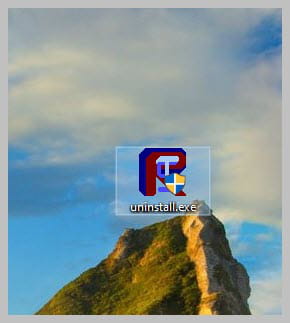
Uninstall FRST, rename the FRST file you downloaded to uninstall, then once the file is renamed, open it; the uninstallation will automatically take place through a PC restart.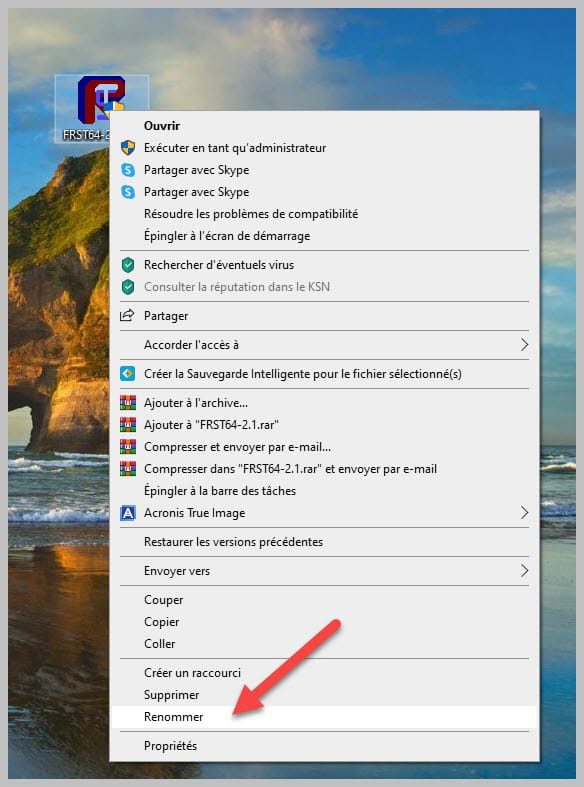
-

