
LibreOffice version issue?
Solved
Hello,
Since this morning, I can no longer open LibreOffice without an automatic update.
And I am not interested in that.
I have been using LibreOffice (for years) only to retrieve data from a .CSV file.
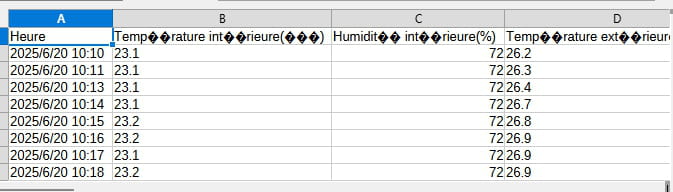
And now, every time I open my .CSV file, I get an update that causes a problem because I have black diamonds with a question mark inside instead of accented characters.
How can I avoid this?
5 answers
-
Good evening,
What disadvantage do you find in not updating LibreOffice? Everything is free.
It's possible that your old version cannot open a .csv (or excel) file created in a recent version.
It would be good to know if your other LibreOffice applications open the files (Writer for example). We would know if LibreOffice is having issues on your computer.
-
Exactly, the new version gives me the image of the message.
The "é"s become black diamonds ???
-
-
@Kori-Kori
Hello,
It's the character set that's the issue, not the LibreOffice version.
I'm not using it; the character set is probably mistakenly something like ISO ASCII instead of the correct national set, UTF-8 ANSI. -
@brucine
See, for example, here:
https://ask.libreoffice.org/t/formats-texte-iso-1252-et-utf-8/40025
-
-
Hello,
I have already uninstalled it several times, and each time I use it, I no longer have the same version.
I have been using LibreOffice for several years, I have version 24.8.3.
Since yesterday, I find myself with version 25.2.4.3 without having asked for it?-
Hello,
I believe there is a setting in LibreOffice to not automatically search for updates or perform them, but it doesn't make much sense, as updates concern other aspects besides CSV imports.
The version itself probably has nothing to do with it, other than it might reset the character set.
Theoretically, this character set is automatically defined based on the Windows language settings and the separator; conversely, if it's not in the CSV file, the standard French delimiter (the semicolon), this will be a source of problems.
Theoretically as well, once this character set is chosen, it is remembered.
Otherwise, LibreOffice will display a dialog box during import allowing it to be specified, which should be forced via the import wizard:
https://www.haute-saone.gouv.fr/contenu/telechargement/12814/104009/file/Proc
There are two workarounds, moreover.
Generally speaking, Windows is more or less at odds with ASCII characters in a number of applications; I regularly prevent issues by deliberately removing accents; you just need to right-click to open the CSV with Notepad and replace in our case Température with Temperature.
We will achieve the same result but this time preserving the accents with a specialized text editor like Notepad++; this time open with Notepad++ and in Encoding choose the appropriate settings: the encoding is usually not ANSI but UTF-8 and the Character Set Western European, Windows-1252.
-
-
The table comes directly from my weather station.
I installed the latest version from the website, it seems to be working.
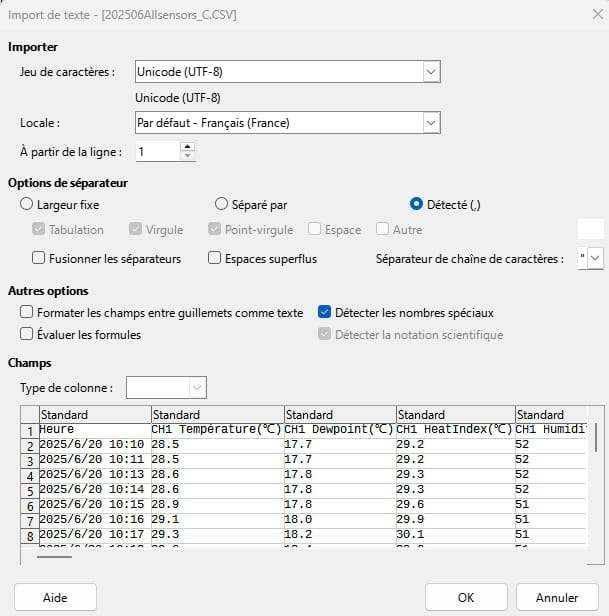
With accents -
Hello,
Thank you for your replies

