
Strangely slow laptop
DrHouse123 Posted messages 20 Status Member -
Hello
I have a Lenovo 2021 laptop with 4GB that is only used for office work and the internet; classic home use.
I find it strangely slow, at startup and even when launching Explorer, not to mention applications.
I do not identify any particular triggering factor.
Windows is up to date.
Can you help me please?
Thanks a lot!!!
5 answers
-
Hello @DrHouse123 StatusMember.
Download FRST .
Once downloaded, save FRST to the desktop and then right-click on FRST and choose Run as administrator which brings up this:


Wait until the message the tool is ready to run appears and then click Analyze
Warning, wait for the messages saying that the scan is complete to appear.


At the end of the scan, the two reports FRST and Addition will be on the desktop.


Send the FRST and ADDITION reports to cjoint.com or to https://pjjoint.malekal.com/.
Then include the two links generated by https://www.cjoint.com/ or https://pjjoint.malekal.com/ in your reply.
bazfile
Moderator/Security Contributor.
a hello, a response, a thank you are always appreciated. -
Hello,
Thank you for your help.
Here are the two requested files:
Additional file: https://pjjoint.malekal.com/files.php?id=20250420_p11m5n10h15x11
Other file: https://pjjoint.malekal.com/files.php?id=FRST_20250420_p8x9z1410l7
Thank you for your help.
-
@DrHouse123 StatusMember .
Your PC is slow and that’s no surprise, it’s a very low-end PC with very little power, here’s what it looks like when we compare your current processor to a simple I3 for €74 COMPARISON the I3 is 220% more powerful.
If you want to give your PC a bit of speed back:
It seems that you cannot apparently add RAM to your PC, this needs to be checked.
You should replace your hard drive Western Digital WDC WD5000LPCX-24VHAT0 with an SSD which will be much faster.
As for antivirus, you have Windows Defender activated but there’s also McAfee which is partially activated, you should uninstall McAfee as it slows down your PC, Windows Defender is sufficient, to uninstall McAfee use this McAfee tool (MCPR).
Also uninstall WebAdvisor by McAfee it's unnecessary adware.
There are some orphan/obsolete processes on your PC and if you want to remove them follow these steps:
Procedure to be done in the order indicated:
1- Open FRST as an administrator, to do this right-click on FRST and choose run as administrator
2 - Copy the entire script that is in the box below:Start:: CreateRestorePoint: CloseProcesses: HKLM\SOFTWARE\Policies\Microsoft\Internet Explorer: Restriction HKLM\...\RunOnce: [ZHPCleaner_File1] => CMD /c DEL "C:\Users\Koumaran\AppData\Local\Google\Chrome\User Data\Default\History" /F /Q (No file) HKLM\...\RunOnce: [ZHPCleaner_Folder1] => CMD /c DEL "C:\Users\Koumaran\AppData\Local\Google\Chrome\User Data\Default\Cache\Cache_Data" /F /Q (No file) Task: {0CA84D6C-F818-4D5B-9D77-0C935E20DA7E} - \Lenovo\ImController\Lenovo iM Controller Scheduled Maintenance -> No file Task: {19F4E6AF-C7F6-4232-8AD4-3943F3C38F9E} - \Lenovo\ImController\TimeBasedEvents\e9af503f-6f16-4f9a-8b57-9c39fbcf2d98 -> No file Task: {1DD8DD73-40D0-4529-B46C-3AF5315D384D} - \Lenovo\ImController\Plugins\LenovoSystemUpdatePlugin_WeeklyTask -> No file Task: {25306B86-DB6E-43E4-A5B0-276BE8AA3D45} - \Lenovo\ImController\TimeBasedEvents\e8f8aae4-69ee-4b38-874b-3fb1ebaf054b -> No file Task: {304CC9DA-27F1-4E8E-B857-537E70F4651E} - \Lenovo\ImController\TimeBasedEvents\450312d5-8e1c-4ef1-9909-9f75d1f812ea -> No file Task: {71245FFF-3978-40E6-BE1E-75048FB2D5B2} - \Lenovo\ImController\TimeBasedEvents\614ae3a0-4295-43e1-bb50-9715b0615064 -> No file Task: {DF88017A-6730-4DE3-853A-40212C553ED7} - \Lenovo\ImController\TimeBasedEvents\8e3f3755-05cd-4955-bf68-ed7d67b26b0a -> No file Task: {9BC55299-FFAD-4B1F-B6A5-E766E29BD59D} - System32\Tasks\CLMLSvc_P2G8 => C:\Program Files (x86)\Lenovo\Power2Go\CLMLSvc_P2G8.exe (No file) Task: {0266D1F8-5254-42F1-AC84-6F1975BB26BA} - System32\Tasks\OneDrive Reporting Task-S-1-5-21-144244970-296769111-1419750845-1003 => %localappdata%\Microsoft\OneDrive\OneDriveStandaloneUpdater.exe /reporting (No file) Task: {F01E3449-BC35-4DCA-9D62-72FA783898EA} - System32\Tasks\OneDrive Standalone Update Task-S-1-5-21-144244970-296769111-1419750845-1003 => %localappdata%\Microsoft\OneDrive\OneDriveStandaloneUpdater.exe (No file) S2 CCSDK; "C:\Program Files (x86)\Lenovo\CCSDK\CCSDK.exe" [X] S2 hshld_12.10.2; "C:\Program Files (x86)\Hotspot Shield\12.10.2\bin\cmw_srv.exe" [X] S2 McProxy; "C:\Program Files\Common Files\McAfee\platform\McSvcHost\McSvHost.exe" /McCoreSvc [X] U1 aswbdisk; no ImagePath R2 mbamchameleon; \SystemRoot\System32\Drivers\MbamChameleon.sys [X] ContextMenuHandlers1: [CLVDShellExt] -> {3E2A0A32-6E14-4BAD-AA87-BBB6A75EBFF2} => -> No file ContextMenuHandlers2: [CLVDShellExt] -> {3E2A0A32-6E14-4BAD-AA87-BBB6A75EBFF2} => -> No file ContextMenuHandlers1_.DEFAULT: [ FileSyncEx] -> {CB3D0F55-BC2C-4C1A-85ED-23ED75B5106B} => -> No file ContextMenuHandlers4_.DEFAULT: [ FileSyncEx] -> {CB3D0F55-BC2C-4C1A-85ED-23ED75B5106B} => -> No file ContextMenuHandlers5_.DEFAULT: [ FileSyncEx] -> {CB3D0F55-BC2C-4C1A-85ED-23ED75B5106B} => -> No file End::3- Once the script is copied click on Fix, FRST will automatically take the script that is in the clipboard.

Let the correction take place once it’s finished you will be asked to restart your PC, do it as soon as it’s requested, see below.
Then once your computer is restarted:
4- You will have a Fixlog file on your desktop then send this report fixlog to https://www.cjoint.com/ or https://pjjoint.malekal.com/ .Then provide the link generated by https://www.cjoint.com/ or https://pjjoint.malekal.com/ in your response.
bazfile
Moderator/Security Contributor.
a hello, a response, a thank you are always appreciated. -
Thanks a lot for your help!
I'm attaching the requested file.
https://pjjoint.malekal.com/files.php?id=20250420_m6e6m15f15i11
Do you think the maximum has been achieved with these manipulations considering the equipment I have?
Is there anything to do regularly?
Thanks again.
-
Nothing to do regularly, as I mentioned before, your PC is an entry-level machine that is very low-powered and unfortunately, it is impossible to turn a Twingo into a Ferrari. ;)
The fixlog is OK.
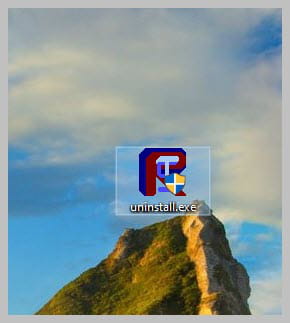
Uninstall FRST, rename the FRST file you downloaded touninstall, then once the file is renamed, open it; the uninstallation will occur automatically via a PC restart.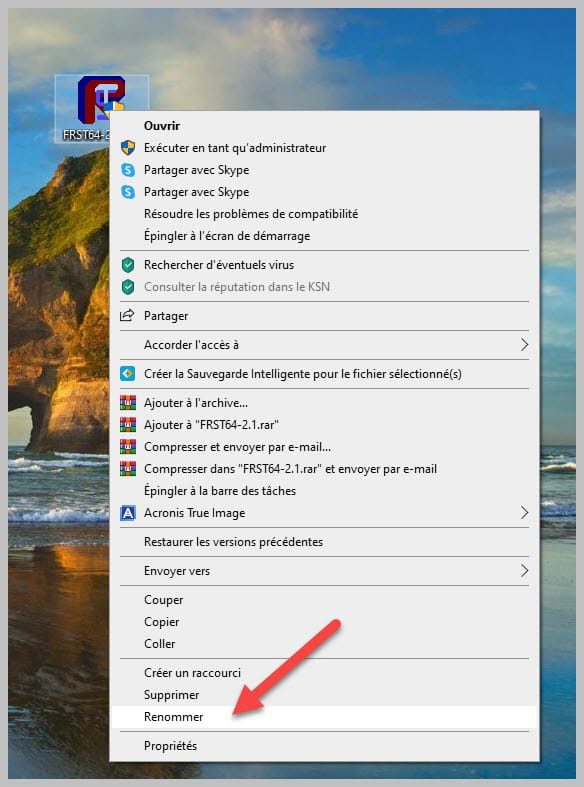
-
-
Thank you for your help. It was invaluable!
For home use (internet, YouTube, movies, office work), is a Core i5/Core i3 PC with 16GB sufficient?
Thanks again!
