
Word on Mac spacing between words for justified text
Aliboron Martin Posted messages 3664 Registration date Status Contributor Last intervention -
Hello,
I'm sorry if this question has already been asked... I searched but couldn't find anything...
When I type a text in Word on my Mac, whenever I justify the text, large spaces are created between the words... I would like to get rid of this permanently.
In Windows, it's so easy to solve this kind of issue... I've had my Mac since 2020, and I regret buying this machine every day.
It's so not intuitive!!! How many hours have I spent trying to figure out how to do this or that... I can't take it anymore.
At work, I use Windows... I prefer it a thousand times over.
I don't use my MacBook Air all the time. I really hate it.... That was my little rant...
For the rest, thank you in advance for your help.
2 answers
-
When you decide to justify a text, the spacing between words must be appropriate. What does "in Windows, it's so easy to solve this kind of issue" mean? How do you proceed in Windows and what result do you get? As for me, I don't really see any difference:
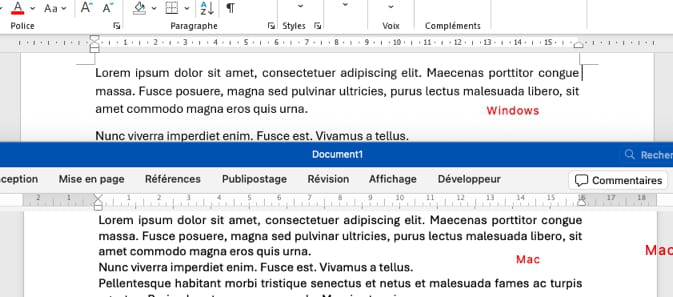
Remember to specify the version of Word in question (currently version 16.95.3) and the version of macOS concerned, it can be relevant.
Hello at your place!
Bernard-
Hello and thank you for your response.
I do indeed have the latest version of Word on macOS Sequoia version 15.3.2.
There is definitely a difference compared to the Windows procedure.
On Windows, you just go to File / Options / Advanced Options / Layout Options and check the box: "do not stretch spaces of lines ending with a line break".
Except on Mac, "option" does not exist under advanced options, nor does this checkbox.
Nothing is intuitive on this system. I need to resolve this problem quickly.
I searched for more than 2 hours yesterday but couldn't find anything. Not on the internet either. Can someone help me?
Thank you in advance.
-
-
OK, you only want to talk about lines that end with a simple line break (as opposed to a paragraph mark). So yes, indeed, Microsoft has not (yet?) brought over the command to solve this problem on Mac.
The classic workaround, when you don't want to replace the line break with a carriage return, is to insert a tab:
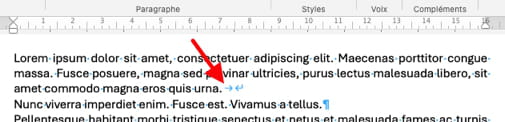
You can pass the information to the product teams via the "Comments" line in the "Help" menu, hoping it motivates them to implement this feature in a future update... ;-) ????
Hello at your place!
Bernard
