
Google Drive PC Size Error
Ticoach -
Hello,
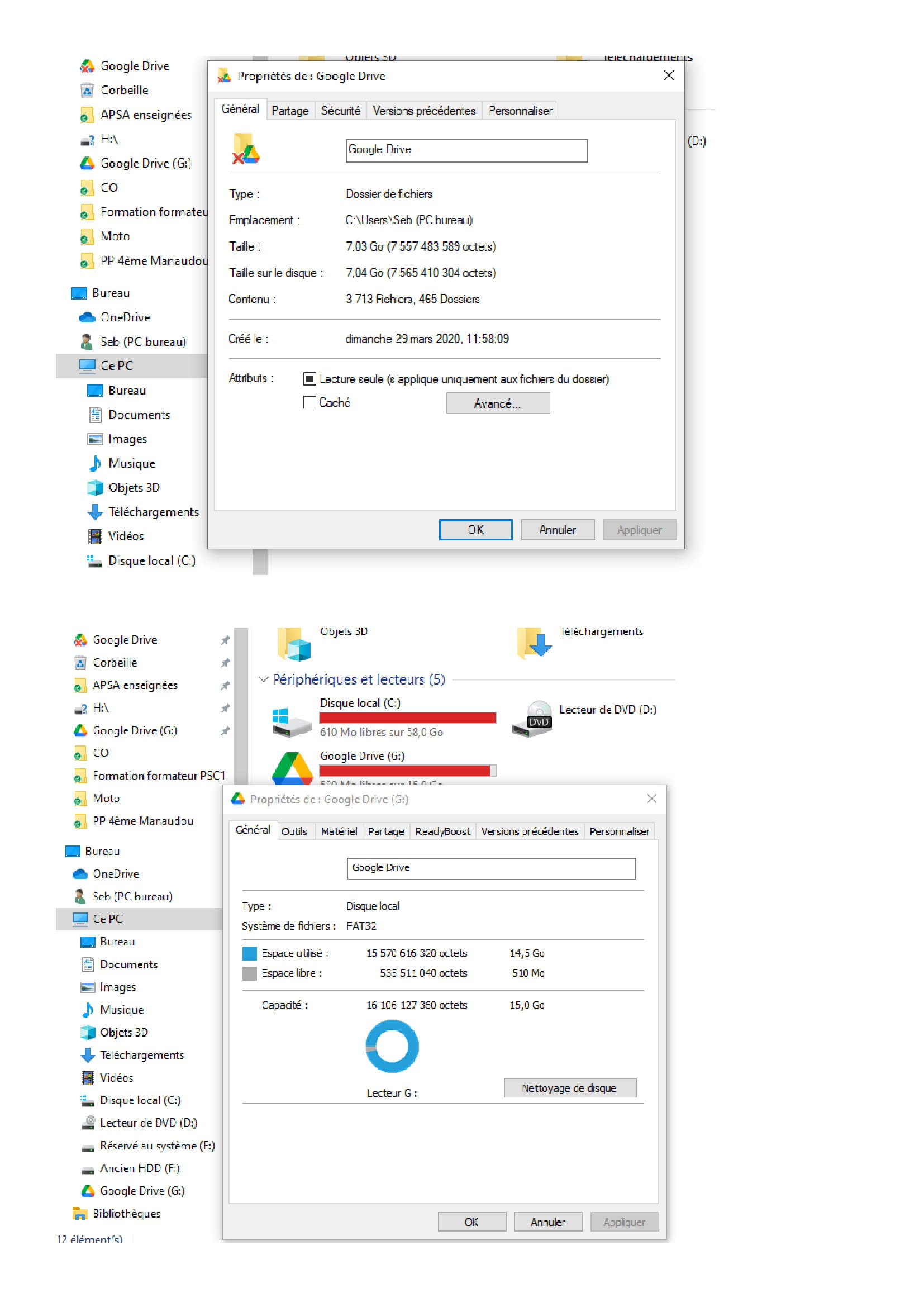
I'm having an issue with Google Drive for PC.
The size of my Drive is 7.03GB (as shown in the top photo).
In the attached photo, I've included 2 screenshots:
- Top photo Google Drive = 7.03 GB
- Bottom photo Google Drive (G) = 14.5 GB
Why is there a difference in size information when it's the same Google Drive?
My PC shows the incorrect information as 14.5 GB, and as a result, I don't have much space left on my C drive.
Thank you in advance for your help,
Seb
7 answers
-
Hello
Google Drive; it's your cloud; you might need to clean up your folders
Google G; it's your Gmail; there's probably some cleaning up to do in your emails too
-
Thank you for your feedback dany311,
I forgot to mention that I had cleaned everything (Google Photos, Gmail…)
Also, on my laptop that uses the same Google Drive account for PC, I don't have this problem: Google Drive and Google Drive (G) have the same size.
I think therefore that it's my desktop PC that's causing the problem, but how can I fix it? Also, for your information, on this latter one, I uninstalled and then reinstalled Google Drive for PC but the problem persists.
-
Hello
If you could avoid putting property windows on the numbers and the 5 "drives" found on the background page, you'd see a bit more.
But anyway, as dany311 said, the problem is your Windows which gives the same name "Google Drive" to both the "cloud" and to a "type: file folder" in the smallest property window at the top, and to a "type: local disk in FAT32" in the largest property window at the bottom. It's this last one, the largest, which has the letter (G) that is a "drive (G)" marked in red on the background page and a "local disk (G)" in the property window at the bottom.
The background page: look how many times "Google Drive" is mentioned? 5 times in the left column only with icons that look alike with a red cross or not; a (G) or not; and two Seb (desktop PC) that we cannot see the descending tree structure; and two Local Disk (C) that we cannot see the descending tree structure knowing that the property window at the top locates the "File folder" at the path "C:\Users\Seb (desktop PC)" while \Users\ does not appear in any tree structure for now.
No wonder we mix everything up since Windows no longer presents tree structures like before.
I'm not joking, without tree structure I understand nothing in the "presentation" probably virtual of the background page and the two words Google Drive represent I don't know how many different things in the PC or in the cloud.
I'm not surprised that so many people lose or delete what they definitely don't want to see disappear between the cloud and Windows' virtual presentations.
I use WinDirStat to understand the size and where the files are, not so much the image but the detailed tables and the tutorials that go with it.
https://telecharger.malekal.com/download/windirstat/
https://sourceforge.net/projects/windirstat/files/latest/download
2.46 MB - 2025-01-18
-
Hello Eric,
Thank you for taking the time to reply to me, but I'm having a bit of trouble following you.
In my screenshots, indeed the entire hierarchy is not present. Would you like me to send new screenshots?In the hierarchy, I have Google Drive three times: twice in the "Quick Access" category (folder + G drive) and once in the "Desktop" category (drive).
Between Google Drive (file folder) and Google Drive (G drive), why do they have different sizes on Windows?
Thank you.
-
Hello
The folder and the disk do not have the same size because they are two different things.
I recommended some software to check the file sizes on your disks and the size of your disks, and to be able to track the hierarchy or have a simple visualization of their location.
Otherwise, I was pointing out the inaccuracies of Windows or Google, which use the same name for different things.
-
-
Hello Eric,
I’m attaching the directory structure with Windirstat.
Just for your information, today Windows indicates that the size of Google Drive (G:) is about 12GB out of 15GB while yesterday it stated 14.5GB out of 15GB. Sometimes it changes, but it never shows me the actual 7GB that my drive actually has.
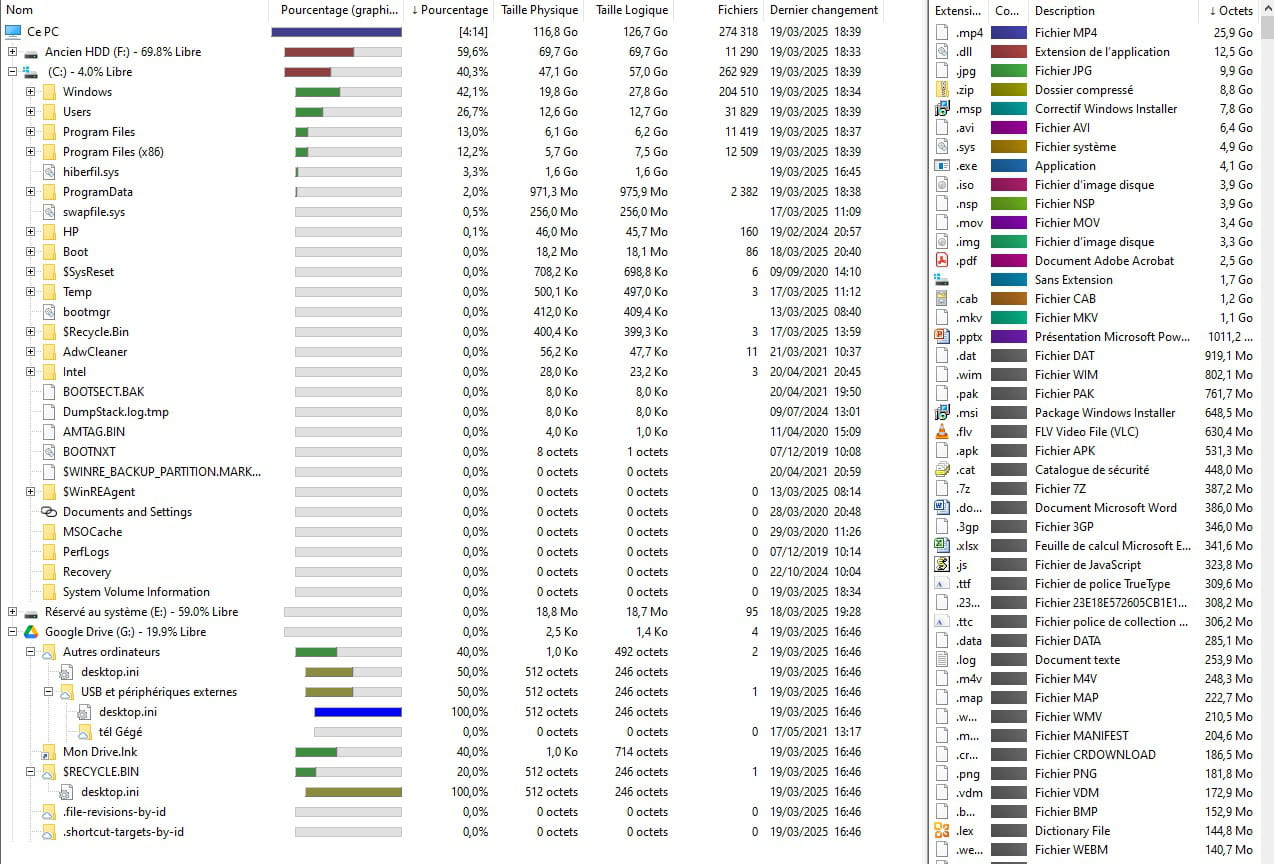
I hope this helps you.
I remain available for any further details you may need.
-
Cleaning done! Do you want me to send you a windirstat?
I clarify that I have a laptop on which I installed the same Google Drive account and here there is no problem. Windows shows me the correct size.
-
