
Mobile Connected on the Windows 11 Start Menu version 24h2
pistouri Posted messages 19011 Registration date Status Contributor Last intervention -
Hello,
I saw in the updates for Windows 24H2 that there is a new mobile app menu connected to the right of the Start menu. However, since I switched to Windows 11 24H2, I don't see this new feature appearing in my Start menu. Do I need to activate it manually or is it a bug?
If someone has a solution please?
7 answers
-
Hello,
It seems to me, but I could be wrong, that this feature requires being logged in with a Microsoft account and using a Windows Insider version (it would not be active in stable versions). -
Oh okay, but why did Microsoft highlight it as a feature of version 24H2? In fact, this feature has been active on Windows Insider for several months before the release of 24H2. Strange that it's not active for the stable version.
As you said, it’s not activated because normally there should be a new option in Settings/Personalization/Start, "Show connected mobile in the start menu," and in my case, this function is nonexistent. To be continued.
-
Hello
Type Connected mobile in the search box on the taskbar.
When you get the result, pin Connected mobile to the Start screen or the taskbar.
What is well conceived is clearly expressed,
And the words to say it come easily.
(Boileau)-
Hello,
I understand, I don't use either Connected Mobile or Windows "tiles."
But is it simply pinned to the start menu (or to the taskbar), or is it a specific "tile" like this one?
https://www.windowslatest.com/2025/02/22/microsoft-confirms-windows-11s-new-ios-like-start-menu-layout-for-all-apps-view -
-
-
I don't understand what the problem is.
You start by doing a search, and if it's positive, you pin Mobile connected to the Start menu or the Taskbar.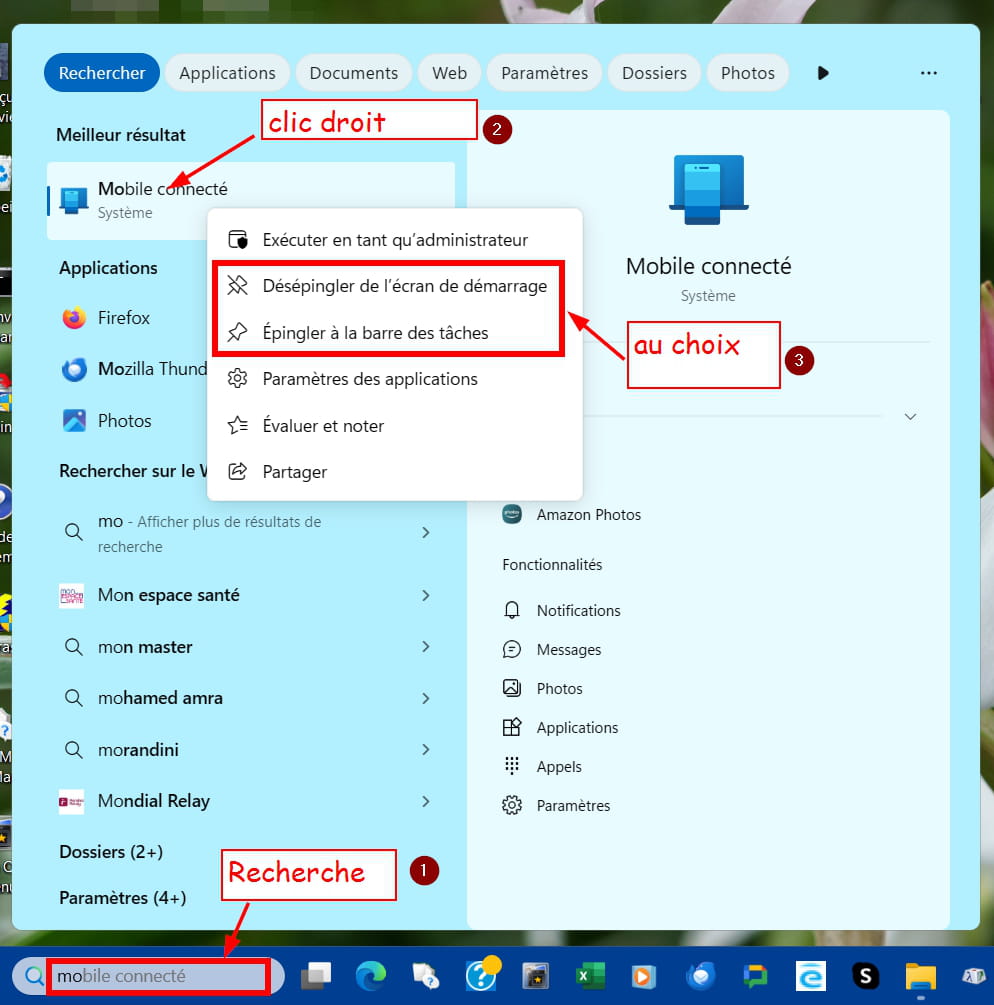
For Mobile connected to be usable, it must be activated and the smartphone must be registered in the allowed devices to connect:
Go to Settings > Bluetooth & devices > Mobile devices:- You allow the PC to access mobile devices
- You activate Mobile connected, if not done already,
- You click on Manage devices to add your smartphone to the allowed devices.
Finally, on the smartphone, you use the Link with Windows app.
pistouri Posted messages 19011 Registration date Status Contributor Last intervention Ambassadeur 8 723
Hello,
Just like the author of this post, I am eagerly awaiting the new feature in the Start menu, specifically the “Send Files” function.
Here’s how it will look once the update is rolled out to users of the stable version 24h2, which should be coming soon.
The image below is in English, but nevertheless shows the display of the anticipated new feature.
Example: mobile device displayed in the Start menu:
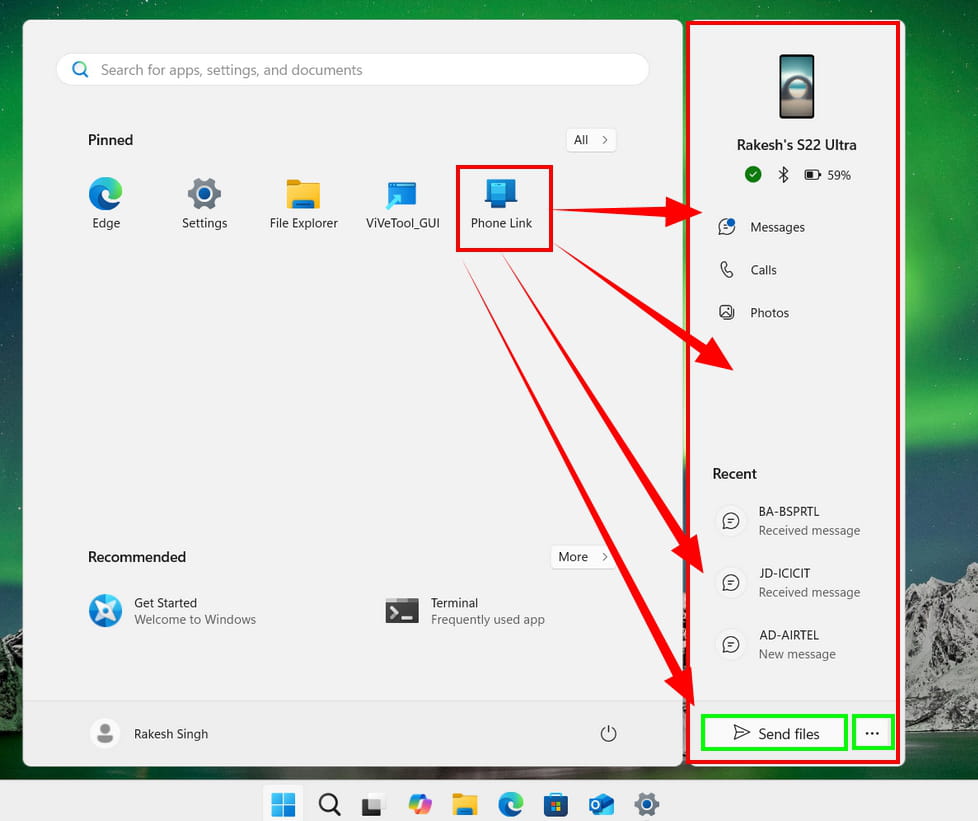
Source ==► Handy Feature: Windows 11's Start Menu Function Allows You to Send Files to Android Phone
****
Registry files (.reg) allow you to add or remove this feature.
It is better to wait for a future update, and for the feature to work, it must first be enabled in Settings --►Personalization
And enable the highlighted line --► Show mobile device in Start
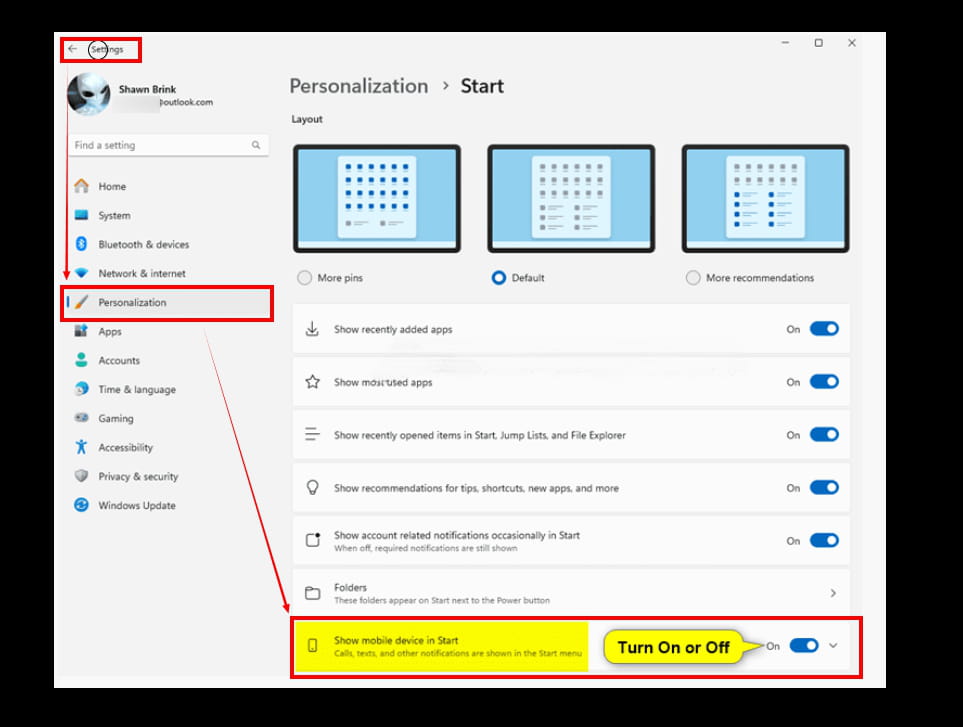
-
Hello,
We will need to be patient regarding the request from the user and everyone like me who wishes to see the Phone Link (Connected Mobile) integration in the Start menu.
With a floating window as anticipated, to view calls, emails, or for file transfers.
Integration of the smartphone
For the integration of the Android smartphone or iPhone, the new Start menu of Windows 11 adds a dedicated space on the right that serves as a companion for the synchronized phone. It can be hidden using a button located to the right of the search field.
By relying on the Phone Link (Connected Mobile) app, it provides quick access to messages and calls, contacts, and other recent activities, as well as the battery charge level of the smartphone.
However, such integration will take a bit longer to arrive in Europe, although it will indeed be here by the end of this year.
I found a YouTube video in English to give an idea.
==► Smartphone integration in the W11 Start menu
Send files:
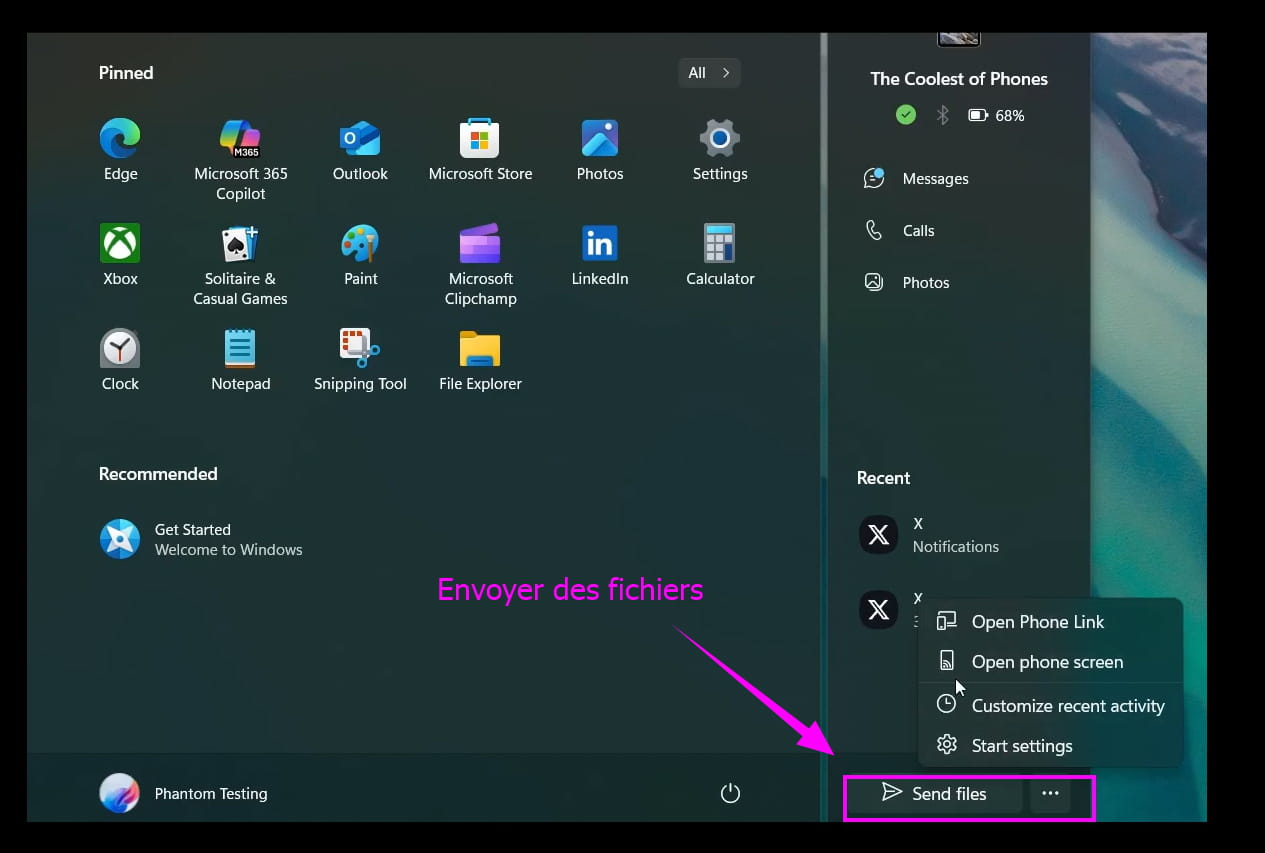
Enable or disable the option in Settings:
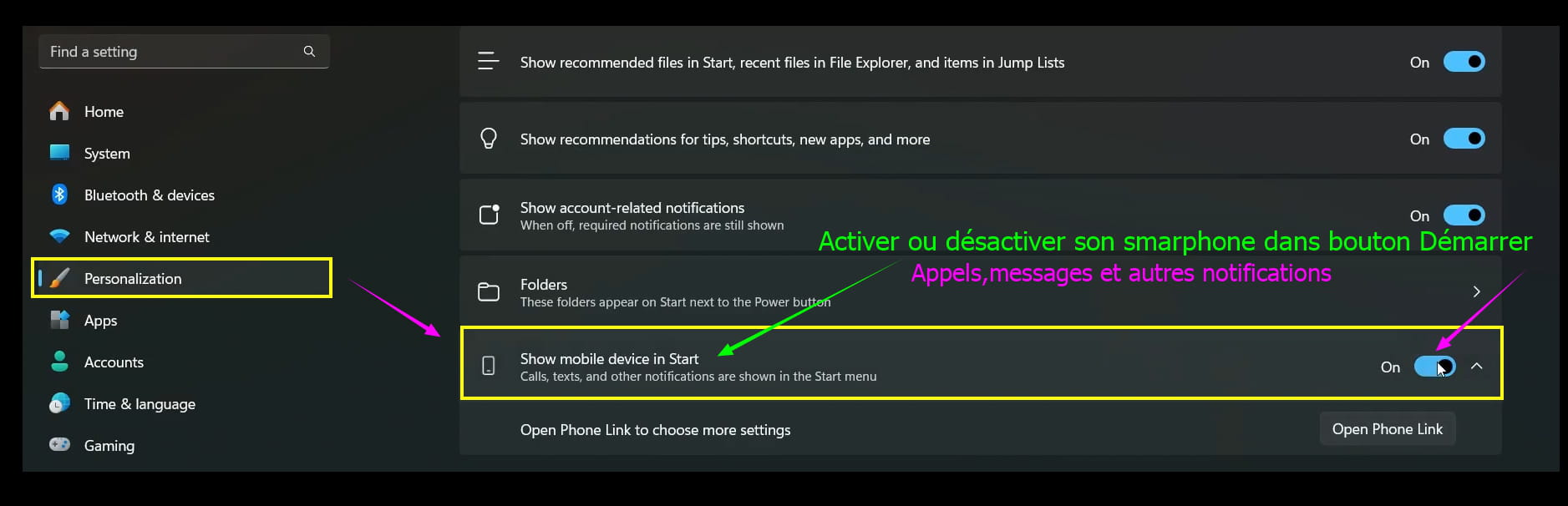
But well before that, Microsoft is preparing a new makeover of the Start button/menu W11 for the stable version in a future Windows Update.
Microsoft is going to reinvent its Start menu, rethought, clearer, and more flexible.
To be continued.
I would add that it is possible to get not just the new lifting of the Start button/menu but the integration of the smartphone still in the Windows 11 Start menu.
A simple command with the ViVeTool
.\vivetool /enable /id:49402389
There is indeed a dot (the small dot) at the beginning of the command.
Right-click in the folder and hold down the Ctrl + Shift keys to open the terminal (this will start as an administrator).
Source
No need to rush without having previously created a restore point, even if on paper the procedure seems manageable, we will leave that to the experts.
Waiting for the Windows update is wiser, even if it arrives by the end of the year, a lot can happen in the meantime, especially for a possible W12 (25h2) that is looming on the horizon.
(It is in Microsoft’s planning notebook) but that is not the subject of the day.
pistouri Posted messages 19011 Registration date Status Contributor Last intervention Ambassadeur 8 723
Hello,
The update KB5055627 for W11 on April 25, 2025 is supposed to roll out the new feature for the Connected Mobile app (Phone Link).
Among the other notable new features, the Connected Mobile function (Phone Link) becomes accessible directly from the Start menu. It displays recent calls, SMS, photos, and notifications from a connected smartphone without requiring the opening of the dedicated app of the same name.
This is a bit of a disappointment for me and for some of you.
The ''Content'' option is not present in the settings.
Settings --► Personalization --► Start --► Content
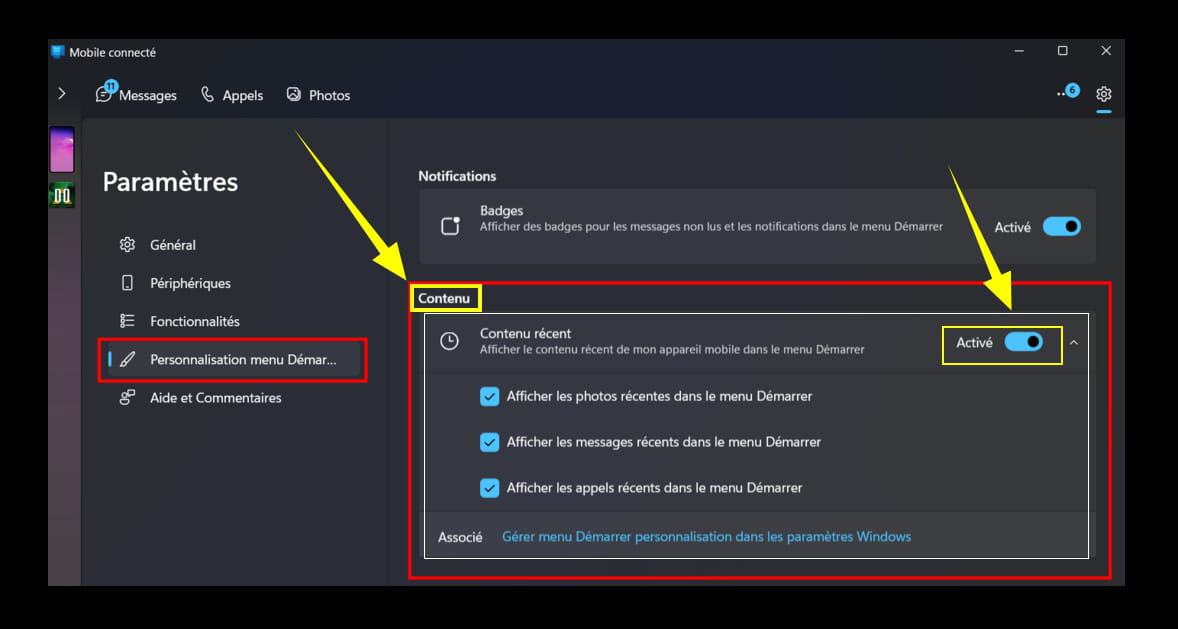
But the good news is that this option will be rolled out in the Patch Tuesday on May 13, 2025.
Clearly, not everything is perfect with Microsoft, but it's better than nothing.
The send files directly from your PC to your phone option is working.
The option is being rolled out gradually.
So, see you on May 13, 2025 in Windows update.
To be continued...
-
Follow-up on message 12:
The KB5055627 that has been widely talked about for a few days, both positively and negatively.
I'm not the one saying it: here
Well inspired by my post 12, and that's a good thing, given the clarifications made, except on one point.
>Gradual deployment distributes a production update...<
So far, no problems.
What is striking is --► the Cross Device Experience Host
the Cross Device Experience Host [Hôte d’expérience inter-appareils].
What is the Cross Device Experience Host?
It allows connected mobile devices to work with the update KB5055627.
That's the principle.
Logically, for the Cross Device Experience Host to work, it is imperative that the Windows Store is up to date.

In summary, after each Windows update, it’s necessary to check for updates in the Windows Store on W11 but also on W10, even if this is automatic, and that’s where the issue lies. By manually checking for updates, you can be sure you've updated everything, especially the Windows Store components. Keep this in mind next time...
Open the Windows Store.
It's the icon with a shopping basket on the taskbar.
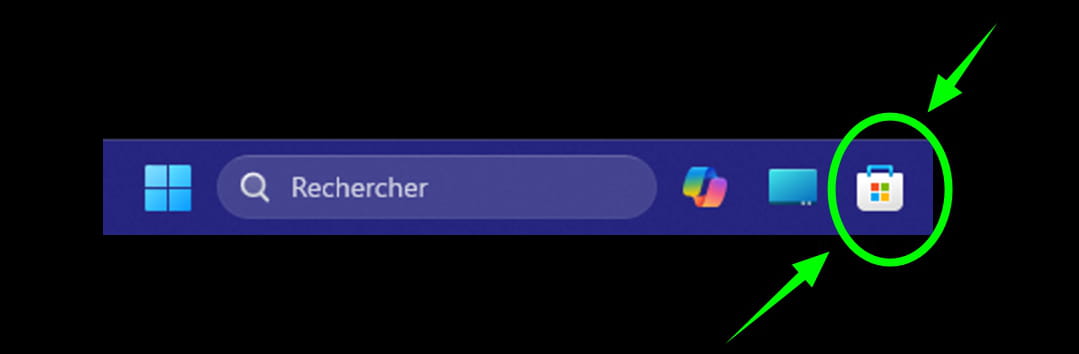
Click on --► Check for updates
Click on --► Install
Do not touch anything else.
Wait.
If updates are available, a number will appear next to --► Updates and downloads.
Depending on your PC (processor/RAM) and the number of updates, this takes no more than 10 minutes, 3 minutes max for the latest generation PCs, sometimes 1 minute is enough.
Once finished, you should see a checkmark in the shape of a V
Sometimes the V (indicating all is up to date) is green, sometimes it is gray.

You can close the Microsoft Store.
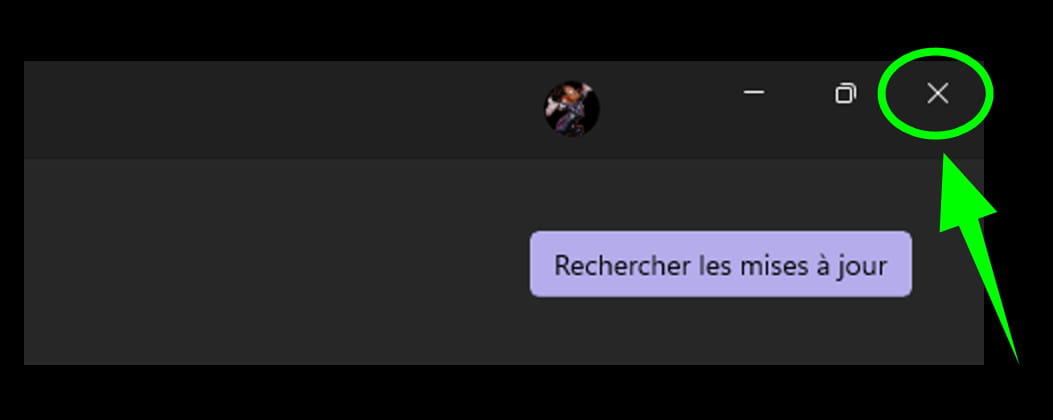
Close by clicking the cross (X) at the top right.
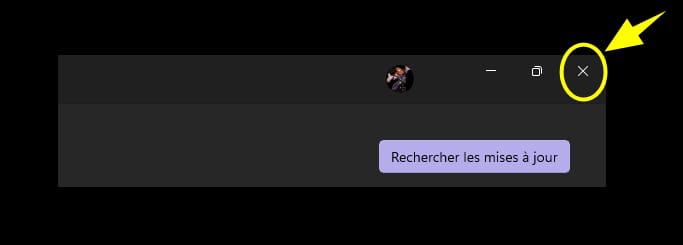
Or right-click on the Microsoft Store icon on the taskbar.
==► Windows 11, how to enable the "End Task" option in the taskbar?
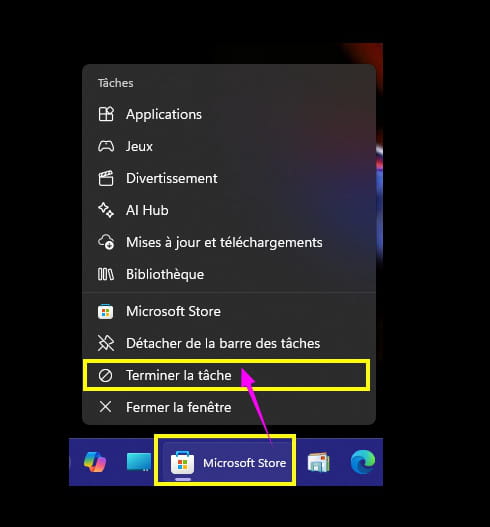
Everything is not perfect with Microsoft, but it's better than nothing.
(Said in message 12).
Reported in this publication:
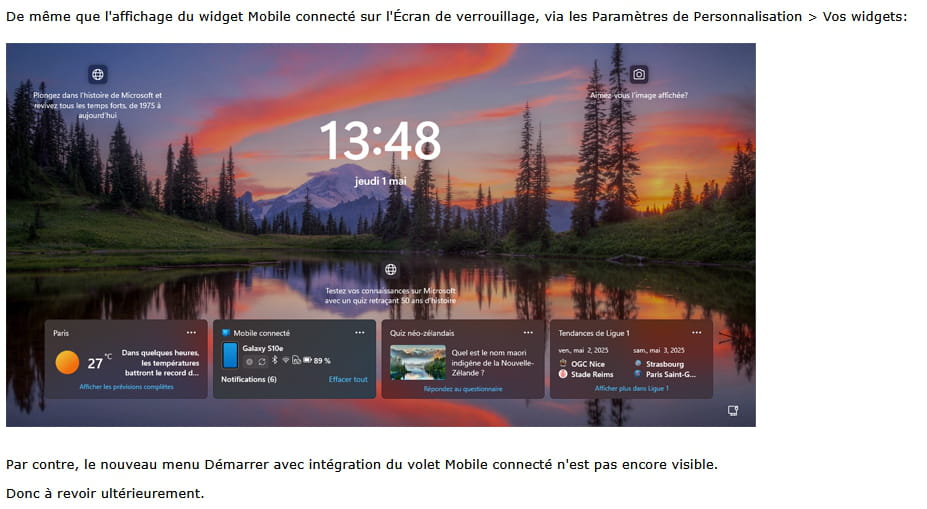
However, the new Start menu with integration of the connected mobile panel is not yet visible.
Yet the connected mobile feature is present on the lock screen. (Widget).
What good does it serve since we log in for those who have a password?
Just a gadget, useless in my opinion, the option is supposed to be available on the PC after the update.
But with images to support, the option is not available, hence my disappointment (message 12).
Worse than that:
The new layout of the Start menu is not even available across all Insider Channels.
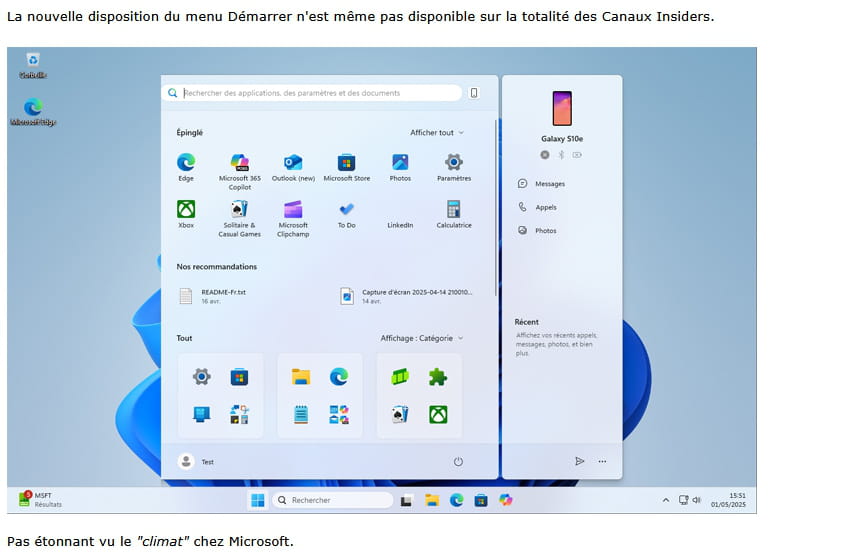
To remember:
Not surprising given the "climate" at Microsoft.
May 13, 2025 Windows Update:
What does the May 13, 2025 Windows Update have in store for us?
Because for now, we are still in the soup, what was promised (even the insider channel=testers) and thus gradually deployed according to Microsoft does not satisfy Windows users.
Hoping this project is not abandoned, which sometimes happens when Microsoft throws in the towel to the detriment of its users.
This useful option with minimal effort deserves to be operational.
In summary, it will mean fewer clicks, so little effort but a lot of comfort.

To be continued...
Oops! I forgot a line for those of you who wish to manually update the Microsoft Store (I recommend the manual method to always stay up to date) after a Windows update.
Let me recap the procedure:
Open the Windows Store.
It's the icon with a cart on the taskbar.
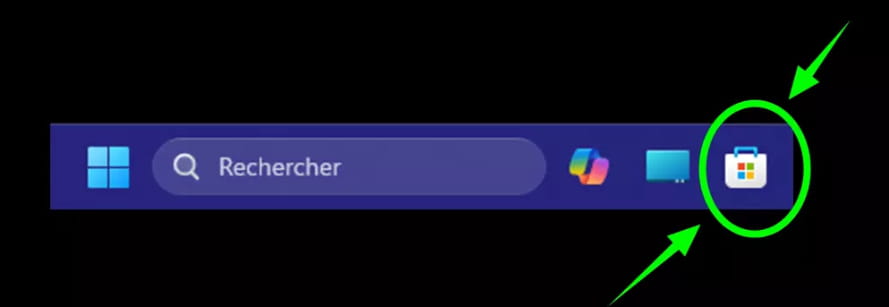
Look for the icons located at the bottom left of the Microsoft Store page.
There are 3 icons.
Click on the cloud icon (with an arrow if present), sometimes you may see a color or a colored dot, this is to draw your attention.... it's because updates are available.
Click on the cloud (if an arrow or a small dot is present, it also indicates that downloads are ready to be installed).
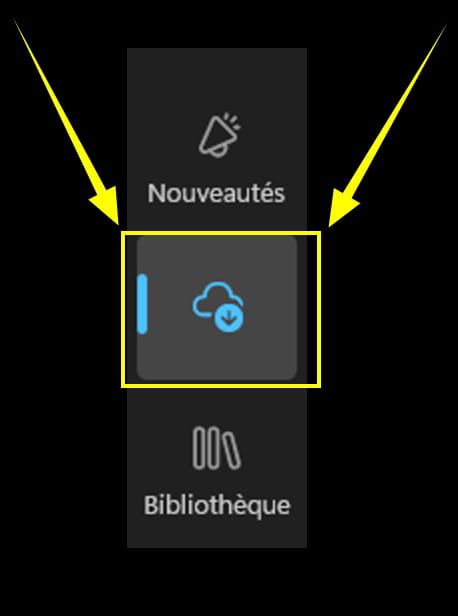
Click on --► Check for updates

Then, don't touch anything else, no need to click on ''check for updates'' again, even if you see nothing.
Be patient.
If you have updates, they will be displayed automatically without any action on your part, and numbers will be shown.
Example with 7 updates that will install automatically:
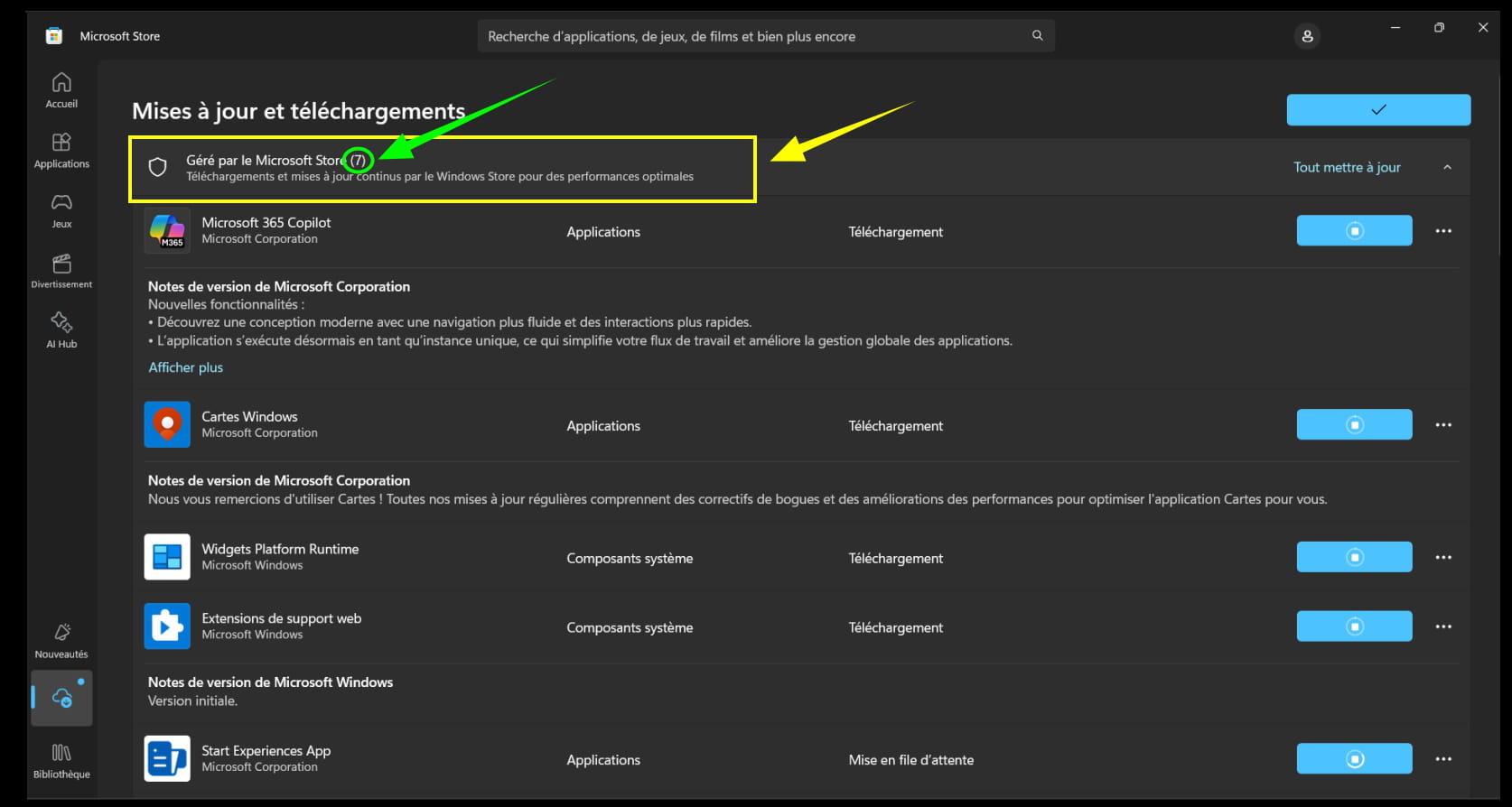
Gradually, the numbers will decrease until there are none.
And we can see in real-time the downloading and installation of updates.
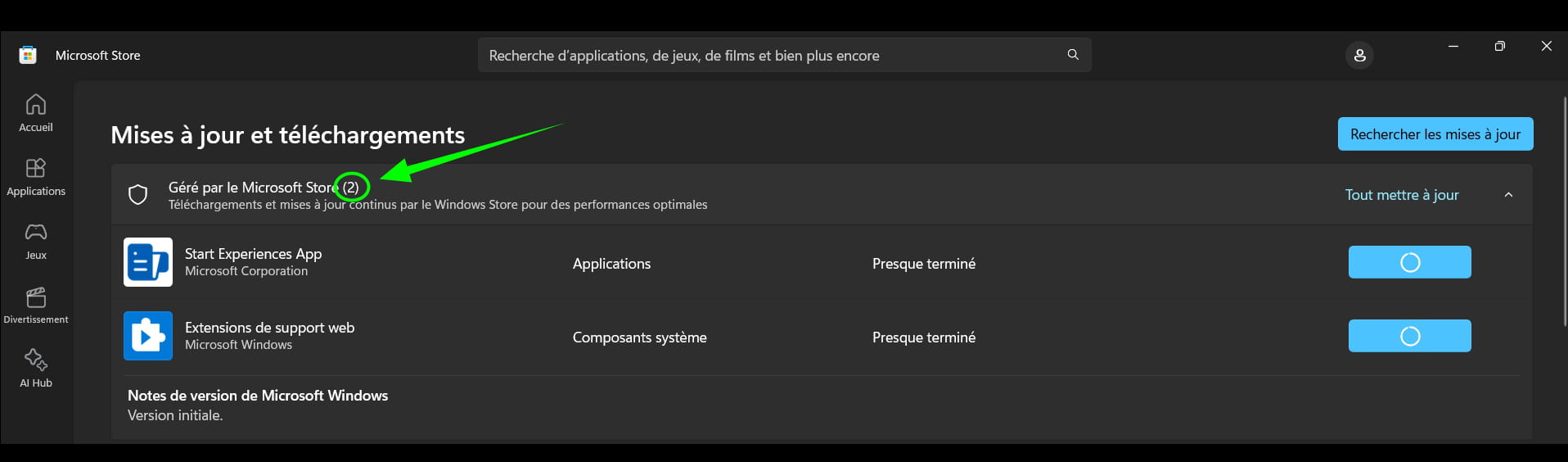
---
Just one more...
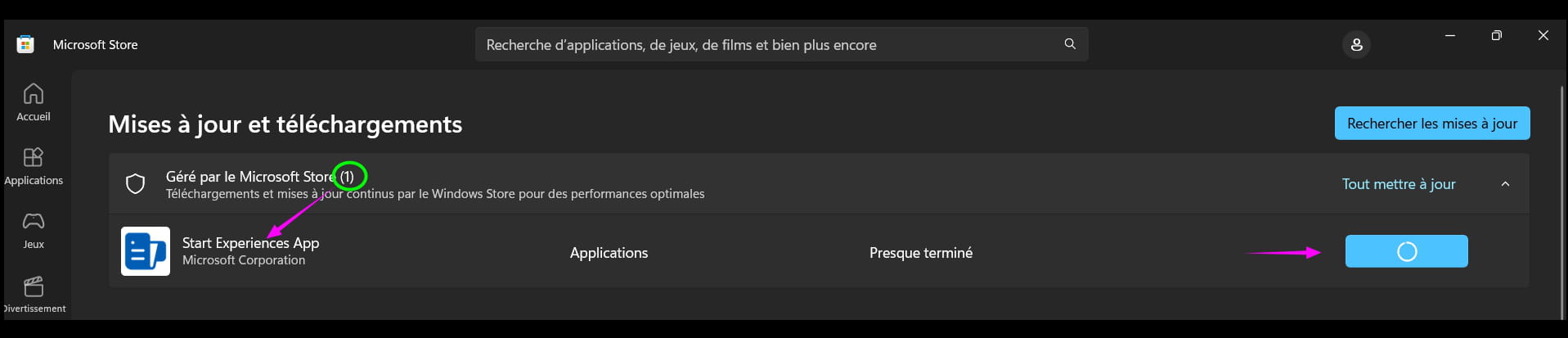
*****
Once finished, you can see for a brief moment (3 seconds at most) the little V e at the top right.

Everything is up to date.
Close the Microsoft Store window.
Click on the cross (X).
No need to restart the PC.
pistouri Posted messages 19011 Registration date Status Contributor Last intervention Ambassadeur 8 723
Hello,
It is with great surprise that I discovered today, without even having received a Windows Update, this famous new Windows 11 Start menu.
Long anticipated, the new Start menu is finally here!

==► Microsoft is set to deeply modify the Start menu of Windows 11
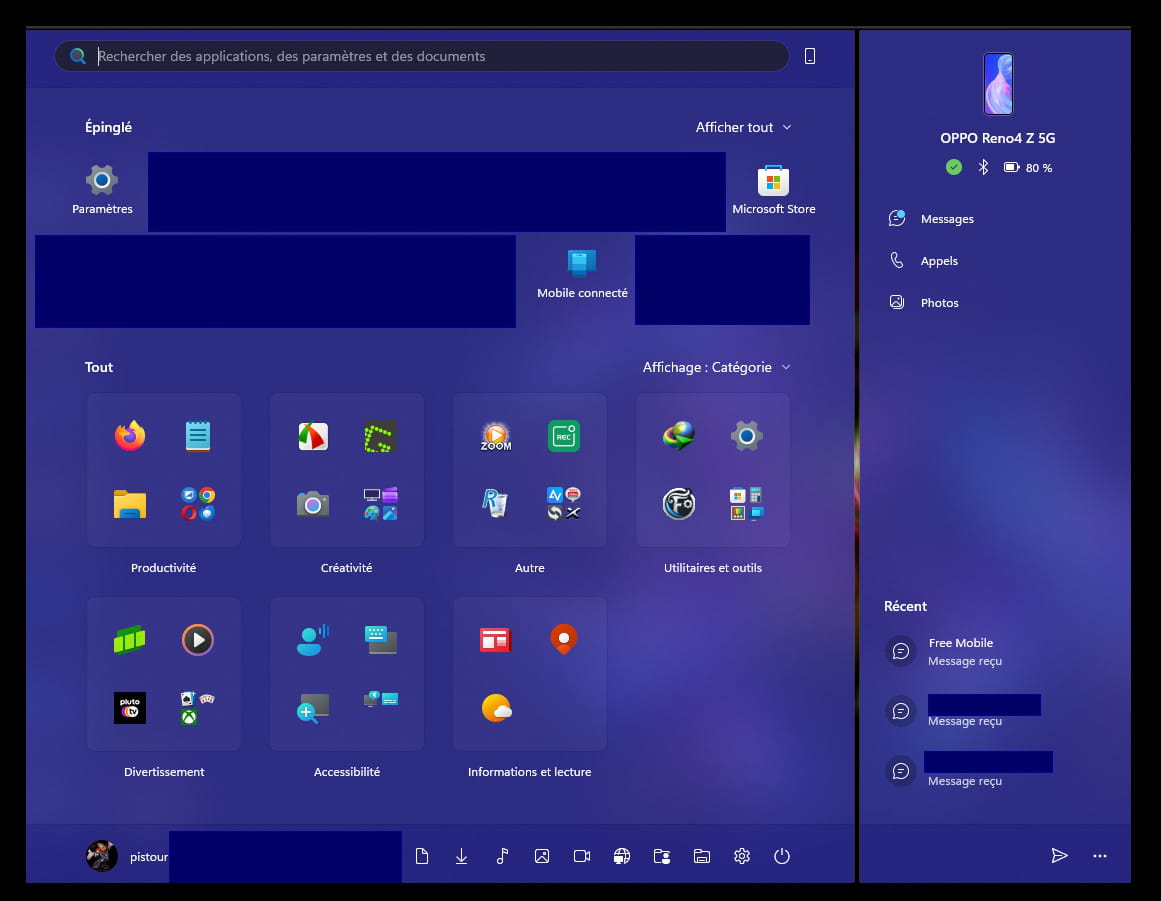
But before using it, especially the option to send files to your smartphone, a few small adjustments are necessary.
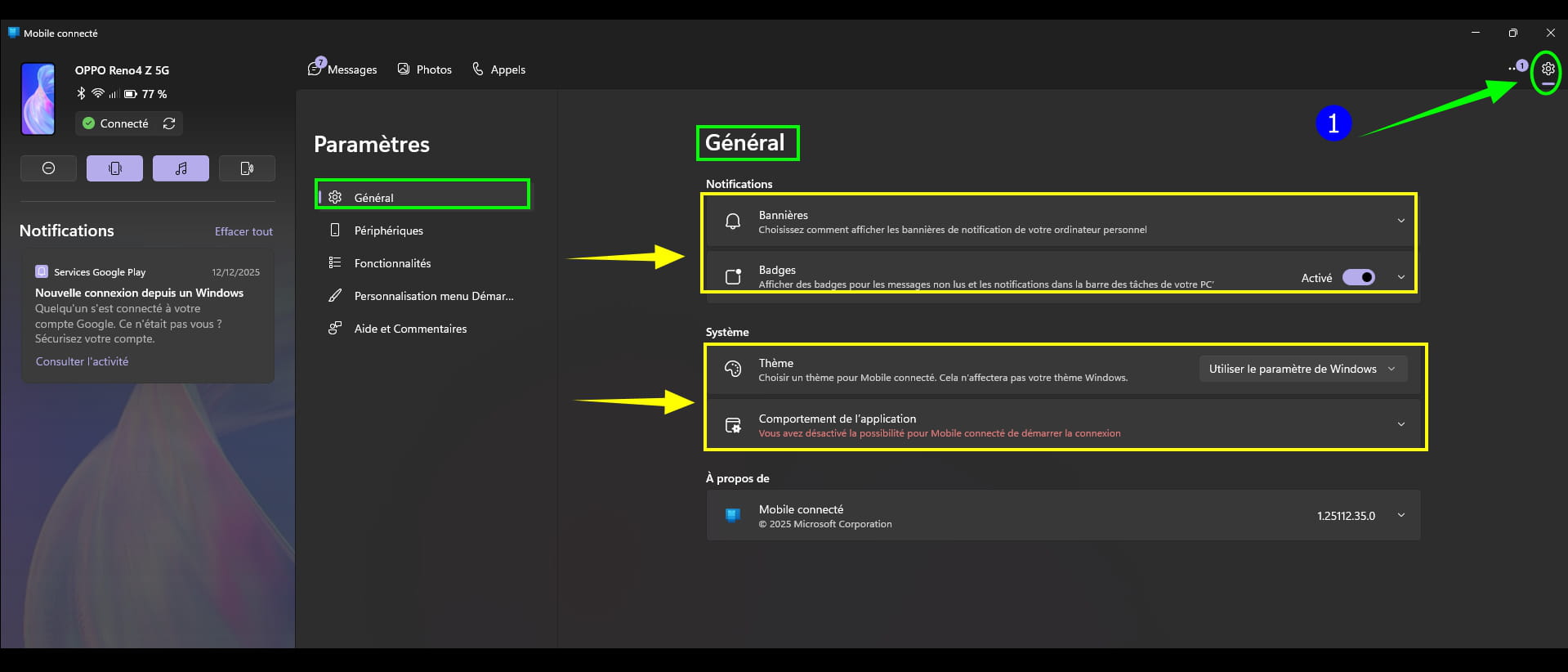
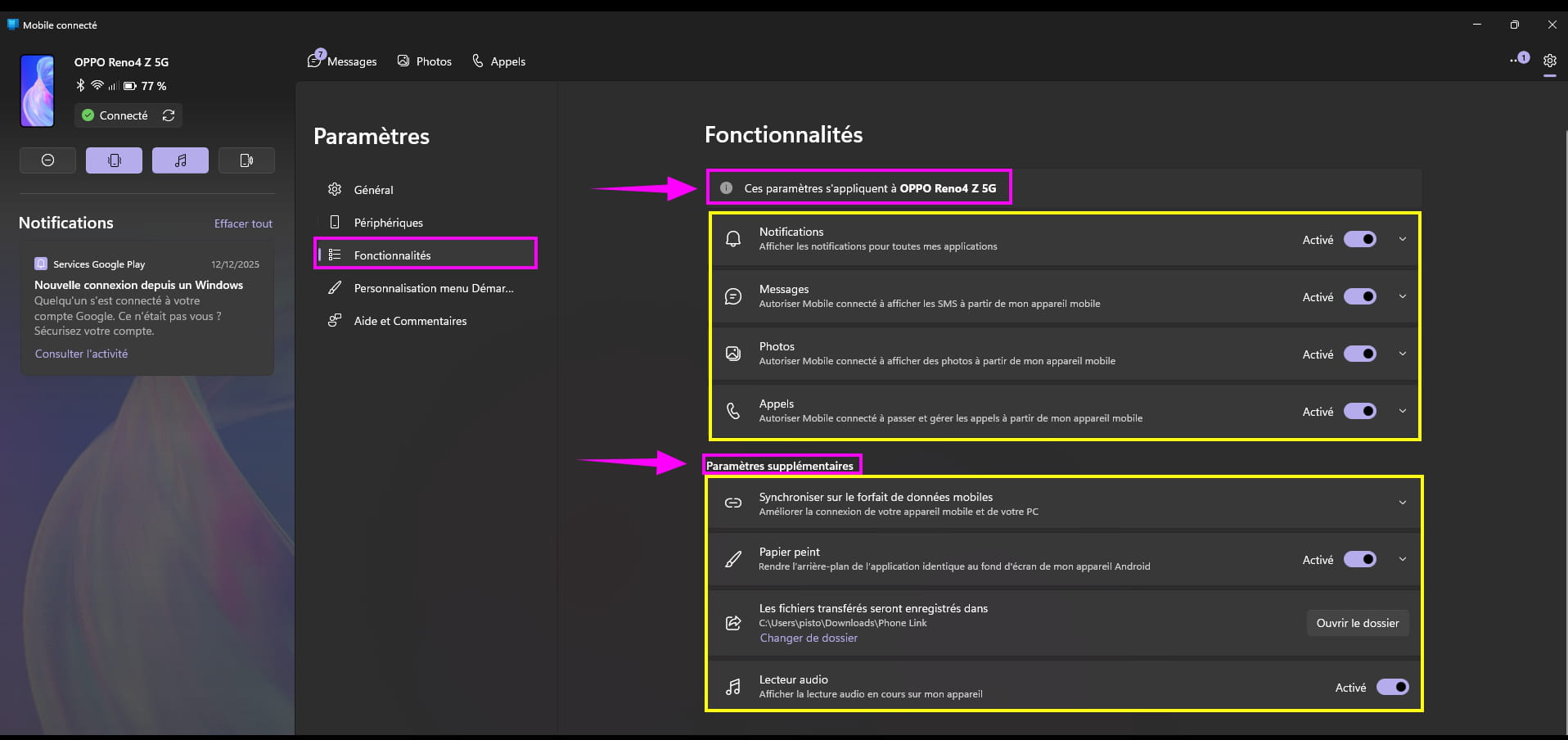
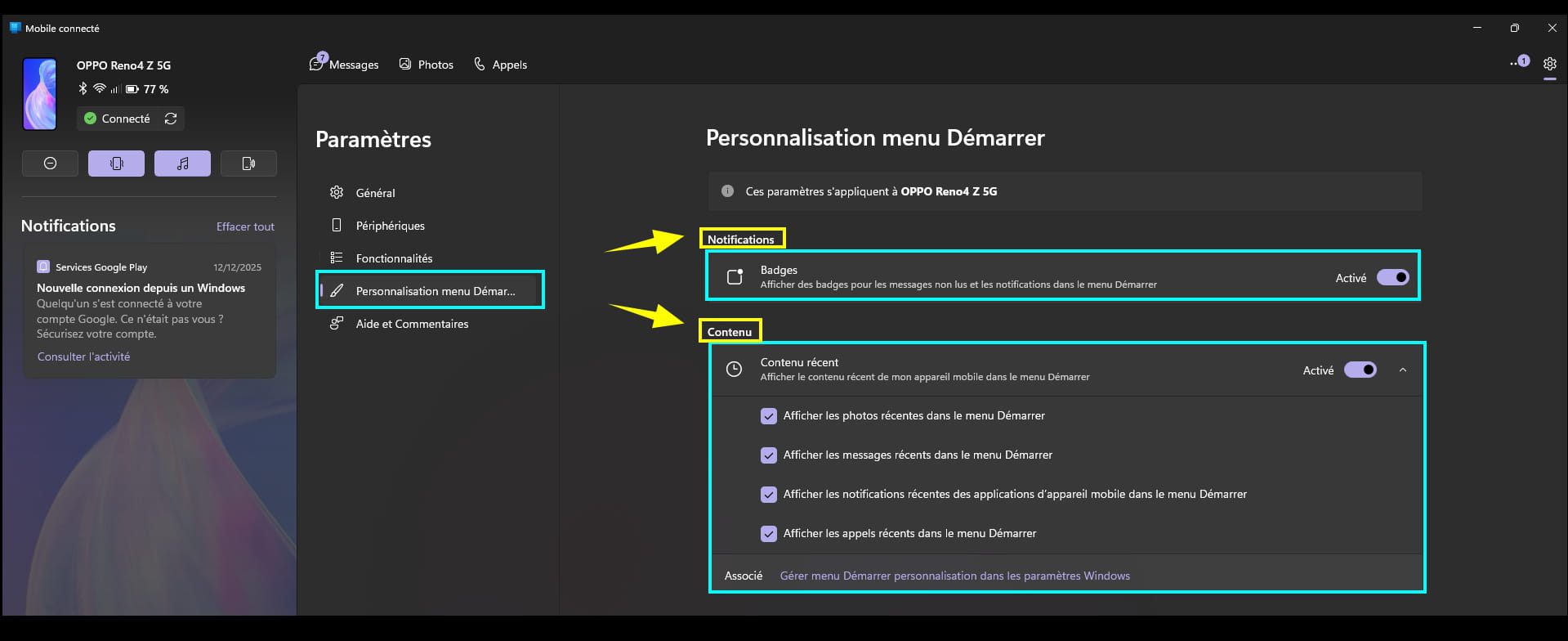
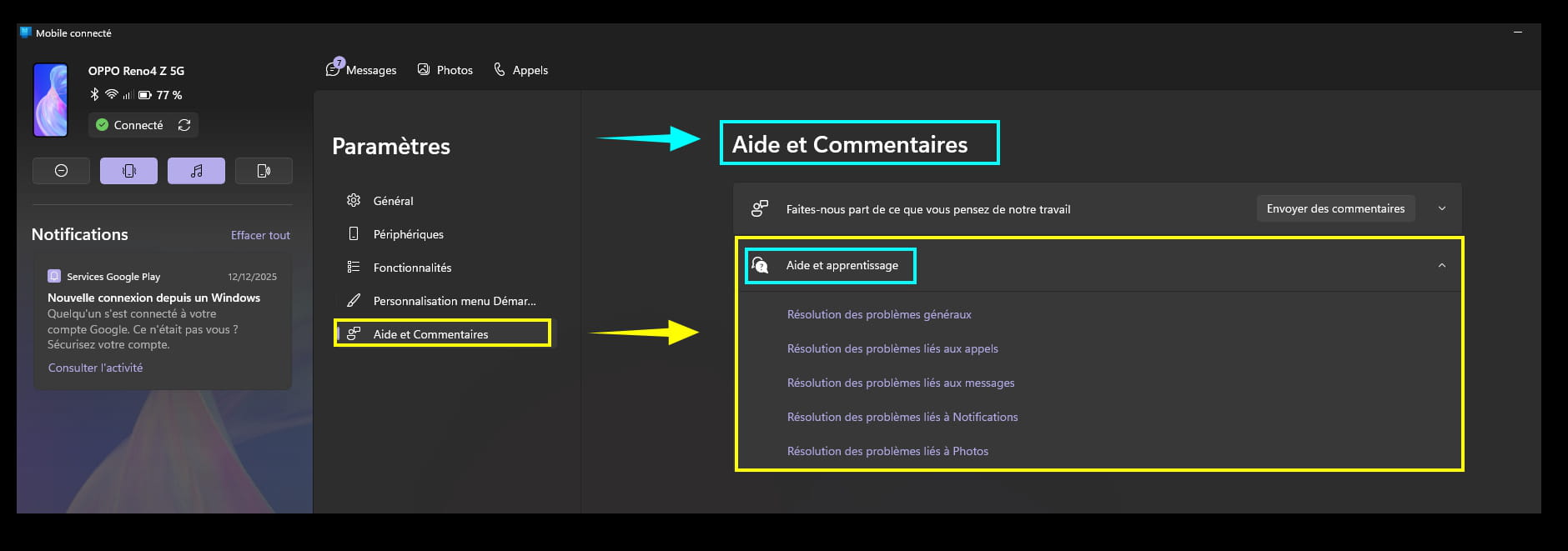
Connected Mobile Settings:
Activating everything is the simplest; on my side, I have disabled Connected Mobile at startup.
Click on the gear icon in Connected Mobile located at the top right.
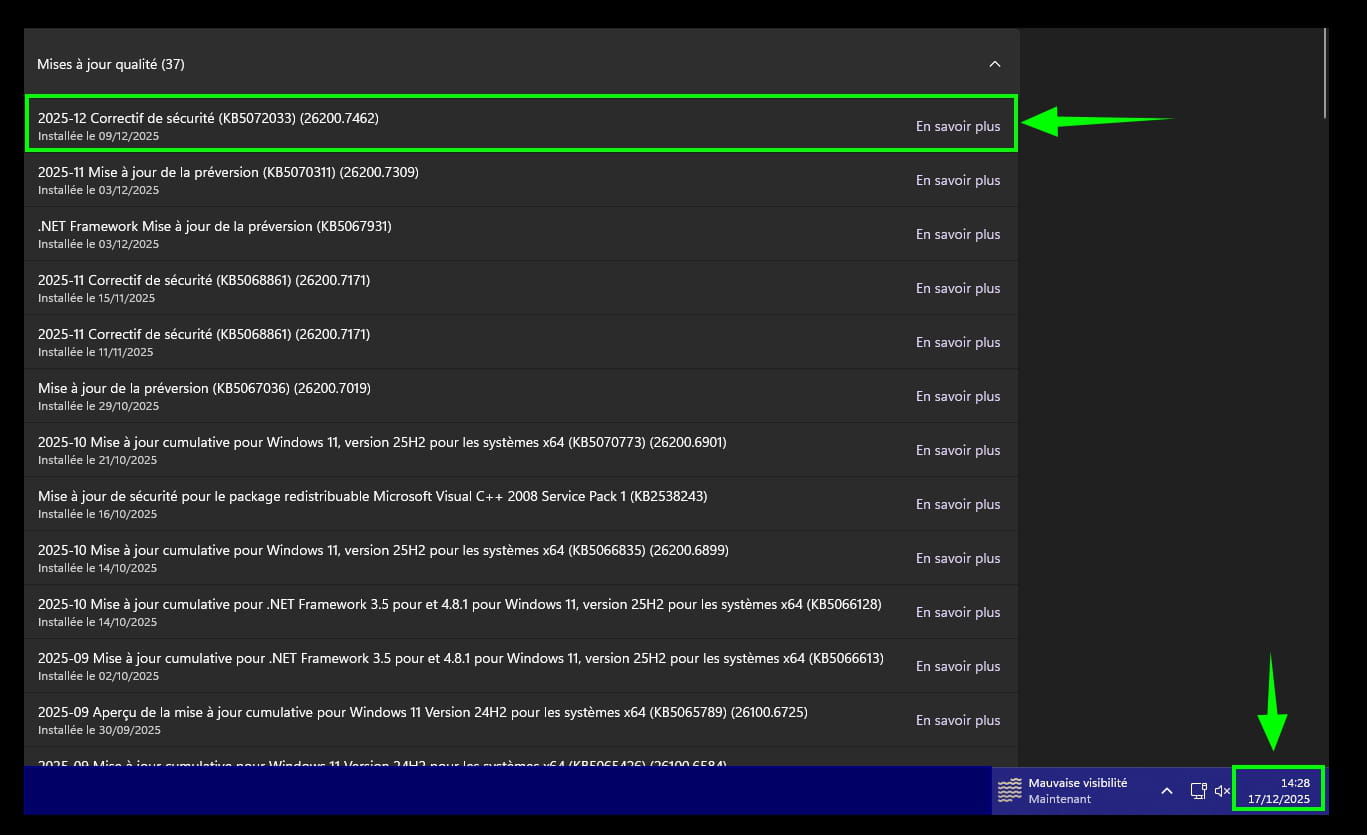
The last update of Windows Update was released on December 9, 2025.
And yet the new Start menu appeared like a magic wand, even though Microsoft is gradually rolling it out on W11 and W10.
Bluetooth, mobile devices settings:
Open Settings on W11 --► Bluetooth, devices settings:
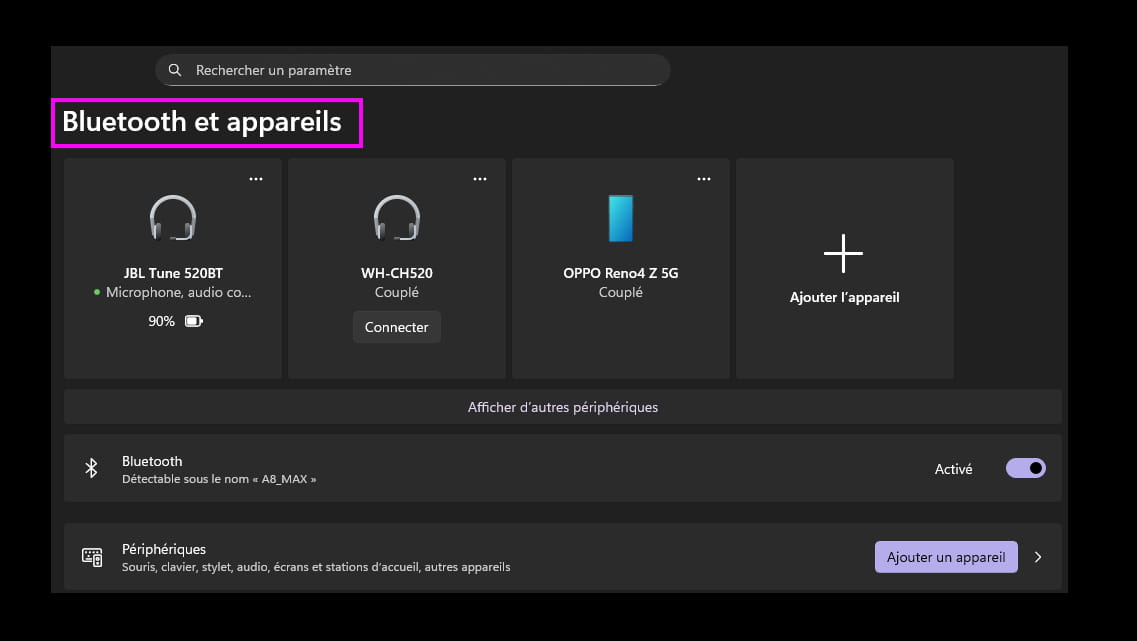
Here, everything can be activated if desired:
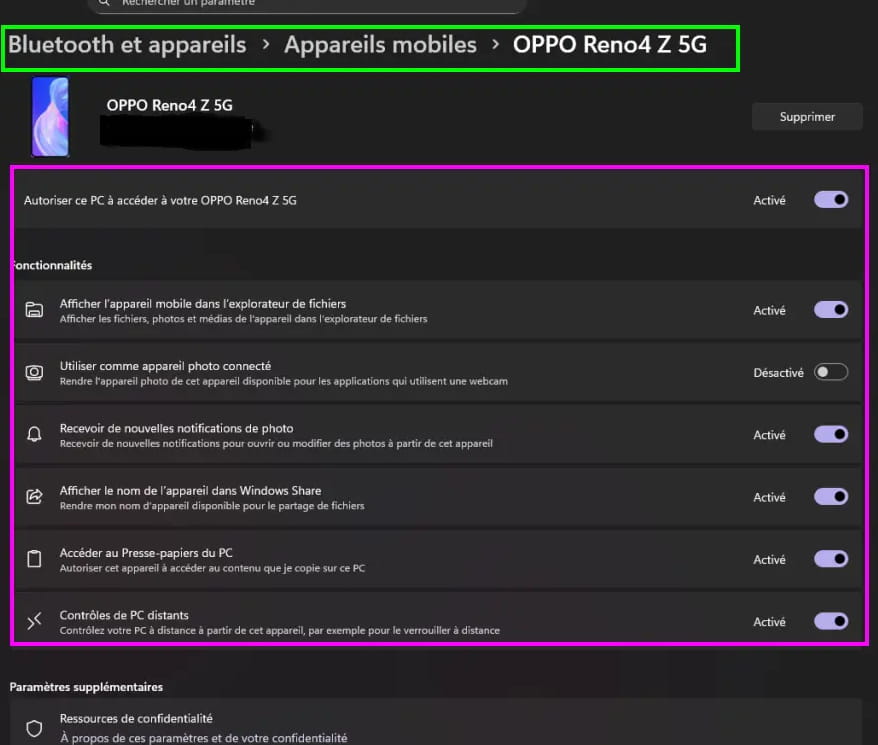
Once the settings are done, it's time to test the new Start menu.
Transfer a file to your smartphone:
Open the Start menu (Windows logo on the left on the taskbar).
Or press the Windows logo on the keyboard (similar more or less on the left side).
Click on the small arrow --► ''Send files''.
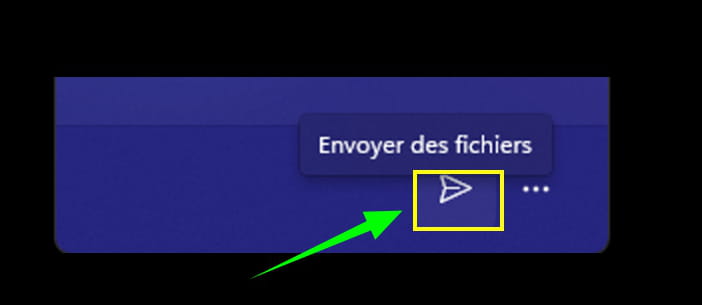
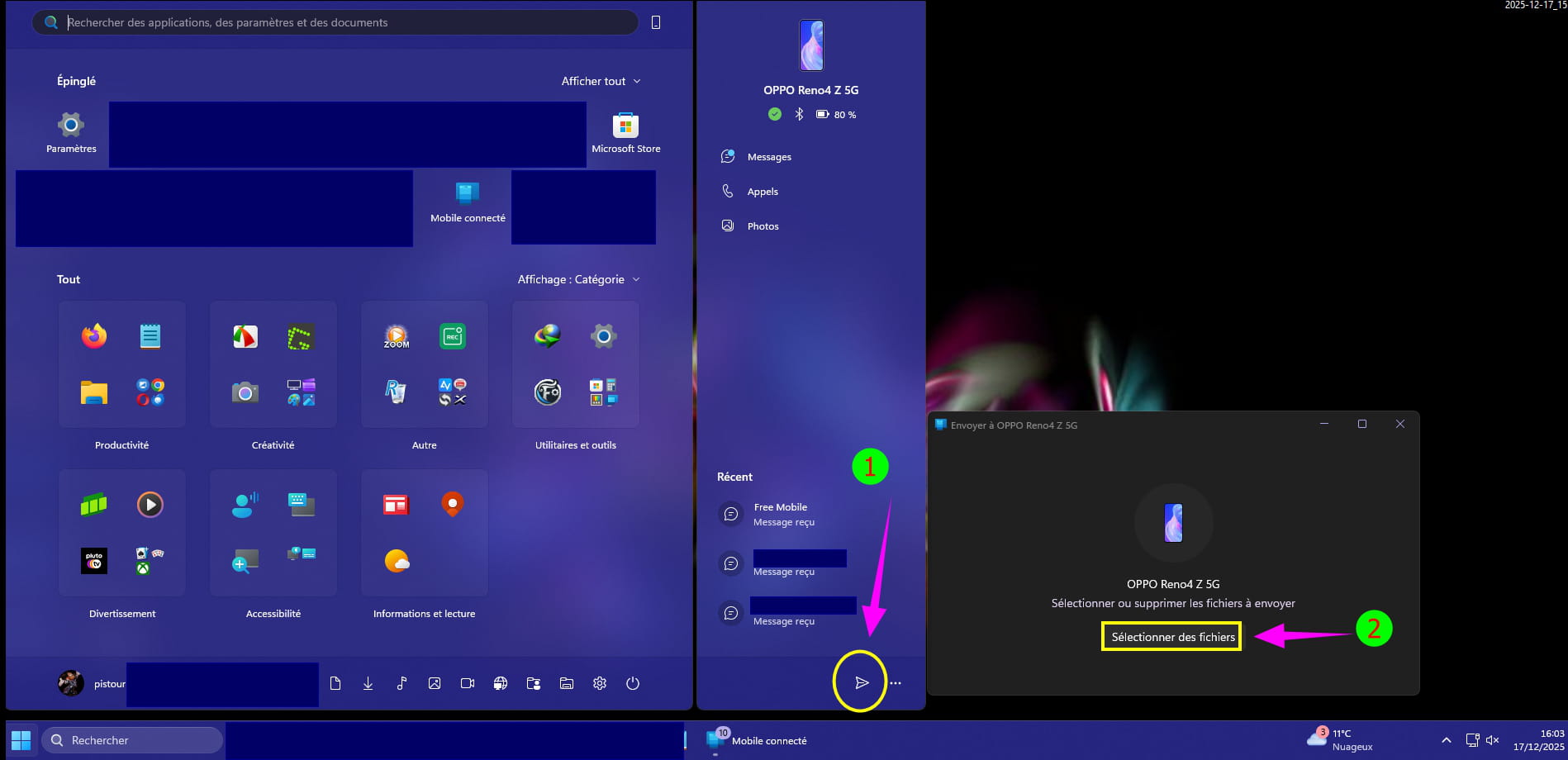
If it’s the wrong file, select it again to delete it:
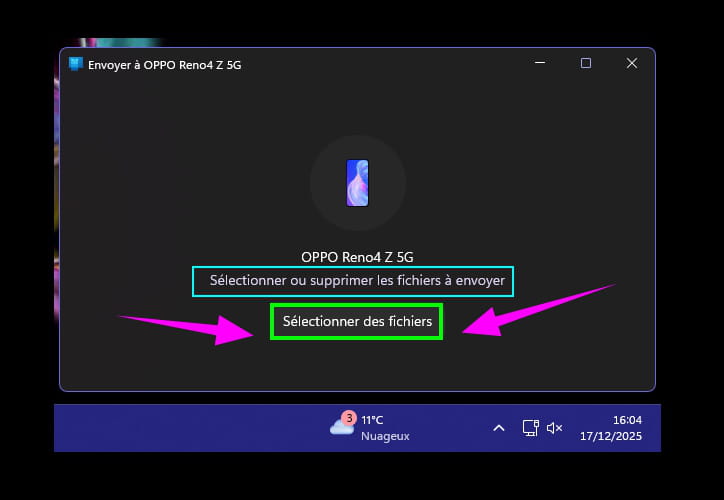
The explorer opens; you just have to go to the desired path (Desktop, pictures, documents, music....).
Click on the document or other choice to send to the smartphone.
Where is the file transferred to the smartphone?:
Smartphones have a file manager.
Go to it to find the transferred file.
Example:
I transferred a PDF (local newspaper) to read later or keep a record.
It can be found in documents in the file manager, being a document.
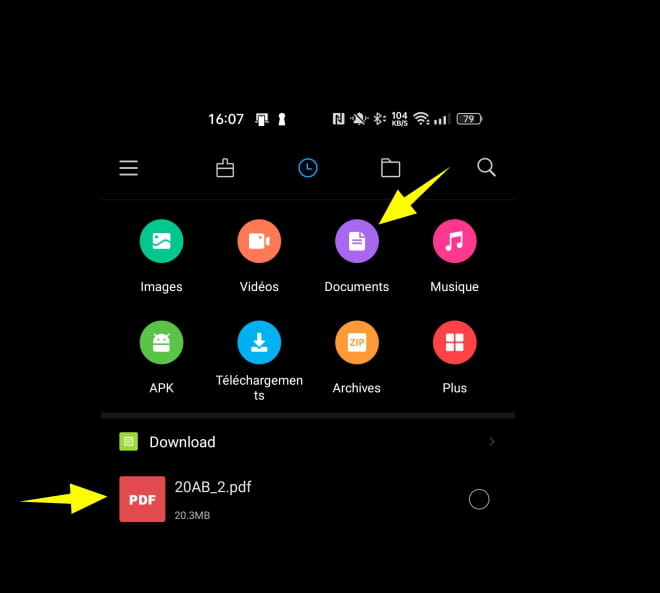
The smartphone explorer (the most recent ones in principle) will display all available formats under the Documents section.
You will find the transferred doc at the top of the list or the first line.
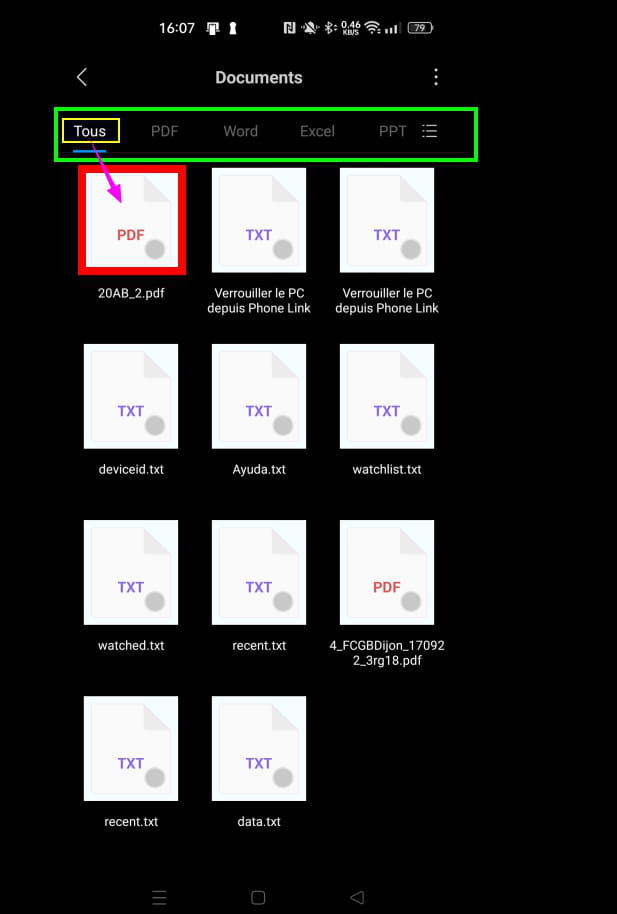
Knowing that this is a PDF file in the example, the PDF section being present, just select it.
The PDF is visible:
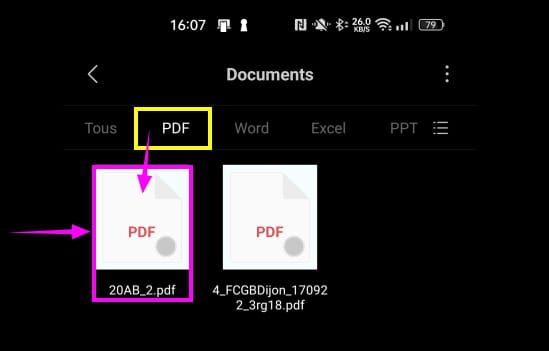
Just launch it with, for example, Adobe Acrobat available in the play store.
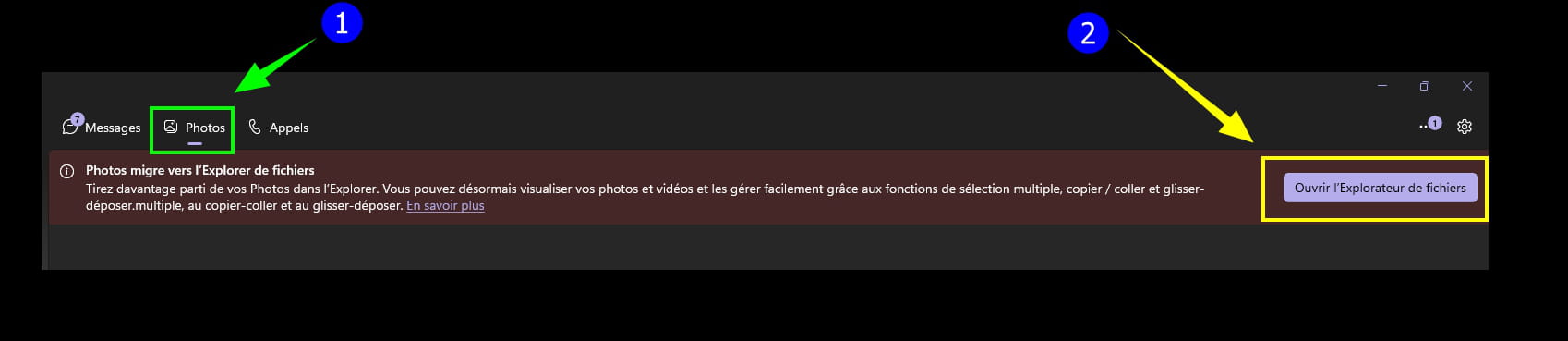
See and find your smartphone photos on PC W11:
Open (if closed) Connected Mobile.
Click on --► Photos
Smartphone photos are visible.
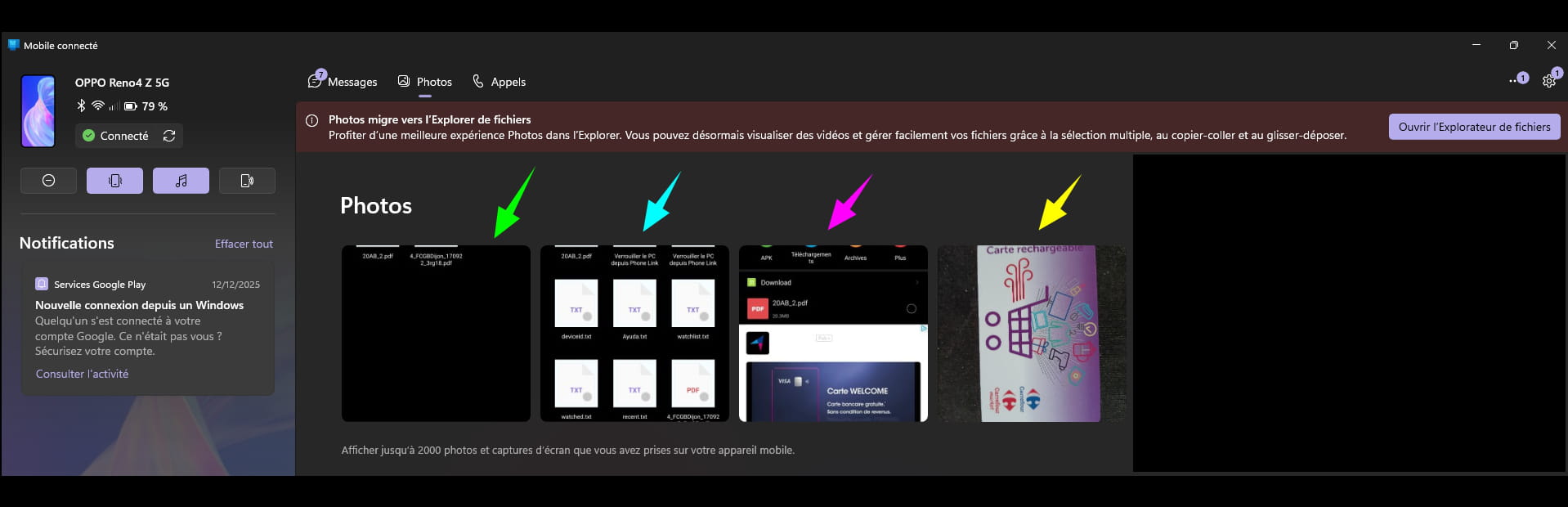
Click on --► Open file explorer
Folder/path ''Camera'' in this example that opens in Windows Explorer:
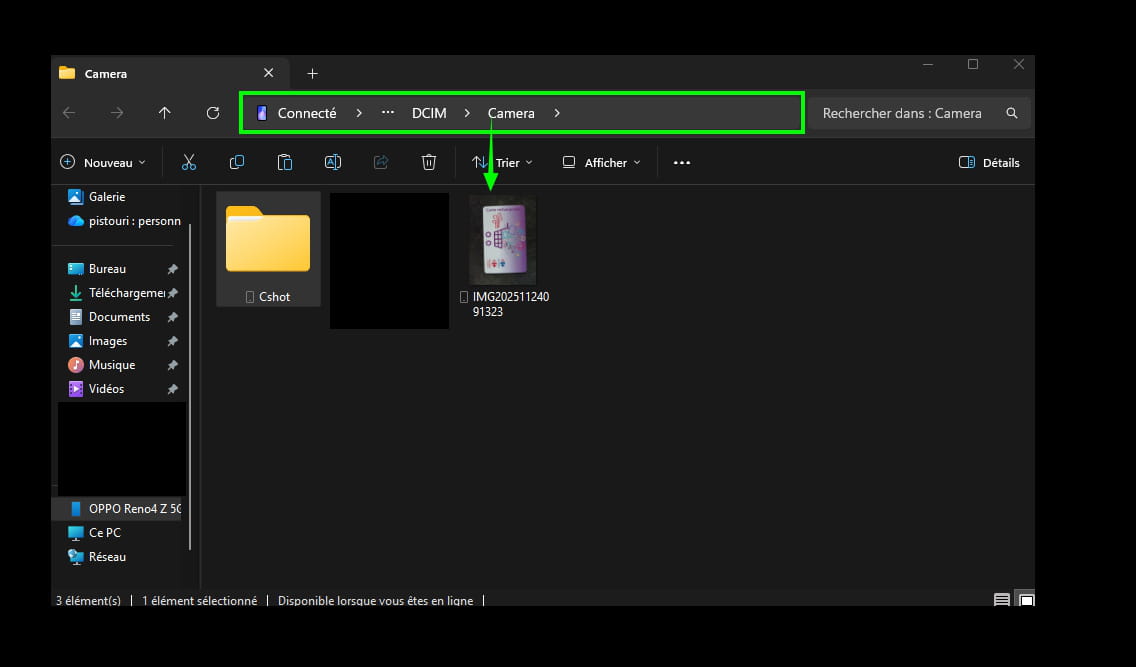
Avoid opening the ''yellow folder'' if possible.
This is certainly the most interesting part for transferring an image from the smartphone to the W11 and W10 PC.
Right-click on the image to be transferred, then choose its destination:
► Open with (only to view the image).
► Copy (copy/paste).
► Save as... ► (Image folder for example).
► Share ► By email for example.
► Delete ► Delete the image.
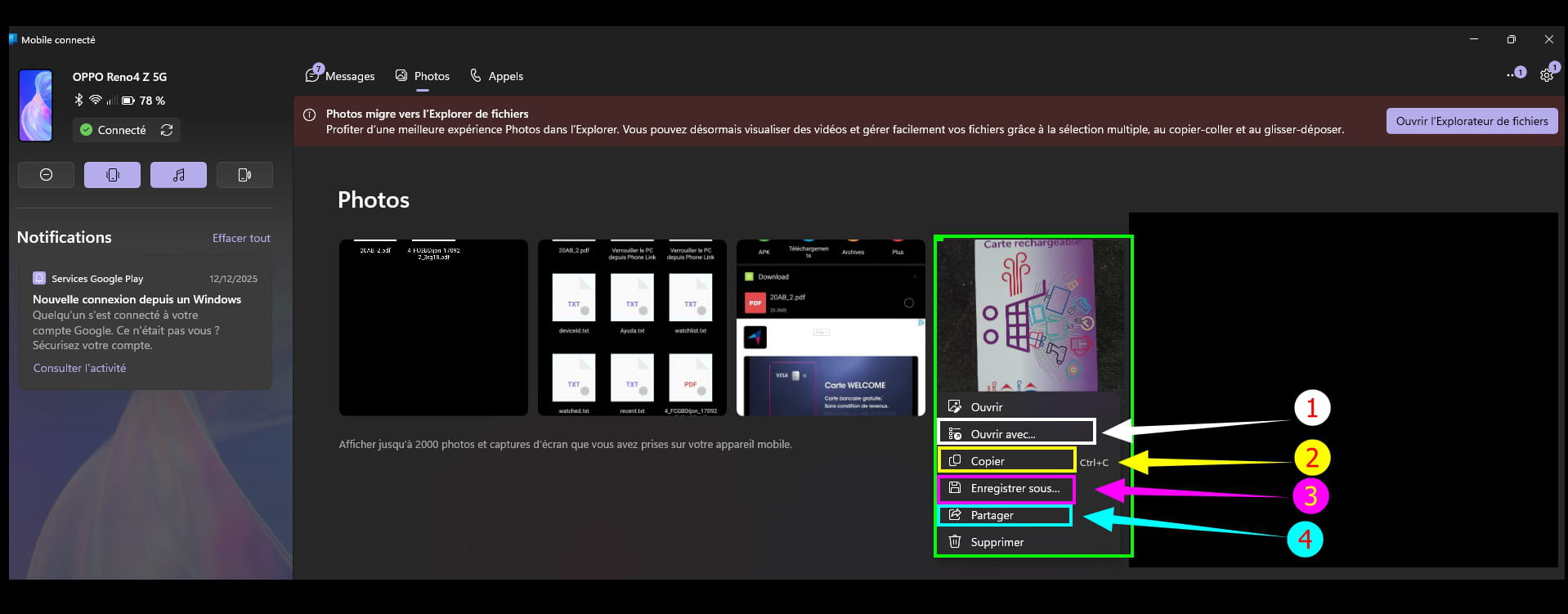
This is quick.
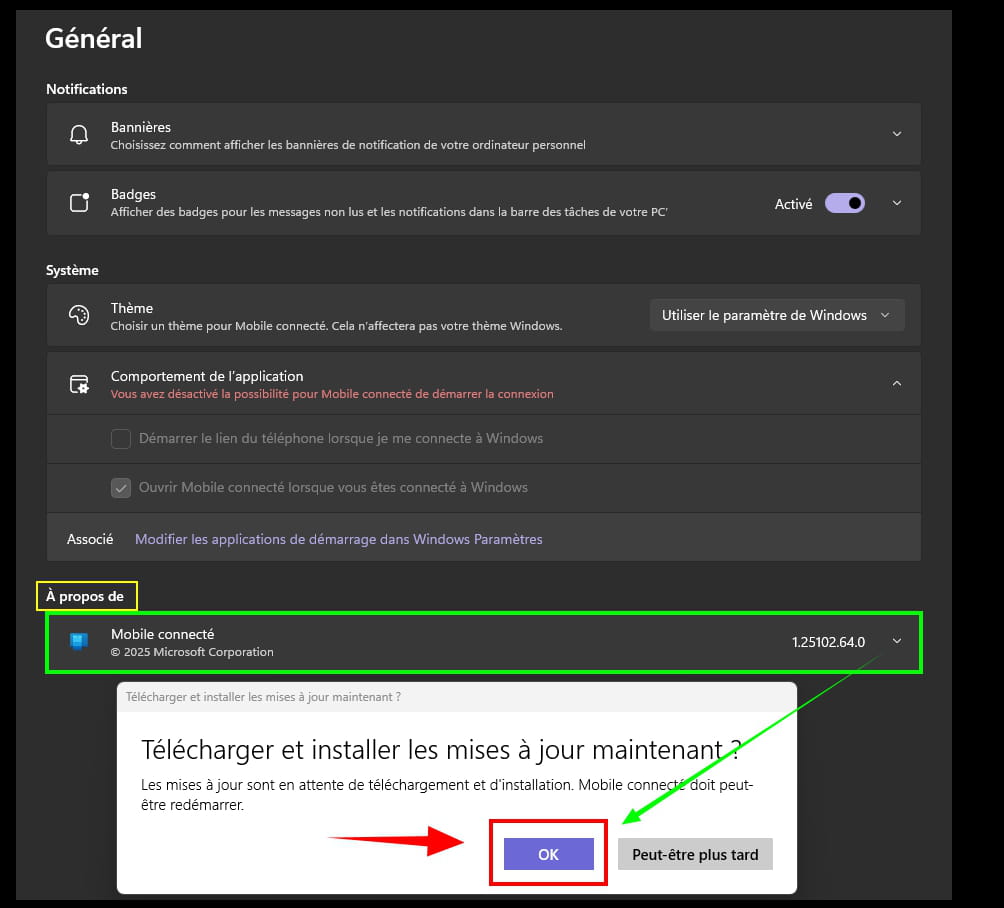
Update Connected Mobile from its application:
Open Connected Mobile.
► Settings (it's the gear icon at the top right)
► General
► Section --► About
Click on --► Check for updates
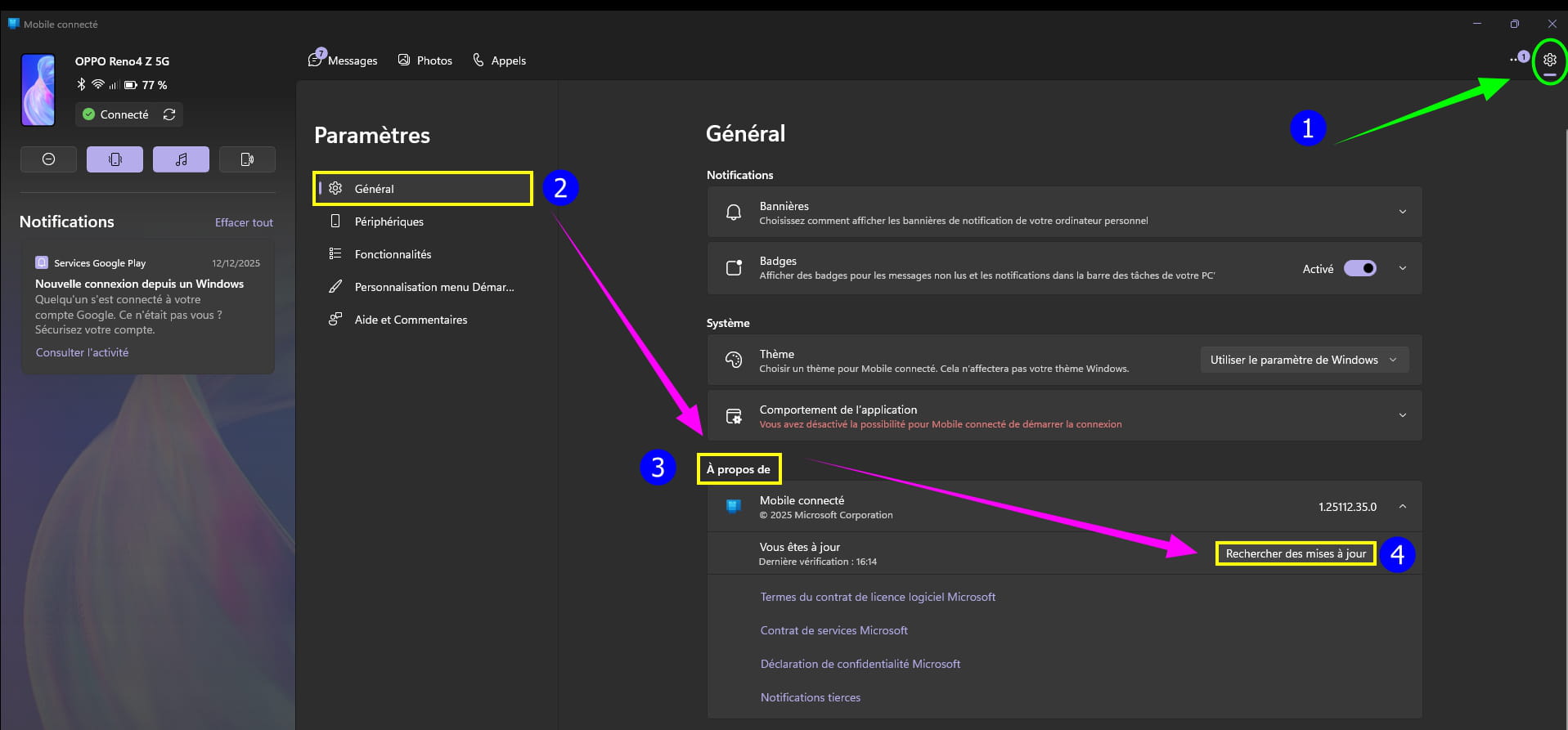
In the next dialog box, click on --► Download and install updates now?
''Maybe later'', avoid clicking below in order to get the latest patches, an improvement for example, or a new section.
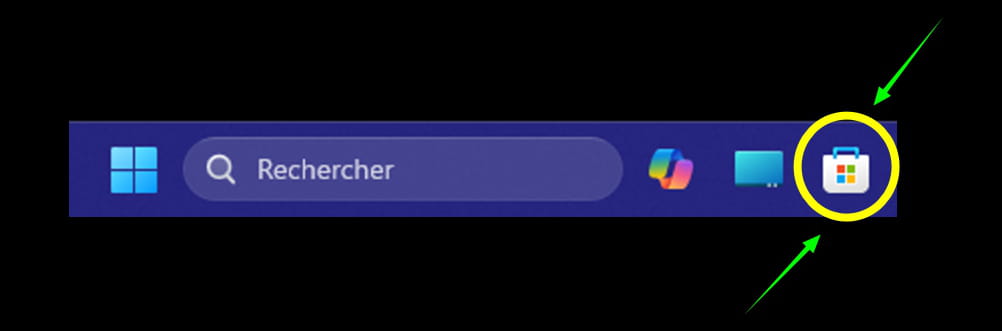
Update Connected Mobile in the Microsoft Store:
And even though this is automatic, a little check to have the component up to date.
Microsoft Store, it's the small basket present on the taskbar.
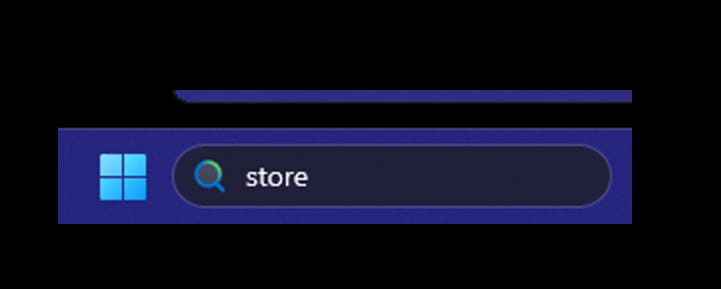
If absent, type in the ''search field'' on the taskbar --► store
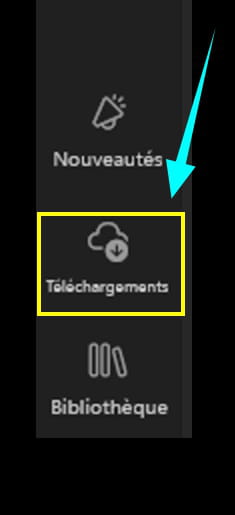
Click on --► Downloads
This is at the bottom left.
Click at the top right on --► Check for updates
And wait, do not click anymore; the updates will happen automatically.
Possibly an update for Connected Mobile (component).
Example:

Close the Microsoft Store when done (a small V briefly appears to indicate this).
Info:
Microsoft seems to have planned soon (W10 and W11) that updates from the Microsoft Store will occur in Windows Update (to be confirmed, but it's looking good according to the latest news).
I do not yet have the new Start menu W11 and W10:
Logically deployed by Microsoft over time with or without updates depending on the countries or perhaps related to more or less recent/older PCs.
Some will be luckier than others.
The ideal would be for W10 and W11 to have this new Start menu available for all, even if forcefully; Microsoft is known to impose its system at the expense of users.
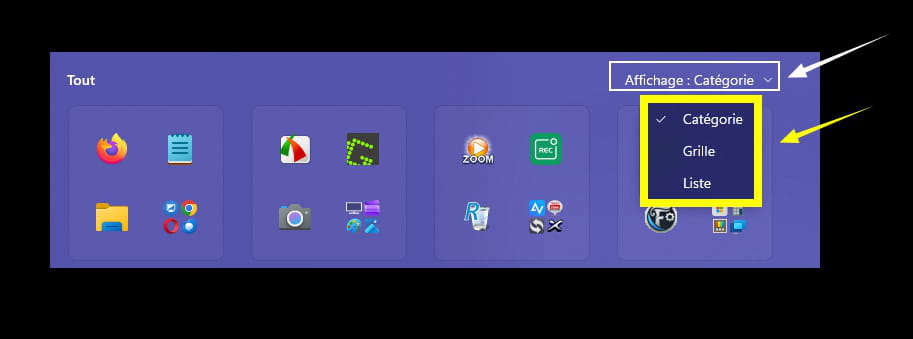
Without reflecting on the publication from CCM, and this is not the subject concerning the inquiry raised, it is still possible to change the layout.
► Category
► Grid
► List
Hoping that everyone takes advantage of this new Start menu.
And questions will surely arise on this topic.
**Year-end requires:

pistouri Posted messages 19011 Registration date Status Contributor Last intervention Ambassadeur 8 723
Hello everyone,
1 month later:
Received on another one of my PCs (a fairly recent PC, compatible with W11) the new Start Menu/button, it's a bit surprising because of the appearance, but it's finally here!
In the image below, the Mobile connected app is not installed (link with Windows on the smartphone), that's the little extra outside of the display which won't satisfy all users.
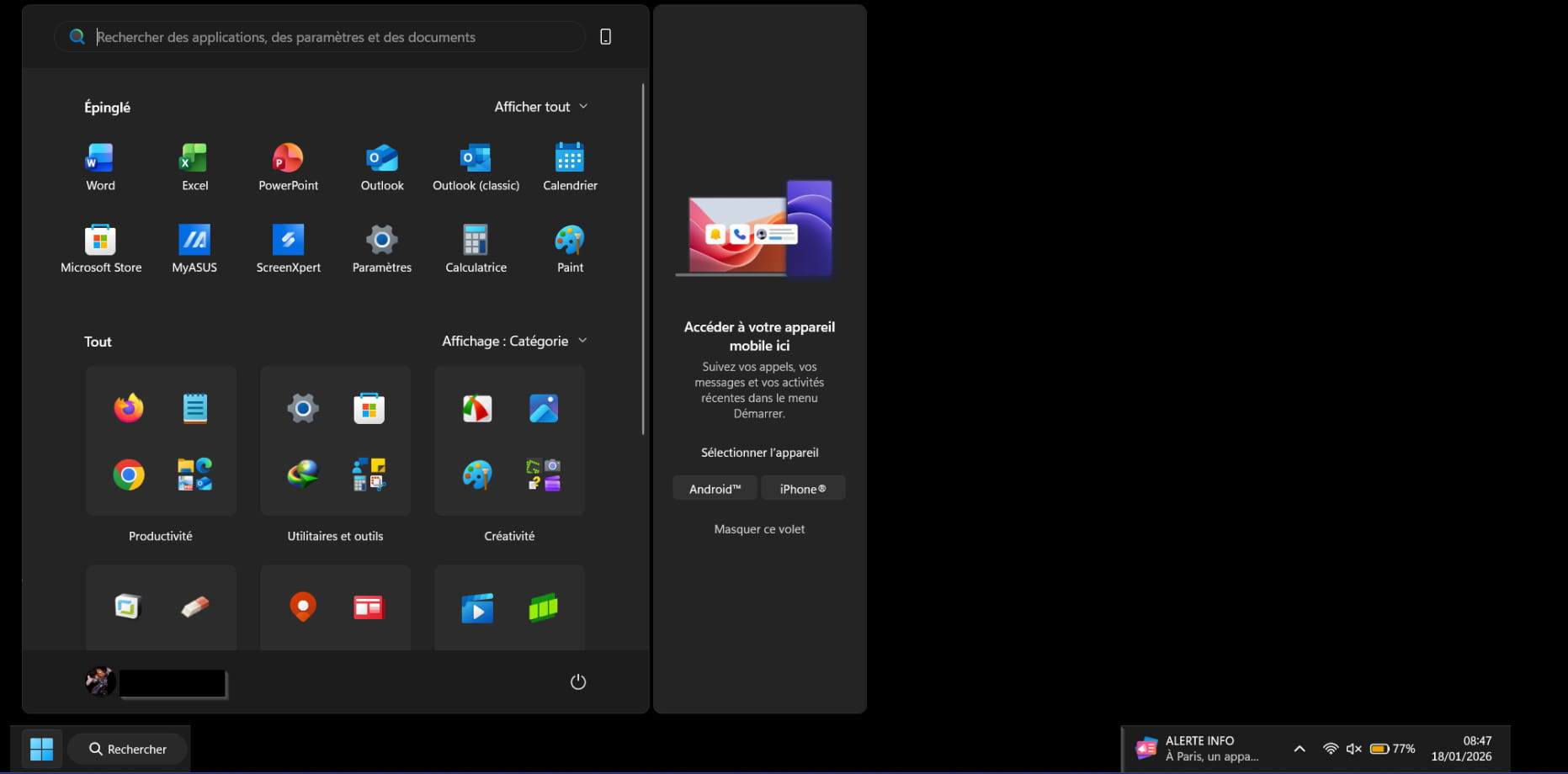
So Microsoft is gradually rolling out this new Start Menu/button, maybe depending on the PC configurations.
And perhaps Microsoft will know how to accelerate the process, not necessarily with Windows Update updates.
I would be curious to know if this new Start button will be present on non-compatible PCs, to be continued...
It is possible to disable the new button.
And to activate it.
To try:
Remove the new Start menu: (for those who are unhappy).
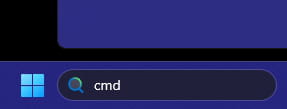
In the search box on the taskbar (or the magnifying glass) type ==►CMD
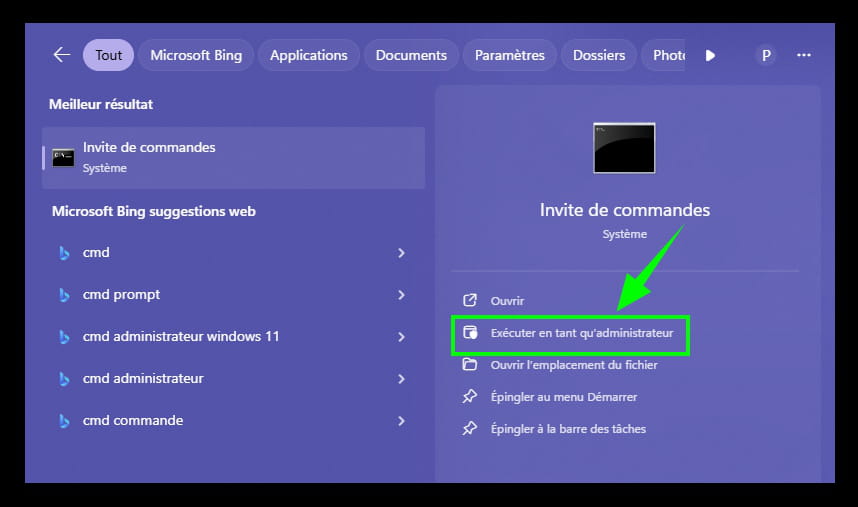
Click on ==►Run as administrator
Copy/paste (with right-click) this command:
reg add "HKCU\Software\Microsoft\Windows\CurrentVersion\Policies\Explorer" /v NoStartMenuMorePrograms /t REG_DWORD /d 1 /f && taskkill /f /im explorer.exe && start explorer.exe
Message==►The operation was successful

Restart the PC to check if the effect is not immediate.
***
To go back: (To have the new Start button for those who want it).
In the search box on the taskbar (or the magnifying glass) type ==►CMD
Click on ==►Run as administrator
Copy/paste (with right-click) this command:
reg add "HKCU\Software\Microsoft\Windows\CurrentVersion\Policies\Explorer" /v NoStartMenuMorePrograms /t REG_DWORD /d 0 /f && taskkill /f /im explorer.exe && start explorer.exe
Message==►The operation was successful
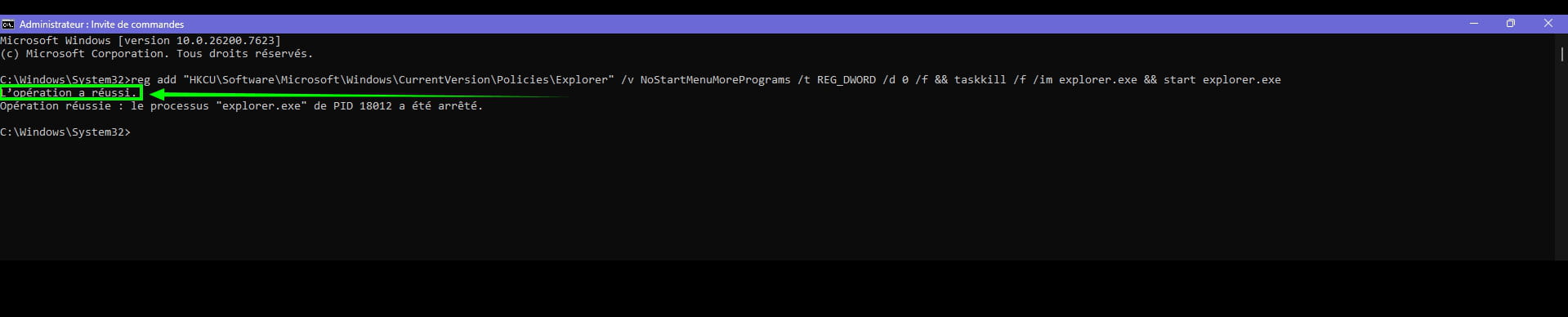
Restart the PC to check if the effect is immediate
Sometimes, there is no need to restart the PC, or Windows Explorer, it is taken into account directly depending on the PCs.
.
P.S:
This will not work every time, depending on the PC configurations, there is no need to insist, but sometimes after 2 or 3 restarts of the PC it can work :-)
In summary:
Everything comes to those who wait
Latest Discussions -
Color of visited links in firefox 153
at 00:30 -
How to tell if i can upgrade the ram on my pc?
on 14 Jul -
Windows security
on 14 Jul -
E.tre456.worm.windows
on 14 Jul -
Broken logitech g915 keyboard key (original part)
on 14 Jul -
Computer stuck at boot menu on startup page
on 14 Jul -
Texture issues in enshrouded
on 14 Jul -
Printer uninstalled
on 14 Jul -
Pc audio connection: jack ports, hi-fi chain
on 14 Jul -
Recording and reading issue for jpg files
on 14 Jul
Other languages
-

