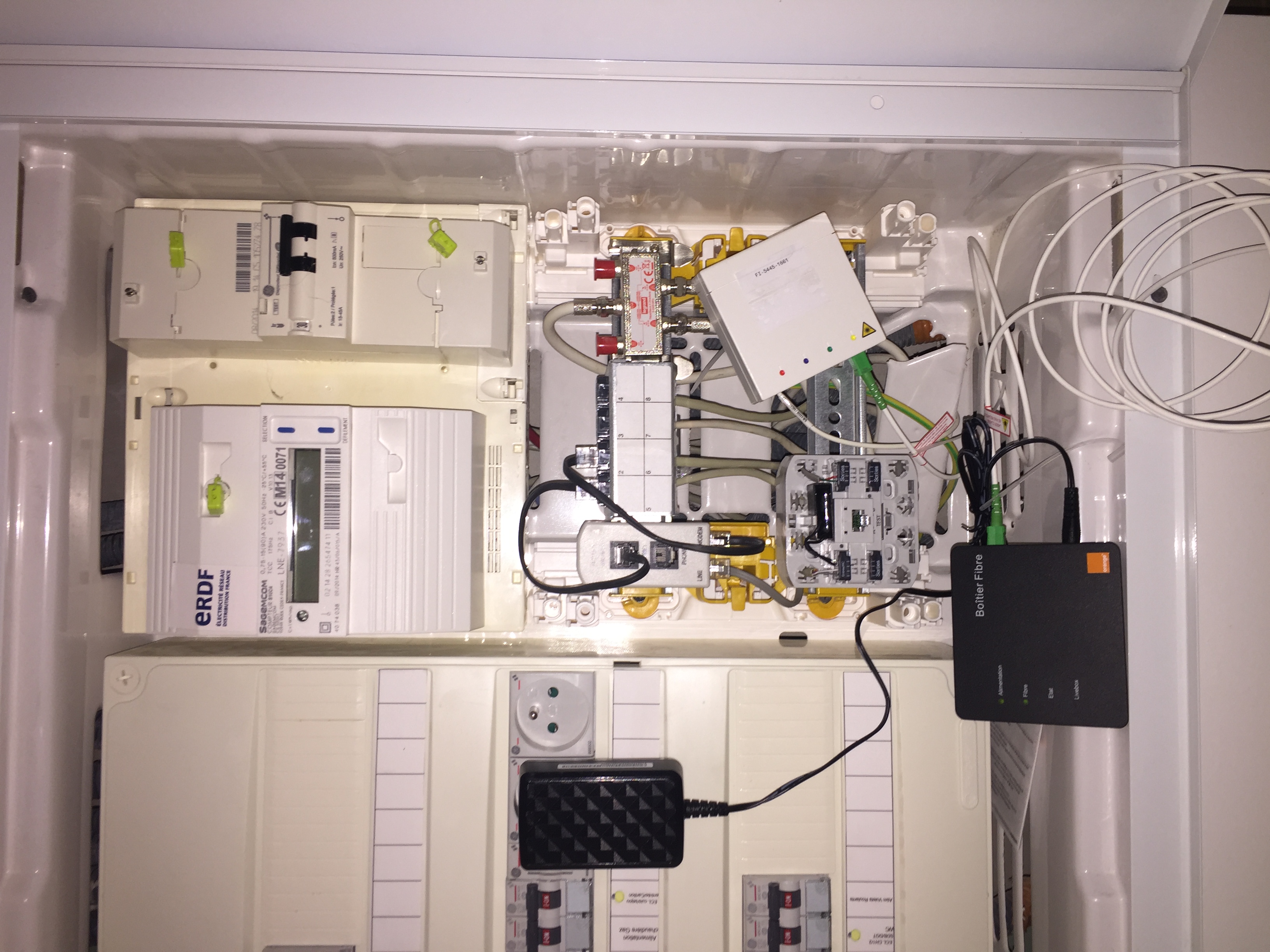
PTT278 Wiring on Telecom Cabinet
Solvedbrupala Posted messages 111196 Registration date Status Member Last intervention -
Hello,
I have a PTT278 cable that I need to connect to the DTI box of my telecom grade 2 cabinet.
I have two RJ45 sockets in the living room for which I only need internet (PC + TV via decoder).
My question: how do I correctly connect the PTT278 to the DTI and is it relevant given that I only use the internet for Netflix?
I gathered from browsing forums that this type of cable isn’t great for internet, except that my provider informed me that fiber is coming in a few months.
Thank you in advance for your insight.
9 answers
-
Hello,
Where is your box and how is it connected to the DTI?
If you want to connect a PC with your cable, it doesn't go through the DTI; the DTI is only for the phone line and ADSL connection, not for the distribution of the Ethernet network in the house.
You need to describe your setup to us, for example, with photos of your central unit where the DTI is located.
-
Hello,
are you sure about PTT 278? Isn't it rather 298, since the former hardly exists anymore and has never really been common in residential setups?
The difference is quite significant; PTT is equivalent to cat5 over a few tens of meters while PTT278 is cat3, limited to 10 Mbit/s.
In any case, you shouldn't confuse the DTI (telephone only) and the patch panel (VDI and ethernet 100/1000/10000).
I almost forgot,
it's unrelated to the arrival of fiber, it doesn't replace it.
Sorry JP, I only read the beginning of your response, not the end where I repeat a bit of what you said.
And there you go, there it is ....
But goodness, how annoying are line breaks!! -
Thank you for your responses. I tried to send you photos, even compressed ones, but to no avail.
I understand that I need to connect the RJ45 to the patch panel. First, I want to know how to connect my telephone cable to the DTI.
Brupala, in the absence of a photo, here are the colors of the cable:
White, blue, purple, gray, yellow, orange, brown, and copper (and not pink, which is why I suspect it is PTT278).
I Pee I plan to connect my box directly to the Telecom cabinet in the basement where my gtl is located.
-
OK, your colors are ptt298 (there are several versions of the blue/clear or blue/pink pair), you should always think in twisted pairs, not in wires.
The PTT278 would be the first 7 pairs white/clear blue/clear yellow/clear, brown/clear, black/clear, red/clear, green/clear ... clear refers to the light blue accompanying
Do you have a patch panel or not?

Hello Brupala,
It's good news that it's from the PTT298. It's still impossible to send an image, so I'm sharing the link to the Telecom box I installed.
From what I saw, there are two wires that need to be connected to the DTI, which will then need to be connected to the patch panel, but I wonder which ones.
https://www.leroymerlin.fr/produits/electricite-et-domotique/tableau-electrique-et-disjoncteur/coffret-de-chantier/coffret-de-communication-dti-grade-2-tv-cat6-thomson-83212919.html
-
OK,
I didn't quite understand where you are in your project ...
Do you have an ADSL box? What is it connected to?
Your RJ45 sockets should connect to two of the four patch panel connections in your cabinet.
Actually, do you want to connect the phone line to your DTI?
Is your PTT298 cable the phone line? Was it not connected anywhere before this cabinet?
In principle, it's the white/gray pair that was used, and that's the one you need to connect to the left of the DTI.
If this is your cabinet:

Thomson cabinet Then, it's under the DTI cover where it happens, and remove the 4 small mushroom cords going to the patch panel (unnecessary).
the phone line connection seems a bit special, apparently they are very compact CAD type RJ45, the line arrives at the bottom of the left one, in 1/2 you can remove the other cables and connect your box to the test socket.

Thomson DTI You should open the DTI and remove the cover next to it to see if there are any patch panels.
To upload an image to the forum, you need to use the "mountain/landscape" icon above the text input.
Alternatively, you can upload it to a site like cjoint.com and provide us with the generated link.
If your box is working today, it means the Rtc/Adsl line is arriving at the DTI, and either there is a cable going from the DTI to a wall socket where your box is located, or from the DTI there is a small cord connected to the patch panel that corresponds to your wall socket.
Yes, I have already received my box and my provider has already activated the line, but nothing is connected at the moment since we have completely rewired the electricity. The ptt298 comes into the basement from a box on the facade to which the phone line is connected and was connected to the DTI.
I'm desperately trying to send you a photo, but nothing works; I have a very poor network.
So to summarize, I connect my ptt298 to the DTI with the white/gray 1/2.
Then I connect my two RJ45 cables in the same way as on the waiting sockets upstairs (type A according to the electrician) on the modules of the patch panel. But how do I connect them to the DTI?
Thank you for your patience.
-
-
You do not connect the wiring to the DTI, but to the ethernet ports of your box, this will still apply with fiber, if the installer places it at the communication cabinet next to the DTI, which can then be removed.
If the line does not work with white/grey, you will need to check in the façade box (PC) which other pair is connected to the Orange incoming cable in this PC (concentration point).
Okay, it’s much clearer. I thought the mixing had to be connected to the DTI as shown in the diagram and the photo of the box you shared, Brupala.
Thanks to both of you for your advice and your promptness, I’m keeping my fingers crossed that it works in white and gray; otherwise, I’ll take a look inside the PC case.
Have a great weekend!
-
In the diagram I provided, the patch panel is not connected to the DTI, but to the box. For the photo of the junction box, I told you to disconnect those 4 small cables.
In fact, if you had thought to note which pair was connected when you dismantled the telephone line, it would have avoided the uncertainty at this level.
Yes, if I had been there, that’s what I would have done ???? Well, I didn’t understand what mixing is, I thought it was the 4 RJ45 connectors.
I’ll keep you informed about the rest, thanks again.
Hello,
The problem is resolved, the wires used are blue and copper. I followed your advice and I have internet in the house through my RJ45 sockets.
Thanks again to both of you! Best wishes
-