
Double circumflex accent issue!
Solvedbazfile Posted messages 58539 Registration date Status Moderator Last intervention -
Hello!
I noticed since yesterday that when I press the caret key, it produces a double caret, and after scanning the forums, it seems that this could be a potential malware issue that cannot be resolved with an antivirus, which seems to be the case since despite several different antivirus programs assuring me that it has been fixed, the problem persists!
Could you help me?
2 answers
-
Hello @AgneauxPoussiere StatusMember.
Antivirus, whatever they may be, are not always very effective against this type of problem which usually comes back; generally, a FRST script fixes the issue permanently.
There is a similarity with PCs infected via this fake Nahimic, the user has always installed the software Notion.
If you don't use it, uninstall the software Samsung Drive Manager which is not developed by Samsung but by Clarus Inc.
On your PC, there is the real Nahimic sound driver and a fake Nahimic, this script will remove the fake Nahimic that has already been partially removed.
Procedure to follow in the indicated order:
1- Open FRST as an administrator; to do this, right-click on FRST and select run as administrator
2 - Copy the entire script that is in the box below:Start:: CreateRestorePoint: CloseProcesses: HKLM\SOFTWARE\Microsoft\Windows Defender: [DisableAntiSpyware] Restriction HKLM\SOFTWARE\Microsoft\Windows Defender: [DisableAntiVirus] Restriction HKLM\SOFTWARE\Policies\Microsoft\Internet Explorer: Restriction Startup: C:\Users\paula\AppData\Roaming\Microsoft\Windows\Start Menu\Programs\Startup\Nahimic32.lnk [2024-08-24] ShortcutTarget: Nahimic32.lnk -> C:\Users\paula\AppData\Roaming\remotesvc\Nahimic32.exe (No file) Task: {6CBF5570-765E-41F6-82DB-3F93096B0561} - System32\Tasks\Din API Services => C:\Users\paula\AppData\Roaming\remotesvc\Nahimic32.exe Task: C:\WINDOWS\Tasks\Din API Services.job => C:\Users\paula\AppData\Roaming\remotesvc\Nahimic32.exe ShortcutTarget: Nahimic32.lnk -> C:\Users\paula\AppData\Roaming\remotesvc\Nahimic32.exe (No file) Task: {6CBF5570-765E-41F6-82DB-3F93096B0561} - System32\Tasks\Din API Services => C:\Users\paula\AppData\Roaming\remotesvc\Nahimic32.exe (No file) Task: {F3AA9646-D3A8-48E5-B8DD-84900F256DCA} - System32\Tasks\IUM-F1E24CA0-B63E-4F13-A9E3-4ADE3BFF3473 => C:\Program Files (x86)\Intel\Intel(R) Update Manager\bin\iumsvc.exe --automatic (No file) Task: {CCDFC0B8-01A3-4E74-A820-4F13F51D269E} - System32\Tasks\Microsoft\Windows\Mobile Broadband Accounts\MNO Metadata Parser => %SystemRoot%\System32\MbaeParserTask.exe (No file) Task: {2343F8E6-1515-4905-8A93-3DCC1A8E245D} - System32\Tasks\Microsoft\Windows\UpdateOrchestrator\MusUx_LogonUpdateResults => %systemroot%\system32\MusNotification.exe LogonUpdateResults (No file) Task: {2A342F7D-3B2C-4A54-BC17-21ACD1FB8F72} - System32\Tasks\Microsoft\Windows\UpdateOrchestrator\Reboot_AC => %systemroot%\system32\MusNotification.exe /RunOnAC ReadyToReboot (No file) Task: {B46A9145-A8D9-4975-991B-28B382AC090C} - System32\Tasks\Microsoft\Windows\UpdateOrchestrator\Reboot_Battery => %systemroot%\system32\MusNotification.exe /RunOnBattery ReadyToReboot (No file) Task: {E0F10DCF-44AD-40E8-9370-FB5DA59F93FB} - System32\Tasks\Microsoft\Windows\UpdateOrchestrator\USO_UxBroker => %systemroot%\system32\MusNotification.exe (No file) Task: {CB9B4D3C-1B4E-4919-8D49-1953DF84441E} - System32\Tasks\OneDrive Standalone Update Task-S-1-5-21-1895031118-79087484-379128680-500 => %localappdata%\Microsoft\OneDrive\OneDriveStandaloneUpdater.exe (No file) CustomCLSID: HKU\S-1-5-21-1895031118-79087484-379128680-1001_Classes\CLSID\{13357088-9834-0409-1600-134951500000}\localserver32 -> "C:\Program Files\Adobe\Acrobat DC\Acrobat\ADNotificationManager.exe" -ToastActivated => No file CustomCLSID: HKU\S-1-5-21-1895031118-79087484-379128680-1001_Classes\CLSID\{28A80003-18FD-411D-B0A3-3C81F618E22B}\InprocServer32 -> C:\Users\paula\AppData\Local\Kingsoft\WPS Office\11.2.0.11537\office6\kwpsmenushellext64.dll => No file CustomCLSID: HKU\S-1-5-21-1895031118-79087484-379128680-1001_Classes\CLSID\{38142727-3008-9161-1521-349515000000}\localserver32 -> "C:\Program Files\Adobe\Acrobat DC\Acrobat\ADNotificationManager.exe" -ToastActivated => No file ShellIconOverlayIdentifiers: [ OneDrive1] -> {BBACC218-34EA-4666-9D7A-C78F2274A524} => -> No file ShellIconOverlayIdentifiers: [ OneDrive2] -> {5AB7172C-9C11-405C-8DD5-AF20F3606282} => -> No file ShellIconOverlayIdentifiers: [ OneDrive3] -> {A78ED123-AB77-406B-9962-2A5D9D2F7F30} => -> No file ShellIconOverlayIdentifiers: [ OneDrive4] -> {F241C880-6982-4CE5-8CF7-7085BA96DA5A} => -> No file ShellIconOverlayIdentifiers: [ OneDrive5] -> {A0396A93-DC06-4AEF-BEE9-95FFCCAEF20E} => -> No file ShellIconOverlayIdentifiers: [ OneDrive6] -> {9AA2F32D-362A-42D9-9328-24A483E2CCC3} => -> No file ShellIconOverlayIdentifiers: [ OneDrive7] -> {C5FF006E-2AE9-408C-B85B-2DFDD5449D9C} => -> No file ShellIconOverlayIdentifiers-x32: [ OneDrive1] -> {BBACC218-34EA-4666-9D7A-C78F2274A524} => -> No file ShellIconOverlayIdentifiers-x32: [ OneDrive2] -> {5AB7172C-9C11-405C-8DD5-AF20F3606282} => -> No file ShellIconOverlayIdentifiers-x32: [ OneDrive3] -> {A78ED123-AB77-406B-9962-2A5D9D2F7F30} => -> No file ShellIconOverlayIdentifiers-x32: [ OneDrive4] -> {F241C880-6982-4CE5-8CF7-7085BA96DA5A} => -> No file ShellIconOverlayIdentifiers-x32: [ OneDrive5] -> {A0396A93-DC06-4AEF-BEE9-95FFCCAEF20E} => -> No file ShellIconOverlayIdentifiers-x32: [ OneDrive6] -> {9AA2F32D-362A-42D9-9328-24A483E2CCC3} => -> No file ShellIconOverlayIdentifiers-x32: [ OneDrive7] -> {C5FF006E-2AE9-408C-B85B-2DFDD5449D9C} => -> No file ContextMenuHandlers1_S-1-5-21-1895031118-79087484-379128680-1001: [ kwpsshellext] -> {28A80003-18FD-411D-B0A3-3C81F618E22B} => C:\Users\paula\AppData\Local\Kingsoft\WPS Office\11.2.0.11537\office6\kwpsmenushellext64.dll -> No file ContextMenuHandlers4_S-1-5-21-1895031118-79087484-379128680-1001: [ kwpsshellext] -> {28A80003-18FD-411D-B0A3-3C81F618E22B} => C:\Users\paula\AppData\Local\Kingsoft\WPS Office\11.2.0.11537\office6\kwpsmenushellext64.dll -> No file AlternateDataStreams: C:\WINDOWS\system32\amifldrv64.sys:BDU [1] AlternateDataStreams: C:\Users\paula\OneDrive\Bureau\FRST64.exe:BDU [0] AlternateDataStreams: C:\Users\paula\Downloads\FRST.exe:BDU [0] SearchScopes: HKU\S-1-5-21-1895031118-79087484-379128680-1001 -> DefaultScope {BE781729-5FFD-4040-A544-21643320661A} URL = SearchScopes: HKU\S-1-5-21-1895031118-79087484-379128680-1001 -> {BE781729-5FFD-4040-A544-21643320661A} URL = C:\Users\paula\AppData\Roaming\remotesvc cmd: netsh advfirewall reset EmptyTemp: End::3- Once the script is copied, click on Fix, FRST will automatically take the script from the clipboard.

Let the correction take place; once it is finished, you will be asked to restart your PC, do it as soon as you are prompted, see below.
Then once your computer is restarted:
4- You will have a Fixlog file on your desktop, then send this fixlog report to https://www.cjoint.com/ or https://pixeldrain.com/
Then give the generated link from https://www.cjoint.com/ or https://pixeldrain.com/ in your reply.
5- CHECK AND TELL ME IF YOUR PROBLEM IS STILL PRESENT
bazfile
Moderator/Security Contributor.
A hello, a reply, a thank you are always appreciated.-
Hello @bazfile StatusModerator, Security Contributor,
Alright, I see, I did well to ask for verification even though it's "resolved" just in case :0
I was wondering where it could come from because I was careful not to open suspicious emails and especially not to download anything strange on my computer. I never thought it could come from software that is supposed to be official!
Shouldn't I contact the company to inform them that there is a potential malware on the installation of their product that takes advantage of it to infect computers?
-
For Samsung Drive Manager, I use it for my Samsung external hard drive. Looking at the official product contract, they state that it is indeed Clarus Inc that developed the software.
I don't know if it's a good thing that it wasn't Samsung that developed it; does that mean that potentially Clarus Inc can do whatever they want with my data?
-
As mentioned previously, the issue with the circumflex has been resolved so I can't say if it's different now, but in any case, I followed the procedure you indicated.
Here is the link for the Fixlog report:
https://www.cjoint.com/doc/24_08/NHzjAhsRcjG_Fixlog.txt
I hope the malware has been removed for good.
Thank you so much for your help!
@AgneauxPoussiere StatusMember .
For Samsung Drive Manager it's up to you; it's not very important, it's always better to use Samsung's software see this page.
Regarding the infection I don't know for sure where it might have come from, I see it quite often in different forms, it often comes from a poorly made malware that causes this bug because normally malware should be invisible to the user, in your case it was a fake Nahimic, malware increasingly takes the name of legitimate software to deceive antivirus software, here is what the analysis of your fake Nahimic file shows, this analysis was done on another PC infected with the same malware, nothing is detected and yet it is infectious.
As a precaution, change your sensitive and important online passwords.
The fixlog is OK, the infection has been completely removed.
Important.
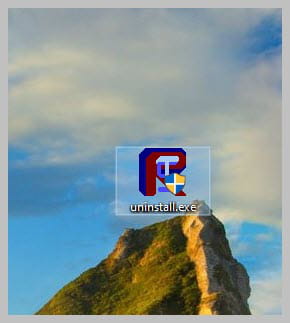
Uninstall FRST, rename the FRST file you downloaded to uninstall, then once the file is renamed, open it, the uninstallation will occur automatically via a restart of the PC.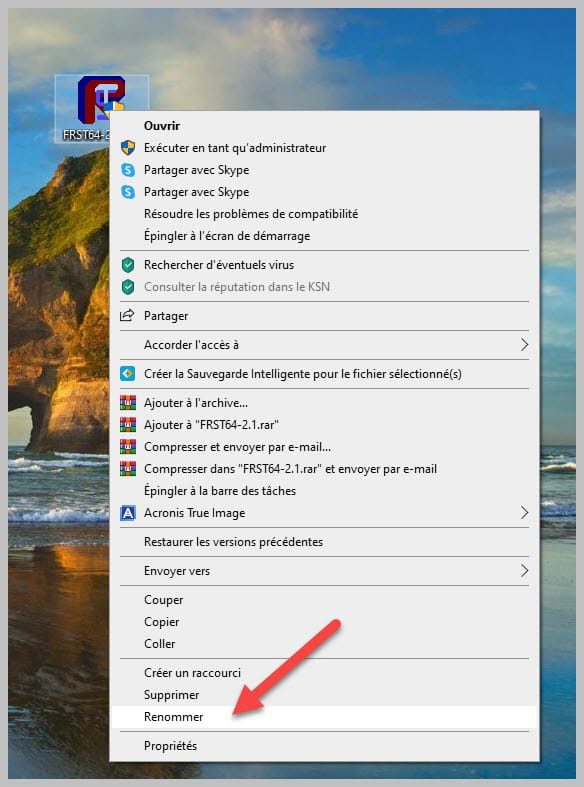
Alright, sounds good, I'll look into it on my end!
-
I see, I'll have to be much more careful and always stay on my guard from now on.
-
I'll do that, yes. Better safe than sorry :)
-
Awesome :D
-
It's done, everything went as planned!
Once again, thank you for your help and for giving your time ^^
Wishing you a great end of the day!
-
-
I just saw on the forum that in case of suspicion, a manipulation needed to be done to help solve the problem.
Here are the two requested reports:
- FRST Link: https://www.cjoint.com/doc/24_08/NHyxqT2FIZG_FRST.txt
- Addition Link: https://www.cjoint.com/doc/24_08/NHyxqgqdJZG_Addition.txt
-
Update: My problem has been resolved, I can now use the caret key without the double issue but I don't know why it got fixed...
BitDefender mentions that they had to quarantine three applications which are as follows:
- Nahimic32.exe (C:\Users\paula\Appdata\Roaming\remotesvc\nahimics32.exe)
- more.com (C:\Windows\SysWOW64)
- conduit.exe (C:\Windows\System32)
However, my problem persisted after that.
At one point, I had disabled all applications at startup in the task manager so I decided to just reactivate Windows' antivirus (Windows Security) and that’s when everything returned to normal.
Could you still read the reports I posted earlier? Just in case there is a risk of infection or not.
-
