
Double circumflex accent - Trojan virus?
Solvedbazfile Posted messages 58539 Registration date Status Moderator Last intervention -
Hello,
For a while now, my caret accent key hasn't been working or is typing double accents (like this ^^). I've read that this could be a sign of a trojan/keylogger. Do you know how to confirm this and get rid of it?
I used FRST to perform an analysis, and I would need a fixlist.txt
Downloadable here: https://www.swisstransfer.com/d/9af7c4e2-d699-4f65-9a23-26f9085f860c
https://pjjoint.malekal.com/files.php?read=FRST_20240329_v5u8c8x6m11
https://pjjoint.malekal.com/files.php?read=20240329_n10x8t11z11s14
Thank you very much in advance
5 answers
-
Hello.
Before I give you a disinfection script, I have a question:
You have software restriction strategies, did you set them up?
bazfile
Moderator/Security Contributor.
A hello, a reply, a thank you are always appreciated. -
Hello Bazfile,
Thank you very much for your response!
I don't have any memory of specifically implementing software restriction strategies.
But at one point I had made sure that Windows updates no longer installed automatically and that I had to manually approve them before installation, could that be it?
I'm not on my desktop computer right now but I will check that this evening.
-
@Vinzee StatusMember .
I will be absent this weekend, so I am providing you with a script. If you are not the one who set these software restrictions, please do the following:
Procedure to follow in the order indicated:
1- Open FRST as an administrator by right-clicking on FRST and choosing run as administrator
2 - Copy the entire script in the box below:Start:: CreateRestorePoint: CloseProcesses: Startup: C:\Users\Vince\AppData\Roaming\Microsoft\Windows\Start Menu\Programs\Startup\031514eb9d2011e8e87a031a1898e1eb.exe [2024-03-28] () [Unsigned file] [File in use] HKLM-x32\...\Run: [] => [X] HKLM-x32\...\Run: [TeamsMachineUninstallerProgramData] => %ProgramData%\Microsoft\Teams\Update.exe --uninstall --msiUninstall --source=default (No file) HKU\S-1-5-21-2896219858-2278722121-3280679691-1001\...\Run: [Facebook.MessengerDesktop] => C:\Users\Vince\AppData\Local\Programs\Messenger\Messenger.exe messenger://openAtLogin (No file) HKLM Group Policy restriction on software: %systemroot%\system32\mrt.exe HKLM Group Policy restriction on software: %HKEY_LOCAL_MACHINE\SOFTWARE\Microsoft\Windows NT\CurrentVersion\SystemRoot% HKLM Group Policy restriction on software: %HKEY_LOCAL_MACHINE\SOFTWARE\Microsoft\Windows\CurrentVersion\ProgramFilesDir% HKLM\SOFTWARE\Microsoft\Windows Defender: [DisableAntiSpyware] Restriction HKLM\SOFTWARE\Microsoft\Windows Defender: [DisableAntiVirus] Restriction HKLM\SOFTWARE\Policies\Microsoft\Windows Defender: Restriction GroupPolicy: Restriction - Chrome Policies: C:\ProgramData\NTUSER.pol: Restriction Policies: C:\Users\Vince\NTUSER.pol: Restriction HKLM\SOFTWARE\Policies\Mozilla\Firefox: Restriction HKLM\SOFTWARE\Policies\Google: Restriction Task: {BB718673-EFE7-4C60-8BCF-E9371E2A61F3} - \Microsoft\Windows\UNP\RunCampaignManager -> No file Task: {C3FCFB91-FABA-47D3-8838-583B297C3885} - System32\Tasks\Nahimic2svc32Run => "C:\Program Files\Nahimic\Nahimic2\UserInterface\Nahimic2svc32.exe" $(Arg0) $(Arg1) $(Arg2) $(Arg3) $(Arg4) $(Arg5) $(Arg6) $(Arg7) (No file) Task: {F16C124D-AC05-4384-AA79-B8A004D88616} - System32\Tasks\Nahimic2svc64Run => "C:\Program Files\Nahimic\Nahimic2\UserInterface\x64\Nahimic2svc64.exe" $(Arg0) $(Arg1) $(Arg2) $(Arg3) $(Arg4) $(Arg5) $(Arg6) $(Arg7) (No file) Task: {BF74E0F7-C514-4937-AE64-FB042C0D4BD8} - System32\Tasks\Nahimic2UILauncherRun => "C:\Program Files\Nahimic\Nahimic2\UserInterface\Nahimic2UILauncher.exe" $(Arg0) $(Arg1) $(Arg2) $(Arg3) $(Arg4) $(Arg5) $(Arg6) $(Arg7) (No file) S2 GLCKIO2; \??\C:\Program Files (x86)\GIGABYTE\RGBFusion\GLCKIO2.sys [X] S3 WinRing0_1_2_0; \??\C:\Program Files (x86)\GIGABYTE\RGBFusion\MODAPI.sys [X] C:\Users\Vince\AppData\Roaming\Microsoft\Windows\Start Menu\Programs\Startup\031514eb9d2011e8e87a031a1898e1eb.exe EmptyTemp: End::3- Once the script is copied, click on Fix, FRST will automatically take the script from the clipboard.

Let the correction complete, once done you will be asked to restart your PC, do it as soon as prompted, see below.
Then once your computer is restarted:
4- You will have a Fixlog file on your desktop, then send this fixlog report to https://www.cjoint.com/ and provide the generated link from https://www.cjoint.com/ in your response.5.
- - Repair Firefox repair-Firefox.
- - Repair Chrome repair Chrome.
6- CHECK AND TELL ME IF YOUR PROBLEM STILL EXISTS.
bazfile
Moderator/Security Contributor.
A hello, a response, a thank you are always appreciated. -
Good evening,
Here is the fixlog link: https://www.cjoint.com/c/NCDxcplstqf
I checked, the problem is indeed resolved, my key is working properly. I imagine that if it was indeed a trojan, I am rid of it. Thank you very much for your help bazfile!
Any idea what it was? -
The fixlog is OK, for safety's sake, change your sensitive and important online passwords.
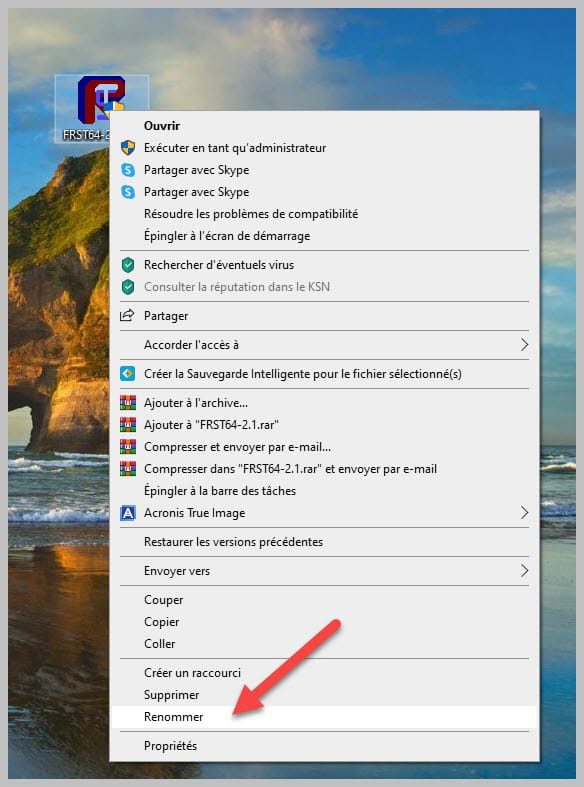
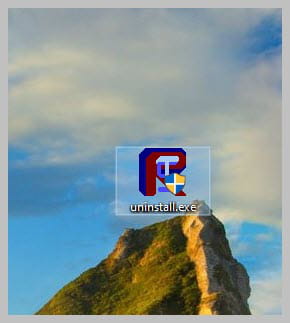
Uninstall FRST, rename the FRST file you downloaded to uninstall, then once the file is renamed, open it; the uninstallation will be done automatically via a PC restart.
bazfile
Moderator/Security Contributor.
A hello, a response, a thank you are always appreciated.
