
Impossible to remove foodcarve virus/malware.
Solvedbazfile Posted messages 58537 Registration date Status Moderator Last intervention -
Hello,
I have a pop-up that opens very often...(foodcarve.com) I have to use "end task" to close it. It is detected and blocked by Malwarebytes and my antivirus, but I can't get rid of it.
Thank you for your help :)
4 answers
-
Hello @fabrice42 StatusMember.
Download FRST.
Once downloaded save it on the desktop then right-click on FRST and select Run as administrator you will see this:


Wait for the message the tool is ready to run to appear then click on Analyze
Warning, wait for the messages saying that the analysis is complete to display.


At the end of the analysis, you will have two text files on the desktop FRST and Addition.


Then send the FRST and ADDITION reports to https://www.cjoint.com/ then provide the two links generated by https://www.cjoint.com/ in your response.
bazfile
Moderator/Security Contributor.
a hello, a response, a thank you is always appreciated. -
-
@fabrice42 StatusMember .
Your PC is heavily infected, the infection occurred on June 5th between 5 PM and 6 PM.
This infection is apparently difficult to remove, since you used your antivirus, Kaspersky Virus Removal Tools and Malwarebytes which failed to get rid of it, I think the following FRST script should work.
Uninstall Spybot - Search and Destroy, this software is useless.
Disinfection.
Procedure to be followed in the indicated order:
1- Open FRST as an administrator, to do this right-click on FRST and select run as administrator
2 - Copy the entire script that is in the box below:Start:: CreateRestorePoint: CloseProcesses: File: C:\Program Files (x86)\delegate\Langauge.exe File: C:\Program Files (x86)\Entries\Sturrock.exe File: C:\Program Files (x86)\Complete\makarov.exe HKLM\SOFTWARE\Microsoft\Windows Defender: [DisableAntiSpyware] Restriction HKLM\SOFTWARE\Microsoft\Windows Defender: [DisableAntiVirus] Restriction HKLM\SOFTWARE\Policies\Microsoft\Windows Defender: Restriction HKLM\SOFTWARE\Policies\Microsoft\Windows Defender Security Center: Restriction StartupDir: C:\Users\fab74\AppData\Local\Temp\4c8d97a9c8\ HKLM\SOFTWARE\Policies\Mozilla\Firefox: Restriction HKU\S-1-5-21-1165803326-879407739-252620839-1001\SOFTWARE\Policies\Microsoft\Edge: Restriction Task: {63362D99-1D8E-4802-B3C4-85601AEAE5EF} - System32\Tasks\3dhrey\o3ghca\t5zqt7\jtazgv\iq7wj9\j0ppmv\k5vdc6\ity8aw\zt87g8\74057s\9va2so\cn5d9d\cayydm\4mjgaj\141t8v\7nl2tj\nx7auo => C:\Program Files (x86)\delegate\Langauge.exe [28160 2024-06-05] (Now) [Unsigned file] Task: {DB472B4B-1E66-4BF0-B2EF-3FEEFAA188A0} - System32\Tasks\ah5207\yg3i3j\bzzytg\qb79uu\x9spk4\i5r5rs\hj5c0q\553u2c\qn3yqh\d76m3q\mqoule\jghkdc\9nakhs\o82nop\sgz7uy\0fnfit\b6y9h6 => C:\Program Files (x86)\Entries\Sturrock.exe [28160 2024-06-05] (Now) [Unsigned file] Task: {BDBAF9C3-9B49-4584-BBDF-E975328B7E66} - System32\Tasks\f705sp\kif0cu\g3qb1d\raqlv9\3plej2\pnmbey\cey9w9\z57rtt\1hu5nm\0svji8\2zs0px\8mm1gs\b8hg5j\5qyh98\fefujt\hj3kct\4uteqz => C:\Program Files (x86)\Complete\makarov.exe [70634 2024-06-05] () [Unsigned file] Task: {63424737-7CF4-4AEA-A9FB-4BF930385FEF} - System32\Tasks\l3z9jm\ohvr2u\zp0tyb\metxmh\4v36hx\1zoph9\d7jl14\v5cyhl\7j16sw\5msr3s\5clh36\mc9s6h\ev8nlq\4nwla0\oov3k2\xnnt1y\etrmk0 => C:\Users\fab74\AppData\Local\Sturrock.exe [28160 2024-06-05] (Now) [Unsigned file] Task: {9ED2BEF7-7A3E-43CB-90AA-DAE3DFEB2A82} - System32\Tasks\x79pi9\6rfn4t\bozjx2\9nkkrx\yfo93w\2z1pts\z81yb9\adet1j\7gdrdb\5dq992\l6xgih\l6vd19\y6t3pv\nidjfh\ioq822\ebnx98\bod1m1 => C:\Users\fab74\AppData\Local\Langauge.exe [28160 2024-06-05] (Now) [Unsigned file] Task: {A3DA165D-AC83-4B1E-BE26-E6969719D348} - System32\Tasks\xe6p62\t4ntao\qs3gzj\raqoql\ey8ci4\l6ir52\2d9n8t\xqafff\bt9z19\4scczh\i7pjia\dhul6e\69n6t0\xdfosj\rem0am\5afl0j\9fitg3 => C:\Program Files (x86)\Complete\Sturrock.exe [28160 2024-06-05] (Now) [Unsigned file] Task: {C603AF03-AA6F-45F8-BABE-D537B31E3EEE} - System32\Tasks\xypa0w\x3q5dp\pmp3l0\yakio5\dbc4cp\zxp58j\jjoi7z\s9jzbw\ys0h4h\wqlqxs\fxqtrd\d3ijgy\211g3i\o605do\6r575d\atdo4a\5sbryb => C:\Users\fab74\AppData\Local\Sturrock.exe [28160 2024-06-05] (Now) [Unsigned file] Task: {3FC2C370-9631-4C60-8494-461DBE462FA9} - System32\Tasks\yp7vzm\ki26yj\4f56tx\0rkn1w\b95ddf\30lsq4\cmla9f\6eg1jh\7aejyd\lovnzo\qzo24q\ijf5nm\paxno7\il65gc\qkmy9t\kh36e3\3fibtc => C:\Program Files (x86)\delegate\Langauge.exe [28160 2024-06-05] (Now) [Unsigned file] Task: {3A9BD628-DFE1-4A60-871C-DC15E89ECA94} - System32\Tasks\z1x4vt\lq7981\gemift\3w4agp\qeb0k6\huw8ks\tn444v\ljz3y3\yj89tj\2xwym1\w9eyd7\iutgwz\w10lr0\1r49ng\zoxu6u\et2lqm\ptkrmt => C:\Program Files (x86)\Entries\Langauge.exe [28160 2024-06-05] (Now) [Unsigned file] Task: {00CE381B-96AA-40B3-8ECB-B408A245215E} - \ASUS USB Charger Plus -> No file Task: {143AE48D-8972-4804-9DA1-64474F7692AD} - \Intel\Intel Telemetry 2 -> No file Task: {2B87FDF9-B9DF-4CD4-9DF1-50FBE78A69CE} - \ASUS\ASUS Product Register Service -> No file Task: {4EE93269-CE4C-4B19-B92A-73474CCED579} - \IntelWiDi-Upgrade-91ba0caa-28a7-4f47-8d08-f71b4b10fbec -> No file Task: {611C823C-437B-46E7-9683-5312DFFCFD7B} - \Microsoft\Windows\UpdateOrchestrator\Policy Install -> No file Task: {7A003965-A297-4DC6-B15B-852D798391E0} - \Microsoft\Windows\UpdateOrchestrator\Reboot -> No file Task: {848DCC36-520C-4946-BF68-C7EFFEFA2F84} - \Microsoft\Windows\UpdateOrchestrator\USO_UxBroker_ReadyToReboot -> No file Task: {A364E297-00AD-490D-900E-22AC34598C71} - \Microsoft\Windows\UpdateOrchestrator\Maintenance Install -> No file Task: {C33F4607-C279-4257-9039-34FF9FE1F21A} - \Microsoft\Windows\AppID\SmartScreenSpecific -> No file Task: {C5EE2EA2-5312-4D1F-B9D0-41B18DF31B78} - \Microsoft\Windows\WindowsUpdate\sih -> No file Task: {DC3725F6-6DD8-4384-90CF-812D4CBA3573} - \IntelWiDi-Upgrade-91ba0caa-28a7-4f47-8d08-f71b4b10fbec-Logon -> No file Task: {E6010D43-6AE7-4B59-8E67-EC78FD8E8E96} - \Microsoft\Windows\NetCfg\BindingWorkItemQueueHandler -> No file Task: {E98AFDFB-4B5D-4DC1-9DCF-5DD16ED4B901} - \Microsoft\Windows\Plug and Play\Plug and Play Cleanup -> No file Task: {EA3F661E-B31C-44A9-B40C-E3D5D56149D4} - \Microsoft\Windows\UpdateOrchestrator\USO_UxBroker_Display -> No file Task: {8D678B1A-C6ED-4C35-B5DD-808E5ED2C025} - System32\Tasks\05d3uk\awlk8y\9chly0\wc1cup\uerm4g\negoa4\vfgmfb\fpsc7t\27lnvq\sagd86\9kxetd\ci6eh2\rtu1qp\mmi8zd\fpe7id\kub2mj\fy6jaj => %localappdata%\lobelia.exe "tgbnhyhtgbnhyttgbnhyttgbnhyptgbnhy:tgbnhy/tgbnhy/tgbnhywtgbnhywtgbnhywtgbnhy.tgbnhyttgbnhyotgbnhyptgbnhygtgbnhyltgbnhyatgbnhyrtgbnhyetgbnhy.tgbnhyctgbnhyotgbnhymtgbnhy/tgbnhygf2c0c2c4ctgbnhy0v6v0gf5gftgbnhychtml20Gm5tgbnhy8M831vvhqJtgbnhy378UZ" (No file) Task: {CD14FA6C-C9AD-4B95-ABD5-0D7A42D408A2} - System32\Tasks\MicrosoftEdgeUpdateTaskMachineCore => C:\Program Files (x86)\Microsoft\EdgeUpdate\MicrosoftEdgeUpdate.exe /c (No file) Task: {37C3E0AC-CFDD-4B73-BF55-B3459CC670EB} - System32\Tasks\MicrosoftEdgeUpdateTaskMachineUA => C:\Program Files (x86)\Microsoft\EdgeUpdate\MicrosoftEdgeUpdate.exe /ua /installsource scheduler (No file) Task: {86E1320C-5EC7-4D22-B326-7FED7244F2F7} - System32\Tasks\qaj3s8\xcakwh\3rvezw\zobs51\0a4qf1\i57pfl\tuxq9n\2pbxn2\q4wq0l\6ejqua\hzd599\kgiqo4\e5wcgh\0n0bey\xl17rr\i7xunu\pd5182 => %localappdata%\croll.exe (No file) HKLM\SOFTWARE\Policies\Microsoft\Internet Explorer: Restriction S3 DevActSvc; C:\Program Files (x86)\ASUS\ASUS Device Activation\DevActSvc.exe [X] S1 ASPI32; no ImagePath S3 Imf8HpRegFilter; \??\C:\Program Files (x86)\IObit\IObit Malware Fighter\drivers\win10_amd64\ImfHpRegFilter.sys [X] S3 ImfHpFileFilter; \??\C:\Program Files (x86)\IObit\IObit Malware Fighter\drivers\win10_amd64\ImfHpFileFilter.sys [X] S3 ImfRealScanner; \??\C:\Program Files (x86)\IObit\IObit Malware Fighter\drivers\win10_amd64\ImfRealScanner.sys [X] S3 ImfRegistryFilter; \??\C:\Program Files (x86)\IObit\IObit Malware Fighter\drivers\win10_amd64\ImfRegistryFilter.sys [X] S4 nvvad_WaveExtensible; \SystemRoot\system32\drivers\nvvad64v.sys [X] U4 Sense; no ImagePath 2024-06-05 17:44 - 2024-06-05 17:44 - 000000000 ____D C:\WINDOWS\system32\Tasks\z1x4vt 2024-06-05 17:44 - 2024-06-05 17:44 - 000000000 ____D C:\WINDOWS\system32\Tasks\yp7vzm 2024-06-05 17:44 - 2024-06-05 17:44 - 000000000 ____D C:\WINDOWS\system32\Tasks\xypa0w 2024-06-05 17:44 - 2024-06-05 17:44 - 000000000 ____D C:\WINDOWS\system32\Tasks\xe6p62 2024-06-05 17:44 - 2024-06-05 17:44 - 000000000 ____D C:\WINDOWS\system32\Tasks\x79pi9 2024-06-05 17:44 - 2024-06-05 17:44 - 000000000 ____D C:\WINDOWS\system32\Tasks\rcgaqf 2024-06-05 17:44 - 2024-06-05 17:44 - 000000000 ____D C:\WINDOWS\system32\Tasks\qaj3s8 2024-06-05 17:44 - 2024-06-05 17:44 - 000000000 ____D C:\WINDOWS\system32\Tasks\l3z9jm 2024-06-05 17:44 - 2024-06-05 17:44 - 000000000 ____D C:\WINDOWS\system32\Tasks\f705sp 2024-06-05 17:44 - 2024-06-05 17:44 - 000000000 ____D C:\WINDOWS\system32\Tasks\ah5207 2024-06-05 17:44 - 2024-06-05 17:44 - 000000000 ____D C:\WINDOWS\system32\Tasks\3dhrey 2024-06-05 17:44 - 2024-06-05 17:44 - 000000000 ____D C:\WINDOWS\system32\Tasks\05d3uk 2024-06-05 17:44 - 2024-06-05 17:44 - 000000000 ____D C:\Program Files (x86)\delegate 2024-06-05 17:40 - 2024-06-05 17:40 - 000028160 _____ (Now) C:\WINDOWS\nonaggressive.exe 2024-06-05 17:40 - 2024-06-05 17:40 - 000028160 _____ (Now) C:\Users\fab74\AppData\Local\Sturrock.exe 2024-06-05 17:40 - 2024-06-05 17:40 - 000028160 _____ (Now) C:\Users\fab74\AppData\Local\Langauge.exe AlternateDataStreams: C:\ProgramData\TEMP:88050731 [228] SearchScopes: HKU\S-1-5-21-1165803326-879407739-252620839-1001 -> DefaultScope {0633EE93-D776-472f-A0FF-E1416B8B2E3A} URL = SearchScopes: HKU\S-1-5-21-1165803326-879407739-252620839-1001 -> {0633EE93-D776-472f-A0FF-E1416B8B2E3A} URL = C:\Program Files (x86)\delegate C:\Program Files (x86)\Entries C:\Program Files (x86)\Complete EmptyTemp: End::3- Once the script is copied, click on Fix, FRST will automatically take the script that is in the clipboard.

Let the fix complete, once it is done you will be asked to restart your PC, do it as soon as requested, see below.
Then once your computer has restarted:
4- You will have a Fixlog file on your desktop, then send this fixlog report to https://www.cjoint.com/ or https://pixeldrain.com/
Then provide the link generated by https://www.cjoint.com/ or https://pixeldrain.com/ in your response.
5- CHECK AND TELL ME IF YOUR ISSUE IS STILL PRESENT
bazfile
Moderator/Security Contributor.
A hello, a response, a thank you are always appreciated.-
-
-
-
@fabrice42 StatusMember .
Windows already has its own antivirus, there's no need to install another one as it is sufficient, it activates automatically if no other antivirus is installed.
As a precaution change your sensitive and important online passwords.
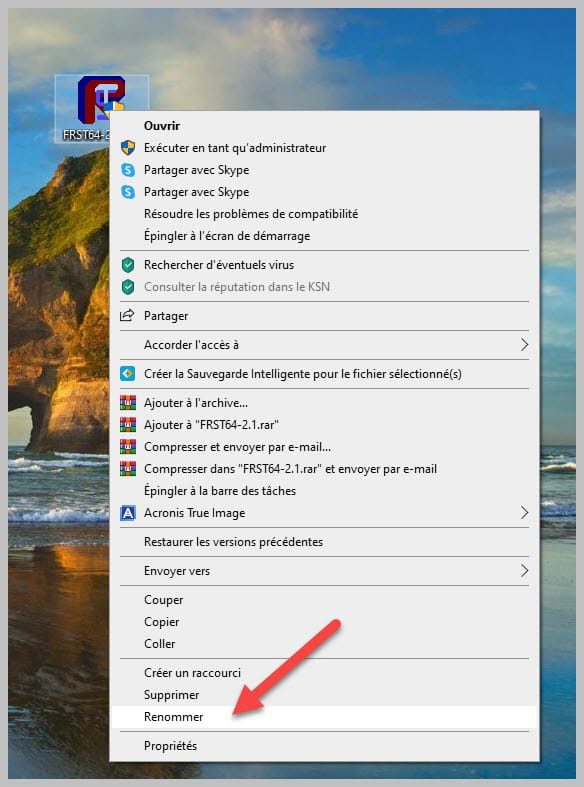
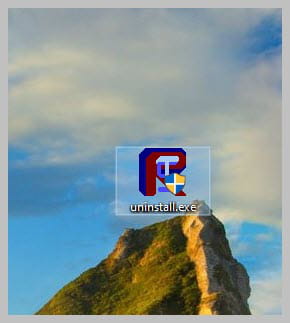
Uninstall FRST, rename the FRST file you downloaded to uninstall, then once the file is renamed, open it, the uninstallation will occur automatically via a restart of the PC.
-
-
