Ubuntu Update Manager
SolvedHello,
Problem when searching for Ubuntu updates:
The download of repository information failed
Thank you, have a good day
ode4472
9 answers
-
Hello,
The error message is incomplete, so it's hard to respond.
Several possible explanations:
- the internet connection is not working
- one of the repositories configured in /etc/apt/sources.list or in a file contained in /etc/apt/sources.list.d is invalid
- one of the repositories configured in /etc/apt/sources.list or in a file contained in /etc/apt/sources.list.d is currently down.
To get a clearer picture, could you type the following command in a terminal and copy-paste the result?
sudo apt update
(You will need to type your password blindly and then press enter).
Good luck
-
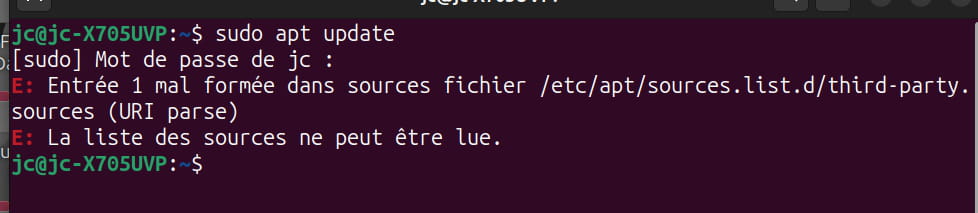
Hello result sudo apt update
Thank you, have a nice day
ode4472 -
Hello
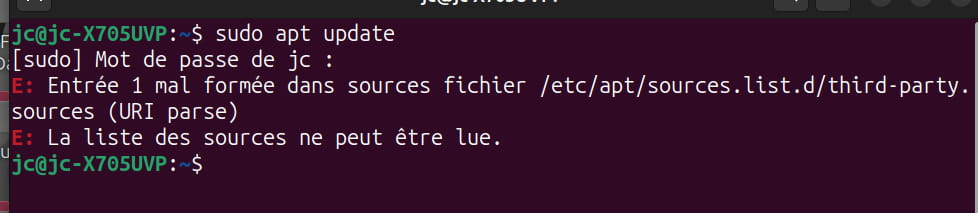
response to: sudo apt update
Thank you, have a nice day
ode4472 -
Hello,
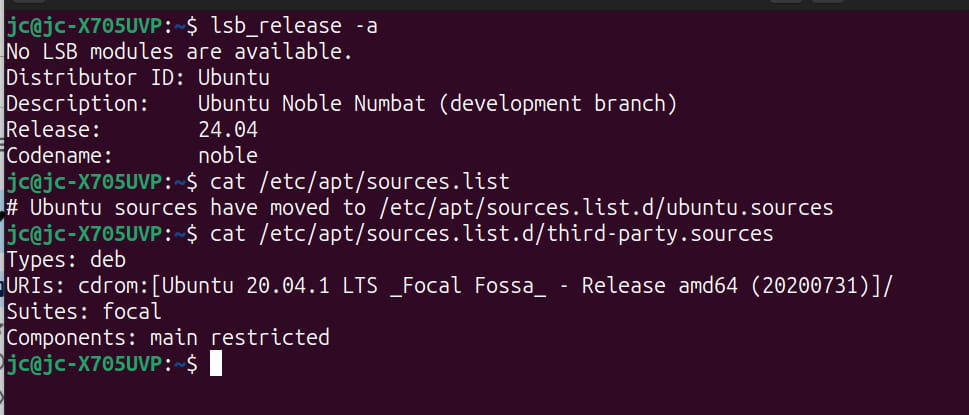
Can you post the output of these 3 commands.
lsb_release -a cat /etc/apt/sources.list cat /etc/apt/sources.list.d/third-party.sources
-
-
Re:
Comment on line 2 of:
/etc/apt/sources.list.d/third-party.sources
By adding # in front
Example:
#URI
Just add # with a text editor like nano or others, save and start again
Sudo apt update
-
-
Hello,
Please avoid screenshots as they are not practical for anyone; it's better to copy and paste (see this tutorial).
The error message (see message #2) means that there is an error on the first line of the file /etc/apt/sources.list.d/third-party.sources. Therefore, you need to correct this file with a text editor launched with root privileges and fix the problematic line (the first line containing a URL) or comment it out (by adding a # at the beginning of the line). To edit this file:
sudo gedit /etc/apt/sources.list.d/third-party.sources &
To correct the offending line, you should copy and paste the content of this file so we can guide you on how to fix it, so in the meantime, the best approach is probably to comment it out.
Once done, save and exit. Then run:
sudo apt update
Furthermore, it seems very strange that you do not have a file /etc/apt/sources.list because this means that your Linux is no longer tracking standard updates. You should create this file and fill it out according to the documentation. You can find it in the Ubuntu documentation.
sudo gedit /etc/apt/sources.list &
Its content should be:
deb http://fr.archive.ubuntu.com/ubuntu/ noble main restricted deb http://security.ubuntu.com/ubuntu noble-security main restricted deb http://fr.archive.ubuntu.com/ubuntu/ noble-updates main restrictedFinally, I see that in /etc/apt/sources.list.d you are mixing repositories related to different versions of Ubuntu (focal, jammy) while your main system seems to be on another version (noble). This is generally a bad idea, unless you have no choice (which I doubt), it's better for all your sources to align on the same version of Ubuntu, the most recent one (in this case, noble).
Good luck
-
-
Thank you for your feedback! Please make sure to mark the topic as resolved when you have all your answers (I'll take care of it this time).
Wishing you all the best
-