Executable from a Python file
Solved
Hello,
I was thinking of creating an executable from a Python code for Windows, so I wouldn't have to open PyCharm. I found this CX FREEZE, and I have installed it in the Windows command prompt, but I don't know where to create the "setup.py" file: in PyCharm or in Windows? Thank you for your help!
11 answers
-
Hello,
No one is mocking, the 80 posts don’t focus on Python, but rather on using the terminal, navigating through the directory tree, and naming files.
Avoid spaces in file names or specify it with single quotes '' :
C:\Users\quent\PycharmProjects\pythonProject\'LES_ ENSEMBLES.py'
Another tip:
Your terminal, regardless of the OS, supports drag-and-drop, which allows you to obtain the absolute path in your terminal from your file browser.
-
Moderator
Hello Quentin
The setup.py file is a file placed at the root of your project, specific to setuptools, which allows you to generate a Python package (.whl, .egg) and/or Linux package (.rpm, .deb).
These days, it is increasingly being replaced by poetry, which is much more modern, convenient, and elegant (which relies on the pyproject.toml file).
To give you an idea of these different technologies, you can take a look at this page and this page.
I am not familiar with cx-freeze and I don't know if it requires the use of setuptools. Not being a Windows user, I don't really care about generating standalone executables, but I know that people also often use pyinstaller or py2exe. Some usage examples here. Typically, if your Python script consists of just one file, you can simply do:
pyinstaller yourfile.py -F --onefile
Good luck
-
It's all strange, it seems like you don't understand everything we're telling you: in your image, we see a path with py.exe. So you already have an exe that corresponds to a py.py file? Is that right or not?
On another note, did you understand that, anyway, you don't need to create an .exe?
I don't use Pycharm but Idle as my IDE, but you necessarily create a file toto.py (for example) in a directory. And to run it, you just need to double-click on the file in the explorer:

Once again, an .exe is useful if you want to run your code on a PC where Python is not installed.
-
-
@quentin2121
@ Phil : Does your file have the .bat or .exe extension?
-
Moderator@quentin2121
- Does the path you mentioned make sense on your other PC?
- At worst, you won't use Phil's script and you'll type the command directly with the appropriate arguments (see #1) from PowerShell.
- The advantage of PowerShell (compared to MS-DOS commands) is that it provides auto-completion, meaning when you type a command, the tab key allows you to complete the argument you are currently typing. This is therefore an effective way to type the path of a file more quickly / easily and without errors.
-
@mamiemando
Hello Mamiemondo,
The path makes sense, yes, but since I don't have Python installed, nor PyCharm, I understand that the path doesn't work.
I will try with PowerShell, "py installer"!
-
Moderator@quentin2121
I can hardly see how C:\Users\quent\PycharmProjects\pythonProject can exist on a machine where PyCharm is not installed. Did you understand that Phil's ".bat" was only meant to generate an ".exe" on your development machine that you should be able to redistribute on a machine without PyCharm? And thus there’s no reason to run this ".bat" on a machine that isn't your development machine? In fact, Phil meant well by talking to you about this script, but I feel like it completely confused you. Another explanation is that I misunderstood your problem, and in that case, it would need clarification.
-
-
Hello,
I would recommend installing and using auto-py-to-exe, which uses PyInstaller.
It offers a Chrome-based graphical interface that allows you to generate your exe package in just a few clicks.
I have tested it on Windows, macOS, and Linux without any issues.
https://pypi.org/project/auto-py-to-exe/
-
Hello Diablo,
Oh la, oh la, oh la!
Don't complicate things any more than they already are :-) :-) :-)
If you've read all these messages, you must have seen that it's not
simple
Especially since Quentin seems to have reached the end:
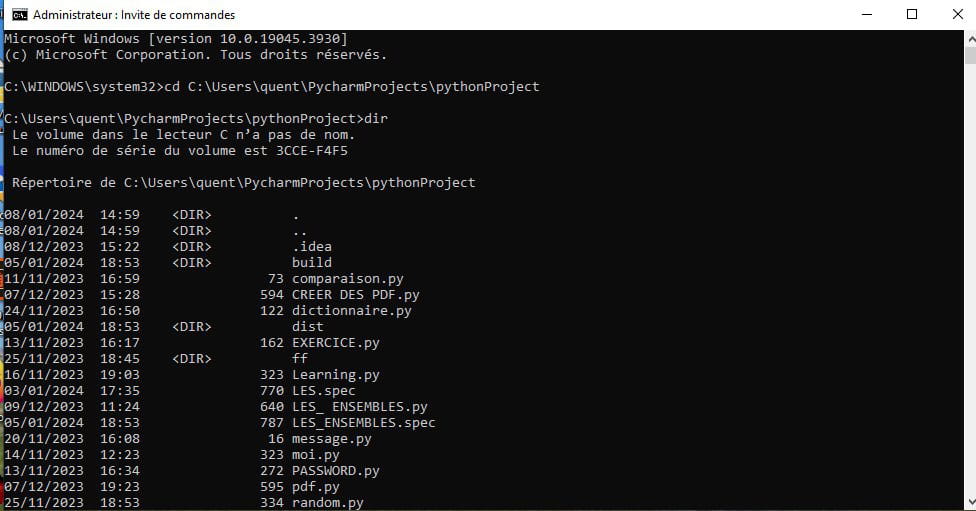
By looking at the image posted yesterday at 7:10 PM, we see the folders
dist, build, and the file LES_ENSEMBLES.spec created by pyinstaller
So, in dist, there is likely a folder LES_ENSEMBLES that contains
all the necessary files including LES_ENSEMBLES.exe
Let's wait for his response to my question...
-
-
@quentin2121
Weird, weird ............
We need to do a test again
1_ delete the build and dist folders and also the file LES_ENSEMBLES.spec
2_ open the Windows command prompt
3_ Type cd path\to\the\folder\of\the\py
4_ Type
path\to\the\folder_pyinstaller\pyinstaller LES_ENSEMBLES.py
Don't forget to remove the copy of the .py that you placed in the folder where
pyinstaller is
And we'll see what it gives ...
-
-
@quentin2121
'C:\Users\quent\PycharmProjects\pythonProject\LES_ENSEMBLES.py' not found
It means that your .py file is not in
C:\Users\quent\PycharmProjects\pythonProject
You did say it was in there, didn't you?
-
-
Hello,
Even without creating an executable, you can run a program by double-clicking the .py file in the explorer ...
I use pyinstaller to send code to someone who hasn't installed the Python environment on their PC, so they need a .exe since they don't have the interpreter to directly execute a .py
To create an exe, I made myself a small .bat file:
echo off set /p py_dir=Program directory : cd %py_dir% set /p py_file=Program name : "C:\Program Files (x86)\Python\Scripts\pyinstaller" %py_file% -p C:\Phil\Dev\Python\projects\base_lib pause
(The directory following the -p option contains files possibly imported into my main code)
-
-
Moderator@quentin2121
Hello Quentin
- See here. The command set /p allows you to initialize a variable interactively.
- When you run Phil_1857's script, you just need to answer the questions ("Program directory:" and "Program name:") to initialize the variables py_dir and py_file respectively.
- However, this script may require some corrections
- the path to pyinstaller.exe so that it is correct according to your installation;
- the path(s) behind the -p option if your program depends on specific imports -- if you don’t have any, you can just remove this option.
- The important point is to determine which options of pyinstaller.exe are relevant in your case. Then, feel free to write a script in the spirit of Phil_1857's to make your life easier.
- Do you have all your answers? If so, can you mark the topic as resolved?
Good luck
- See here. The command set /p allows you to initialize a variable interactively.
-
-
Line 3 asks for the program directory:

Line 4 changes the directory to place itself there
Line 6 asks for the name of the program:

And it's started!
-
-
Moderator@quentin2121
Have you read #5 ? :-)
-
-
yes, as long as you change the path to pyinstaller as indicated
Mamiemando in his last message
But I hope you understood that you can run your code
without using pyinstaller by double-clicking on the .py in the explorer
-
@echo off set /p py_dir=C:\Users\quent\PycharmProjects\pythonProject\LES ENSEMBLES : cd %py_dir% set /p py_file=PycharmProjects : "C:\Program Files (x86)\Python\Scripts\pyinstaller" %py_file% -p C:\Users\quent\Dev\Python\projects\base_lib pause
-
Moderator
There is a confusion, Quentin. Maybe you didn't understand the message #5 correctly. You shouldn't modify the set /p lines: what is written after is the question message posed by the script when you execute it (that’s what you see in the screenshots posted by Phil in #6).
- What you enter from the keyboard in response is stored in the variable. So it is normal that no path appears.
- What you wrote would likely make sense without the /p option, in order to impose the values of the py_dir and py_file variables.
Furthermore, nothing indicates that you have a base_lib folder in your case. And nothing indicates that you actually need to pass the -p option. That’s where Phil stores some of his Python packages he likes to use on his computer, but there’s no guarantee that it’s the same for you. It is highly likely that in your case, you don’t need the -p option. That’s why I refer you to the documentation for pyinstaller options to understand what they do.
Good luck
-
@mamiemando
echo off
set /p py_dir=Program directory :
cd %py_dir%
set /p py_file=Program name :
"C:\Program Files (x86)\Python\Scripts\pyinstaller" %py_file% -p
pause
-
Moderator@quentin2121
- Perfect, the script now seems correct :-) In the black window you captured in the screenshot, you just need to type after the first question the folder in which your ".py" file is located, hit enter, and then after the second question, the name of that ".py" file.
- The important thing is that this script is absolutely not mandatory. Phil suggested it to you because he finds it useful in his case and thinks it might be the same for you. But fundamentally, the only thing that really matters is to invoke pyinstaller.exe with the right parameters.
Good luck
-
@mamiemando
In fact, when I enter the path of the folder where the .py file is located, it responds with "path not found."
The correct path is this one:

It’s not the same one where Pycharm is installed! It should be noted that this .py file was created during my first installation of Pycharm, which may explain this!
Otherwise, for me, it's simpler, after installing pyinstaller in cmd, to click on my .py file, which then opens directly!
-
-
Yes, that's right: it avoids having to write the command by hand with the path to pyinstaller and the path to the file + the name of the .py file.
Still, remove the -p at the end.
-
Well, here it is: the dir command gives you the list of files and folders contained in
the current folder
(here: C:\WINDOWS\System32 because you type the command while you are in
this folder)
All you have to do is run cd path_where_the_Python_code_is_located
then run a dir
and you'll see if the file LES_ENSEMBLES.py appears in the list that shows up
(by the way, why a file name in uppercase?)
-
-
Moderator@quentin2121
At that moment, it needs to be written correctly (respecting lowercase and uppercase letters). We are still waiting for you to copy-paste the result of the dir command (in the appropriate directory) to see what’s wrong. One thing you can certainly do is use PowerShell instead of MS-DOS commands. Like a terminal in Linux, it supports auto-completion, which means that by using the "tab" key, it completes folder/file names.
-
-
@quentin2121
you're a funny guy, aren't you! open your eyes
I see a file
LES_ ENSEMBLES.py
and not
LES_ENSEMBLES.py
and in the Windows Explorer, didn’t that catch your eye?
and get rid of all those useless .spec files
And also adopt a good habit:
use underscores ( _ ) instead of spaces in file names:
create_a_pdf.py
-
Moderator@Phil_1857
Have you finally managed to run the pyinstaller command?
-
-
Contributor
Quentin is clearly not familiar with the command prompt.
To summarize and clarify for Quentin, in this post by Quentin:
We can see that:
cd C:\Users\quent\PycharmProjects\pythonProjectworks and allows Quentin to navigate to "C:\Users\quent\PycharmProjects\pythonProject".
And that:
C:\Users\quent\PycharmProjects\pythonProject4\venv\Scripts\pyinstaller LES_ENSEMBLES.pyactually launches pyinstaller, which must therefore be in the directory "C:\Users\quent\PycharmProjects\pythonProject4\venv\Scripts\pyinstaller", but its execution fails with an error:
1038 INFO: PyInstaller: 6.3.0 1039 INFO: Python: 3.12.0 1064 INFO: Platform: Windows-10-16.0.19645-SPe 1065 INFO: wrote C:\Users\quent\PycharmProjects\pythonProject\LES_ENSEMBLES.spec Script 'C:\Users\quent\PycharmProjects\pythonProject\LES_ENSEMBLES.py' not foundThe execution of the pyinstaller program fails because the directory "C:\Users\quent\PycharmProjects\pythonProject\" does not contain a file "LES_ENSEMBLES.py".
Assuming that "C:\Users\quent\PycharmProjects\pythonProject\" contains "LES_ ENSEMBLES.py" (with a space after the underscore) and not "LES_ ENSEMBLES.py", the correct sequence of commands, after opening the command prompt, would be:
cd C:\Users\quent\PycharmProjects\pythonProject C:\Users\quent\PycharmProjects\pythonProject4\venv\Scripts\pyinstaller "LES_ ENSEMBLES.py"If Quentin has renamed his file "LES_ ENSEMBLES.py" to "LES_ ENSEMBLES.py", without a space, as advised, the correct sequence of commands, after opening the command prompt, would be:
cd C:\Users\quent\PycharmProjects\pythonProject C:\Users\quent\PycharmProjects\pythonProject4\venv\Scripts\pyinstaller LES_ENSEMBLES.pyYou can paste text into the command prompt (right-click - paste). Do it to avoid typos.
-
Contributor
In his message:
suggested using a graphical interface to run PyInstaller: auto-py-to-exe
This is undoubtedly more suitable for people who are not familiar with the command line.
-
-
@quentin2121
look at our answers above
we've already explained it to you!
in the folder that contains the .py, there is a folder that contains another folder
which contains the .exe
Reread our answers and you will know what to do
-
Contributor@quentin2121
As there are 87 responses, you can also consult the documentation:
https://www.pyinstaller.org/en/stable/usage.html
PyInstaller analyzes myscript.py and:
- Writes myscript.spec in the same folder as the script.
- Creates a build folder in the same folder as the script if it does not exist.
- Writes some log files and working files in the build folder.
- Creates a dist folder in the same folder as the script if it does not exist.
- Writes the myscript executable folder in the dist folder.
-