
Windows 11 startup is slow
domxav1759 -
Hello,
At startup, Windows 11 is slow; it takes 30 seconds to reach the password window.
Yet my computer is equipped with a 1TB M.2 SSD.
When I first installed Windows 11, it was fast, but after installing the applications, it became slow at startup.
After entering the password and logging into the system, it works normally.
At startup, I have:
WSHleper,
TwDsUIlaunch,
securityhealthsystray,
realtek HD audio universal service,
onedrive,
lwemon,
brccboot,
bluestacks services
are enabled.
My configuration is:
Motherboard: Asus ROG Strix Z690-G Gaming
Processor: Intel i7 12700K 12th generation
RAM: DDR5 32GB Kingston Beast
M.2 SSD: Samsung 980 1TB
Graphics card: Nvidia GeForce ASUS TUF RTX 3080
Please help me.
19 answers
-
Hello.
It takes 30 seconds to reach the password window.
You're being a bit picky; 30 seconds isn't that long, especially since, as time goes by, you're installing software that starts up and naturally slows down the boot process.
WSHleper corresponds to an adware called Wondershare helper, uninstall it; it's unnecessary.
To get an overview of your PC, follow these steps:
Download FRST, once downloaded save it on the desktop, then right-click on FRST and choose Run as administrator, you will see this:

Click on Analyze
Note: wait for the messages indicating that the analysis is complete to display.


At the end of the analysis, you will have two text files on the desktop: FRST and Addition.

Then send the FRST and ADDITION reports to PJJOINT, then provide the two links generated by PJJOINT in your response.
bazfile
Moderator/Security Contributor.
A hello, a response, a thank you are always appreciated. -
Here they are, I sent them via PJJOINT
The following files: addition.txt and FRST.txt
https://pjjoint.malekal.com/files.php?id=20230612_v9g9o10s10h5
https://pjjoint.malekal.com/files.php?id=FRST_20230612_u8y11t9h15s9
-
I'm giving you my opinion; it's up to you to follow my advice or not.
It's no surprise that your pc is slow; you have several antivirus programs installed on your pc Reason Cybersecurity and TotalAV.
Keep your current antivirus (Reason Cybersecurity), it is sufficient, and uninstall TotalAV, which is a scam.
For your information: Windows 11 already has its own built-in antivirus that activates automatically as soon as no other antivirus is installed on the pc; it is effective and less likely to slow down the pc.
First step.
Uninstall the following software with Revo Uninstaller in advanced scan mode (see the tutorial below):
- TotalAV this antivirus is a scam.
- WebAdvisor by McAfee is an unnecessary adware.
- Wondershare Helper Compact is also an unnecessary adware that can cause bugs on some pcs.
Tutorial for Revo Uninstaller to read carefully.
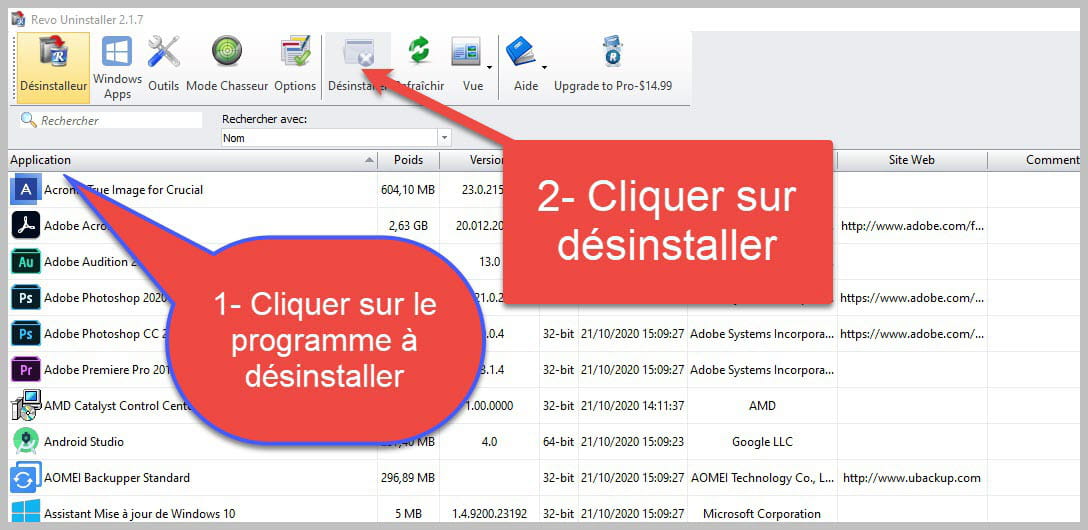

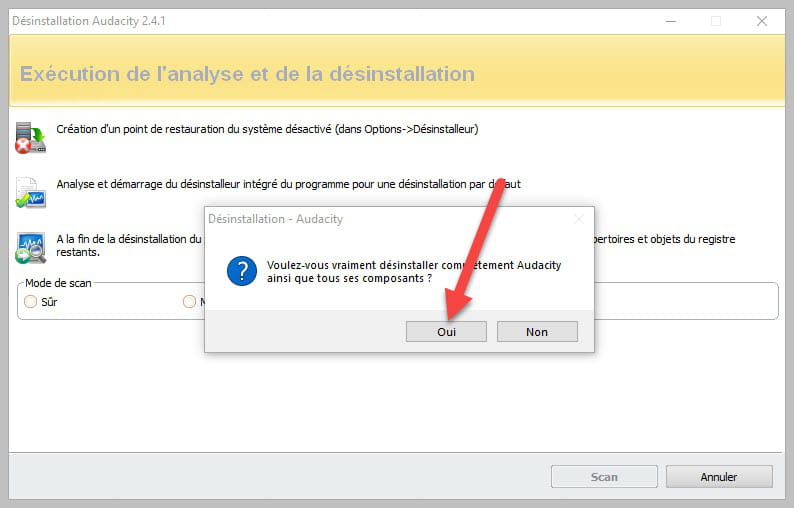
Accept the uninstallation of the program you wish to uninstall, and if there is an error message stating that the uninstallation is impossible, close the error message and continue the procedure.

Check "Advanced Scan" and then click "Scan."

Click on "Select all" and then on "Delete"; if a second list appears, do the same, and once everything is deleted, click on "Finish"; a restart may be requested.
FRST Correction.
There is an infectious service.
There are quite a few orphan processes.
You uninstalled Kaspersky, but there are still some traces.
You downloaded a pirate activator for Windows or Office (AutoPico); you deleted it, but there are still traces.
To remove all this, do the following:
Procedure to follow in the indicated order:
1- Open FRST as an administrator; for this, right-click on FRST and choose run as administrator
2 - Copy the entire script in the box below:Start:: CreateRestorePoint: CloseProcesses: AV: Kaspersky Internet Security (Enabled - Up to date) {4F76F112-43EB-40E8-11D8-F7BD1853EA23} FW: Kaspersky Internet Security (Enabled) {774D7037-0984-41B0-3A87-5E88E680AD58} HKLM\...\Run: [] => [X] HKLM-x32\...\Run: [] => [X] HKU\S-1-5-21-860643609-839681364-3982730900-1001\...\Run: [] => [X] Task: {0D4BE8DF-7A6C-4556-BFF6-83F41962C96A} - no file path Task: {45AEF1C2-C20E-4111-8D21-59157CD1A9B0} - no file path Task: {5BB5A028-5A6A-4815-A819-7878FAAE03A6} - no file path Task: {6DEBF3A1-773B-4204-90F7-8C107519B7E5} - no file path Task: {8088303C-6BEE-484A-921E-2FF4301D2410} - System32\Tasks\ASUS\P508PowerAgent_sdk => C:\Program Files (x86)\ASUS\ArmouryDevice\dll\ShareFromArmouryIII\Mouse\ROG STRIX CARRY\P508PowerAgent.exe (File not found) Task: {87BF85F4-2CE1-4160-96EA-52F554AA28A2} - \Microsoft\Windows\Autochk\Proxy -> File not found <==== WARNING Task: {B301D490-3CB7-4B44-AF04-0DF7B51BE9D0} - \AutoPico Daily Restart -> File not found Task: {BD30B767-86C3-4867-8DDE-468207782635} - no file path Task: {C4712746-C123-4B44-8785-703094A3BC12} - no file path Task: {CCDFC0B8-01A3-4E74-A820-4F13F51D269E} - no file path Task: {E0F10DCF-44AD-40E8-9370-FB5DA59F93FB} - no file path S4 Service KMSELDI; [X] U3 aswbdisk; no ImagePath S3 cpuz150; \??\C:\WINDOWS\temp\cpuz150\cpuz150_x64.sys [X] S3 cpuz157; \??\C:\WINDOWS\temp\cpuz157\cpuz157_x64.sys [X] S3 EuGdiDrv; \SystemRoot\system32\EuGdiDrv.sys [X] S3 klids; \??\C:\ProgramData\Kaspersky Lab\AVP21.3\Bases\klids.sys [X] S3 Netwtw10; \SystemRoot\System32\DriverStore\FileRepository\netwtw6e.inf_amd64_56499dad0fa07c96\Netwtw10.sys [X] HKLM\Software\...\Authentication\Credential Providers: [{C885AA15-1764-4293-B82A-0586ADD46B35}] -> IFEO\SppExtComObj.exe: [Debugger] HKLM\SOFTWARE\Microsoft\Windows Defender: [DisableAntiSpyware] Restriction HKLM\SOFTWARE\Microsoft\Windows Defender: [DisableAntiVirus] Restriction GroupPolicy: Restriction ? Policies: C:\ProgramData\NTUSER.pol: Restriction R1 webshieldfilter; C:\Windows\System32\drivers\webshieldfilter.sys [96264 2023-01-16] (Microsoft Windows Hardware Compatibility Publisher -> Windows (R) Win 7 DDK provider) AlternateDataStreams: C:\ProgramData\TEMP:4FC01C57 [282] FirewallRules: [{F2407C06-7C77-48CF-B173-DC8968F362C6}] => (Allow) c:\program files (x86)\pc-faxreceive\brengineprocess.exe => File not found FirewallRules: [{96C77240-44F1-4722-8AD0-9C3841750F04}] => (Allow) c:\program files (x86)\pc-faxreceive\brengineprocess.exe => File not found EmptyTemp: End::3- Once the script is copied, click on Repair; FRST will automatically take the script from the clipboard.

Let the correction take place; once it is complete, you will be asked to restart your pc, do so as soon as you are prompted, see below.
Then once your computer is restarted:
4- You will have a file Fixlog on your desktop; then send this fixlog report to PJJOINT and provide the link generated by PJJOINT in your response.5- CHECK AND TELL ME IF YOUR PC IS WORKING BETTER.
bazfile
Moderator/Security Contributor.
A hello, a response, a thank you are always appreciated. -
Hello,
I tried as you said, nothing has changed, still 30 seconds to get to the password screen.
Thank you.
-
If I were you, I would check if your motherboard drivers are up to date, especially the chipset driver which was released in March. I would uninstall Reason Cybersecurity and let Windows Defender handle the security of the PC.
No other solution to offer you.
Best of luck.
-
-
Reason Cybersecurity
my system cannot find this application
and I have just added the Intel chipset driver
-
-
Reason Cybersecurity
my system can’t find this application
The name in the installed programs is RAV Endpoint Protection did you install it or do you not know this antivirus?
I’m asking you this question because since you had that piece of junk TotalAV sometimes RAV Endpoint Protection is also installed without the user’s knowledge via the installation of free applications, if it’s not you who installed it uninstall it with RevoUninstaller, Windows Defender will automatically take over.
If you uninstall it make a new scan with FRST and provide the links to the reports so I can see if it’s been properly uninstalled.
-
-
-
There are two other software related to "Reason Cybersecurity. If you are not using them, uninstall them, they are:
Safer Web and VPN by RAV.
You did not complete the FRST correction that I mentioned in my message number 3, so I am reminding you of the procedure.
FRST Correction.
There is a service that is infectious.
There are quite a few orphan processes.
You uninstalled Kaspersky, but some traces remain.
You downloaded a pirated Windows or Office activator (AutoPico), you removed it, but traces remain.
To remove all this, do the following:
Procedure to follow in the indicated order:
1- Open FRST as an administrator, for that right-click on FRST and choose run as administrator
2 - Copy the entire script that is in the box below:Start:: CreateRestorePoint: CloseProcesses: AV: Kaspersky Internet Security (Enabled - Up to date) {4F76F112-43EB-40E8-11D8-F7BD1853EA23} FW: Kaspersky Internet Security (Enabled) {774D7037-0984-41B0-3A87-5E88E680AD58} HKLM\...\Run: [] => [X] HKLM-x32\...\Run: [] => [X] HKU\S-1-5-21-860643609-839681364-3982730900-1001\...\Run: [] => [X] Task: {0D4BE8DF-7A6C-4556-BFF6-83F41962C96A} - no file path Task: {45AEF1C2-C20E-4111-8D21-59157CD1A9B0} - no file path Task: {5BB5A028-5A6A-4815-A819-7878FAAE03A6} - no file path Task: {6DEBF3A1-773B-4204-90F7-8C107519B7E5} - no file path Task: {8088303C-6BEE-484A-921E-2FF4301D2410} - System32\Tasks\ASUS\P508PowerAgent_sdk => C:\Program Files (x86)\ASUS\ArmouryDevice\dll\ShareFromArmouryIII\Mouse\ROG STRIX CARRY\P508PowerAgent.exe (No file) Task: {87BF85F4-2CE1-4160-96EA-52F554AA28A2} - \Microsoft\Windows\Autochk\Proxy -> No file <==== ATTENTION Task: {B301D490-3CB7-4B44-AF04-0DF7B51BE9D0} - \AutoPico Daily Restart -> No file Task: {BD30B767-86C3-4867-8DDE-468207782635} - no file path Task: {C4712746-C123-4B44-8785-703094A3BC12} - no file path Task: {CCDFC0B8-01A3-4E74-A820-4F13F51D269E} - no file path Task: {E0F10DCF-44AD-40E8-9370-FB5DA59F93FB} - no file path S4 Service KMSELDI; [X] U3 aswbdisk; no ImagePath S3 cpuz150; \??\C:\WINDOWS\temp\cpuz150\cpuz150_x64.sys [X] S3 cpuz157; \??\C:\WINDOWS\temp\cpuz157\cpuz157_x64.sys [X] S3 EuGdiDrv; \SystemRoot\system32\EuGdiDrv.sys [X] S3 klids; \??\C:\ProgramData\Kaspersky Lab\AVP21.3\Bases\klids.sys [X] S3 Netwtw10; \SystemRoot\System32\DriverStore\FileRepository\netwtw6e.inf_amd64_56499dad0fa07c96\Netwtw10.sys [X] HKLM\Software\...\Authentication\Credential Providers: [{C885AA15-1764-4293-B82A-0586ADD46B35}] -> IFEO\SppExtComObj.exe: [Debugger] HKLM\SOFTWARE\Microsoft\Windows Defender: [DisableAntiSpyware] Restriction HKLM\SOFTWARE\Microsoft\Windows Defender: [DisableAntiVirus] Restriction GroupPolicy: Restriction ? Policies: C:\ProgramData\NTUSER.pol: Restriction R1 webshieldfilter; C:\Windows\System32\drivers\webshieldfilter.sys [96264 2023-01-16] (Microsoft Windows Hardware Compatibility Publisher -> Windows (R) Win 7 DDK provider) AlternateDataStreams: C:\ProgramData\TEMP:4FC01C57 [282] FirewallRules: [{F2407C06-7C77-48CF-B173-DC8968F362C6}] => (Allow) c:\program files (x86)\pc-faxreceive\brengineprocess.exe => No file FirewallRules: [{96C77240-44F1-4722-8AD0-9C3841750F04}] => (Allow) c:\program files (x86)\pc-faxreceive\brengineprocess.exe => No file CHR DefaultSearchURL: Default -> hxxps://fr.search.yahoo.com/search?fr=mcafee&type=E210FR91082G0&p={searchTerms} CHR DefaultSearchKeyword: Default -> McAfee CHR DefaultSuggestURL: Default -> hxxps://fr.search.yahoo.com/sugg/gossip/gossip-fr-partner?output=fxjson&appid=mca&source=yahoo_mcafee_searchassist&command={searchTerms} EmptyTemp: End::3- Once the script is copied, click on Fix, FRST will automatically take the script from the clipboard.
Let the correction proceed, once it is finished you will be prompted to restart your PC, do so as soon as you are prompted, see below.Then, once your computer is restarted:
4- You will have a Fixlog file on your desktop, then send this fixlog report to PJJOINT, then provide the generated link from PJJOINT in your response.As for me, that's all.
bazfile
Moderator/Security Contributor.
A hello, a response, a thank you are always appreciated. -
Hello
"Safer Web and VPN by RAV."
I uninstalled them
"There is a service that is infectious.
There are quite a few orphan processes.
You uninstalled Kaspersky but there are still some traces left.
You downloaded a pirate activator for Windows or Office (AutoPico), you deleted it but there are still traces."
I don’t know how to remove the remaining traces, help me
clicking on fix does nothing
https://pjjoint.malekal.com/files.php?id=FRST_20230616_v7h6p13o5y6
https://pjjoint.malekal.com/files.php?id=20230616_r11t8i8k6x6
-
https://pjjoint.malekal.com/files.php?id=20230616_l12y6j10n12h11
https://pjjoint.malekal.com/files.php?id=FRST_20230616_c7g12b8l12n11
I removed Kaspersky residue
what else should I remove?
-
-
As soon as your PC is cleaned of all the crap like TotalAV and the like, you hurry to install another one (Argente Utilities).
As for me, that will be all, your PC is clean.
bazfile
Moderator/Security Contributor.
A hello, a response, a thank you are always appreciated. -
Hello,
apparently there are known issues with these cards, during startup loading all drivers.
It is advised to uninstall the driver Realtek USB Audio Driver.
Either:
WINDOWS + R
Audio and Video Controllers
and uninstall "Realtek USB Audio Driver"
devmgmt.msc
firstly, and if you have touched the BIOS, reset the DRAM configuration to default (FAST BOOT)
-
I uninstalled the Realtek USB Audio Driver.
And upon restarting my computer, Windows reinstalled it.
In the BIOS, I set FAST BOOT to disabled.
-
Hello, thank you for sharing the feedback on this order, you will have a startup.csv file on the desktop.
Get-WmiObject win32_StartupCommand | Select-Object -Property name,command,location,id,user | Export-Csv ~/Desktop/startup.csv
share with:
-
Where should I copy this command? In the terminal?
Get-WmiObject win32_StartupCommand | Select-Object -Property name,command,location,id,user | Export-Csv ~/Desktop/startup.csv
Please
-
there is an error message
https://pjjoint.malekal.com/files.php?read=20230623_v14e14z9o11l9

