
Copy an existing file in Windows 11 Explorer
brucine Posted messages 25314 Registration date Status Member Last intervention -
Hello,
Before, on Windows, it was possible to keep both files when pasting a file with the same name by adding (1) and (2) to differentiate them.
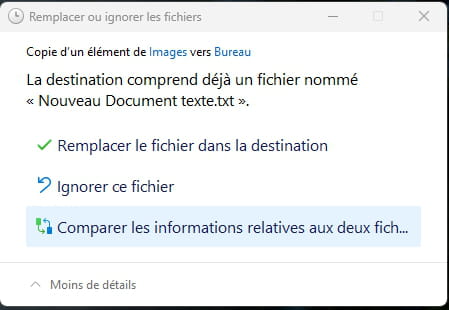
I can't do the same on Windows 11 because the window that opens doesn't offer that option; we only have the choice to replace or not replace the file in question:

Can someone help me?
Thank you in advance,
Have a nice day.
Best regards.
6 answers
-
Hello,
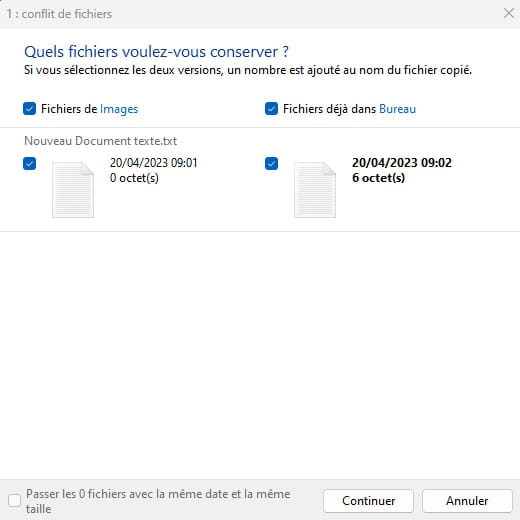
it requires more clicks but it's still there, you need to start by clicking on Compare the information related to the two files, then check the two documents to keep, and finally continue.
++
Problem solved or solution found, please indicate it,
it's always helpful for the community. ;-) -
Hello,
Thank you for your response, but as shown in my screenshot, I do not have the option "Compare the information related to the two files."
I had seen this option on other forums, but I can't find where to locate it.
-
Do you have the latest updates for Windows 11? Is it an official version (not customized)? Because even the retail box is not the same which is strange.
Problem solved or solution found, please indicate it,
it's always helpful for the community. ;-) -
I just checked and I have this:
Edition Windows 11 Pro
Version 22H2
Installed on 30/01/2023
OS build 22621.1555
Experience Windows Feature Experience Pack 1000.22640.1000.0
In Windows Update, I am up to date.
It must be an official version since it’s a professional PC, maybe that changes something?
-
Hello,
I exhibit the behavior described by MaxGix when copying from one partition to another or within the same one (on Windows 10 Home), even when my destination is also on my desktop.
Perhaps, as a hypothesis, the fact that we haven’t chosen to display hidden files in Windows (which is the case for those on the desktop in the explorer) could be an issue, or maybe we are trying to make this copy without administrative rights or without being the user of the destination folder.
When it comes to downloaded files, but this doesn't seem to be the case here, the question doesn't arise and the incrementing of the number is systematic.Hello Brucine,
In this case, the situation in which this occurs is the classification of an email from Outlook 365 to the Explorer, it might be similar to a downloaded file in this case.
What is certain is that there must be administrative rights, maybe that is what we are missing. I tried it on another non-professional PC and it adds "- Copy" but does not have an incrementing system. This is also what happens when I copy/paste a file that is in the same destination by the way.
You made me doubt and I checked (which doesn't resolve the question).
When it comes to downloading, if it's an executable (exe, zip...), increment the number without hesitation.
With a pdf file, only replace or ignore.
The behavior therefore depends not only on whether it is a "downloaded" file (or only coming from a remote PC, such would be the case of a Drive, Cloud...?) but on its extension.
In other words, it would be necessary, if possible (Outlook is against my religion) for you to see what happens by saving as another type of file (eml, it should be the same, but html, html signature file or image, pdf attachment...) and if, like me, you download any executable (reliable, for example a utility) from the Internet.I tried saving a pdf or jpg file from an Outlook email, and it behaves exactly the same. It offers me to replace it or keep the file.
However, if I download an executable, a jpg, pdf, or even xlsx.
So my problem does not concern downloaded files, only when I duplicate a file or save an attachment or the email itself from Outlook. I tried saving as, printing to PDF, and dragging it directly to file Explorer, but it still doesn't work.
-
-
You are up to date and I also have a pro version, so I don't know why you have a different copy box... The two things you could do:
- Try to repair the system by launching a command prompt as an administrator and typing the command:sfc /scannow(possibly DISM: tutorial)
- Use third-party software like Teracopy
Problem solved or solution found, please indicate it,
it's always helpful for the community. ;-)-
-
-
-
Well, anyway, I don't think that's the issue but Windows 11... I managed to reproduce your situation with my email client; actually, the ability to increment the names is only possible if both files are already saved on the computer. In the case of an attachment that you're trying to save in the same location as the previous one, Windows only offers the option to replace it. I did a few tests and it's always the same situation, even with a third-party copy utility (UltraCopier), it's always the Windows utility that takes precedence in this situation and with this problem.
So, we should check in Outlook if there’s a setting to have attachments automatically saved/stored on the computer, which could resolve the issue (no certainty).
-
-
-
Thank you for your time and your response.
Unfortunately, I am indeed referring to a simple file, specifically the filing of an email in Outlook 365 or an attachment from an email.
If I copy/paste an existing file in the explorer, the system adds "- Copy" but does not increment with (1), (2), (3), etc...
