
How to uninstall HEIF images extensions
Solved/ClosedApic -
Hello,
I am on Windows 10 and I installed HEIF image extensions that I would like to uninstall, but I can't. Indeed, when I go to "Add/Remove Programs" and click on it, "Uninstall" is greyed out, and the same happens if I click on "Advanced options"; "Uninstall" is still greyed out, making it impossible to uninstall. How can I uninstall it otherwise? Thank you for your responses.
7 answers
-
Hello,
If it’s recent, perform a system restore and choose a date prior to the installation.
Windows + R
Type --> rstrui.exe and hit OK.Otherwise, reinstall it and uninstall with Revo Uninstaller.
-
Hello.
Uninstall it with Revo Uninstaller in advanced scan mode.
Revo Uninstaller tutorial to read carefully.
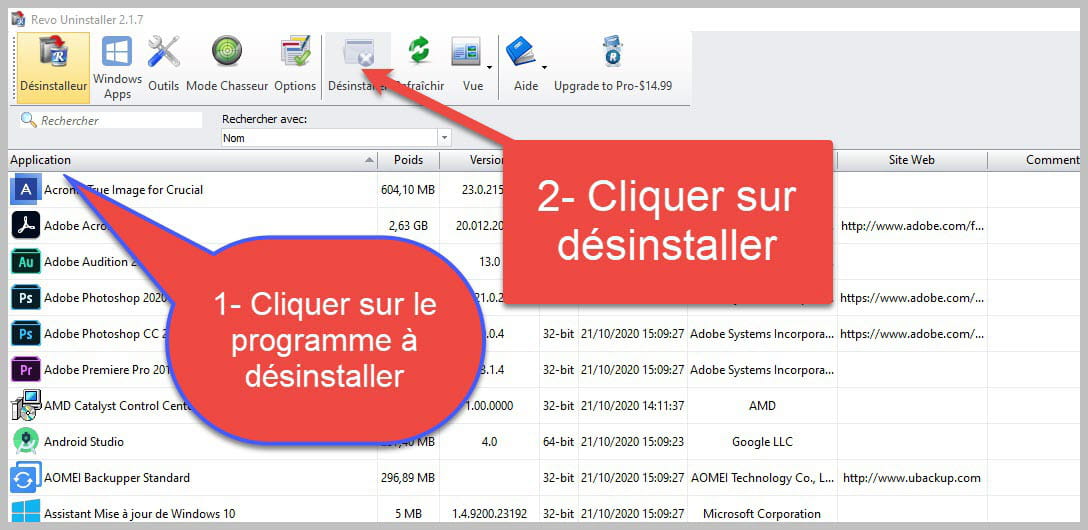

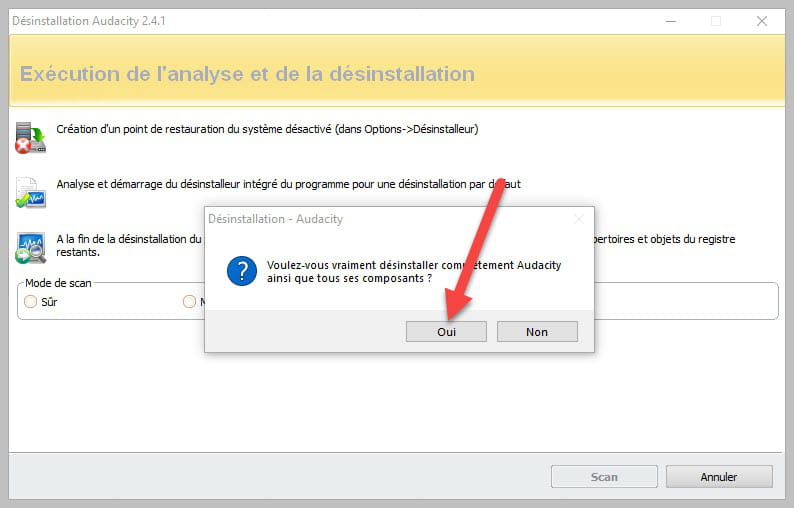
Accept the uninstallation of the program you wish to uninstall if the program is grayed out or impossible to uninstall or if there is an error message saying that uninstallation is impossible, close the error message and continue the procedure.
.

Check "Advanced Scan" then click on "Scan".

Click on "Select All" then on "Delete" if a second list appears do the same and once everything is deleted click on "Finish" a reboot may be requested.
bazfile
Moderator/Security Contributor.
a hello, a response, a thank you are always appreciated. -
Hello,
Thank you for this response, but I have already tried with Revo Uninstaller and it does not appear in the application list even though it shows up fine in the "add/remove programs" list. So I don't know what to do. -
Hello,
I don't see the point in uninstalling this extension that allows the Photos app to read photos in HEIF format (used by Apple and some smartphones). It doesn't harm anyone.
But if you really want to, here’s a solution found on the Internet. No guarantees, I haven't tried it.
1) Click on the Start button and go to Windows Tools in the list of applications. Click.
In the window that opens, right-click on Windows PowerShell and choose Run as administrator.
You allow the application to make changes to the device.
2) In the new window, type:
Get-AppxPackage *Microsoft.HEIFImageExtension* | Remove-AppxPackage
and validate.
Reference here.
What is well conceived is expressed clearly,
And the words to say it come easily.
(Boileau)-
It is an application from the Microsoft Store, so it should be uninstalled in Apps and Features.
(Start - Settings - Apps - Apps and Features)https://apps.microsoft.com/store/detail/extensions-dimage-heif/9PMMSR1CGPWG?hl=fr-ca&gl=ca&rtc=1
Actually, there's a scam I've just discovered: Microsoft Store requires purchasing a HEVC video extension. This is the codec used to compress the files.
As for uninstalling the HEIF extension through the Microsoft Store, it seems that's not possible. Hence the use of the technique I provided.
In short, it's quite a mess, and it seems that users are not fully satisfied.
So I will continue to use XnView MP to read this kind of files.
-
-
-
Hello,
Thank you for your replies. The reason for wanting to remove it was that despite its installation, I wasn't able to view photos sent by a trusted person through this system. I can't see them. I've contacted the person who will resend them to me in JPG format. I performed a restore, and HEIF is still there. As for uninstalling from applications and features, it's not possible because the uninstall option is always grayed out.
I will try the method mentioned above. -
I tried using the WindowsShell method, and nothing happens when I press enter after copying/pasting: Get-AppxPackage *Microsoft.HEIFImageExtension* | Remove-AppxPackage
The problem still persists.
-
Ultimately, it must have worked because HEIFImageExtension has disappeared; I must have checked too quickly.
So thank you all, I hope this will help others; I read elsewhere that HEIF was not functional for other people.


