
Toshiba TV Sound Management Issue
Valentin -
Hello,
I have a Toshiba television model 32L3733DG, with 2.1 speakers connected to the audio output (green jack).
When I use the TV remote to adjust the volume, it changes the sound coming from the TV, not from the speakers. So I end up with the same sound coming from both.
However, I also have a Red SFR box connected via HDMI 1 on the TV, and when I adjust the volume with the box remote, it changes the sound from the speakers.
The problem is that it's a hassle for playing on the console.
When I watch TV through my box, there's no problem adjusting the sound remotely. But when I play on Switch or Xbox, I can't adjust the sound remotely since the box remote is turned off because the console doesn't go through the box, and the TV remote always changes the sound from the TV and not the speakers.
I hope this is somewhat understandable. ????
Has anyone been able to help me?
Thank you very much!
3 answers
-
Hello,
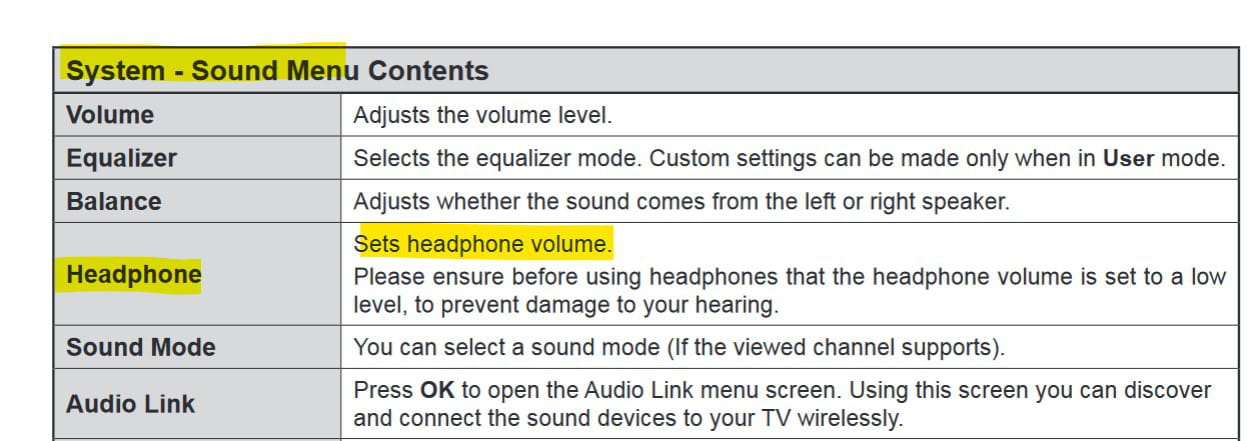
In the sound menu of the television, you have a volume adjustment for the headphone output...
Very difficult to catch a black cat in a dark room.
Especially when it isn't there... -
I’m not talking about headset mode or audio output… But in the sound menu, under the headphones section, you should find a way to adjust the volume! Right?
What are the references of your speakers (Brand and model)?
It’s very difficult to catch a black cat in a dark room.
Especially when it’s not there...-
Indeed, the headset's volume bar does change the sound of the speakers.
But my remote control changes the sound of the TV and not the headset soundbar instead. :/
Is there a way to set it up so that the remote controls the headset sound instead of the TV sound?
My speakers are Trust SP 3850.
Thank you for your help!
-
-
I don't get it... your Trust SP-3850 speakers have their own volume control...
So why not use it?
It's very difficult to catch a black cat in a dark room.
Especially when it's not there...-
Because I don't have a remote control to adjust them.
With the box, no problem, I can adjust it remotely, but not with the TV remote. :(
And since I constantly have to manage the sound that fluctuates between too loud and too low, it's not great to have to get up every minute to adjust the volume.
Not exactly, to adjust this soundbar of the headset, I have to go into menu, system, sound. In the TV settings actually.
I can't adjust the sound of the speakers remotely, with the TV remote. Whereas the box remote does that.
(but I don't use the box to launch the console, but the TV remote instead)
The only solution via a wireless remote control would be to use the digital coaxial audio output of the television with a coaxial to analog converter with remote control.
Example: https://www.amazon.fr/PROZOR-Convertisseur-DAC/dp/B0B5G9TG1B
-
