
FIREFOX prevents automatic redirection to another page.
Solved
Hello everyone,
I've been searching, but I haven't found anything regarding the setting for this protection:
FIREFOX prevents automatic redirection to another page
And it stops me from accessing my AMELI account; well, I can access it, but this message is displayed, and I can't go any further, unless I receive an email warning from AMELI that someone just logged in, etc.
I haven't tried removing my prefs from the folder; I will do so, but in case that doesn't work, I'm waiting for your guidance. I found information for Windows, but not for my version of Firefox Mac: 78.15.0 (Mac OS X 10.11.6)
Thank you for any information.
Sincerely
dede
When it’s urgent, it’s already too late (Talleyrand)
When everything has failed, read the manual or come to CCM ;)
3 answers
-
Moderator
Hello.
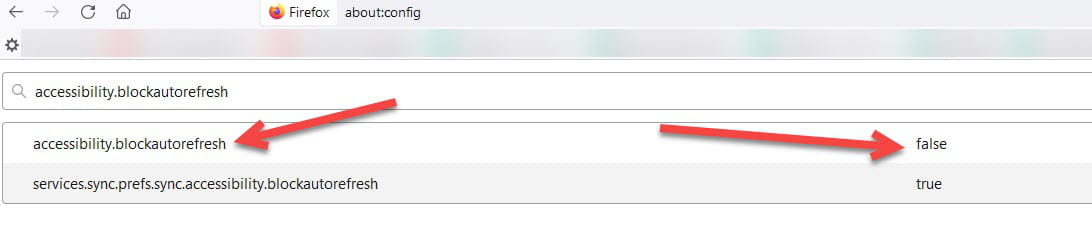
In the address bar of Firefox, enter about:config in the search field, then enter accessibility.blockautorefresh. It should normally be set to False. If it's not, double-click on the line to change it to False. See below:
bazfile
Moderator/Security Contributor.
A hello, a reply, a thank you are always appreciated.-
-
Moderator@dede74
See you on CCM. :)
-
-
Hello Dede, how are you? With a 10.11.6, the certificate is obsolete, right? I think Améli is blocking you. The chain of trust?
I know you manage the Mac environment well, but since I don't know what you have tested, I'm asking the question. :)
-
Hello Gab1, I'm doing well thank you and I see that you've returned to full service, well done, that's good.
Thank you for your intervention, the problem is resolved.

