
How to transfer Gigaset phonebook directory
baladur13 Posted messages 47409 Registration date Status Moderator Last intervention -
Hello,
I just acquired a Gigaset CL 770A trio and I want to transfer the phonebook that I currently have on my old Gigaset (SL 785); how can I do that?
I saw the "copy list" option... but what should I do next??
Thanks in advance
- transfer of a Gigaset landline phone directory to another one
- modify fixed line directory Alcatel F570
- Transfer the directory from an old Gigaset C430 fixed phone to a new C430A.
- Gigaset duo A 605 H directory transfer between handsets
- Transfer directory from Gigaset C620 to Gigaset CL660A
- Directory transfer from a landline phone
1 answer
-
Hello,
to be able to copy the entire directory list from the old handset SL785 to the new handset CL770a.
You must first register the SL785 handset to the CL770a base.
The registration must also be done on the base as well as on the handset.
This operation must be carried out within 60 seconds.To do this:
- On the handset containing the directory to be transferred SL785
Excerpt from SL785 manual page 31 (63 of the pdf) -
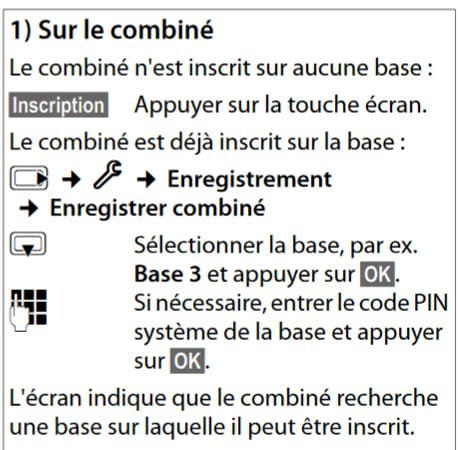
On the CL770a base (excerpt from manual page 66)
¤Press and hold the Registration/Paging button on the base (for about 3 seconds).Once the registration is complete... The old SL785 handset becomes an additional handset for the CL770a.
Next, you need to copy the directory list from the SL785 to the CL770a handset.
See SL785 manual page 35 paragraph:
Copy the directory/presets list between handsets
Note: if multiple handsets make up the new CL770a, the copy procedure will need to be repeated on each of the new handsets.
The manuals:
SL785 https://gse.gigaset.com/fileadmin/legacy-assets/A31008-M2009-R101-5-3T19_fr_MEA.pdf
Very difficult to catch a black cat in a dark room.
Especially when it's not there...
- On the handset containing the directory to be transferred SL785
