
How to burn an image to a CD
jmarion3 Posted messages 49498 Registration date Status Contributor Last intervention -
Hello, let me explain. I would like to buy CDs (I think I found them at this link), put an image on them even if I have to stick it on, and then be able to burn music onto them, but I can't figure out how to do it. All the links or advice I've found are outdated, which seems normal since the use of CDs is no longer very common.
5 answers
-
jeannets Posted messages 28443 Registration date Status Contributor Last intervention Ambassador 6 615
Hello,
Well, your CDs are very good for making your various recordings... they are just regular blank CDs, you can also find them in supermarkets...
As for sticking an image on it, you need to be careful with the quality of this work... The downside is that this "label" can come off and get stuck in the CD player, which can render it unusable...
Another solution is to print this image directly onto the CD; there are printers that can do that, in addition to standard printing, like the Epson XP-640 for example, and many others.
I believe that CDs also need to be dedicated for this type of printing...??? We'll see.
-
So I see that to have an image on top of my CD, there’s the option of printing an image and then sticking it with strong glue, or printing the image directly onto the CD. However, that likely requires a special CD and printer, I see. Do you think the first solution, which is accessible for most, is reliable? I mean, what are the chances that the image will come off? I presume yes, it is paper after all, but I would like to know if there might be a type of more durable paper, I don't know.
-
-
Hello everyone ...
To customize a CD or DVD by sticking on a cover, you just need to buy self-adhesive labels such as Avery ... I’ve been doing this regularly for years and I have never encountered any peeling issues because they are very strong ..
For your information ► The labels come with a centering point to position them on the CD ... and once stuck ... they are impossible to peel off!
You can find these labels ► Here for example
If needed, I will share a small free software with you to make these labels
Cheers ► A+
-
Great! If there have been no issues based on your experience, I plan to do the same. However, being a slow learner and incompetent when it comes to understanding, once I receive the article (thanks for the link by the way), I don't understand how I should proceed. I have my image, but how do I print it on a jacket? Isn't it going to come out on an A4 sheet sized for a CD? I know it sounds obvious since you have the knowledge, but just know that I’m a little 18-year-old who barely knows the era of CDs, if at all.
-
-
jeannets Posted messages 28443 Registration date Status Contributor Last intervention Ambassador 6 615
I don't know either...
However, you also have to be wary of strong glue... Which penetrates and distorts the plastic of the CD... This changes the audio and video recording, and can even render it unusable..??
This defect has already been observed with the use of certain felt-tip markers...
-
Good evening,
Personally, I used to stick quite a few "intended for" labels on burned CDs in the past. (pre-cut labels on A4 sheets and using a dedicated printing application). I didn't notice any anomalies for quite some time, then after acquiring new CD players, (one for the apartment, the other for the car), I found that sometimes there were unpleasant friction noises when the CD rotated. (sometimes with the labels starting to peel off at the edges)
Since then, I only use CDs designed for printing. (their surfaces, white and matte, are specially intended for printing).
My latest printers, (Canon), have been chosen specifically to be able to print on CDs thanks to suitable media. For these prints, I use the DiscCover application, which was provided to me when I purchased the Roxio Toast burning software.
https://www.commentcamarche.net/telecharger/audio-musique/7423-disc-cover/
-
-
@n0iraudes ► Hello ...and thanks for the reply!
I assume your printer doesn't have a tray for inserting a printable CD like those that exist for printing directly on them, and if you don't have that model of printer, you can use Avery self-adhesive labels by following the instructions below
You need to install Epson Print CD ► Here (this software is no longer online with Epson, which is why it's on a file host)
Unzip and install Epson Print CD, which will serve as a tool for designing labels to stick on your CDs or DVDs
For your information, Epson Print CD is compatible with all printers!
You will obtain this tool

Example

The software comes with its own images, but you can obviously paste your own or browse the web to find the images you want to "paste"
You can add text... etc... and even make covers for CD/DVD cases
- The format of the Avery sheet is A4, which fits in all printers; one sheet contains 2 self-adhesive labels ... however, you need to place the sheet in the correct orientation in the printer tray, otherwise it will obviously print on the wrong side ► The sheet comes out of the printer with the label to peel off and stick directly onto the CD or DVD using the small centering tool provided in the label packaging ... be careful when sticking it on because once it's stuck ... it's really stuck!
I confirm that these self-adhesive labels do not peel off and work everywhere without problems because they are very thin and very durable ....
See you later if there are issues
Regards
-
I installed the software and got familiar with it. I will receive my pay in a little while (on the 12th since I'm a temp), so until then I'm waiting, and as soon as I have the money, I will buy everything I need, namely this:
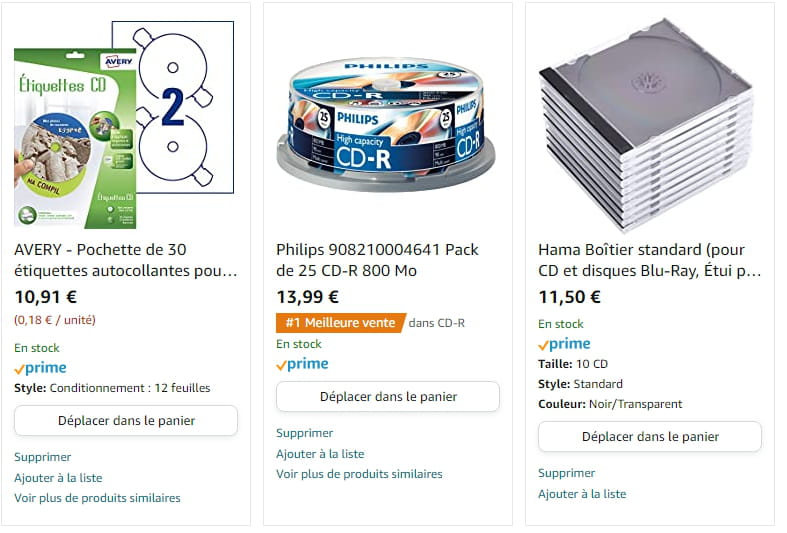
and I will send you the results and my questions if I have any problems. Thanks again for the advice and the links provided ????
-
Hello ......Thanks for the feedback ...
With all that, you should make some nice labels ... but if you're not very well-off, just a heads up that you might use quite a bit of ink with your printer ... and the cartridges aren’t exactly "cheap" ....
If you also want to make covers for cases, you'll need to buy additional media for that, and they are referenced as J8435 ► Here (not forgetting the case that goes with it because it's different from the one for labels... thicker... ► Here)
- If I have one piece of advice for you, it would be to skip the CD covers since you can easily just make labels to stick on CDs and put them in slim cases ..... which are only intended for CDs or DVDs because for the covers you need larger cases ... and in my opinion, it’s not really useful unless you're a collector ... These media are pre-cut and go through printer trays without a problem....
That's it... you know everything now ..
Best regards ► A+
-

