
Boot issue on TOSHIBA
joemontain Posted messages 1056 Registration date Status Member Last intervention -
Hello,
I'm looking to repair a Windows 10 on an old Toshiba C660 that was sold back in the day with W7, which was "upgraded" forcefully by Microsoft through the versions, up to W10 which apparently worked for a while. The machine no longer boots.
I recreated a bootable W10 USB key, but the boot doesn't work. After examination and analysis, it seems that the problem is related to the UEFI Boot of the downloaded and installed W10 ISO version, which is not managed by the Toshiba's Legacy BIOS.
I can't find a bootable W10 version in Legacy BIOS.
So several questions:
Is it possible to find a bootable W10 in Legacy BIOS?
If not, is it possible to modify the bootable USB key to switch it from UEFI to Legacy?
Finally, is it reasonable to run W10 on a Toshiba C660, or is it preferable to migrate to a less resource-intensive Linux (and bootable in Legacy)?
Thank you for your advice.
JM
5 answers
-
Hello,
Check the Recovery console (at least if it still exists...) :
Also try tapping the F12 key in the first few seconds of booting up; this should normally take you to the "HDD Recovery" section unless there’s an error.
Did you make the recovery DVDs under Windows 7 after buying the PC?
-
Hello,
You are, like yesterday, off-topic, and you will probably, just like yesterday, delete your message in such a case, especially if it receives a negative vote:
In both situations, and provided that the recovery partition still exists, it is Windows 7 that we are going to resurrect, whereas the question is about doing it with Windows 10.Good evening,
Except that he is unable to reinstall Windows 10 on the media...
Reinstalling Windows 7 with the recovery console allows for a fresh start and reinstating Windows 10 for free without hassle; as for the rest, I'll leave it to you because I have better things to do than waste my time with someone who always thinks they know better than others...
To conclude this topic, I propose a solution that is viable, which is in no way contrary to the forum's rules, so you are kindly asked for the future to leave me alone (not wanting to be rude) thank you in advance, otherwise I will have to report to the administrators, since my proposal here on this topic is in no way contrary to the forum's rules as previously explained.
Anything: the PC has already run on Windows 10 since it was migrated by Microsoft, so I don't see why it wouldn't reinstall on it, and even assuming it is materially unable to do so, one shouldn't make a comment on how to reinstall Windows 7 without mentioning this hypothesis; there will be no difference (except for the time wasted) between installing Windows 7 to immediately migrate to Windows 10 (especially since Windows Update has forbidden it for some time) or directly installing Windows 10 which must have an OEM license embedded in the BIOS under these conditions, and your "solution" is therefore worthless.
You can say whatever you want, I didn't say that your contribution was against the forum's charter, I simply expressed my opinion which is also not contrary to what should be thought about it fundamentally.
Since we are talking about guidelines, you will enlighten me on how Netiquette leads (not this time) to deleting writings in which one has made a mistake (which happens to me too, as I am no wiser than others), and especially to play the role of contributor or whatever to reverse the negative votes that any of us can be affected by for one reason or another, and whose rule of the game states that they should be kept even when they make no sense.
-
-
Hello,
The Windows 10 ISO is neither UEFI nor Legacy: it is the software making it bootable (Rufus or others) that allows you to choose a GPT partition table for UEFI or, in the case that interests us, MBR for Legacy: you need to recreate the USB stick.
As for the suitability of Windows 10 on the machine, you are the only judge based on the smoothness achieved; a number of Linux distros are indeed less memory-hungry, if not Ubuntu, which is not mentioned, at least its "lighter" versions (K, X, L), Linux Mint....-
Thank you for this information. But how can I explain that my key is indeed in MBR (according to the appropriate tool, see screenshot) and that it still doesn't boot?

Furthermore, I tested the key on another machine (a bit more recent, and probably using UEFI) and there, the key boots normally.
Any ideas?
Thank you
It's not clear why a USB drive would work on one machine and not on another, unless of course the boot menu is not set to start from it or there is some kind of security in place.
Moreover, the USB drive in question would refuse to install if it's indeed in MBR format while booting is specified in UEFI.
Aside from BIOS settings, it's hard to see how a USB drive wouldn't work if it's formatted in FAT32 with any utility capable of writing an MBR boot table to it.
There are several utilities under Linux to do this job, for example:
https://doc.ubuntu-fr.org/tutoriel/installer_windows_boot_usb
This is an area I don't know well, except that some are poorly documented for creating bootable Windows USB drives (notably unetbootin, and woeusb can be tricky in this regard because it actually partitions the drive); you might try with another utility just in case; Ventoy is reported to be often more effective, Gparted has never let me down for anything, but I use it from a standalone CD or Puppy Linux, it's simpler.
Hello.
Create a new Windows 10 installation media, connect a USB stick with at least 8 GB to your PC, download this Microsoft tool, open the tool and then create your USB stick containing Windows 10:
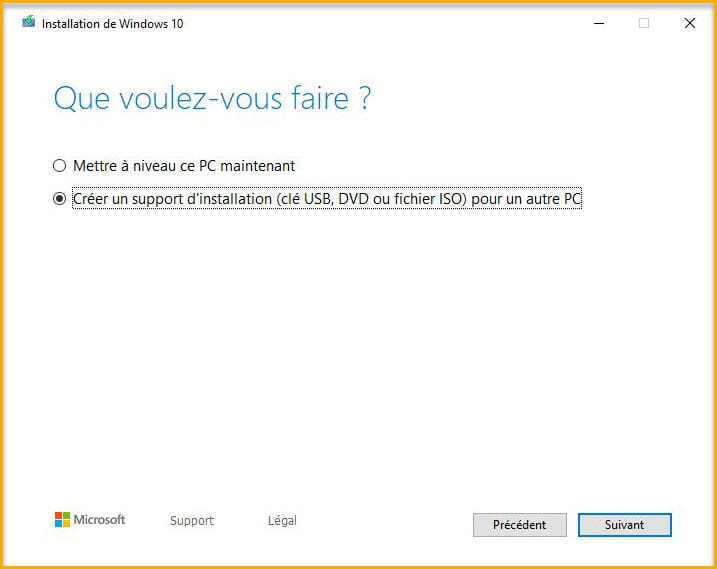
bazfile
Moderator/Security Contributor.
A hello, a reply, a thank you are always appreciated.-
Thank you, but I've been a Linux user for a long time and I no longer have a working machine running Windows. The only one I have is the one that's broken. So I can't use Microsoft tools... and anyway, they're not necessary since you can do the same thing with Linux tools, notably replacing Rufus with weousb, for example, to create a bootable USB on any OS from the ISO...
-
Thank you, joemontain. It's interesting, but I'll need to find a Windows machine to use Rufus. That said, in the BIOS settings of the Toshiba C660, there's no way to enable or disable UEFI; that option is not mentioned in the list...
I'm thinking about your post and I'll get back to you when I've experimented...
Thank you
Hello
1/ An important clarification, if you use the Windows 7 OEM license key for Windows 10, you cannot install the downloaded version of Windows 10 copied onto a USB stick, it is only compatible with a full version (with another license).
2/ On your Toshiba, it is only under BIOS, there is no UEFI mode.
3/ If you did not perform a Windows 10 backup, you will need to restore Windows 7, then upgrade to Windows 10 (via Windows Update).
4/ To restore Windows 7: https://www.modes-d-emploi.com/manuals/487927/toshiba-satellite-pro-c660-satellite-c660.html?page=34
-


