
HP Smart does not recognize the scanner.

cristali Posted messages 9486 Registration date Status Member Last intervention -
Hello!
Having an HP Envy 6030 printer, I wanted to scan a document, but when I go to the HP Smart program, it shows an error message stating that it doesn't detect the scanner when I click on the scan button.
My printer is well detected because I can print documents without issues, whether they are placed in the scanner or on my desktop.
I uninstalled the devices for my printer, uninstalled HP, turned off my PC, and reinstalled everything (and even changed the connection of my printer to each USB port), but nothing changes. Each time I go back to HP Smart and click on the scan button, it shows me the message indicated in the image below.
I should point out that the scanner worked before when I used HP Smart, but since today, when I access it, it asked me for my credentials to log in to HP Smart (whereas I didn't have to do that during previous sessions).
What is the problem, and is there a solution?
Thank you in advance for your help.

6 answers
-
Hello
Try using the app already in W10
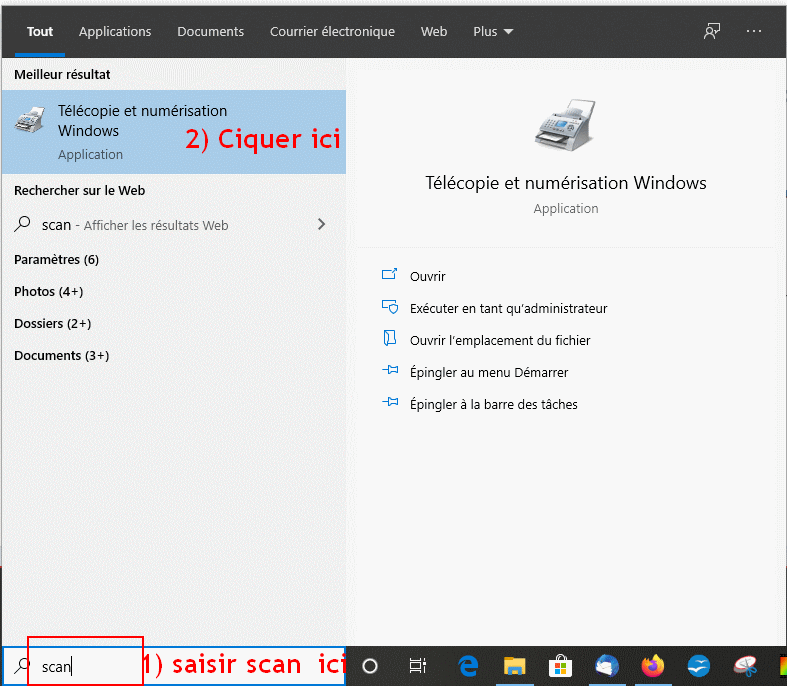

-
Hello,
Reinstall the drivers... https://support.hp.com/be-fr/printer-setup/hp-envy-6000-all-in-one-printer-series/29256672/model/33518699
-
My message above indicates that I uninstalled the device drivers and that after installing HP Smart, they are reinstalled since the printer is redetected.
-
Hi
Install Microsoft Store Scanner instead of that useless and polluting HP SDmart junk
-
Hello,
Why so much hate for an application that works very well? I use it regularly on Android to print from my smartphone and with my PC on Windows.
Hi
Good for you, but we're not talking about printing here, we're talking about scanning.
There's no hate in that (lol), just simple observations.
There are tons of topics online that address this issue with HP Smart.
HP has always produced useless and buggy contraptions that are everywhere.
It's unnecessary on both a PC and a phone as long as you read the docs a bit to configure things manually, since everything you need is in the OS.
Here, I'm talking about the Microsoft Scanner app, but we can do without it as well; Fax and Scan from W1x does the same thing very well, albeit with a less user-friendly interface.
-
-
Proceed as requested by yclik, whom I greet, but you can also use HP Scan and Capture
I use it when I need to scan.
-
Hello, try this
This PC
C
program (x86)
HP
Digital imaging
bin
hpiscnapp.exe
normally, it opens the scan




